
hive2.1.0安装
这里是使用mysql作为hive的元数据存储所以要先启动mysql的服务,MySQL的安装可以参考下面连接
MySQL安装:http://www.cnblogs.com/zhangXingSheng/p/6941422.html
下载hive(http://mirrors.cnnic.cn/apache/hive/)

#########hive####################

export HIVE_HOME=/usr/local/development/hive-2.1.0

export PATH=$HIVE_HOME/bin:$PATH
[root@node4 bin]# hdfs dfs -mkdir -p /opt/hive/warehouse

[root@node4 bin]# hdfs dfs -mkdir -p /opt/hive/log
cp hive-default.xml.template hive-site.xml<name>hive.metastore.warehouse.dir</name>
<value>/opt/hive/warehouse</value>//对应以上在hdfs创建的文件目录
<description>location of default database for the warehouse</description> <name>javax.jdo.option.ConnectionURL</name>
<value>jdbc:mysql://192.168.177.124:3306/hivedb</value>//mysql的链接地址,这里的hivedb是我已经在mysql中创建的数据库,如果不写就是default
<description>
JDBC connect string for a JDBC metastore.
To use SSL to encrypt/authenticate the connection, provide database-specific SSL flag in the connection URL.
For example, jdbc:postgresql://myhost/dbName?ssl=true for postgres database.
</description> <name>javax.jdo.option.ConnectionDriverName</name>
<value>com.mysql.jdbc.Driver</value>//mysql的驱动
<description>Driver class name for a JDBC metastore</description> <name>javax.jdo.option.ConnectionUserName</name>
<value>hive</value>//链接mysql的用户名
<description>Username to use against metastore database</description> <name>javax.jdo.option.ConnectionPassword</name>
<value>hive</value>////链接mysql的密码
<description>password to use against metastore database</description> <name>hive.metastore.uris</name>
<value>thrift://192.168.177.124:9083</value>
<description>Thrift URI for the remote metastore. Used by metastore client to connect to remote metastore.</description>
(1)hive-log4j2.propertiesproperty.hive.log.dir = ${mine:/home/zhangxs/hive/log}/${user.name}
(2)hive-exec-log4j2.propertiesproperty.hive.log.dir = ${mine:/home/zhangxs/hive/execlog}/${user.name}
schematool -dbType mysql -initSchema

[ hive --service metastore]

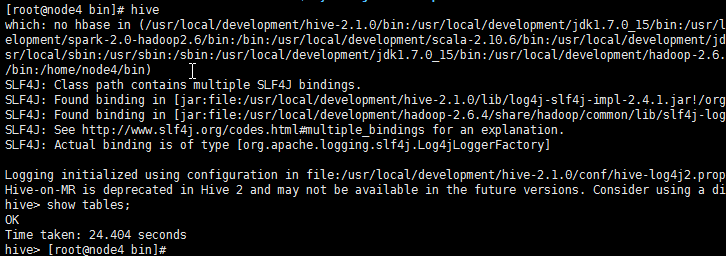
hive

Caused by: java.sql.SQLException: Access denied for user 'root'@'hadoop-node4.com' (using password: YES)

at com.mysql.jdbc.SQLError.createSQLException(SQLError.java:964)

at com.mysql.jdbc.MysqlIO.checkErrorPacket(MysqlIO.java:3970)

at com.mysql.jdbc.MysqlIO.checkErrorPacket(MysqlIO.java:3906)

at com.mysql.jdbc.MysqlIO.checkErrorPacket(MysqlIO.java:873)

at com.mysql.jdbc.MysqlIO.proceedHandshakeWithPluggableAuthentication(MysqlIO.java:1710)

at com.mysql.jdbc.MysqlIO.doHandshake(MysqlIO.java:1226)

at com.mysql.jdbc.ConnectionImpl.coreConnect(ConnectionImpl.java:2253)

at com.mysql.jdbc.ConnectionImpl.connectOneTryOnly(ConnectionImpl.java:2284)

at com.mysql.jdbc.ConnectionImpl.createNewIO(ConnectionImpl.java:2083)

at com.mysql.jdbc.ConnectionImpl.<init>(ConnectionImpl.java:806)

at com.mysql.jdbc.JDBC4Connection.<init>(JDBC4Connection.java:47)

at sun.reflect.NativeConstructorAccessorImpl.newInstance0(Native Method)

at sun.reflect.NativeConstructorAccessorImpl.newInstance(NativeConstructorAccessorImpl.java:57)

at sun.reflect.DelegatingConstructorAccessorImpl.newInstance(DelegatingConstructorAccessorImpl.java:45)

at java.lang.reflect.Constructor.newInstance(Constructor.java:525)

at com.mysql.jdbc.Util.handleNewInstance(Util.java:425)

at com.mysql.jdbc.ConnectionImpl.getInstance(ConnectionImpl.java:410)

at com.mysql.jdbc.NonRegisteringDriver.connect(NonRegisteringDriver.java:328)

at java.sql.DriverManager.getConnection(DriverManager.java:579)

at java.sql.DriverManager.getConnection(DriverManager.java:190)

at com.jolbox.bonecp.BoneCP.obtainRawInternalConnection(BoneCP.java:361)

at com.jolbox.bonecp.BoneCP.<init>(BoneCP.java:416)
Logging initialized using configuration in file:/usr/local/development/hive-2.1.0/conf/hive-log4j2.properties Async: true

Exception in thread "main" java.lang.RuntimeException: org.apache.hadoop.hive.ql.metadata.HiveException: java.lang.RuntimeException: Unable to instantiate org.apache.hadoop.hive.ql.metadata.SessionHiveMetaStoreClient

at org.apache.hadoop.hive.ql.session.SessionState.start(SessionState.java:578)

at org.apache.hadoop.hive.ql.session.SessionState.beginStart(SessionState.java:518)

at org.apache.hadoop.hive.cli.CliDriver.run(CliDriver.java:705)

at org.apache.hadoop.hive.cli.CliDriver.main(CliDriver.java:641)

at sun.reflect.NativeMethodAccessorImpl.invoke0(Native Method)

at sun.reflect.NativeMethodAccessorImpl.invoke(NativeMethodAccessorImpl.java:57)

at sun.reflect.DelegatingMethodAccessorImpl.invoke(DelegatingMethodAccessorImpl.java:43)

at java.lang.reflect.Method.invoke(Method.java:601)

at org.apache.hadoop.util.RunJar.run(RunJar.java:221)

at org.apache.hadoop.util.RunJar.main(RunJar.java:136)

Caused by: org.apache.hadoop.hive.ql.metadata.HiveException: java.lang.RuntimeException: Unable to instantiate org.apache.hadoop.hive.ql.metadata.SessionHiveMetaStoreClient

Logging initialized using configuration in file:/usr/local/development/hive-2.1.0/conf/hive-log4j2.properties Async: true

Hive-on-MR is deprecated in Hive 2 and may not be available in the future versions. Consider using a different execution engine (i.e. tez, spark) or using Hive 1.X releases.

hive> show tables;

FAILED: IllegalArgumentException java.net.URISyntaxException: Relative path in absolute URI: file:./$%7B/home/zhangxs/data/hive/tmp%7D/$%7Bsystem:user.name%7D/dfb16330-2bbc-481a-bbdc-e4503c4d1a5f/hive_2016-12-12_05-12-52_963_7246570582065346726-1

hive> show tables;

FAILED: IllegalArgumentException java.net.URISyntaxException: Relative path in absolute URI: file:./$%7B/home/zhangxs/data/hive/tmp%7D/$%7Bsystem:user.name%7D/dfb16330-2bbc-481a-bbdc-e4503c4d1a5f/hive_2016-12-12_05-14-22_015_4353303889983385851-1

SLF4J: See http://www.slf4j.org/codes.html#multiple_bindings for an explanation.

SLF4J: Actual binding is of type [org.apache.logging.slf4j.Log4jLoggerFactory]

Logging initialized using configuration in file:/usr/local/development/hive-2.1.0/conf/hive-log4j2.properties Async: true

^Z

[2]+ Stopped hive
hive2.1.0安装的更多相关文章
- CentOS7安装hive-2.1.0
环境: CentOS7 Hadoop-2.6.4,配置两个节点:master.slave1 mysql-server 过程: 下载.解压hive-2.1.0到/usr/hadoop-2.6.4/thi ...
- 初次安装hive-2.1.0启动报错问题解决方法
首次安装hive-2.1.0,通过bin/hive登录hive shell命令行,报错如下: [hadoop@db03 hive-2.1.0]$ bin/hive which: no hbase in ...
- centos7安装Hive2.3.0
1.下载Hive2.3.0 wget http://mirror.bit.edu.cn/apache/hive/hive-2.3.0/apache-hive-2.3.0-bin.tar.gz 2.解压 ...
- Ubuntu系统下安装并配置hive-2.1.0
说在前面的话 默认情况下,Hive元数据保存在内嵌的Derby数据库中,只能允许一个会话连接,只适合简单的测试.实际生产环境中不使用,为了支持多用户会话, 则需要一个独立的元数据库,使用MySQL作为 ...
- 记:MySQL 5.7.3.0 安装 全程截图
前言: 下一个班快讲MySQL数据库了,正好把服务器里面的MySQL卸了重装了一下. 截个图,作为笔记.也正好留给需要的朋友们. 目录: 下载软件 运行安装程序 安装程序欢迎界面 许可协议 查找更新 ...
- 烂泥:zabbix3.0安装与配置
本文由ilanniweb提供友情赞助,首发于烂泥行天下 想要获得更多的文章,可以关注我的微信ilanniweb 这个月又快过完了,最近也比较忙,没时间写文章,今天挤点时间把zabbix3.0安装与配置 ...
- CentOS 7.0安装配置Vsftp服务器
一.配置防火墙,开启FTP服务器需要的端口 CentOS 7.0默认使用的是firewall作为防火墙,这里改为iptables防火墙. 1.关闭firewall: systemctl stop fi ...
- elasticsearch5.0.0 安装插件及配置过程
elasticsearch5.0.0 安装插件及配置过程 由于es5.0是里程碑式的更新,所以很多变化的地方,暂时我就插件安装遇到的问题记录一下. 插件安装命令 2.3版本的安装命令 安装Marvel ...
- IIS和4.0安装到底有没有先后顺序解答
在很多人或许很多技术大神都会觉得IIS的安装和4.0没得先后顺序的.其错误弊端在与IIS没有注册到4.0上. 经过今天遇到了服务器安装服务端发觉报错[无法识别的属性“targetFramework”. ...
随机推荐
- 86 ipmitools-查看硬件信息工具
1.简介 IPMI(Intelligent Platform Management Interface)即智能平台管理接口是使硬件管理具备"智能化"的新一代通用接口标准.用户可以利 ...
- Interface小例子
using System; using System.Collections.Generic; using System.Linq; using System.Text; namespace Cons ...
- String()与 toString()
我们知道String()与 .toString()都是可以转换为字符串类型,但是String()与 .toString()的还是有区别的 1..toString()可以将所有的的数据都转换为字符串,但 ...
- CDN的combo技术能把多个资源文件合并引用,减少请求次数
CDN的combo技术能把多个资源文件合并引用,减少请求次数.比如淘宝的写法: <link rel="stylesheet" href="//g.alicdn.co ...
- [转]C#反射-Assembly.Load、LoadFrom与LoadFile进阶
关于.NET中的反射,常用的有三个方法: Assembly.Load()Assembly.LoadFrom()Assembly.LoadFile() 下面说说这三个方法的区别和一些细节问题 1. As ...
- 学习Javascript
分别归类为: javascript变量 javascript运算符 javascript数组 javascript流程语句 javascript字符串函数 javascript函数基础 javascr ...
- 如何将EXCEL表导入ORACLE数据库中?【转】
来源:https://zhidao.baidu.com/question/383828330.html?qbl=relate_question_2&word=excel%20%B1%ED%CA ...
- 11月1日上午PHP------empty、 is_null、isset、unset的区别
1.empty 判断一个变量是否为"空".null.false.00.0.'0′.』.为以上值的变量在检测時都将返回true. 2.isset 判断一个变量是否已经设置.0.00. ...
- [Web开发] 在HTML代码里面如何判断IE版本
在上一篇blog里面提到IE有不同的显示模式以及如何用Javascript 来动态判定. Web开发者可以根据不同显示模式导入不同的内容.这篇blog 主要讲如何让静态HTML代码根据不同IE版本显示 ...
- 自定义checkbox风格
1.在drawable中创建文件checkbox_selector.xml: <?xml version="1.0" encoding="utf-8"?& ...