
jQuery实现高亮显示网页关键词的方法
本文实例讲述了jQuery实现高亮显示网页关键词的方法。分享给大家供大家参考。具体如下:
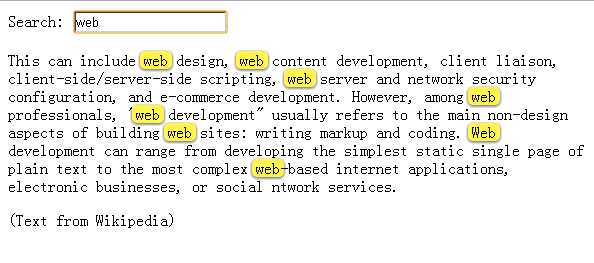
这是一款基于jquery实现的高亮显示网页上搜索关键词的代码,当你在文本框中输入的时候,如果下面的正文中包括你输入的内容,也就是关键字,那么这些关键字是会高亮显示的,被动态添加成黄色,看上去很醒目,就像百度快照显示关键词的样子。
运行效果如下图所示:
<!DOCTYPE html><head><meta http-equiv="Content-Type" content="text/html; charset=utf-8" /><title>jquery文字高亮显示</title><style type="text/css">.highlight { padding: 0px 0px 0px 5px; background-image: initial; background-position: initial; background-size: initial; background-repeat: initial; background-attachment: initial; background-origin: initial; background-clip: initial; border-left: 3px solid rgb(108, 226, 108); line-height: 20px; width: 640px; clear: both; border-radius: 0px !important; border-top: 0px !important; border-right: 0px !important; border-bottom: 0px !important; border-image: initial !important; bottom: auto !important; float: none !important; height: auto !important; left: auto !important; outline: 0px !important; overflow: visible !important; position: static !important; right: auto !important; top: auto !important; vertical-align: baseline !important; box-sizing: content-box !important; font-family: Consolas, "Bitstream Vera Sans Mono", "Courier New", Courier, monospace !important; min-height: auto !important; color: gray !important;">#fff34d; -moz-border-radius: 5px; /* FF1+ */ -webkit-border-radius: 5px; /* Saf3-4 */ border-radius: 5px; /* Opera 10.5, IE 9, Saf5, Chrome */ -moz-box-shadow: 0 1px 4px rgba(0, 0, 0, 0.7); /* FF3.5+ */ -webkit-box-shadow: 0 1px 4px rgba(0, 0, 0, 0.7); /* Saf3.0+, Chrome */ box-shadow: 0 1px 4px rgba(0, 0, 0, 0.7); /* Opera 10.5+, IE 9.0 */}.highlight { padding:1px 4px; margin:0 -4px;}</style></head><body>Search: <input type="text" id="text-search" /><p>This can include web design, web content development, client liaison, client-side/server-side scripting, web server and network security configuration, and e-commerce development. However, among web professionals, "web development" usually refers to the main non-design aspects of building web sites: writing markup and coding. Web development can range from developing the simplest static single page of plain text to the most complex web-based internet applications, electronic businesses, or social ntwork services.</p>(Text from Wikipedia)<script type="text/javascript" src="jquery-1.6.2.min.js"></script><script type="text/javascript">jQuery.fn.highlight = function(pat) { function innerHighlight(node, pat) { var skip = 0; if (node.nodeType == 3) { var pos = node.data.toUpperCase().indexOf(pat); if (pos >= 0) { var spannode = document.createElement('span'); spannode.className = 'highlight'; var middlebit = node.splitText(pos); var endbit = middlebit.splitText(pat.length); var middleclone = middlebit.cloneNode(true); spannode.appendChild(middleclone); middlebit.parentNode.replaceChild(spannode, middlebit); skip = 1; } } else if (node.nodeType == 1 && node.childNodes && !/(script|style)/i.test(node.tagName)) { for (var i = 0; i < node.childNodes.length; ++i) { i += innerHighlight(node.childNodes[i], pat); } } return skip; } return this.each(function() { innerHighlight(this, pat.toUpperCase()); });};jQuery.fn.removeHighlight = function() { function newNormalize(node) { for (var i = 0, children = node.childNodes, nodeCount = children.length; i < nodeCount; i++) { var child = children[i]; if (child.nodeType == 1) { newNormalize(child); continue; } if (child.nodeType != 3) { continue; } var next = child.nextSibling; if (next == null || next.nodeType != 3) { continue; } var combined_text = child.nodeValue + next.nodeValue; new_node = node.ownerDocument.createTextNode(combined_text); node.insertBefore(new_node, child); node.removeChild(child); node.removeChild(next); i--; nodeCount--; } }return this.find("span.highlight").each(function() { var thisParent = this.parentNode; thisParent.replaceChild(this.firstChild, this); newNormalize(thisParent); }).end();};</script><script type="text/javascript">$(function() { $('#text-search').bind('keyup change', function(ev) { // pull in the new value var searchTerm = $(this).val(); // remove any old highlighted terms $('body').removeHighlight(); // disable highlighting if empty if ( searchTerm ) { // highlight the new term $('body').highlight( searchTerm ); } });});</script></body></html>jQuery实现高亮显示网页关键词的方法的更多相关文章
- [JS]jQuery,javascript获得网页的高度和宽度
[JS]jQuery,javascript获得网页的高度和宽度网页可见区域宽: document.body.clientWidth 网页可见区域高: document.body.clientHeigh ...
- Jquery获得控件值的方法
一 Jquery获得服务器控件值的方法 由于ASP.NET网页运行后,服务器控件会随机生成客户端id,jquery获取时候不太好操作,google了下,总结有以下3种方法: 服务器控件代码:<a ...
- JQuery阻止表单提交的方法总结 - 使用onsubmit()验证表单并阻止非法提交
方法1:<form onsubmit="javascript:confirm()"> 方法内返回false阻止表单提交 示例:代码检测textarea内填写的长度,未填 ...
- 记一个jquery 无缝轮播的制作方法
接触前端也很久了,今天才发现,要做好一个轮播,其实有很多东西需要考虑进去,否则做出来的轮播效果并不好,下面我就来做一个轮播,是依赖jquery来写的 1.要做轮播,首先需要的是HTML的内容,css的 ...
- Python爬虫之三种网页抓取方法性能比较
下面我们将介绍三种抓取网页数据的方法,首先是正则表达式,然后是流行的 BeautifulSoup 模块,最后是强大的 lxml 模块. 1. 正则表达式 如果你对正则表达式还不熟悉,或是需要一些提 ...
- jquery数组删除指定元素的方法:grep()
jquery数组删除指定元素的方法:grep() 金刚 数组 jquery javascript 元素 遇到的问题 今天遇到一个问题,删除数组中的一个指定元素,并返回新的数组. 我定义的js数组是这样 ...
- JQuery中操作Css样式的方法
JQuery中操作Css样式的方法//1.获取和设置样式 $("#tow").attr("class")获取ID为tow的class属性 $("#tw ...
- jquery ajax success 函数 异步调用方法中不能给全局变量赋值的原因及解决办法
jquery ajax success 函数 异步调用方法中不能给全局变量赋值的原因及解决办法 在调用一个jquery的ajax方法时我们有时会需要该方法返回一个值或者给某个全局变量赋值,可是我们 ...
- php查看网页源代码的方法
这篇文章主要介绍了php查看网页源代码的方法,涉及php读取网页文件的技巧,具有一定参考借鉴价值,需要的朋友可以参考下 本文实例讲述了php查看网页源代码的方法.分享给大家供大家参考.具体实现 ...
随机推荐
- 数据库选型之MySQL(多线程并发)
刘勇 Email: lyssym@sina.com 本博客记录作者在工作与研究中所经历的点滴,一方面给自己的工作与生活留下印记,另一方面若是能对大家有所帮助,则幸甚至哉矣! 简介 鉴于高频中心库 ...
- window.open()函数
http://hi.baidu.com/gagahjt/blog/item/7b76e0dee61b20aecd11661c.html open函数详解: window.open("sUrl ...
- HTML5学习笔记 Web存储
HTML5 web存储,一个比cookie更好的本地存储方式. 什么是html5 Web存储 使用HTML5可以在本地存储用户的浏览器数据. 早些时候,本地存储使用的是cookies.但是Web存储需 ...
- 最短作业优先(SJF)
1. 最短作业优先: 最短作业优先(SJF)是一种调度任务请求的调度策略.每个任务请求包含有请求时间(即向系统提交的请求的时间)和持续时间(即完成任务所需时间). 当前任务完成后,SJF策略会选择最短 ...
- 阿里云maven 库
阿里云maven 库 , 好用,速度快 maven setting.xml https://github.com/ae6623/Zebra/blob/master/maven-repo-setting ...
- linux Find命令教程
find的语法: find [起始目录] 寻找条件 操作 还有种表述方式:find PATH OPTION [-exec COMMAND { } \;] 因为find命令会根据我们给的option,也 ...
- Netty的ByteBuf
https://blog.csdn.net/thinking_fioa/article/details/80795673 netty的ByteBuf知识点
- libvirt网络过滤规则简单总结
libvirt网络过滤规则, 一个过滤规则定义的示例: < filter name='no-ip-spoold'chain='ipv4' > < uuid >fce8ae33 ...
- swift 继承和构造器
继承 class Vehicle { var numberOfWheels: Int var maxPassengers: Int func description() -> String { ...
- ssm开发系的统架构图