
Easyui Datagrid相同连续列合Demo之三
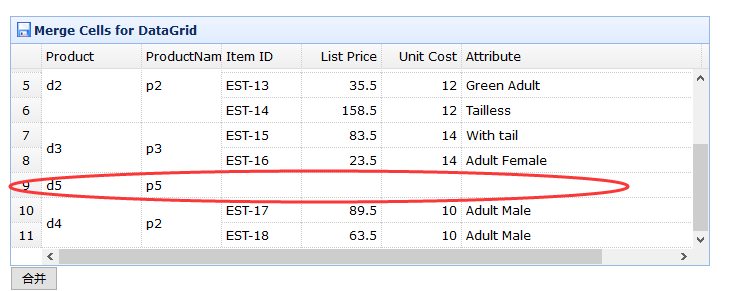
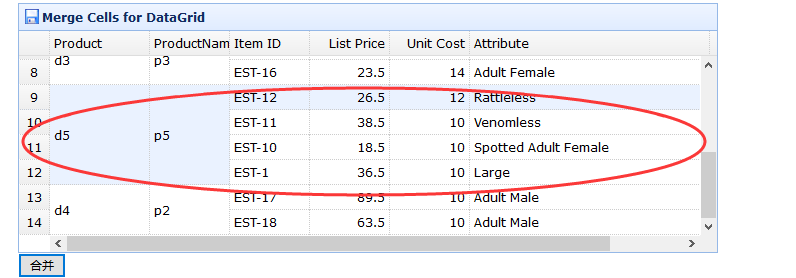
效果图:
html

<!DOCTYPE html>

<html>

<head>

    <meta charset="UTF-8">

    <title>Merge Cells for DataGrid - jQuery EasyUI Demo</title>

    <link rel="stylesheet" type="text/css" href="../../themes/default/easyui.css">

    <link rel="stylesheet" type="text/css" href="../../themes/icon.css">

    <link rel="stylesheet" type="text/css" href="../demo.css">

    <script type="text/javascript" src="../../jquery.min.js"></script>

    <script type="text/javascript" src="../../jquery.easyui.min.js"></script>

    <script type="text/javascript" src="../../extends.js"></script>

</head>

<body>

    <h2>Merge Cells for DataGrid</h2>

    <p>Cells in DataGrid body can be merged.</p>

    <div style="margin:20px 0;"></div>

    <table class="easyui-datagrid" id="dg" title="Merge Cells for DataGrid" style="width:700px;height:250px"

            data-options="

                rownumbers: true,

                singleSelect: true,

                iconCls: 'icon-save',

                data:qyData,

                method: 'get',

                onLoadSuccess: onLoadSuccess

            ">

        <thead>

            <tr>

                <th data-options="field:'productid',width:100">Product</th>

                <th data-options="field:'productname',width:80">ProductName</th>

                <th data-options="field:'itemid',width:80">Item ID</th>

                <th data-options="field:'listprice',width:80,align:'right'">List Price</th>

                <th data-options="field:'unitcost',width:80,align:'right'">Unit Cost</th>

                <th data-options="field:'attr1',width:240">Attribute</th>

                <th data-options="field:'status',width:60,align:'center'">Status</th>

            </tr>

        </thead>

    </table>

    <input type="button" value="合并" id="mergeCells" onclick="hb()">

    <script type="text/javascript">

       var qyData = {"total":11,"rows":[

                {"productid":"d1","productname":"p1","unitcost":10.00,"status":"P","listprice":36.50,"attr1":"Large","itemid":"EST-1"},

                {"productid":"d1","productname":"p1","unitcost":10.00,"status":"P","listprice":18.50,"attr1":"Spotted Adult Female","itemid":"EST-10"},

                {"productid":"d1","productname":"p2","unitcost":10.00,"status":"P","listprice":38.50,"attr1":"Venomless","itemid":"EST-11"},

                {"productid":"d2","productname":"p2","unitcost":12.00,"status":"P","listprice":26.50,"attr1":"Rattleless","itemid":"EST-12"},

                {"productid":"d2","productname":"p2","unitcost":12.00,"status":"P","listprice":35.50,"attr1":"Green Adult","itemid":"EST-13"},

                {"productid":"d2","productname":"p2","unitcost":12.00,"status":"P","listprice":158.50,"attr1":"Tailless","itemid":"EST-14"},

                {"productid":"d3","productname":"p3","unitcost":14.00,"status":"P","listprice":83.50,"attr1":"With tail","itemid":"EST-15"},

                {"productid":"d3","productname":"p3","unitcost":14.00,"status":"P","listprice":23.50,"attr1":"Adult Female","itemid":"EST-16"},

                {"productid":"d5","productname":"p5"},

                {"productid":"d4","productname":"p2","unitcost":10.00,"status":"P","listprice":89.50,"attr1":"Adult Male","itemid":"EST-17"},

                {"productid":"d4","productname":"p2","unitcost":10.00,"status":"P","listprice":63.50,"attr1":"Adult Male","itemid":"EST-18"}

            ]}

        var jcData = [

            {"unitcost":10.00,"status":"P","listprice":36.50,"attr1":"Large","itemid":"EST-1"},

            {"unitcost":10.00,"status":"P","listprice":18.50,"attr1":"Spotted Adult Female","itemid":"EST-10"},

            {"unitcost":10.00,"status":"P","listprice":38.50,"attr1":"Venomless","itemid":"EST-11"},

            {"unitcost":12.00,"status":"P","listprice":26.50,"attr1":"Rattleless","itemid":"EST-12"}

        ]

        function onLoadSuccess(data){

            $(this).datagrid("autoMergeCellAndCells",['productid','productname']);

        }

        function hb(){

            var id = "d5";

            var data = $("#dg").datagrid('getData');

            var rows = data.rows;

            var total = data.total;

            var qFileds = ['productid','productname'];

            var qrow = {};

            var n = null;

            var d = 0;

            for(var i = 0;i<rows.length;i++){

               if(rows[i][qFileds[0]] == id){

                 if(n == null)  n = i;

                 d++;

               }

            }

            for(var i = 0;i<qFileds.length;i++){

                qrow[qFileds[i]] = rows[n][qFileds[i]];

            }

            var r = null;

            for(var i = 0;i<jcData.length;i++){

              //Array.prototype.push.apply(jcData[i], qrow);  //数组追加

              jcData[i] = $.extend({}, jcData[i],qrow);//json对象追加

              if(i == 0){

                 r = rows.splice(n,d,jcData[i]);//从n个位置,开始删除d个,并追加jcData

              }else{

                 r = rows.splice(n,0,jcData[i]);

              }

            }

            total = total - d + jcData.length;

            $("#dg").datagrid('loadData',{total:total,rows:rows})

        }

    </script>

</body>

</html>
Easyui Datagrid相同连续列合Demo之三的更多相关文章
- 扩展-Easyui Datagrid相同连续列合并扩展(一)
一.autoMergeCellAndCells实现效果 调用方法: function onLoadSuccess(data){ $(this).datagrid("autoMerge ...
- EasyUI DataGrid 相同连续列合并
扩展方法:$.extend($.fn.datagrid.methods, { autoMergeCells: function(jq, fields) { return jq.each(functio ...
- Easyui Datagrid相同连续列合并扩展(三)
function MergeCells(seletor, rows, fields) { if(rows == null || rows.length == 0 || fields == null | ...
- Easyui Datagrid相同连续列合并扩展(二)
JS: //合并相同数据的单元格 function MergeCells(seletor, rows, fields) { if(rows == null || rows.length == 0 || ...
- jQuery Easyui Datagrid相同连续列合并扩展
/** * author ____′↘夏悸 * create date 2012-11-5 **/$.extend($.fn.datagrid.methods, { autoMergeCells : ...
- 完美实现保存和加载easyui datagrid自定义调整列宽位置隐藏属性功能
需求&场景 例表查询是业务系统中使用最多也是最基础功能,但也是调整最平凡,不同的用户对数据的要求也不一样,所以在系统正式使用后,做为开发恨不得坐在业务边上,根据他们的要求进行调整,需要调整最多 ...
- (转)扩展jquery easyui datagrid 之动态绑定列和数据
本文转载自:http://blog.csdn.net/littlewolf766/article/details/7336550 easyui datagrid 不支持动态加载列,上次使用的方法是自己 ...
- easyui datagrid Column Group 列组、 复杂表头 嵌套表头 组合表头 (转载)
核心: rowspan:2 //占两行 colspan:3 //占三列 所有的colspan下的二级列表头,统一放在一个数组里. 文章一: 转载来源:https://blog.csdn.ne ...
- easyui datagrid自定义操作列
通过formatter方法给Jquery easyui 的datagrid 每行增加操作链接 我们都知道Jquery的EasyUI的datagrid可以添加并且自定义Toolbar, 这样我们选择一行 ...
随机推荐
- 反射方式,获取出集合ArrayList类的class文件对象
/* * 定义集合类,泛型String * 要求向集合中添加Integer类型 * * 反射方式,获取出集合ArrayList类的class文件对象 * 通过class文件对象,调用add方法 * * ...
- uva:10487 - Closest Sums(二分查找)
题目:10487 - Closest Sums 题目大意:给出一组数据,再给出m个查询的数字. 要求找到这组数据里的两个数据相加的和最靠近这个查询的数据,输出那两个数据的和. 解题思路:二分查找.这样 ...
- windows 设置定时锁屏
设置间隔指定时间电脑自动锁屏 CreateTime--2017年7月3日10:16:14Author:Marydon 参考地址:电脑爱好者杂志 举例:实现每间隔45分钟,电脑自动锁屏 实现思路: ...
- HDU1823-Luck and Love-二维线段树(模板)
题目链接:http://acm.hdu.edu.cn/showproblem.php? pid=1823 好吧,给这题跪了. ..orz.... 一道非常基础的二维线段树的模板题: 可是细节非常多:尤 ...
- 【APP接口开发】常用HTTP响应头状态码详解
1.200 OK,客户端请求城成功 2.400 Bad Request ,客服端请求语法错误,服务器无法理解和处理 3.401 unauthorized,请求未通过认证 4.403 permissio ...
- PHP - MAC下PhpStorm安装调试环境xdebug
今天下午一直在捣鼓如何用PhpStorm进行调试,查找了许多资料,零零碎碎的,所以自己弄篇文章记录一下步骤. 安装xdebug 使用brew安装xdebug,语法如下 brew install hom ...
- Python-搭建Nginx+Django环境
1.安装 flup 模块 下载:http://projects.unbit.it/downloads/uwsgi-latest.tar.gz 安装:python setup.py install 2. ...
- lamp 一键安装
下载安装(ssh登录服务器,执行如下操作即可,需要用到root用户权限来安装) 源码编译安装 wget http://dl.wdlinux.cn:5180/lanmp_laster.tar.gz ta ...
- 获取含有class为某个值的a标签或img标签
<a\s+[^>]*class='fjLink'[^>]*>[^<]*</a>|<img\s+[^>]*class='fjLink'[^>] ...
- 第23章、OnFocuChangeListener焦点事件(从零开始学Android)
在Android App应用中,OnFocuChangeListener焦点事件是必不可少的,我们在上一章的基础上来学习一下如何实现. 基本知识点:OnFocuChangeListener事件 一 ...