
Udacity carnd2 Sensor Fusion, Extended Karman Filter (English)
Extended Karman Filter
Zhenglei 2018 January
This is a project to estimate the car position from Lidar data and Radar data. Lidar data is using Kalman filter. Radar data is using Extended Karman filter, because the radar data is provided by non-linear data(rho, rho-dot, phi). Then we put the two types of sensor data together, and get an more accurate estimate. The solution is so called sensor fusion.
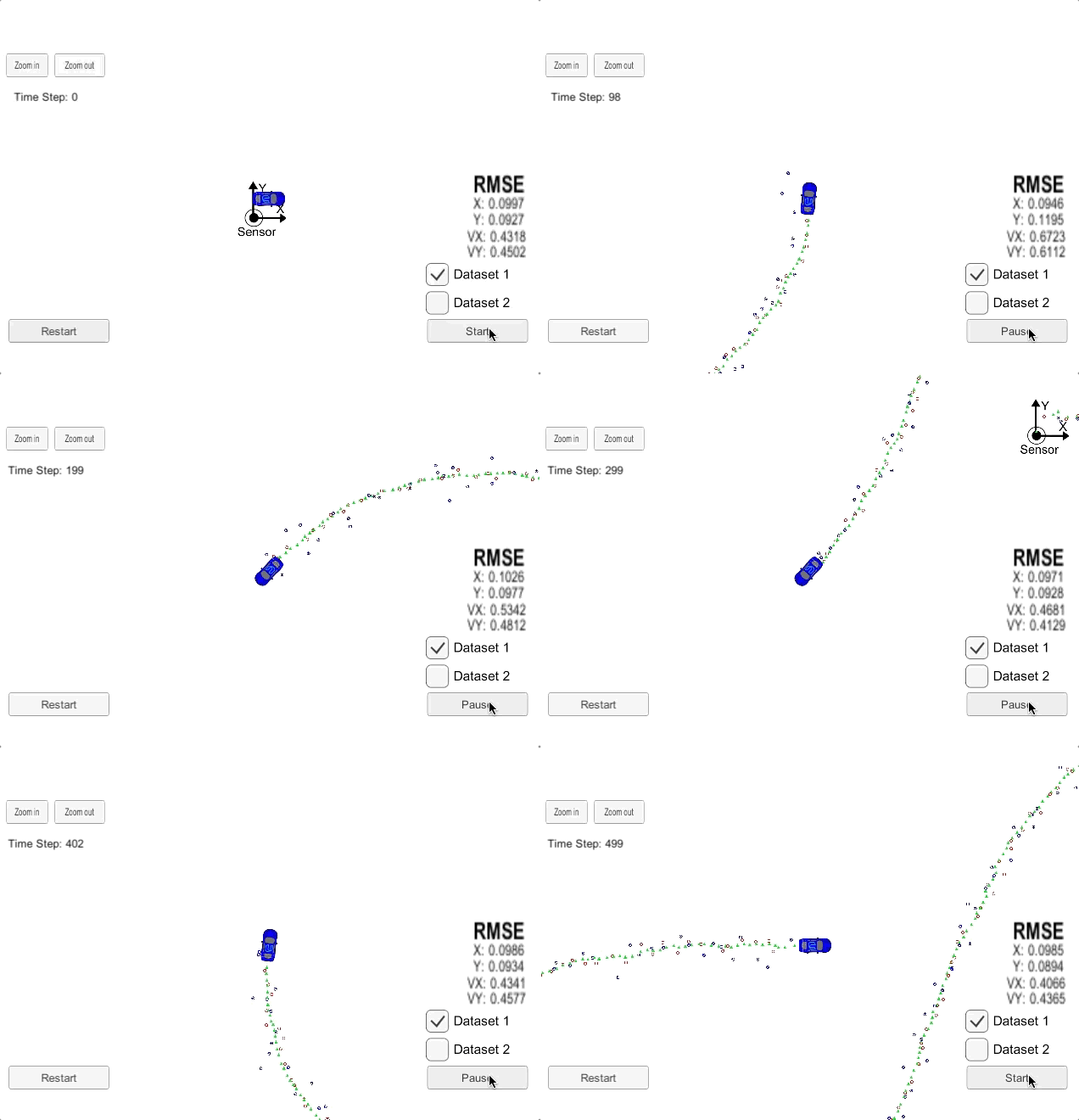
The following gif picture is record from the simulator.
- Blue circle: radar measurement
- Red circle: laser measurement
- Green circle : EKF estimated position
1.Create the enviroment for carnd-term2
I don't have an mac, and my working PC is install windows7
So, this is the options
- windows7 professinal + vmware(ubuntu), not work
- windows7 professinal + docker, not work
- pure ubuntu, it works
... I haven't test
So, this is the suggestion, if you are using windows7. Don't try anything on it. It will waste your time.
Buy a computer or borrow a computer, then install ubuntu (16.4 is the version use)
2. From a empty computer to run the code with Simulator
2.1 install ubuntu
(PreRequirment: you already have another windows PC)
on the windows pc:
1)down ubuntu from https://www.ubuntu.com/download/desktop
2)this installation guide: https://tutorials.ubuntu.com/tutorial/tutorial-create-a-usb-stick-on-windows#0
3)create a bootable USB flash disk include ubuntu image, using Rufus :https://rufus.akeo.ie/
on the empty linux comupter:
1) boot the computer using the USB flash disk
2) install linux
2.2 download project from github
https://github.com/udacity/CarND-Extended-Kalman-Filter-Project
2.3 install uWebSocket
uWebSocket is software to connect our C++ program and the simulator.
In the project folder, execute sudo sh ./install-ubuntu.sh
This command will installed uWebSockets.
2.4 download simulator
term2_sim.x86_64, download it from https://github.com/udacity/self-driving-car-sim/releases/
hins:
- add execute permission to the file
sudo chmod -c 777 <your file name> - The simulator may corrupt sometimes, so unzip it from the download file, or download it again
2.5 install anaconda and jupyter notebook
The python jupyter notebook is used for analyze the output log file.
check conda version
conda --version
If you computer don't have anaconda, then you could download anaconda or miniconda. Any of them is OK.
miniconda is about 50M. Download from:
https://conda.io/miniconda.html
anaconda is about 500M. Download from:
https://www.anaconda.com/download/#linux
Then install it,
- miniconda
bash Miniconda3-latest-Linux-x86_64.sh - anaconda
bash Anaconda-latest-Linux-x86_64.sh
I use the enviroment from udacity Carnd-term1
https://github.com/udacity/CarND-Term1-Starter-Kit/blob/master/doc/configure_via_anaconda.md
Set the enviroment like this:
git clone https://github.com/udacity/CarND-Term1-Starter-Kit.git

cd CarND-Term1-Starter-Kit
Then run these commands, will create an conda enviroment, include the libraries we need.
conda env create -f environment.yml
If conda download these package too slow, you can use other channels instead. Edit your environment.yml file.
channels:
- https://conda.anaconda.org/menpo
- https://mirrors.tuna.tsinghua.edu.cn/anaconda/pkgs/free/
- https://mirrors.tuna.tsinghua.edu.cn/anaconda/cloud/menpo/
- https://mirrors.tuna.tsinghua.edu.cn/anaconda/cloud/conda-forge/
- conda-forge
Activate the enviroment
source activate carnd-term1
Then get into the jupyter notebook
jupyter notebook
3. Install some usefull software (optional)
3.1 Install chrome in ubuntu
(If you like, the firefox is good enough also)
https://www.cyberciti.biz/faq/how-to-install-google-chrome-in-ubuntu-linux-12-xx-13-xx/
3.2 Install uGet download tools
If you want download something big in linux, you may need a download tool.
The uGet website: http://ugetdm.com/downloads-ubuntu
Install uget using command line
sudo add-apt-repository ppa:plushuang-tw/uget-stable

sudo apt update

sudo apt install uget
Then, install aria2 plugin for uGet
sudo apt install aria2
After these, search uGet in ubuntu search bar, you will found uGet.
3.3 Haroopad markdown editor
download from this site: http://pad.haroopress.com/user.html
Your downloaded Haroopad package could be an deb package. How to install an deb package?
sudo dpkg -i xxxx.deb
4.Data Flow
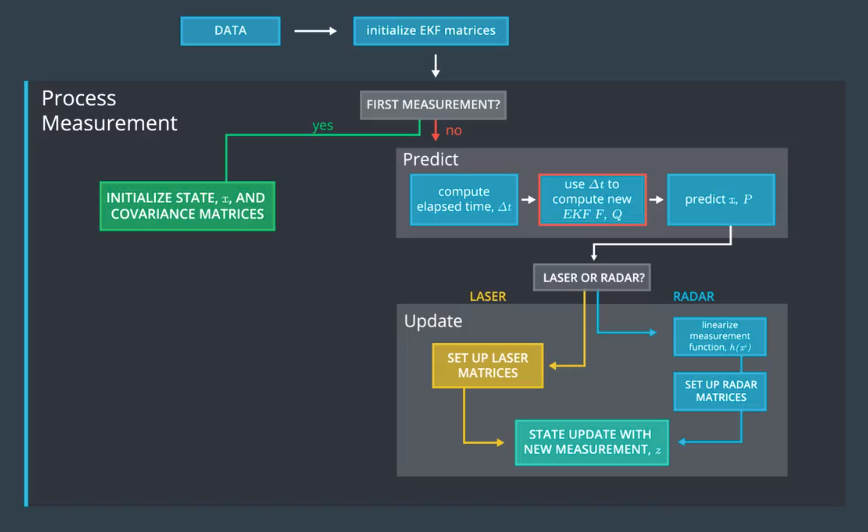
- The measuremennt processor/matlab simulator is generating the FUSION .txt file:
"data/obj_pose-laser-radar-synthetic-ukf-input.txt";
OR
"../matlab_examples/obj_pose-laser-radar-synthetic-ukf-input.txt";
The Input file format is:
L(for laser) meas_px meas_py timestamp gt_px gt_py gt_vx gt_vy (gt is ground truth)
R(for radar) meas_rho meas_phi meas_rho_dot timestamp gt_px gt_py gt_vx gt_vy (gt is ground truth)
Example:
R 8.60363 0.0290616 -2.99903 1477010443399637 8.6 0.25 -3.00029 0
L 8.45 0.25 1477010443349642 8.45 0.25 -3.00027 0
The EKF Algorithm reads form file reads all the lines and generates measurement structures
The MeasurementProcessor() is called with individual measurements (one by one). The results are saved
(Attention: no file processing routines are used inside MeasurementProcessor() all the file processing routines are in the main function.
So the data read/write is decoupled from the algorithmThe results are saved in an output file:
"data/obj_pose-laser-radar-ekf-output.txt"
Output file format:
est_px est_py est_vx est_vy meas_px meas_py gt_px gt_py gt_vx gt_vy
Example:
4.53271 0.279 -0.842172 53.1339 4.29136 0.215312 2.28434 0.226323
43.2222 2.65959 0.931181 23.2469 4.29136 0.215312 2.28434 0.226323
5.CMakeLists.txt
There is nothing need to change in the CMakeLists.txtx
6.Program structure
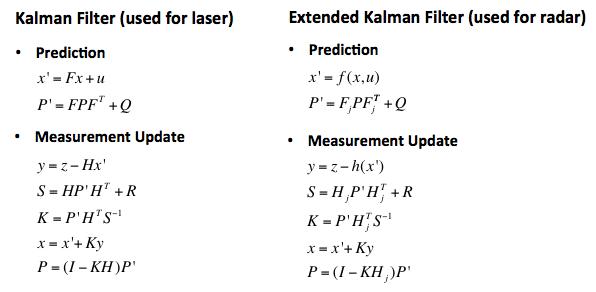
overview of the formular
Tools.h
define a class named "tools" , and 2 method:
- CalculateRMSE
- CalculateJacobian
Tools.app
Implementation of the 2 method.
measurement_package.h
Defines a class called "MeasurementPackage".
It include the data of a measurement.
Kalman_filter.h
Defines a class named "KalmanFilter"
The class include some data
- x_ state vector
- P_ covariance matrix
- F_ state transition matrix
- Q_ process covariance matrix
- H_ measurement matrix
- R_ measurement covariance
The class defined some method
- Init: initializes Kalman filter
- Predict :predicts the state and state covariance, using the process model
- update :update the state by using standard Kalman Filter equations.
- updateEKF :update the state by using Extended Kalman Filter equations.
Kalman_filter.cpp
Implementation the method defined by Kalman_filter.h
FusionEKF.h
Head file of FusionEKF.cpp
Define a class called FusionEKF
Define a method ProcessMeasurement, a public KalmanFilter
FusionEKF.cpp
Implementation the method difined by FusionEKF.h
Main.cpp
- Check_arguments: I add an option to the program, select
fusionoronlyRadaroronlyLidar - hasData:
- main:
- write logfile, depend on the option you select.The logfile could be log_fusion.txt or log_onlyRadar.txt or log_onlyRidar.txt.
- using uWS to communicate with Simulator.
- calculate RMSE(root mean squre error) between estimations and ground truth.
- Json is the message type, send to, or receive from the simulator.
- extrac variables form istringstream, and put them into
- Call ProcessMeasurment(meas_package) for Kalman filter
-
7 Compile and run
mkdir buildcd buildcmake ..make./ExtendedKF fusion- Download simulator
term2_sim.app(if in OSX) and open it. Clickplay!bottom, select Project 1/2: EKF and UKF, and pressStartbottom to start.
8. If your program can not run
Download the simulator again. Maybe the simulator is crash.
9. Analyze the Output data.
The analyze can be see in the build/analyz_log_file.ipynb. You can use jupyter notebook to open it.
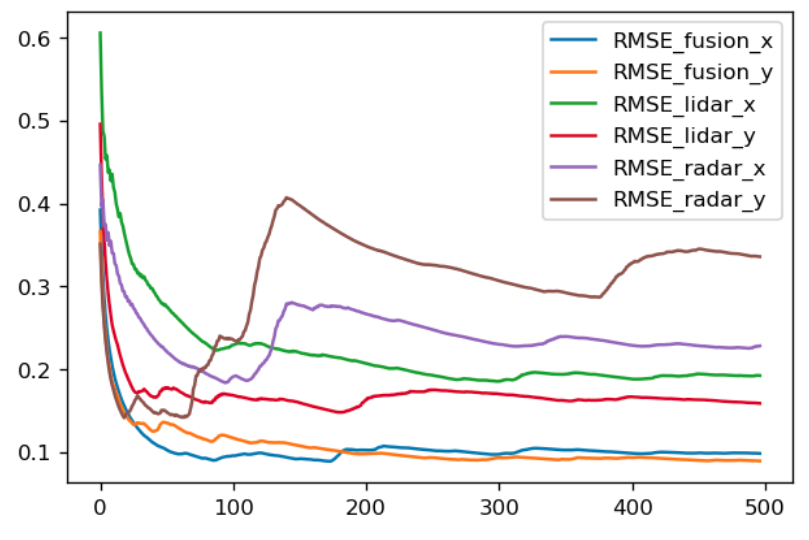
This picture is the compare of RMSE. Obviously, the error is radar > lidar > fusion.
Outro
The course provide almost full of the code.
In my experience,
1)The hardest part is build a enviroment, at last I choose ubuntu linux platform.
2)If the simulator has no response, download it again, or extract it from the zip file.
Udacity carnd2 Sensor Fusion, Extended Karman Filter (English)的更多相关文章
- Sensor fusion(传感器融合)
From Wikipedia, the free encyclopedia 来自维基百科,免费的百科Sensor fusion is combining of sensory data or data ...
- Kalman Filter、Extended Kalman Filter以及Unscented Kalman Filter介绍
模型定义 如上图所示,卡尔曼滤波(Kalman Filter)的基本模型和隐马尔可夫模型类似,不同的是隐马尔科夫模型考虑离散的状态空间,而卡尔曼滤波的状态空间以及观测空间都是连续的,并且都属于高斯分布 ...
- Kalman filter, Laser/Lidar measurement
You can download this project from https://github.com/lionzheng10/LaserMeasurement The laser measure ...
- (转) How a Kalman filter works, in pictures
How a Kalman filter works, in pictures I have to tell you about the Kalman filter, because what it d ...
- 卡尔曼滤波—Simple Kalman Filter for 2D tracking with OpenCV
之前有关卡尔曼滤波的例子都比较简单,只能用于简单的理解卡尔曼滤波的基本步骤.现在让我们来看看卡尔曼滤波在实际中到底能做些什么吧.这里有一个使用卡尔曼滤波在窗口内跟踪鼠标移动的例子,原作者主页:http ...
- probabilistic robotics_Kalman filter(一)
码农生活告一段落,继续.... 多元正态分布 协方差矩阵,为正定对称矩阵.det表示行列式 协方差反应随机样本变量各分量之间的相关性. 当变量的假设模型不一致时,不适合用高斯滤波. 叠加高斯噪声的线性 ...
- LightOJ 1074 - Extended Traffic (SPFA)
http://lightoj.com/volume_showproblem.php?problem=1074 1074 - Extended Traffic PDF (English) Stati ...
- SQL Server Extended Events 进阶 3:使用Extended Events UI
开始采用Extended Events 最大的阻碍之一是需要使用Xquery和XML知识用来分析数据.创建和运行会话可以用T-SQL完成,但是无论使用什么目标,数据都会被转换为XML.这个限制在SQL ...
- {ICIP2014}{收录论文列表}
This article come from HEREARS-L1: Learning Tuesday 10:30–12:30; Oral Session; Room: Leonard de Vinc ...
随机推荐
- Canvas 动态小球重叠效果
<!doctype html> <html> <head> <meta charset="utf-8"> <title> ...
- 设置IIS,使客户端访问服务器上的文件
1.打开IIS控制器——"运行-cmd-inetmgr-回车“ 2.选中要设置的网站 3.右键,添加虚拟目录 4.如上图所示,在别名处输入文件目录的名称,物理路径要选择文件在磁盘上的存储根目 ...
- 1022 D进制的A+B (20 分)
输入两个非负 10 进制整数 A 和 B (≤),输出 A+B 的 D (1)进制数. 输入格式: 输入在一行中依次给出 3 个整数 A.B 和 D. 输出格式: 输出 A+B 的 D 进制数. 输入 ...
- IDEA中如何添加jar包
File -> Project Structure -> Libraries -> + -> jar -> 选择classes
- java 数据库连接
一.JDBC(Java Database Connectivity) JDBC是Java语言中访问数据库的应用程序接口,可以为多种关系数据库提供统一访问. jdbc.properties jdbc.d ...
- 4.会话管理(Session)
1.会话管理的概念和基本原理: 会话管理概念: 会话的实现过程: 2.使用Cookie.隐藏域.URL重写实现会话管理 创建并向客户端发送Cookie; 从客户端读取Cookies Cookie的方法 ...
- js学习笔记 -- await/ async
await 暂停async function函数,等待Promise处理完成,若Promise 状态为fulfilled,其回调resolve的参数作为await的值,Promise 状态为rejec ...
- spring和springmvc父子容器关系
一般来说,我们在整合spring和SpringMVC这两个框架中,web.xml会这样写到: <!-- 加载spring容器 --> <!-- 初始化加载application.xm ...
- ERROR:105: Unable to locate a modulefile for 'xxx'
查看可用的 module:module avail 将xxx替换为屏幕输出中已有的模块.
- Java基础06-条件选择语句
1.switch多分支结构 import java.util.Scanner; public class Test1{ public static void main(String[] args){ ...