
重绘DataGridView的DataGridViewCheckBoxCell控件
最近项目中要用到在DataGridView单元格里面放置一个带有文本的 DataGridViewCheckBoxCell控件但原有
的是不支持的然后我就想着重写个 DataGridViewCheckBoxTextCell
下面是源码:(如有疑问可以加源码分享群 81582487 来问我)
using System;
using System.Collections.Generic;
using System.Linq;
using System.Text;
using System.Windows.Forms;
using System.Windows.Forms.VisualStyles;
using System.Drawing;
namespace WindowsDemo
{
public class DataGridViewCheckBoxTestCell : DataGridViewCheckBoxCell
{
public DataGridViewCheckBoxTestCell()
: base()
{
}
public CheckBoxState CheckBoxTestState { get; set; }
/// <summary>
/// 单元格边框颜色
/// </summary>
private Color CellBorderColor { get { return Color.FromArgb(172, 168, 153); } }
protected override void Paint(Graphics graphics, Rectangle clipBounds, Rectangle
cellBounds, int rowIndex, DataGridViewElementStates cellState, object value, object
formattedValue, string errorText, DataGridViewCellStyle cellStyle,
DataGridViewAdvancedBorderStyle advancedBorderStyle, DataGridViewPaintParts paintParts)
{
var check = (Boolean)value;
CheckBoxTestState = check ? CheckBoxState.CheckedNormal :
CheckBoxState.UncheckedNormal;
if (paintParts == DataGridViewPaintParts.Background || paintParts ==
DataGridViewPaintParts.All)
{
graphics.FillRectangle(new SolidBrush(cellStyle.BackColor), cellBounds);
}
if (paintParts == DataGridViewPaintParts.Border || paintParts ==
DataGridViewPaintParts.All)
{
graphics.DrawRectangle(new Pen(CellBorderColor), cellBounds);
}
if (paintParts == DataGridViewPaintParts.SelectionBackground || Selected)
{
graphics.FillRectangle(new SolidBrush(cellStyle.SelectionBackColor),
cellBounds);
}
var col = OwningColumn as DataGridViewCheckBoxTextColumn;
if (col != null && !string.IsNullOrEmpty(col.Text))
{
graphics.DrawString(col.Text, cellStyle.Font, new SolidBrush(Selected ?
cellStyle.SelectionForeColor : cellStyle.ForeColor),
new Point(cellBounds.X + 25, cellBounds.Y + cellBounds.Height / 4));
}
if (!string.IsNullOrEmpty(Text))
{
graphics.DrawString(Text, cellStyle.Font, new SolidBrush(Selected ?
cellStyle.SelectionForeColor : cellStyle.ForeColor),
new Point(cellBounds.X + 25, cellBounds.Y + cellBounds.Height / 4));
}
CheckBoxRenderer.DrawCheckBox(graphics, new Point(cellBounds.X + 4, cellBounds.Y +
cellBounds.Height / 4), CheckBoxTestState);
// ButtonRenderer.DrawButton(graphics, new Rectangle(new Point(cellBounds.X + 50,
cellBounds.Y + cellBounds.Height / 4), new Size(20, 20)), true, PushButtonState.Default);
// base.Paint(graphics, clipBounds, cellBounds, rowIndex, cellState, value,
formattedValue, errorText, cellStyle, advancedBorderStyle, paintParts);
}
protected override void OnMouseDown(DataGridViewCellMouseEventArgs e)
{
var check = (bool)Value;
CheckBoxTestState = check ? CheckBoxState.CheckedNormal :
CheckBoxState.UncheckedNormal;
Value = !check;
base.OnMouseDown(e);
}
public string Text { get; set; }
}
}
使用也很简单:(使用时先把结构加载完了在对这列进行如下操作)
DataGridViewCheckBoxTestCell check3 = new DataGridViewCheckBoxTestCell();
check3.Text = "请选择";
check3.Value = true;
row.Cells["check"] = check3;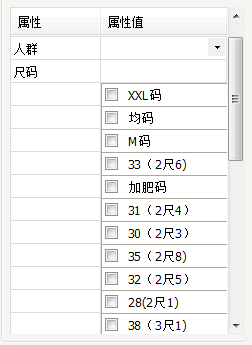
重绘DataGridView的DataGridViewCheckBoxCell控件的更多相关文章
- 玩转控件:重绘DEVEXPRESS中DateEdit控件 —— 让DateEdit支持只选择年月 (提供源码下载)
前言 上一篇博文<玩转控件:重绘ComboBox —— 让ComboBox多列显示>中,根据大家的回馈,ComboBox已经支持筛选了,更新见博文最后最后最后面. 奇葩 这两天遇到 ...
- C# DataGridView自定义分页控件
好些日子不仔细写C#代码了,现在主要是Java项目,C#.Net相关项目不多了,有点手生了,以下代码不足之处望各位提出建议和批评. 近日闲来无事想研究一下自定义控件,虽然之前也看过,那也仅限于皮毛,粗 ...
- 使用DataGridView数据窗口控件,构建用户快速输入体验
在"随风飘散" 博客里面,介绍了一个不错的DataGridView数据窗口控件<DataGridView数据窗口控件开发方法及其源码提供下载>,这种控件在有些场合下,还 ...
- C# 自定义重绘DataGridView
using System.Collections.Generic; using System.ComponentModel; using System.Diagnostics; using Syste ...
- Winform带dataGridview的Combox控件
调用控件: public partial class Form1 : Form { public Form1() { InitializeComponent(); //---------------- ...
- 初识DataGridView 表格数据控件
DataGridView控件提供了一种强大而灵活的以表格形式显示数据的方式,用户可以使用DataGridView控件来显示少量数据的只读视图,也可以对其进行缩放以显示特大数据集的可编辑视图. 扩展Da ...
- 重绘DataGridView标头
最近突然想在DataGridView标头放置一个CheckBox,我就想着重写下DataGridViewColumnHeaderCell抱着试试的心态结果真的是可以的下面是源码:(如果有看不懂的可以加 ...
- winfrom中DataGridView绑定数据控件中DataGridViewCheckBoxColumn怎么选中
; i < this.dataGridView1.Rows.Count; i++) { this.dataGridView1.Rows[i].Cells["CheckBoxCulums ...
- 自绘CProgressCtrl进度条控件,支持自定义显示文本和进程百分比信息
// CXProgressCtrl 头文件 #pragma once // CXProgressCtrl class CXProgressCtrl : public CProgressCtrl { D ...
随机推荐
- windows下如何正确使用Jconsole远程连接linux主机上的JVM
https://www.aliyun.com/jiaocheng/589230.html
- leetcode算法学习----逆波兰表达式求值(后缀表达式)
下面题目是LeetCode算法:逆波兰表达式求值(java实现) 逆波兰表达式即后缀表达式. 题目: 有效的运算符包括 +, -, *, / .每个运算对象可以是整数,也可以是另一个逆波兰表达式.同 ...
- 洛谷——P1720 月落乌啼算钱
题目背景 (本道题目木有以藏歌曲……不用猜了……) <爱与愁的故事第一弹·heartache>最终章. 吃完pizza,月落乌啼知道超出自己的预算了.为了不在爱与愁大神面前献丑,只好还是硬 ...
- Spring MVC中@RequestMapping注解使用技巧(转)
@RequestMapping是Spring Web应用程序中最常被用到的注解之一.这个注解会将HTTP请求映射到MVC和REST控制器的处理方法上. 在这篇文章中,你将会看到@RequestMapp ...
- mms
Quartz2D 二维绘图引擎(绘制图形|绘制文字|读取生成 PDF|裁剪图片|自定义 UI 控件) 继承 UIView 重写 drawRect.(viewDidLoad->viewWillAp ...
- Android 自己定义Activity基类
我们在开发App的时候有时候碰到多个界面有一个共同点的时候.比方,都有同样的TitleBar.而且TitleBar能够设置显示的文字.TitleBar上的点击事件,假设给每个Activity都写一遍T ...
- 【POJ 1275】 Cashier Employment
[题目链接] 点击打开链接 [算法] 设Ti为第i小时有多少个出纳员开始工作,Vi表示第i小时有多少个来应聘的出纳员 那么,有 : 1. 0 <= Ti <= Vi 2. Ti + Ti- ...
- bzoj1345
贪心 这并没有想清楚就看题解了... 看上去肯定是贪心,那么怎么贪呢?事实上,我们想一下,假设max(a[i],a[i+1])中a[i]没有合并,那么后面取max肯定是a[i+1],因为如果后面合并之 ...
- 特征变化--->特征向量中部分特征到类别索引的转换(VectorIndexer)
VectorIndexer: 倘若所有特征都已经被组织在一个向量中,又想对其中某些单个分量进行处理时,Spark ML提供了VectorIndexer类来解决向量数据集中的类别性特征转换. 通过为其提 ...
- Nginx的alias与root的用法区别和location匹配规则
1.alias与root的用法区别 最基本的区别:alias指定的目录是准确的,root是指定目录的上级目录,并且该上级目录要含有location指定名称的同名目录. location /abc/ { ...