
jQuery 点击查看 收起
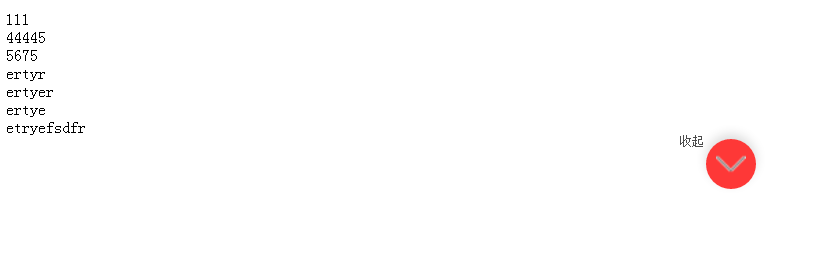
<!DOCTYPE html>

<html lang="en">

<head>

    <meta charset="UTF-8">

    <title>点击查看 收起</title>

    <script src="js/jquery-1.7.1.min.js"></script>

</head>

<style>

    .abc{width: 150px;height: 150px;background: red;}

    .fff{font-size: 18px;color: blue;}

    .big-box{background: #888;}

    .pink{

        width: 150px;

        height: 100px;

        background: pink;

        position: absolute;

        margin: auto;

        left: 0;

        right: 0;

        bottom: 0;

        top: 0;

        transform: rotate(80deg);

        text-align: center;

        line-height: 100px;

    }

    .fff{

        background: #fff;

        border: 1px solid #000;

    }

    .head{line-height: 30px;}

    .arrow{width: 20px;height: 20px;background: red;display: block;float: right;}

.show_hide_btn{line-height: .64rem;font-size: .28rem;color: #4c4c4c;text-align: center;}

.show_hide_btn i{display: inline-block;width: 50px;height:50px;vertical-align: top;margin-top: .18rem;margin-left: .1rem;

 background: url(img/fold_t.png) no-repeat center #fe3837;background-size: 30px auto;border-radius: 50%;    box-shadow: 0 5px 15px 0 rgba(0,0,0,.14);}

.show_hide_btn i.flod_t{background: url(img/fold_t.png) no-repeat center #fe3837; background-size: 30px auto;transform:rotate(180deg);

-ms-transform:rotate(180deg);     /* IE 9 */

-moz-transform:rotate(180deg);     /* Firefox */

-webkit-transform:rotate(180deg); /* Safari 和 Chrome */

-o-transform:rotate(180deg); }

</style>

<script>

    $(document).ready(function() {

 var le = $('div.coup_list').length;

if(le >1){

$('.show_hide_btn').css('display','block');

  $('.coup_list:gt(0)').css('display','none');

}

$('.show_hide_btn').toggle(function(){

    $('.coup_list:gt(0)').show();

    $('.show_hide_btn i').addClass('flod_t');

    $('.show_hide_btn span').html('收起')

}

    ,function(){

        $('.coup_list:gt(0)').hide();

        $('.show_hide_btn i').removeClass('flod_t');

        $('.show_hide_btn span').html('点击查看');

})

    });

</script>

<body>

<div class="coup">

    <div class="coup_list">111</div>

    <div class="coup_list">44445</div>

    <div class="coup_list">5675</div>

    <div class="coup_list">ertyr</div>

    <div class="coup_list">ertyer</div>

    <div class="coup_list">ertye</div>

    <div class="coup_list">etryefsdfr</div>

    <div class="show_hide_btn" style="display:none" ><span>点击查看全部券码 </span><i class=""></i></div>

</div>

</body>

</html>
jQuery 点击查看 收起的更多相关文章
- jquery 点击查看,收起特效
<div class="all"> <p><a href="javascript:;" id="onvk"&g ...
- jquery 点击查看更多箭头变化,文字变化,超出带滚动条。
从网上好了好久,没找到自己要的,自己写了一下. <!DOCTYPE html> <html> <head> <meta charset="utf-8 ...
- jQuery点击图片放大拖动查看效果
效果如图: 放大前: 放大后(可拖动图片浏览): 源码如下: <html xmlns="http://www.w3.org/1999/xhtml"> <head& ...
- JS点击查看更多内容 控制段落文字展开折叠
JavaScript+jQuery实现的文字展开折叠效果,点击文字后文字内容会完整的显示出来,控制段落来显示文字,不需要的时候,可以再次点击后将内容折叠起来,也就是隐藏了一部分内容.点击查看更多的功能 ...
- jquery点击放大图片
参考地址:https://blog.csdn.net/qq_42249896/article/details/86569636 一.应用场景:点击图片可以对图片进行放大显示. 二.实现代码: 说明:我 ...
- jquery点击复选框触发事件给input赋值
体验效果:http://keleyi.com/keleyi/phtml/jqtexiao/31.htm 代码如下: <!DOCTYPE html> <html xmlns=" ...
- 基于jQuery点击加载动画按钮特效
分享一款基于jQuery点击加载动画按钮特效.这是一款基于jQuery+CSS3实现的鼠标点击按钮加载动画特效代码.效果图如下: 在线预览 源码下载 实现的代码. html代码: <div ...
- jquery点击改变图片src源码并toggle
<!DOCTYPE html PUBLIC "-//W3C//DTD XHTML 1.0 Transitional//EN" "http://www.w3.org/ ...
- jquery点击改变class并toggle;jquery点击改变图片src源码并toggle;jquery显示隐藏toggle
<html><head><meta charset="utf-8"><title></title><script ...
随机推荐
- 省市区三级-sql脚本:
/*Navicat MySQL Data Transfer Source Server : moiraiSource Server Version : 50631Source Host : 192.1 ...
- c# 字节高低位
byte n = br.ReadByte(); ; // 高位 var l = n & 0x0f; // 低位
- x86 linux 裁剪过程中能正常跑起来的必要配置项
A .选中Executable file formats/Emulations ---> Kernel support for ELFbinaries -----加载运行rootfs 中的程序. ...
- FLASH OTP
OTP 软件加密运用参考 为了防止软件被他人盗用,spansion flash给每个芯片植入了代表身份的unique ID,增加了OTP扇区,目前我们可以运用这两个特性,来实现软件的加密保护.软件加密 ...
- 虚拟机C盘扩容
使用 <分区助手> 下载地址:http://115.com/file/belj8wkm
- python3.6 + selenium2.53.1 查询数据库并将返回的内容中每一行的内容转换成class对象
环境: win10 python3.6 selenium2.53.1 准备工作:先安装pymysql python2.x链接数据库使用MySQLdb,而python3.x链接数据库使用pymysql ...
- bootstrap table 分页后,重新搜索的问题
前提: 自定义搜索且有分页功能,比如搜索产品名的功能. 现象:当搜索充气娃娃的时候返回100条记录,翻到第五页. 这时候搜索按摩棒,数据有200条,结果应该是第一页的记录,但是实际显示的还是第五页的 ...
- SQL两个字段排序
ORDER BY 后可加2个字段,用英文逗号隔开. 1.f1用升序, f2降序,sql该这样写: 1 ORDER BY f1, f2 DESC 2.也可以这样写,更清楚: 1 ORDER BY ...
- poj 1637 Sightseeing tour【最大流+欧拉路】
参考:https://www.cnblogs.com/kuangbin/p/3537525.html 这篇讲的挺好的 首先分清欧拉路和欧拉环: 欧拉路:图中经过每条边一次且仅一次的路径,要求只有两个点 ...
- 身份认证系统(四)OAuth2运行流程
上一节介绍过什么是OAuth2,这节准备用生动的事例来告诉大家OAuth2运行的流程. 我们来想这样一个场景:假设我们有一个叫做万方网盘的服务是用来帮助用户存储论文文档的,我们向外提供了符合OAuth ...