
Pytest系列(20)- allure结合pytest,allure.step()、allure.attach的详细使用
如果你还想从头学起Pytest,可以看看这个系列的文章哦!
https://www.cnblogs.com/poloyy/category/1690628.html
前言
allure除了支持pytest自带的特性之外(fixture、parametrize、xfail、skip),自己本身也有强大的特性可以在pytest中使用
@allure.step
- allure报告最重要的一点是,它允许对每个测试用例进行非常详细的步骤说明
- 通过 @allure.step() 装饰器,可以让测试用例在allure报告中显示更详细的测试过程
示例代码
#!/usr/bin/env python

# -*- coding: utf-8 -*-

"""

__title__  =

__Time__   = 2020-04-08 21:24

__Author__ = 小菠萝测试笔记

__Blog__   = https://www.cnblogs.com/poloyy/

"""

import allure

@allure.step("第一步")

def passing_step():

    pass

@allure.step("第二步")

def step_with_nested_steps():

    nested_step()

@allure.step("第三步")

def nested_step():

    nested_step_with_arguments(1, 'abc')

@allure.step("第四步{0},{arg2}")

def nested_step_with_arguments(arg1, arg2):

    pass

@allure.step("第五步")

def test_with_nested_steps():

    passing_step()

    step_with_nested_steps()
测试用例在allure上的显示
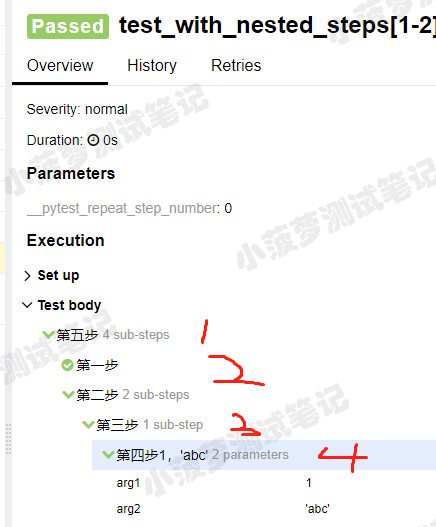
知识点
- step() 只有一个参数,就是title,你传什么,在allure上就显示什么
- 可以像python字符串一样,支持位置参数和关键字参数 {0},{arg2},可看第四步那里,如果函数的参数没有匹配成功就会报错哦
- step() 的使用场景,给我感觉就是,当方法之间嵌套会比较有用,否则的话只会显示一个步骤,类似下面图

allure.attach(挺有用的)
作用:allure报告还支持显示许多不同类型的附件,可以补充测试结果;自己想输出啥就输出啥,挺好的
语法: allure.attach(body, name, attachment_type, extension)
参数列表
- body:要显示的内容(附件)
- name:附件名字
- attachment_type:附件类型,是 allure.attachment_type 里面的其中一种
- extension:附件的扩展名(比较少用)
allure.attachment_type提供了哪些附件类型?

语法二: allure.attach.file(source, name, attachment_type, extension)
source:文件路径,相当于传一个文件
其他参数和上面的一致
其中一个测试用例的代码栗子
#!/usr/bin/env python

# -*- coding: utf-8 -*-

"""

__title__  =

__Time__   = 2020-04-08 21:24

__Author__ = 小菠萝测试笔记

__Blog__   = https://www.cnblogs.com/poloyy/

"""

import allure

import pytest

@pytest.fixture

def attach_file_in_module_scope_fixture_with_finalizer(request):

    allure.attach('在fixture前置操作里面添加一个附件txt', 'fixture前置附件', allure.attachment_type.TEXT)

    def finalizer_module_scope_fixture():

        allure.attach('在fixture后置操作里面添加一个附件txt', 'fixture后置附件',

                      allure.attachment_type.TEXT)

    request.addfinalizer(finalizer_module_scope_fixture)

def test_with_attacments_in_fixture_and_finalizer(attach_file_in_module_scope_fixture_with_finalizer):

    pass

def test_multiple_attachments():

    allure.attach('<head></head><body> 一个HTML页面 </body>', 'Attach with HTML type', allure.attachment_type.HTML)

    allure.attach.file('./reports.html', attachment_type=allure.attachment_type.HTML)
运行之后看结果
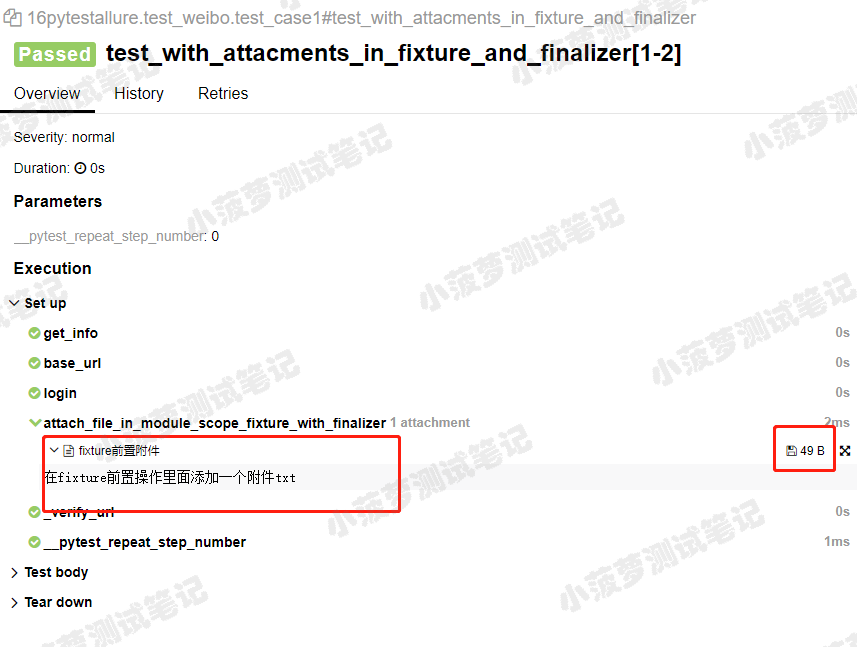
这是一个txt附件
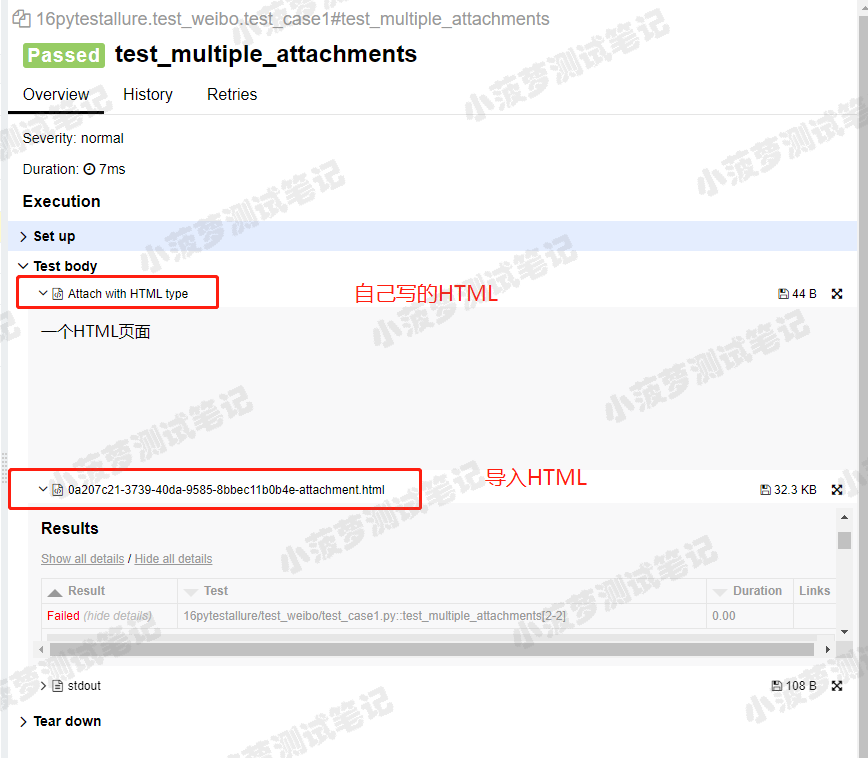
这是一个用了 allure.attach() 来插入一段自己写的HTML和 allure.attach.file() 来导入一个已存在的HTML文件(pytest-html报告)
Pytest系列(20)- allure结合pytest,allure.step()、allure.attach的详细使用的更多相关文章
- Pytest系列(16)- 分布式测试插件之pytest-xdist的详细使用
如果你还想从头学起Pytest,可以看看这个系列的文章哦! https://www.cnblogs.com/poloyy/category/1690628.html 前言 平常我们功能测试用例非常多时 ...
- Pytest系列(15)- 多重校验插件之pytest-assume的详细使用
如果你还想从头学起Pytest,可以看看这个系列的文章哦! https://www.cnblogs.com/poloyy/category/1690628.html 前言 pytest中可以用pyth ...
- Pytest学习(20)- allure之@allure.step()、allure.attach的详细使用
一.@allure.step的用法 可以理解为我们编写测试用例中的每一步操作步骤,而在allure中表示对每个测试用例进行非常详细的步骤说明 通过 @allure.step(),可以让测试用例在all ...
- Pytest系列(21)- allure的特性,@allure.description()、@allure.title()的详细使用
如果你还想从头学起Pytest,可以看看这个系列的文章哦! https://www.cnblogs.com/poloyy/category/1690628.html 前言 前面介绍了两种allure的 ...
- Pytest 系列(27)- allure 命令行参数
如果你还想从头学起Pytest,可以看看这个系列的文章哦! https://www.cnblogs.com/poloyy/category/1690628.html 先看看 allure 命令的帮助文 ...
- Pytest 系列(24)- allure 环境准备
如果你还想从头学起Pytest,可以看看这个系列的文章哦! https://www.cnblogs.com/poloyy/category/1690628.html allure 和 pytest 相 ...
- Pytest 系列(28)- 参数化 parametrize + @allure.title() 动态生成标题
如果你还想从头学起Pytest,可以看看这个系列的文章哦! https://www.cnblogs.com/poloyy/category/1690628.html 前言 参数化 @pytest.ma ...
- Pytest 系列(29)- 详解 allure.dynamic 动态生成功能
如果你还想从头学起Pytest,可以看看这个系列的文章哦! https://www.cnblogs.com/poloyy/category/1690628.html 前言 @allure.title ...
- pytest系列(四)- pytest+allure+jenkins - 持续集成平台生成allure报告
pytest是什么 pytest是python的一款测试框架,拥有unittest的功能并比它更丰富. allure是什么 有非常多的优秀的测试框架,但却是有非常少优秀的报告工具可以展示非常清楚的用例 ...
随机推荐
- emWin模拟器Visual Studio开发时无法printf打印的问题
1.emWin模拟器 为了方便用户学习evWin框架,Segger设计了一个PC仿真的工具,可以测试绝大部分GUI的功能,除了方便使用者学习之外,还可以加速项目开发进度.毕竟在PC上用Visual S ...
- [模拟,英语阅读] Codeforces 549D Haar Features
题目:https://codeforces.com/contest/549/problem/D D. Haar Features time limit per test 1 second memory ...
- 基于树莓派与YOLOv3模型的人体目标检测小车(一)
项目介绍: 本科毕业选的深度学习的毕设,一开始只是学习了一下YOLOv3模型, 按照作者的指示在官网上下载下来权重,配好环境跑出来Demo,后来想着只是跑模型会不会太单薄,于是想了能不能做出来个比较实 ...
- 莎士比亚电路ヾ(≧▽≦*)o
偶尔记录一件有趣的事儿! 这个电路叫做 "莎士比亚电路"[1],请自行参悟,ヾ(≧▽≦)o,ヾ(≧▽≦)o,ヾ(≧▽≦*)o ヾ(≧▽≦*)o . <穿越计算机的迷雾> ...
- Python基础 | pandas中dataframe的整合与形变(merge & reshape)
目录 行的union pd.concat df.append 列的join pd.concat pd.merge df.join 行列转置 pivot stack & unstack melt ...
- iOS 应用签名
一.密码学简介 1.1 base64 Base64 是一种通过查表的编码方法,不能用于加密,即使使用自定义的编码表也不行. Base64 适用于小段内容的编码,比如数字证书签名.Cookie 的内容等 ...
- 数据分析_numpy_基础1
数据分析_numpy_基础1 创建数组 方法 说明 np.array( x ) 将输入数据转化为一个ndarray| np.array( x, dtype ) 将输入数据转化为一个类型为type的nd ...
- windows server 2016 远程桌面mstsc DPI(更改文本、应用和其他项目大小) 设置
windows server 2016 远程桌面mstsc DPI 设置 在高分辨率机器2K,4K,8K,登入使用window远程桌面mstsc时,登入后虽然分辨率变成了和cilent一样分辨率 但是 ...
- Kubernets中获取客户端真实IP总结
1. 导言 绝大多数业务场景都是需要知道客户端IP的 在k8s中运行的业务项目,如何获取到客户端真实IP? 本文总结了通行的2种方式 要答案的直接看方式一.方式二和总结 SEO 关键字 nginx i ...
- 文件上传 Window & Linux
1. 在application配置文件添加图片存储路径的参数 上传路径前必须加 file:/ 否则网页图片请求可能404window gofy: uploadPath: file:/F:/fileUp ...