
【Hadoop】3、Hadoop-MapReduce使用avro进行数据的序列化与反序列化
package cn.cutter.demo.hadoop.avro;

import org.apache.hadoop.io.Text;

import java.text.DateFormat;

import java.text.ParseException;

import java.text.SimpleDateFormat;

import java.util.Date;

/**

 * @ClassName NcdcRecordParser

 * @Description TODO

 * @Author xiaof

 * @Date 2019/2/17 16:36

 * @Version 1.0

 **/

public class NcdcRecordParser {

    private static final int MISSING_TEMPERATURE = 9999;

    private static final DateFormat DATE_FORMAT =

            new SimpleDateFormat("yyyyMMddHHmm");

    private String stationId;

    private String observationDateString;

    private String year;

    private String airTemperatureString;

    private int airTemperature;

    private boolean airTemperatureMalformed;

    private String quality;

    public void parse(String record) {

        stationId = record.substring(4, 10) + "-" + record.substring(10, 15);

        observationDateString = record.substring(15, 27);

        year = record.substring(15, 19);

        airTemperatureMalformed = false;

        // Remove leading plus sign as parseInt doesn't like them

        if (record.charAt(87) == '+') {

            airTemperatureString = record.substring(88, 92);

            airTemperature = Integer.parseInt(airTemperatureString);

        } else if (record.charAt(87) == '-') {

            airTemperatureString = record.substring(87, 92);

            airTemperature = Integer.parseInt(airTemperatureString);

        } else {

            airTemperatureMalformed = true;

        }

        airTemperature = Integer.parseInt(airTemperatureString);

        quality = record.substring(92, 93);

    }

    public void parse(Text record) {

        parse(record.toString());

    }

    public boolean isValidTemperature() {

        return !airTemperatureMalformed && airTemperature != MISSING_TEMPERATURE

                && quality.matches("[01459]");

    }

    public boolean isMalformedTemperature() {

        return airTemperatureMalformed;

    }

    public boolean isMissingTemperature() {

        return airTemperature == MISSING_TEMPERATURE;

    }

    public String getStationId() {

        return stationId;

    }

    public Date getObservationDate() {

        try {

            System.out.println(observationDateString);

            return DATE_FORMAT.parse(observationDateString);

        } catch (ParseException e) {

            throw new IllegalArgumentException(e);

        }

    }

    public String getYear() {

        return year;

    }

    public int getYearInt() {

        return Integer.parseInt(year);

    }

    public int getAirTemperature() {

        return airTemperature;

    }

    public String getAirTemperatureString() {

        return airTemperatureString;

    }

    public String getQuality() {

        return quality;

    }

}
通过avro输出数据,我们的数据集是:
0067011990999991950051507004+68750+023550FM-12+038299999V0203301N00671220001CN9999999N9+00001+99999999999

0043011990999991950051512004+68750+023550FM-12+038299999V0203201N00671220001CN9999999N9+00221+99999999999

0043011990999991950051518004+68750+023550FM-12+038299999V0203201N00261220001CN9999999N9-00111+99999999999

0043012650999991949032412004+62300+010750FM-12+048599999V0202701N00461220001CN0500001N9+01111+99999999999

0043012650999991949032418004+62300+010750FM-12+048599999V0202701N00461220001CN0500001N9+00781+99999999999
package cn.cutter.demo.hadoop.avro;

import org.apache.avro.Schema;

import org.apache.avro.generic.GenericData;

import org.apache.avro.generic.GenericRecord;

import org.apache.avro.mapred.*;

import org.apache.avro.mapreduce.AvroJob;

import org.apache.avro.mapreduce.AvroKeyOutputFormat;

import org.apache.hadoop.conf.Configured;

import org.apache.hadoop.fs.Path;

import org.apache.hadoop.io.LongWritable;

import org.apache.hadoop.io.NullWritable;

import org.apache.hadoop.io.Text;

import org.apache.hadoop.mapred.*;

import org.apache.hadoop.mapreduce.Job;

import org.apache.hadoop.mapreduce.Mapper;

import org.apache.hadoop.mapreduce.Reducer;

import org.apache.hadoop.mapreduce.lib.input.FileInputFormat;

import org.apache.hadoop.mapreduce.lib.input.TextInputFormat;

import org.apache.hadoop.mapreduce.lib.output.FileOutputFormat;

import org.apache.hadoop.util.Tool;

import org.apache.hadoop.util.ToolRunner;

import java.io.FileInputStream;

import java.io.IOException;

/**

 * @ClassName AvroGenericMaxTemperature

 * @Description 通过avro记录的数据文件,使用MapReduce进行解析读取数据

 * @Author xiaof

 * @Date 2019/2/17 15:23

 * @Version 1.0

 **/

public class AvroGenericMaxTemperature extends Configured implements Tool {

    //转换json数据,avro的模式解析

    private static final Schema SCHEMA = new Schema.Parser().parse("{\"name\":\"WeatherRecord\",\"doc\":\"A weather reading\",\"type\":\"record\",\"fields\":[{\"name\":\"year\",\"type\":\"int\"},{\"name\":\"temperature\",\"type\":\"int\"},{\"name\":\"stationId\",\"type\":\"string\"}]}");

    public static class MaxTemperatureMapper extends Mapper<LongWritable, Text, AvroKey<Integer>, AvroValue<GenericRecord>> {

        //创建天气解析类对象,数据记录对象

        private NcdcRecordParser ncdcRecordParser = new NcdcRecordParser();

        private GenericRecord genericRecord = new GenericData.Record(SCHEMA);

        @Override

        protected void map(LongWritable key, Text value, Context context) throws IOException, InterruptedException {

            //1.解析数据

            ncdcRecordParser.parse(value.toString());

            //2.判断数据有效性

            if(ncdcRecordParser.isValidTemperature()) {

                //3.获取对应的数据进入记录record中,然后输出到上下文对象

                genericRecord.put("year", ncdcRecordParser.getYearInt());

                genericRecord.put("temperature", ncdcRecordParser.getAirTemperature());

                genericRecord.put("stationId", ncdcRecordParser.getStationId());

                context.write(new AvroKey<Integer>(ncdcRecordParser.getYearInt()), new AvroValue<GenericRecord>(genericRecord));

            }

        }

    }

    public static class MaxTemperatureReducer extends Reducer<AvroKey<Integer>, AvroValue<GenericRecord>, AvroKey<GenericRecord>, NullWritable> {

        @Override

        protected void reduce(AvroKey<Integer> key, Iterable<AvroValue<GenericRecord>> values, Context context) throws IOException, InterruptedException {

            //遍历所有的数据,获取最大的数据

            GenericRecord max = null;

            for(AvroValue<GenericRecord> value : values) {

                //获取数据的值,判断max等于空,或者当前温度大于max记录的温度,那么就更新max

                GenericRecord record = value.datum();

                if(max == null || (Integer) record.get("temperature") > (Integer) max.get("temperature")) {

                    max = newWeatherRecord(record);

                }

            }

            context.write(new AvroKey(max), NullWritable.get());

        }

        private GenericRecord newWeatherRecord(GenericRecord value) {

            GenericRecord record = new GenericData.Record(SCHEMA);

            record.put("year", value.get("year"));

            record.put("temperature", value.get("temperature"));

            record.put("stationId", value.get("stationId"));

            return record;

        }

    }

    @Override

    public int run(String[] strings) throws Exception {

        if (strings.length != 2) {

            System.err.printf("Usage: %s [generic options] <input> <output>\n",

                    getClass().getSimpleName());

            ToolRunner.printGenericCommandUsage(System.err);

            return -1;

        }

        Job job = Job.getInstance(this.getConf(), "Max temperature");

        job.setJarByClass(this.getClass());

        job.getConfiguration().setBoolean(Job.MAPREDUCE_JOB_USER_CLASSPATH_FIRST, true);

        FileInputFormat.addInputPath(job, new Path(strings[0]));

        FileOutputFormat.setOutputPath(job, new Path(strings[1]));

        AvroJob.setMapOutputKeySchema(job, Schema.create(Schema.Type.INT));

        AvroJob.setMapOutputValueSchema(job, SCHEMA);

        AvroJob.setOutputKeySchema(job, SCHEMA);

        job.setInputFormatClass(TextInputFormat.class);

        job.setOutputFormatClass(AvroKeyOutputFormat.class);

        job.setMapperClass(MaxTemperatureMapper.class);

        job.setReducerClass(MaxTemperatureReducer.class);

        return job.waitForCompletion(true) ? 0: 1;

    }

    public static void main(String[] args) throws Exception {

        System.setProperty("hadoop.home.dir", "F:\\hadoop-2.7.7");

        String paths[] = {"H:\\ideaworkspace\\1-tmp\\input\\1.txt", "H:\\ideaworkspace\\1-tmp\\output1"};

        int exitCode = ToolRunner.run(new AvroGenericMaxTemperature(), paths);

        System.exit(exitCode);

    }

}
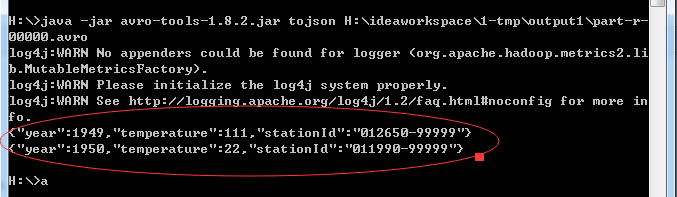
结果使用avro-tool进行查看:
H:\>java -jar avro-tools-1.8.2.jar tojson H:\ideaworkspace\1-tmp\output1\part-r-
00000.avro
【Hadoop】3、Hadoop-MapReduce使用avro进行数据的序列化与反序列化的更多相关文章
- 对 JSON 数据进行序列化和反序列化
如何:对 JSON 数据进行序列化和反序列化 2017/03/30 作者 JSON(JavaScript 对象符号)是一种高效的数据编码格式,可用于在客户端浏览器和支持 AJAX 的 Web 服务之间 ...
- Json数据的序列化与反序列化的三种经常用法介绍
下面内容是本作者从官网中看对应的教程后所做的demo.其体现了作者对相关知识点的个人理解..作者才疏学浅,难免会有理解不到位的地方.. 还请各位读者批判性对待... 本文主要介绍在Json数据的序列化 ...
- c#中对json数据的序列化和反序列化(笔记)
今天遇到在后台中要获取json格式数据里的某些值,网上查了些资料: string jsonstr = _vCustomerService.LoadCustomerbyNumTotalData(quer ...
- JS实现Ajax,Josn数据的序列化和反序列化---例: 省市区联动(包含get,post)
服务器端相应JOSN数据 用到序列化和反序列化----命名空间using System.Web.Script.Serialization; public void ProcessRequest(H ...
- Python 中数据的序列化和反序列化(json处理)
概念: JSON(JavaScript Object Notation):是一种轻量级的数据交换格式. 易于人阅读和编写.同时也易于机器解析和生成. 它基于JavaScript Programming ...
- 详解电子表格中的json数据:序列化与反序列化
从XML到JSON 当下应用开发常见的B/S架构之下,我们会遇到很多需要进行前后端数据传输的场景.而在这个传输的过程中,数据通过何种格式传输.方式是否迅速便捷.书写方式是否简单易学,都成为了程序员在开 ...
- NSFileManager(沙盒文件管理)数据持久化 <序列化与反序列化>
iOS应用程序只能在为该改程序创建的文件中读取文件,不可以去其它地方访问,此区域被成为沙盒,所以所有的非代码文件都要保存在此,例如图像,图标,声音,映像,属性列表,文本文件等. 默认情况下 ...
- fastjson生成和解析json数据,序列化和反序列化数据
本文讲解2点: 1. fastjson生成和解析json数据 (举例:4种常用类型:JavaBean,List<JavaBean>,List<String>,List<M ...
- 【转】GOOGLE-PROTOBUF与FLATBUFFERS数据的序列化和反序列化
转载自[黑米GameDev街区] 原文链接: http://www.himigame.com/unity3d-game/1607.html 关于Protobuf 通过本文的转载和分享的相关链接,足够 ...
随机推荐
- MySQL ERROR 1064(42000): You have an error in your SQL syntax; check the manual that corresponds to your MySQL server version for the right syntax to use near
通常出现该错误的原因是使用了 MySQL 的保留字 解决方法是对使用的保留字使用反引号 (Tab键上面)
- What is REST API
What is REST REST is acronym for REpresentational State Transfer. It is architectural style for dist ...
- Android学习(四)
教材学习内容总结 图形和定制视图 硬件加速 Android APILevel14及其以上版本为目标的应用程序来说,硬件加速是默认可用的. 可通过android:hardwareAccelerated= ...
- navicat for mysql 连接报错1251详细解决步骤
我的是8.0的版本,因为比较新的mysql采用新的保密方式所以旧的似乎不能用,改密码方式:use mysql:ALTER USER 'root'@'localhost' IDENTIFIED WITH ...
- VB批量替换文本字符
Private Sub Command1_Click()Open App.Path & "\abc.txt" For Binary As #1a = Input(LOF(1 ...
- 【机器学习】异常检测算法(I)
在给定的数据集,我们假设数据是正常的 ,现在需要知道新给的数据Xtest中不属于该组数据的几率p(X). 异常检测主要用来识别欺骗,例如通过之前的数据来识别新一次的数据是否存在异常,比如根据一个用户以 ...
- java32
1.抽象类必须有子类才有意义 2.子类中会默认有构造器来调用父类的构造器 3.接口:表示一种规范 interface 接口名(命名规则:在名称前加上I后加上able){ } -2接口也生成对应的字节码 ...
- python编程之如何在Windows上安装python
一.安装python 首先检查你的系统里是否安装了python,开始菜单里点击运行输入cmd打开一个命令窗口,或键盘快捷键windows+R打开,在窗口中输入python并回车,如果出现了Python ...
- [Java算法] -- 1. 常用排序之冒泡排序和选择排序
使用Java语言实现冒泡排序和选择排序 推荐一个数据结构可视化的网站:http://zh.visualgo.net/zh (暂时访问不了) 对排序不太熟悉的朋友,建议去上面的网站学习一下,你将会发现一 ...
- 软件光栅器实现(二、VS和PS的运作,法线贴图,切空间的计算)
二.软件光栅器的VS和PS的输入.输出和运作,实现法线贴图效果的版本.转载请注明出处. 这里介绍的VS和PS是实现法线映射的版本,本文仅介绍实现思路,并给出代码供参考.切空间计算.光照模型等相关公式不 ...