
bash 的配置文件加载顺序
bash配置文件的加载顺序和登陆方式有关,下面先介绍下登陆方式。
1 登陆方式有2种
登陆式SHELL:
- su - oracle
- su -l oracle
- 正常从终端登陆
非登录式SHELL:
- su oracle
- 图形终端打开命令窗口
- 自动执行的shell脚本
2 bash配置文件的分两大类
- 全局配置:/etc/profile, /etc/profile.d/*.sh, /etc/bashrc
- 个人配置:~/.bash_profile, ~/.bashrc
profile类文件作用
- 定义环境变量
- 运行命令或者脚本
bashrc类文件作用
- 定义本地变量,函数
- 命令别名
3 加载顺序
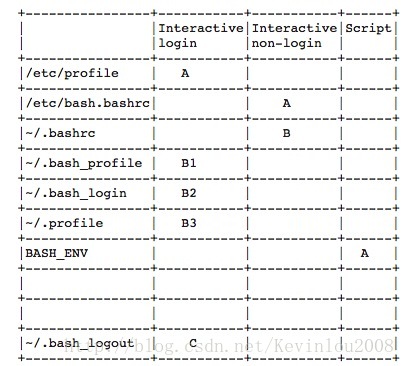
登陆式SHELLL配置文件加载顺序:/etc/profile > .bash_profile > .bash_login > .profile > .bash_logout.
非登录式SHELL配置文件加载顺序:/etc/bash.bashrc > .bashrc
注: 先加载的配置文件的配置,可能会被后加载的配置所覆盖
下面一张图展示下加载顺序, A >B1>B2>B2>C
4 主要代码分析
4.1 在/etc/profile文件中, 我们可以看到如下代码
for i in /etc/profile.d/*.sh ; do

    if [ -r "$i" ]; then

        if [ "${-#*i}" != "$-" ]; then

            . "$i"

        else

            . "$i" >/dev/null 2>&1

        fi

    fi

done
简单的说,我们的/etc/profile这个文件进行一系列的设置后, 最后需要遍历下/etc/profile.d这个目录下的所有sh文件, 然后source每个文件,让每个文件的设置生效。
4.2 在~/.bash_profile文件中,我们可以看到如下代码
[root@centos6 ~]# cat ~/.bash_profile

# .bash_profile

# Get the aliases and functions

if [ -f ~/.bashrc ]; then

    . ~/.bashrc

fi

# User specific environment and startup programs

PATH=$PATH:$HOME/bin

export PATH
我们可以看出来,在~/.bash_profile文件中, 判断了~/.bashrc文件是不是存在,如果存在,也source下,让其生效。
4.3 在~/.bashrc文件中,我们可以看到如下代码
[root@centos6 ~]# cat ~/.bashrc

# .bashrc

# User specific aliases and functions

alias rm='rm -i'

alias cp='cp -i'

alias mv='mv -i'

# Source global definitions

if [ -f /etc/bashrc ]; then

    . /etc/bashrc

fi
我们可以看出来,先设置了一些自定义的别名设置,然后去source了/etc/bashrc这个文件。
4.4 在/etc/bashrc文件中, 我们可以看到如下代码
if ! shopt -q login_shell ; then # We're not a login shell

    # Need to redefine pathmunge, it get's undefined at the end of /etc/profile

    pathmunge () {

        case ":${PATH}:" in

            *:"$1":*)

                ;;

            *)

                if [ "$2" = "after" ] ; then

                    PATH=$PATH:$

                else

                    PATH=$:$PATH

                fi

        esac

    }

    # By default, we want umask to get set. This sets it for non-login shell.

    # Current threshold for system reserved uid/gids is

    # You could check uidgid reservation validity in

    # /usr/share/doc/setup-*/uidgid file

    if [ $UID -gt  ] && [ "`/usr/bin/id -gn`" = "`/usr/bin/id -un`" ]; then

       umask

    else

       umask

    fi

    # Only display echos from profile.d scripts if we are no login shell

    # and interactive - otherwise just process them to set envvars

    for i in /etc/profile.d/*.sh; do

        if [ -r "$i" ]; then

            if [ "$PS1" ]; then

                . "$i"

            else

                . "$i" >/dev/null 2>&1

            fi

        fi

    done

    unset i

    unset pathmunge

fi
我们可以看到,最后一部分代码表示在非登录shell中, /etc/bashrc文件会source /etc/prifile.d目录下的所有sh文件。
bash 的配置文件加载顺序的更多相关文章
- struts几个配置文件加载顺序_2015.01.04
struts几个配置文件加载顺序: 01:struts-default.xml 02:struts-plugin.xml 03:struts.xml 04:struts.properties 05:w ...
- struts2配置文件加载顺序
struts2配置文件加载顺序: struts-default.xml/ struts-plugin.xml/ struts.xml/ struts.properties/ web.xml
- hadoop配置文件加载顺序(转)
原文 http://www.cnblogs.com/wolfblogs/p/4147485.html 用了一段时间的hadoop,现在回来看看源码发现别有一番味道,温故而知新,还真是这样的 在使用h ...
- SpringBoot的配置文件加载顺序和使用方式
1.bootstrap.properties bootstrap.properties 配置文件是由"根"上下文优先加载,程序启动之初就感知 如:Spring Cloud Conf ...
- @PropertySource加载文件的两种用法以及配置文件加载顺序
第一种: 现在我把资源文件的路径放在application.properties里 config.path=/home/myservice/config.properties @PropertySou ...
- Spring Boot配置文件加载顺序
提示:文章写完后,目录可以自动生成,如何生成可参考右边的帮助文档 文章目录 前言 一.通过spring.config.location改变配置文件的位置 二.外部配置加载顺序 1.使用命令行参数指定加 ...
- Springboot配置文件加载顺序
使用Springboot开发的时候遇到了配置的问题,外部config里的配置文件本来没有配置https怎么启动还是https呢,原来开发中测试https在classpath路径的配置文件添加https ...
- shell脚本,配置文件加载顺序,以及什么时候加载。
在linux系统中,有/etc/profile,/etc/bashrc ,~/.bash_profile,~/bashrc这四个配置文件,这些文件,会自动的在某些时候加载,也就是点一下,一般都是些别名 ...
- Spring boot 配置文件 加载顺序
springboot 启动会扫描以下位置的application.properties或者application.yml文件作为Spring boot的默认配置文件 –file:./config/ – ...
随机推荐
- P4149 [IOI2011]Race
对于这道题,明显是点分治,权值等于k,可以用桶统计树上路径(但注意要清空); 对于每颗子树,先与之前的子树拼k,再更新桶,维护t["len"]最小边数; #include < ...
- 2019.03.28 bzoj3595: [Scoi2014]方伯伯的Oj(splay+map+set)
传送门 题意简述: 给一个有优先级的nnn个人的序列,初始的时候第iii个人排名为iii,现在有mmm个操作,种类如下: 把编号为xxx的改成yyy,输出改前xxx的排名 把编号为xxx放到队首,输出 ...
- java+phantomjs实现动态网页抓取
1.下载地址:http://phantomjs.org/download.html 2.java代码 public void getHtml(String url) { HTML="&quo ...
- 挑选队友 (生成函数 + FFT + 分治)
链接:https://www.nowcoder.com/acm/contest/133/D来源:牛客网 题目描述 Applese打开了m个QQ群,向群友们发出了组队的邀请.作为网红选手,Applese ...
- 探寻TP-Link路由器的登录验证
提示:该案例仅供学习使用,切勿滥用!!! 查找路由器连接地址 查找ip $ ifconfig enp2s0: flags=<UP,BROADCAST,RUNNING,MULTICAST> ...
- 5随机到7随机的C++实现
一.5随机到7随机 //给定条件 int Rand1To5(){ + ; } //实现代码,使用插空法和筛的过程 int Rand1To7(){ ; do{ tmp = (Rand1To5() - ) ...
- ubuntu+apache2设置访问、重定向到https
环境:ubunt14裸机,apache2,php5 条件:证书(部分商家买域名送一年),域名,为了方便均在root用户下进行的 web目录:/var/www/test 证书目录(自建):/etc/ap ...
- C++ 虚函数的两个例子
1. 第一个例子是朋友告诉我Qt中的某个实现 1 #include <iostream> 2 3 // Qt中的某个实现 4 class A{ 5 public: 6 A() = defa ...
- windows10的环境变量path如何列表显示
如果你的变量值以%开头,打开编辑的时候就会显示一串的变量值,不方便查找编辑 所以将变量值更改为以盘符开始,就可以解决这个问题,比如:D:\WorkSoft\app\product\11.2.0\dbh ...
- mysql兼容emoji表情存取
emoji介绍 Emoji (絵文字,词义来自日语えもじ,e-moji,moji在日语中的含义是字符)是一套起源于日本的12x12像素表情符号,由栗田穣崇(Shigetaka Kurit)创作,最早在 ...