
使用testng.xml组织测试用例
测试用例类TeseNG.java:

import org.openqa.selenium.By;
import org.openqa.selenium.WebDriver;
import org.openqa.selenium.WebElement;
import org.openqa.selenium.firefox.FirefoxDriver;
import org.testng.Assert;
import org.testng.Reporter;
import org.testng.annotations.*;

public class TestNG {
    private WebDriver driver;

    @BeforeClass
    public void beforeClass() throws InterruptedException {
        System.setProperty("webdriver.firefox.marionette",
                "src/main/resourcec/geckodriver.exe");
        String baiduHomePage;
        baiduHomePage = "https://www.baidu.com/";

        driver = new FirefoxDriver();
        driver.manage().window().maximize();
        driver.get(baiduHomePage);
        Thread.sleep(2000);
        Assert.assertEquals(driver.getTitle(), "百度一下,你就知道");
    }

    @Test(dataProvider = "word")
    public void testNG(String keyword, String case_1, String searchTitle)
            throws InterruptedException {
        WebElement webElement = driver.findElement(By.xpath(".//*[@id='kw']"));
        webElement.clear();
        webElement.sendKeys(keyword);

        driver.findElement(By.xpath(".//*[@id='su']")).click();
        Thread.sleep(3000);

        Reporter.log(case_1);
        Assert.assertEquals(driver.getTitle(), searchTitle);
        driver.navigate().refresh();
    }

    @AfterClass
    public void afterClass(){
        driver.close();
        driver.quit();
    }

    @DataProvider(name = "word")
    public static Object[][] data(){
        return new Object[][]{{"Selenium", "搜索Selenium的测试用例", "Selenium_百度搜索"},
                {"JMeter", "搜索JMeter的测试用例", "JMeter_百度搜索"},
                {"Appium", "搜索Appium的测试用例", "Appium_百度搜索"}
    };
    }
}

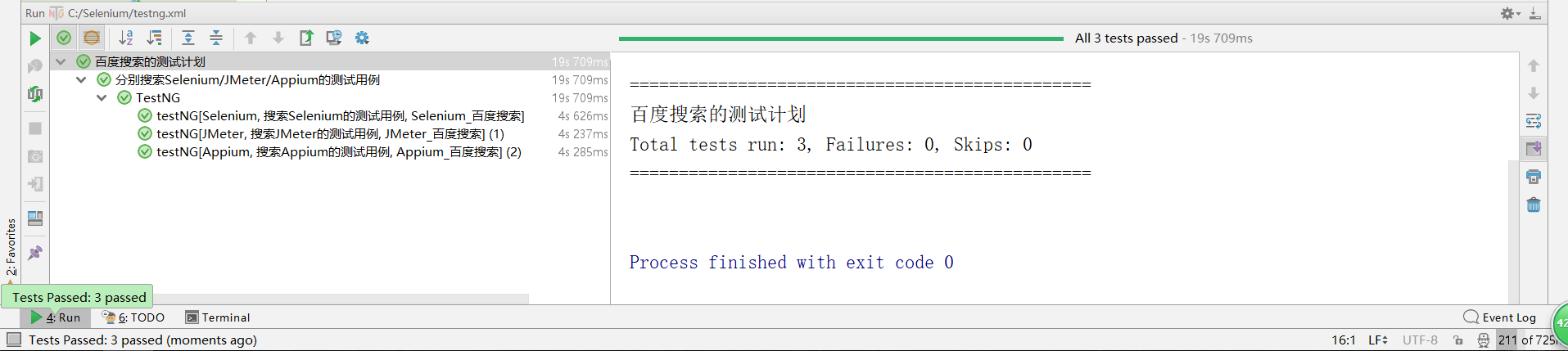
testng.xml文件:
<?xml version="1.0" encoding="UTF-8"?>
<!DOCTYPE suite SYSTEM "http://testng.org/testng-1.0.dtd">
<suite name="百度搜索的测试计划" verbose="2" preserve-order="true">

    <test  name="分别搜索Selenium/JMeter/Appium的测试用例">
        <classes>
            <class name="TestNG" />
        </classes>
    </test>

    <listeners>
        <listener class-name="org.uncommons.reportng.HTMLReporter" />
        <listener class-name="org.uncommons.reportng.JUnitXMLReporter" />
    </listeners>
</suite>
使用testng.xml组织测试用例的更多相关文章
- testng.xml 执行多个测试用例
1.在工程名字上点击右键,点击[New]-->[File] 2.在弹出的[New File]对话框中的[File name]输入[testng.xml],点击[Finish]即创建了一个test ...
- testng.xml文件的配置
------Web自动化测试之Webdriver+TestNG--从零到熟练(系列) TestNG用来管理测试用例的是testng.xml配置文件,我们可以通过配置这个文件来达到组织测试用例,输出测试 ...
- testng教程之testng.xml的配置和使用,以及参数传递
昨天学习了一下testng基础教程,http://www.cnblogs.com/tobecrazy/p/4579414.html 昨天主要学习的是testng 的annotation基本用法和生命周 ...
- IDEA 单元测试testng入门及testng.xml
直接进入正题: 1.TestNG的运行方式如下: With a testng.xml file 直接run as test suite With ant 使用ant From the command ...
- 接口自动化框架(java)--5.通过testng.xml生成extentreport测试报告
这套框架的报告是自己封装的 由于之前已经通过Extentreport插件实现了Testng的IReport接口,所以在testng.xml中使用listener标签并指向实现IReport接口的那个类 ...
- testng.xml 配置大全
1.TestNG的运行方式如下: 1 With a testng.xml file 直接run as test suite 2 With ant 使用ant 3 From the command li ...
- TestNG 入门指导——理解testng.xml执行/不执行某个包,某个类,某个方法
这一篇我们主要学习如下几个知识点: ⑴关于testng.xml ⑵创建一个测试套件 ⑶执行testng.xml ⑷在测试套件中创建多个测试用例 ⑸在用例中增加class,packages, metho ...
- 【TestNG测试】TestNG、Maven、testng.xml构建测试工程
创建一个maven工程 使用Idea创建maven工程 建立类似如上的工程结构,src/main/java,src/test/java,pom.xml,testng.xml,这里由于我们使用工程是 ...
- TestNG的testng.xml配置概述
TestNG提供的annotaions用来辅助定义测试类. TestNG的testng.xml配置文件用来辅助定义执行什么样的测试,即testng.xml更像是一个测试规划. testng.xml配置 ...
随机推荐
- maven项目重构目录
刚从svn下载下来的项目需要重新构建目录,package 包显示不正确, 是的,删除箭头指向的那个文件夹.
- 【luogu P3931 SAC E#1 - 一道难题 Tree】 题解
题目链接:https://www.luogu.org/problemnew/show/P3931 肉眼观察题目感觉可以跑最大流. 证明是如果拆断一棵树,可以最小割,最小割等于最大流. 注意: 图是无向 ...
- Android学习笔记_79_ Android 使用 搜索框
1.在资源文件夹下创建xml文件夹,并创建一个searchable.xml: android:searchSuggestAuthorityshux属性的值跟实现SearchRecentSuggesti ...
- Spring知识点总结(三)之注解方式实现IOC和DI
1. 注解概念 所谓注解就是给程序看的提示信息,很多时候都用来作为轻量级配置的方式. 关于注解的知识点,参看java基础课程中java基础加强部分的内容. 2 ...
- 序列化表单为json对象,datagrid带额外参提交一次查询 后台用Spring data JPA 实现带条件的分页查询 多表关联查询
查询窗口中可以设置很多查询条件 表单中输入的内容转为datagrid的load方法所需的查询条件向原请求地址再次提出新的查询,将结果显示在datagrid中 转换方法看代码注释 <td cols ...
- 【2018 ICPC亚洲区域赛沈阳站 L】Tree(思维+dfs)
Problem Description Consider a un-rooted tree T which is not the biological significance of tree or ...
- oracle 12.1的删除和创建公共用户问题
版本12.1 ,cdb-rac模式 一个集群,4个节点,一个cdb,下面有12个pdb. os:linux 64 --- 删除用户 drop user c##test atler.log提示 ORA- ...
- Zabbix源码安装部署
zabbix源码部署安装 参考文档:https://www.zabbix.com/documentation/4.0/manual/installation/install https://www ...
- Vue.js中 computed 和 methods 的区别
官方文档中已经有对其的解释了,在这里把我的理解记录一下Vue中的methods.watch.computed computed 的使用场景 HTML模板中的复杂逻辑表达式,为了防止逻辑过重导致不易维护 ...
- eclipse全选包
按住shift键,点击第一个jar包,然后点击最后一个jar包,就全选了所有jar包,然后添加build path 添加到类路径