
org.springframework.web.context.ContextLoaderListener 解决办法
最近部署ssm项目在tomcat,tomcat启动的时候发出org.springframework.web.context.ContextLoaderListener 错误
严重: Error configuring application listener of class org.springframework.web.context.ContextLoaderListener

java.lang.ClassNotFoundException: org.springframework.web.context.ContextLoaderListener

    at org.apache.catalina.loader.WebappClassLoaderBase.loadClass(WebappClassLoaderBase.java:1892)

    at org.apache.catalina.loader.WebappClassLoaderBase.loadClass(WebappClassLoaderBase.java:1735)

    at org.apache.catalina.core.DefaultInstanceManager.loadClass(DefaultInstanceManager.java:495)

    at org.apache.catalina.core.DefaultInstanceManager.loadClassMaybePrivileged(DefaultInstanceManager.java:477)

    at org.apache.catalina.core.DefaultInstanceManager.newInstance(DefaultInstanceManager.java:113)

    at org.apache.catalina.core.StandardContext.listenerStart(StandardContext.java:5026)

    at org.apache.catalina.core.StandardContext.startInternal(StandardContext.java:5633)

    at org.apache.catalina.util.LifecycleBase.start(LifecycleBase.java:145)

    at org.apache.catalina.core.ContainerBase.addChildInternal(ContainerBase.java:1009)

    at org.apache.catalina.core.ContainerBase.addChild(ContainerBase.java:985)

    at org.apache.catalina.core.StandardHost.addChild(StandardHost.java:652)

    at org.apache.catalina.startup.HostConfig.deployDirectory(HostConfig.java:1296)

    at org.apache.catalina.startup.HostConfig$DeployDirectory.run(HostConfig.java:2038)

    at java.util.concurrent.Executors$RunnableAdapter.call(Executors.java:471)

    at java.util.concurrent.FutureTask.run(FutureTask.java:262)

    at java.util.concurrent.ThreadPoolExecutor.runWorker(ThreadPoolExecutor.java:1145)

    at java.util.concurrent.ThreadPoolExecutor$Worker.run(ThreadPoolExecutor.java:615)

    at java.lang.Thread.run(Thread.java:744)
在确认了spring各种配置都正确的情况下,发生这种错误很有可能是 jar 没有在 WEB-INF/lib 目录下
我的解决办法是,手动添加 jar 在 WEB-INF/lib 下即可。
在eclipse或者myeclipse中,右键项目,点击Properties,输入D
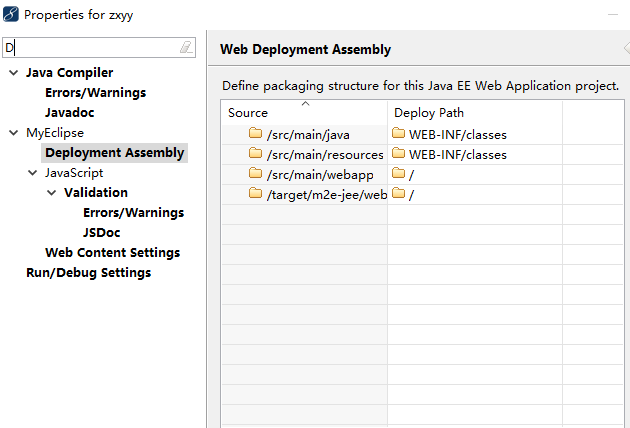
点击Deployment Assembly ,仔细看看是不是发现 WEB-INF 目录少了点什么东西?
没错!就是少了jar包。
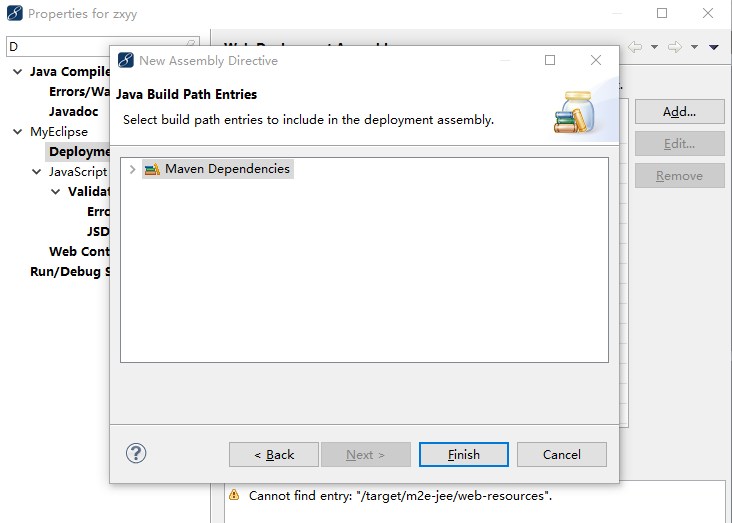
那么点击 add ,选择Java Build Path Entries

继续选择 Maven Dependencies,选择Finish即可。
org.springframework.web.context.ContextLoaderListener 解决办法的更多相关文章
- java.lang.ClassNotFoundException: org.springframework.web.context.ContextLoaderListene解决办法
照着以前写的项目搭一个框架,项目用到的是ssm,spring+spring mvc+mybatis,由Eclipse转战IDEA上,项目的文件夹有一些改变,在之前的小项目中喜欢把lib文件夹放在项目根 ...
- 严重: Error configuring application listener of class org.springframework.web.context.ContextLoaderListener
严重: Error configuring application listener of class org.springframework.web.context.ContextLoaderLis ...
- idea调试springmvc出现java.lang.ClassNotFoundException: org.springframework.web.context.ContextLoaderListener
idea调试springmvc出现java.lang.ClassNotFoundException: org.springframework.web.context.ContextLoaderList ...
- SEVERE: Error configuring application listener of class org.springframework.web.context.ContextLoaderListener错误
错误信息:SEVERE: Error configuring application listener of class org.springframework.web.context.Context ...
- idea调试SpringMvc, 出现:java.lang.ClassNotFoundException: org.springframework.web.context.ContextLoaderListener错误的解决办法
有时,使用idea开发SpringMvc发现调试时出现以下错误: 12-Mar-2017 12:08:02.345 严重 [RMI TCP Connection(2)-127.0.0.1] org.a ...
- maven 项目启动tomcat报错 java.lang.ClassNotFoundException: org.springframework.web.context.ContextLoaderListener
maven项目启动tomcat报错: java.lang.ClassNotFoundException: org.springframework.web.context.ContextLoaderLi ...
- Exception sending context initialized event to listener instance of class org.springframework.web.context.ContextLoaderListener org.springframework.beans.factory.BeanCreationException:
严重: Exception sending context initialized event to listener instance of class org.springframework.we ...
- 使用Maven构建javaWeb项目时,启动tomcat出错:严重: Error configuring application listener of class org.springframework.web.context.ContextLoaderListener java.lang.ClassNotFoundException: org.springframework.web.conte
在初学使用maven构建javaWeb的项目的时候,启动tomcat加载时,总是提示如下错误,辛苦一番终于找到解决办法. 严重: Error configuring application liste ...
- java.lang.ClassNotFoundException:org.springframework.web.context.ContextLoaderListener问题解决
今天搭建SSH项目的时候出现了如下错误: 严重: Error configuring application listener of class org.springframework.web.con ...
随机推荐
- ASP.NET Core使用Elasticsearch记录NLog日志
ASP.NET Core使用Elasticsearch记录NLog日志 1.新建一个 ASP.NET Core项目 2.安装Nuge包 运行:Install-Package NLog.Web.AspN ...
- Java中的split和join
Javascript中的用于字符串和数组之间转换的split和join函数使用起来非常方便,在Java中也有这两个函数,只不过join是在apache commons的lang库里实现的. impor ...
- Android 导入 aar 库文件
1. 在需要导入 aar 的 module 目录下创建一个名叫 "aars" 的目录,并把 aar 文件复制到这里. 2. 在项目的 build.gradle 文件里添加 allp ...
- Delphi - 如何执行Windows、OSX、Linux的外部程序?
毫无疑问,几乎对所有Delphi程序员来说,不用说如何在Windows下如何执行外部程序了!目前Delphi,真的已经很棒了,Delphi有一套和VCL并驾齐驱的图形界面库,叫做"FireM ...
- A - 开门人和关门人(sort+结构体)
点击打开链接 每天第一个到机房的人要把门打开,最后一个离开的人要把门关好.现有一堆杂乱的机房签 到.签离记录,请根据记录找出当天开门和关门的人. Input 测试输入的第一行给出记录的总天数N ( ...
- Flask从入门到精通之使用Flask-SQLAlchemy管理数据库
Flask-SQLAlchemy 是一个Flask 扩展,简化了在Flask 程序中使用SQLAlchemy 的操作.SQLAlchemy 是一个很强大的关系型数据库框架,支持多种数据库后台.SQLA ...
- 3.修改更新源sources.list,提高软件下载安装速度(2017.04.05)
2017年4月5日再次更新源 1.切换到root用户(如果已经是root用户就直接看第二步) dnt@HackerKali:~$ su 密码: 2.用文本编辑器打开sources.list,手动添加下 ...
- Visual Studio 中的 Office 和 SharePoint 开发
MSDN Library 开发工具和语言 Visual Studio 中的 Office 和 SharePoint 开发 https://msdn.microsoft.com/zh-cn/libra ...
- android view知识点 总结
DecorView : http://www.jianshu.com/p/5aa96683d0dc 安卓事件分发机制: http://blog.csdn.net/guolin_blog/article ...
- C++的开源跨平台日志库glog学习研究(一)
作为C++领域中为数不多的好用.高效的.跨平台的日志工具,Google的开源日志库glog也算是凤毛麟角了.glog 是一个C++实现的应用级日志记录框架,提供了C++风格的流操作. 恰巧趁着五一我也 ...