
ActiveMQ详细入门使用教程
ActiveMQ介绍
MQ是消息中间件,是一种在分布式系统中应用程序借以传递消息的媒介,常用的有ActiveMQ,RabbitMQ,kafka。ActiveMQ是Apache下的开源项目,完全支持JMS1.1和J2EE1.4规范的JMS Provider实现。
特点:
1、支持多种语言编写客户端
2、对spring的支持,很容易和spring整合
3、支持多种传输协议:TCP,SSL,NIO,UDP等
4、支持AJAX
消息形式:
1、点对点(queue)
2、一对多(topic)
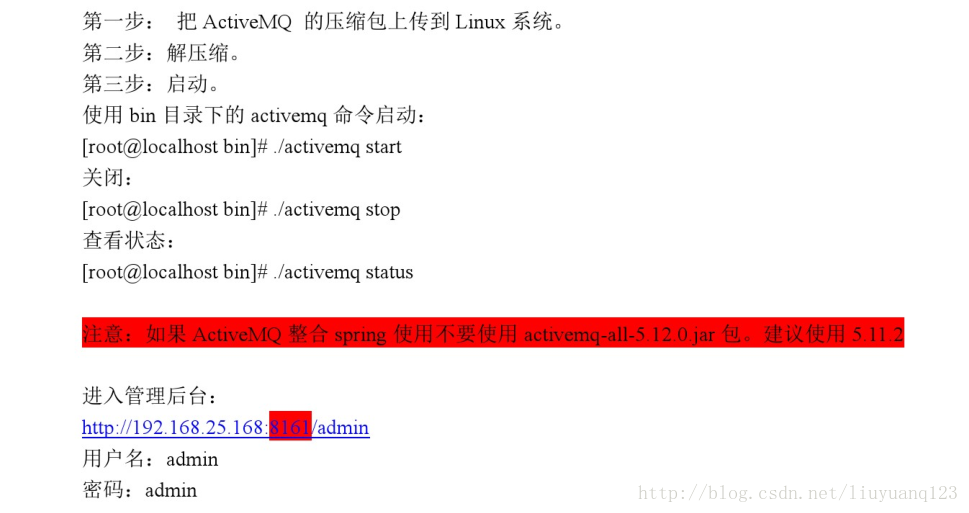
ActiveMQ安装
我这里提供一个安装好的虚拟机:http://download.csdn.net/download/liuyuanq123/10217892
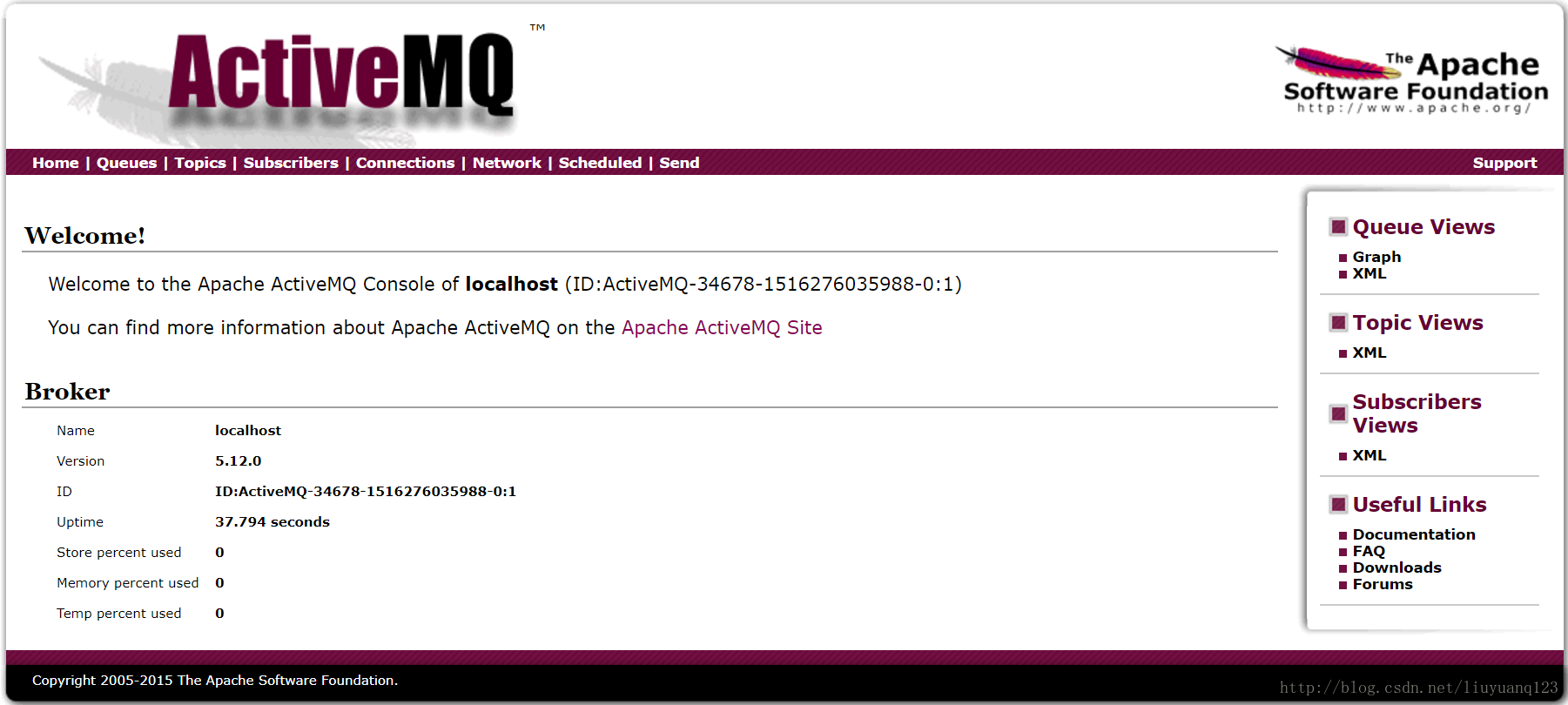
服务器运行后,我们可以直接访问到activeMQ的界面:
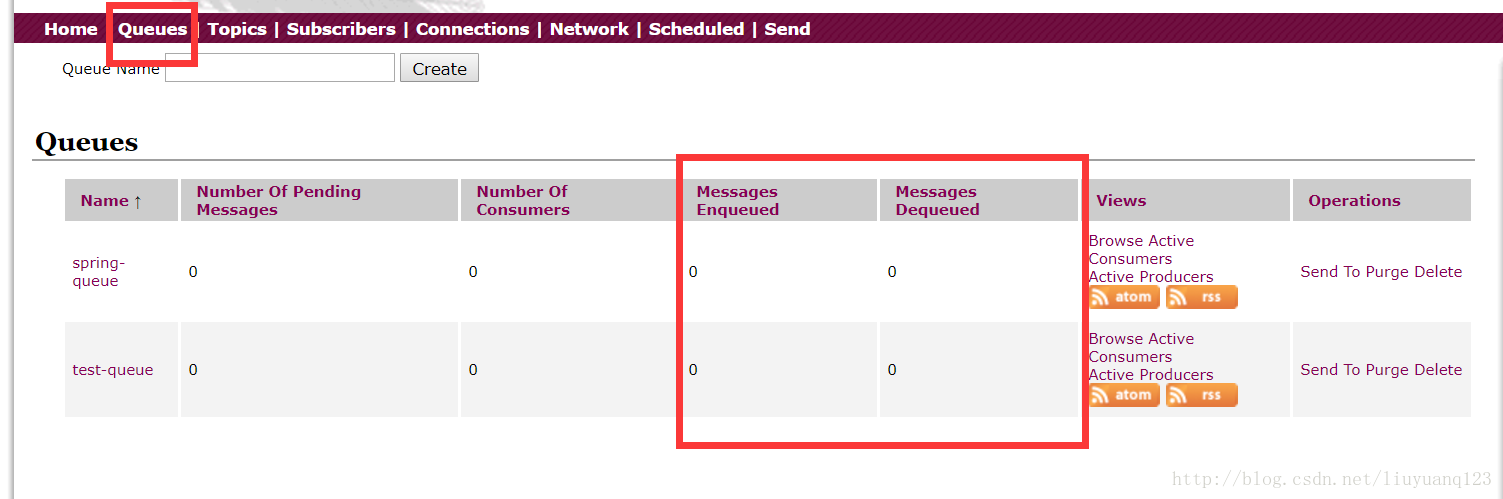
然后点击queues可以看到现在没有一条消息:
ActiveMQ测试
编写一个测试类对ActiveMQ进行测试,首先得向pom文件中添加ActiveMQ相关的jar包:
     <dependency>

         <groupId>org.apache.activemq</groupId>

         <artifactId>activemq-all</artifactId>

    </dependency>
queue的发送代码如下:
    public void testMQProducerQueue() throws Exception{

        //1、创建工厂连接对象,需要制定ip和端口号

        ConnectionFactory connectionFactory = new ActiveMQConnectionFactory("tcp://192.168.156.44:61616");

        //2、使用连接工厂创建一个连接对象

        Connection connection = connectionFactory.createConnection();

        //3、开启连接

        connection.start();

        //4、使用连接对象创建会话(session)对象

        Session session = connection.createSession(false, Session.AUTO_ACKNOWLEDGE);

        //5、使用会话对象创建目标对象,包含queue和topic(一对一和一对多)

        Queue queue = session.createQueue("test-queue");

        //6、使用会话对象创建生产者对象

        MessageProducer producer = session.createProducer(queue);

        //7、使用会话对象创建一个消息对象

        TextMessage textMessage = session.createTextMessage("hello!test-queue");

        //8、发送消息

        producer.send(textMessage);

        //9、关闭资源

        producer.close();

        session.close();

        connection.close();

    }
接收代码:
  public void TestMQConsumerQueue() throws Exception{

        //1、创建工厂连接对象,需要制定ip和端口号

        ConnectionFactory connectionFactory = new ActiveMQConnectionFactory("tcp://192.168.156.44:61616");

        //2、使用连接工厂创建一个连接对象

        Connection connection = connectionFactory.createConnection();

        //3、开启连接

        connection.start();

        //4、使用连接对象创建会话(session)对象

        Session session = connection.createSession(false, Session.AUTO_ACKNOWLEDGE);

        //5、使用会话对象创建目标对象,包含queue和topic(一对一和一对多)

        Queue queue = session.createQueue("test-queue");

        //6、使用会话对象创建生产者对象

        MessageConsumer consumer = session.createConsumer(queue);

        //7、向consumer对象中设置一个messageListener对象,用来接收消息

        consumer.setMessageListener(new MessageListener() {

            @Override

            public void onMessage(Message message) {

                // TODO Auto-generated method stub

                if(message instanceof TextMessage){

                    TextMessage textMessage = (TextMessage)message;

                    try {

                        System.out.println(textMessage.getText());

                    } catch (JMSException e) {

                        // TODO Auto-generated catch block

                        e.printStackTrace();

                    }

                }

            }

        });

        //8、程序等待接收用户消息

        System.in.read();

        //9、关闭资源

        consumer.close();

        session.close();

        connection.close();

    }
然后当我们运行queue发送的时候可以看到队列里已经有一条消息了,但没有发送出去:
然后在运行queue 的接收端,可以看到消息已经发出了:
接着对topic进行测试,发送代码如下:



public void TestTopicProducer() throws Exception{

        //1、创建工厂连接对象,需要制定ip和端口号

        ConnectionFactory connectionFactory = new ActiveMQConnectionFactory("tcp://192.168.156.44:61616");

        //2、使用连接工厂创建一个连接对象

        Connection connection = connectionFactory.createConnection();

        //3、开启连接

        connection.start();

        //4、使用连接对象创建会话(session)对象

        Session session = connection.createSession(false, Session.AUTO_ACKNOWLEDGE);

        //5、使用会话对象创建目标对象,包含queue和topic(一对一和一对多)

        Topic topic = session.createTopic("test-topic");

        //6、使用会话对象创建生产者对象

        MessageProducer producer = session.createProducer(topic);

        //7、使用会话对象创建一个消息对象

        TextMessage textMessage = session.createTextMessage("hello!test-topic");

        //8、发送消息

        producer.send(textMessage);

        //9、关闭资源

        producer.close();

        session.close();

        connection.close();

    }
接收代码:
    public void TestTopicConsumer() throws Exception{

        //1、创建工厂连接对象,需要制定ip和端口号

        ConnectionFactory connectionFactory = new ActiveMQConnectionFactory("tcp://192.168.156.44:61616");

        //2、使用连接工厂创建一个连接对象

        Connection connection = connectionFactory.createConnection();

        //3、开启连接

        connection.start();

        //4、使用连接对象创建会话(session)对象

        Session session = connection.createSession(false, Session.AUTO_ACKNOWLEDGE);

        //5、使用会话对象创建目标对象,包含queue和topic(一对一和一对多)

        Topic topic = session.createTopic("test-topic");

        //6、使用会话对象创建生产者对象

        MessageConsumer consumer = session.createConsumer(topic);

        //7、向consumer对象中设置一个messageListener对象,用来接收消息

        consumer.setMessageListener(new MessageListener() {

            @Override

            public void onMessage(Message message) {

                // TODO Auto-generated method stub

                if(message instanceof TextMessage){

                    TextMessage textMessage = (TextMessage)message;

                    try {

                        System.out.println(textMessage.getText());

                    } catch (JMSException e) {

                        // TODO Auto-generated catch block

                        e.printStackTrace();

                    }

                }

            }

        });

        //8、程序等待接收用户消息

        System.in.read();

        //9、关闭资源

        consumer.close();

        session.close();

        connection.close();

    }
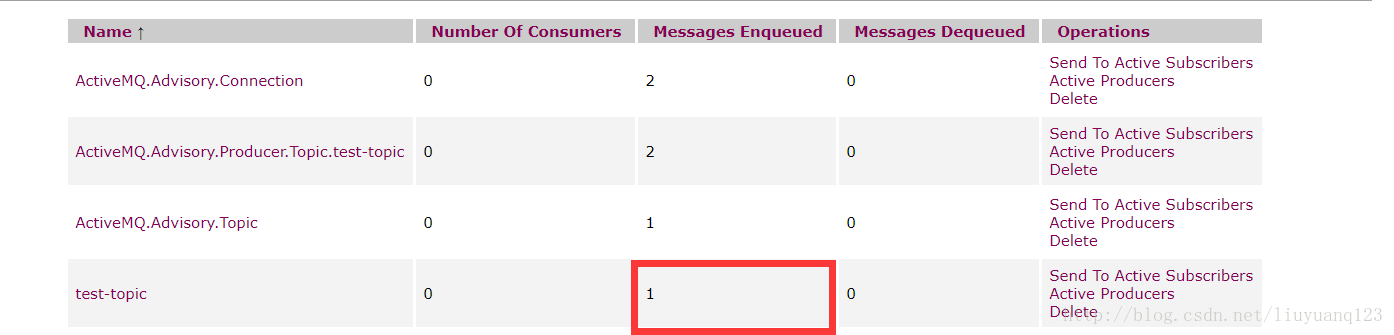
然后运行topic发送:
可以看到消息已经发送出去。再运行topic接收:
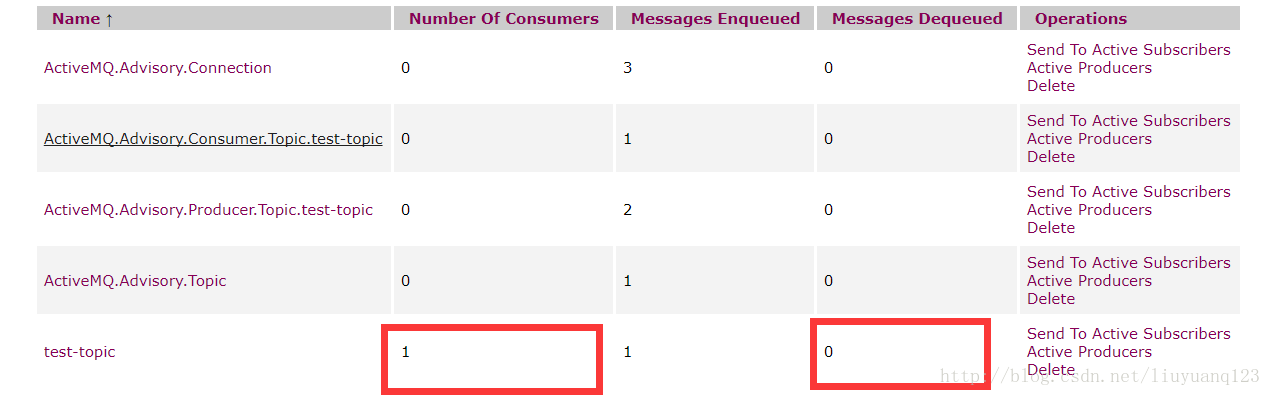
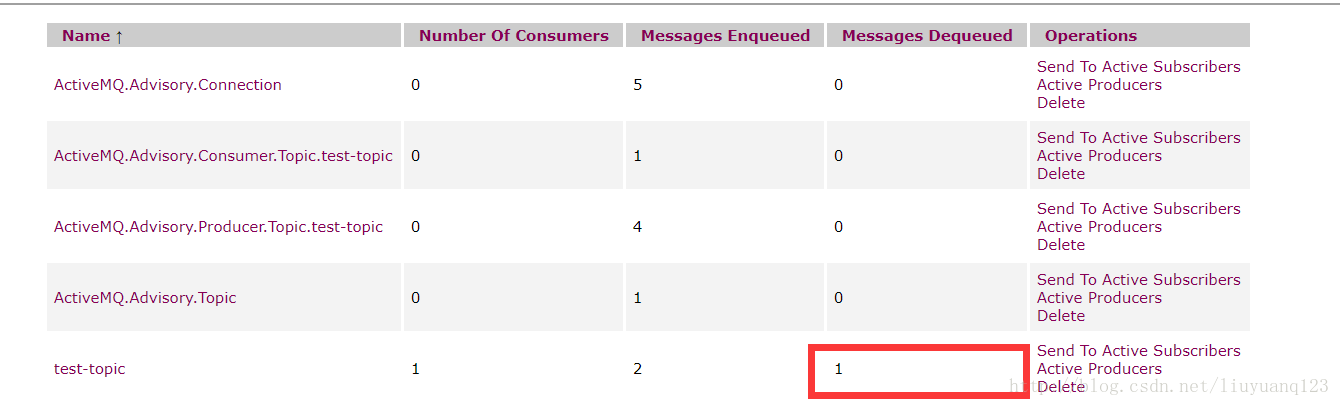
可以看到有了一个消费者,但是没有接收的消息,这是因为正常情况下我们的topic消息不会再服务器持久化,所以要先打开消费者,再打开生产者,这个时候我们再运行生产者发送一条消息看到消息已经接收到了:

ActiveMQ整合spring及项目中运用
activeMQ与spring看一整合到一起使用,除了添加ActiveMQ相关的jar包外,还需要添加spring的jar包:
    <dependency>

        <groupId>org.springframework</groupId>

        <artifactId>spring-context</artifactId>

    </dependency>
然后编写applicationContext-activemq.xml文件,
代码如下:
<?xml version="1.0" encoding="UTF-8"?>

<beans xmlns="http://www.springframework.org/schema/beans"

    xmlns:context="http://www.springframework.org/schema/context" xmlns:p="http://www.springframework.org/schema/p"

    xmlns:aop="http://www.springframework.org/schema/aop" xmlns:tx="http://www.springframework.org/schema/tx"

    xmlns:dubbo="http://code.alibabatech.com/schema/dubbo"

    xmlns:xsi="http://www.w3.org/2001/XMLSchema-instance"

    xsi:schemaLocation="http://www.springframework.org/schema/beans http://www.springframework.org/schema/beans/spring-beans-4.2.xsd

    http://www.springframework.org/schema/context http://www.springframework.org/schema/context/spring-context-4.2.xsd

    http://www.springframework.org/schema/aop http://www.springframework.org/schema/aop/spring-aop-4.2.xsd http://www.springframework.org/schema/tx http://www.springframework.org/schema/tx/spring-tx-4.2.xsd

    http://code.alibabatech.com/schema/dubbo http://code.alibabatech.com/schema/dubbo/dubbo.xsd

    http://www.springframework.org/schema/util http://www.springframework.org/schema/util/spring-util-4.2.xsd">

    <!-- 配置能够产生connection的connectionfactory,由JMS对应的服务厂商提供 -->

    <bean id="tagertConnectionFactory" class="org.apache.activemq.ActiveMQConnectionFactory">

        <constructor-arg name="brokerURL" value="tcp://192.168.156.44:61616"/>

    </bean>

    <!-- 配置spring管理真正connectionfactory的connectionfactory,相当于spring对connectionfactory的一层封装 -->

    <bean id="connectionFactory" class="org.springframework.jms.connection.SingleConnectionFactory">

        <property name="targetConnectionFactory" ref="tagertConnectionFactory"/>

    </bean>

    <!-- 配置生产者 -->

    <!-- Spring使用JMS工具类,可以用来发送和接收消息 -->

    <bean id="jmsTemplate" class="org.springframework.jms.core.JmsTemplate">

        <!-- 这里是配置的spring用来管理connectionfactory的connectionfactory -->

        <property name="connectionFactory" ref="connectionFactory"/>

    </bean>

    <!-- 配置destination -->

    <!-- 队列目的地 -->

    <bean id="queueDestination" class="org.apache.activemq.command.ActiveMQQueue">

        <constructor-arg value="spring-queue"/>

    </bean>

    <!-- 话题目的地 -->

    <bean id="itemAddTopic" class="org.apache.activemq.command.ActiveMQTopic">

        <constructor-arg value="item-add-topic"/>

    </bean>

</beans>
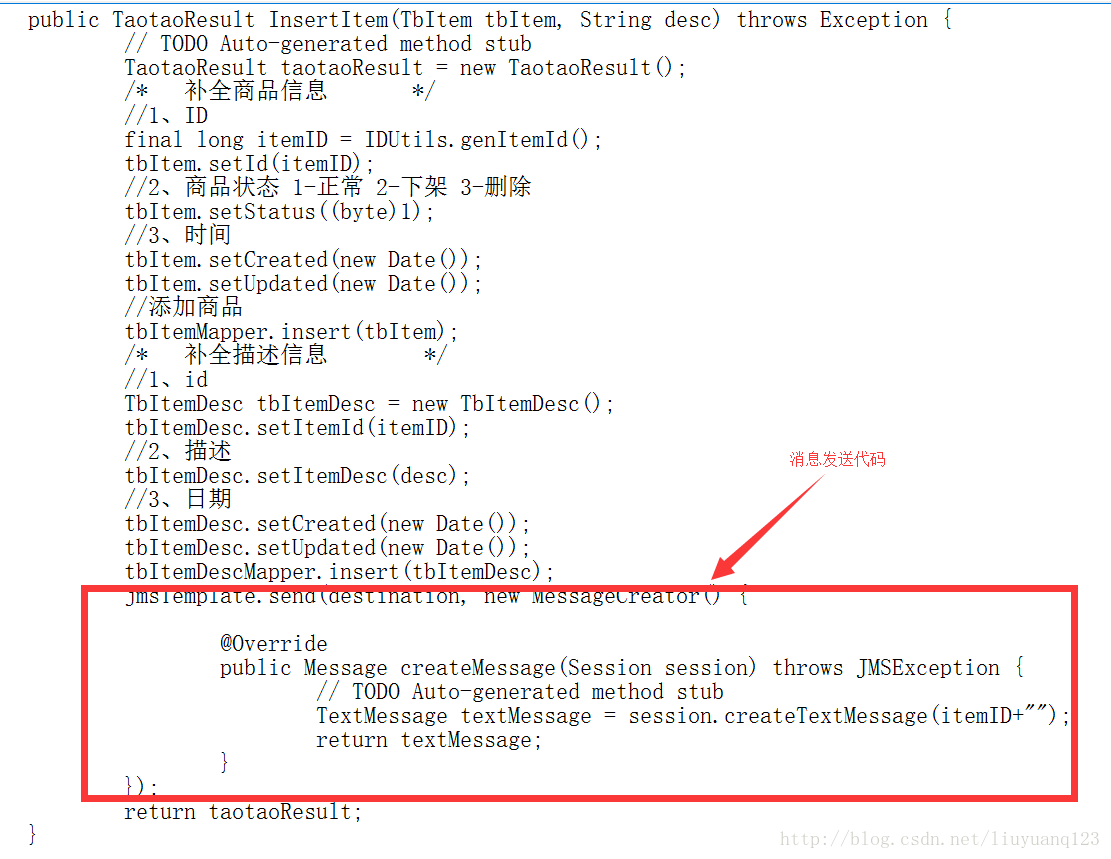
然后在我们淘淘商城中,商品添加到数据库的时候,对应也要添加数据到我们的solr索引中,所以生产者应该在插入数据后创建:
当然,在xml文件中配置好的jmstemplate和destination也要注入进来:
    @Autowired

    private JmsTemplate jmsTemplate;

    @Resource(name="itemAddTopic")

    private Destination destination;
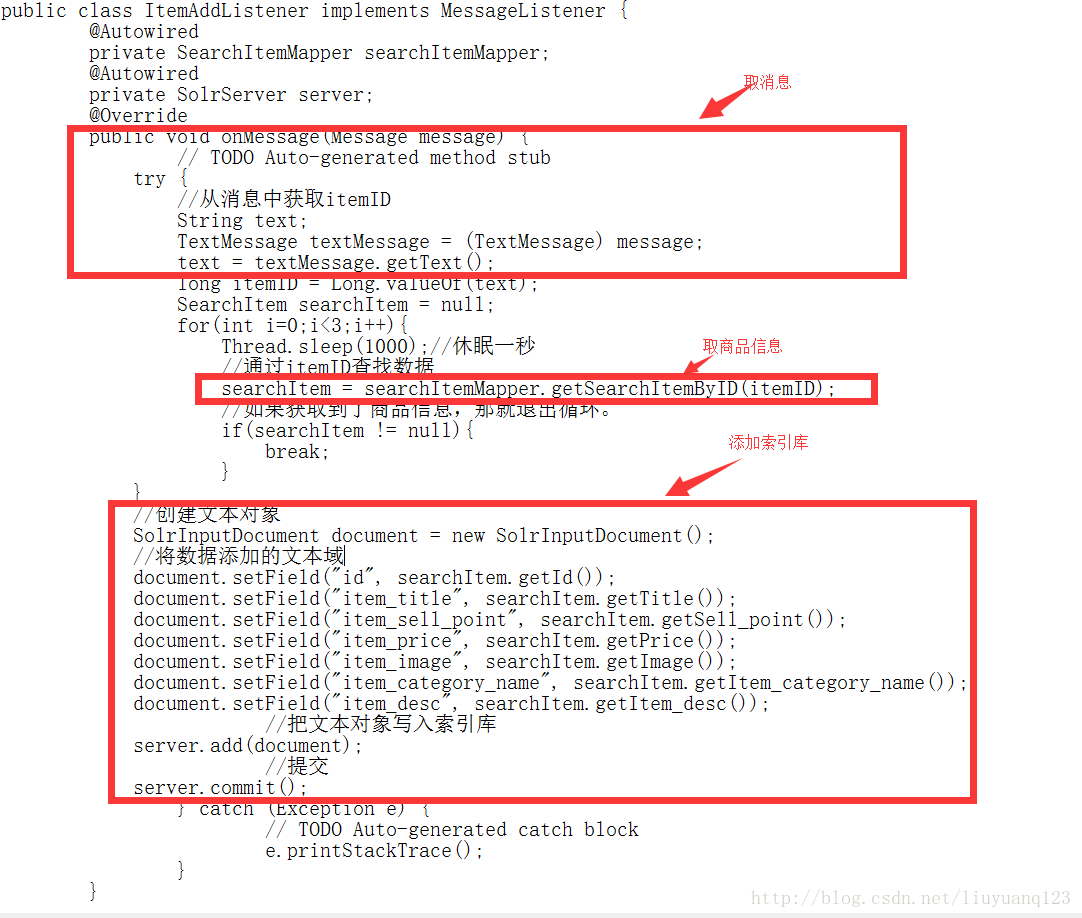
然后消费者应该写在我们的搜索工程中,首先添加spring和activeMQ的jar包,然后配置xml文件,再编写一个监听器,当接收到消息时,就讲数据存入索引库,xml文件代码如下:
<?xml version="1.0" encoding="UTF-8"?>

<beans xmlns="http://www.springframework.org/schema/beans"

    xmlns:context="http://www.springframework.org/schema/context" xmlns:p="http://www.springframework.org/schema/p"

    xmlns:aop="http://www.springframework.org/schema/aop" xmlns:tx="http://www.springframework.org/schema/tx"

    xmlns:dubbo="http://code.alibabatech.com/schema/dubbo"

    xmlns:xsi="http://www.w3.org/2001/XMLSchema-instance"

    xsi:schemaLocation="http://www.springframework.org/schema/beans http://www.springframework.org/schema/beans/spring-beans-4.2.xsd

    http://www.springframework.org/schema/context http://www.springframework.org/schema/context/spring-context-4.2.xsd

    http://www.springframework.org/schema/aop http://www.springframework.org/schema/aop/spring-aop-4.2.xsd http://www.springframework.org/schema/tx http://www.springframework.org/schema/tx/spring-tx-4.2.xsd

    http://code.alibabatech.com/schema/dubbo http://code.alibabatech.com/schema/dubbo/dubbo.xsd

    http://www.springframework.org/schema/util http://www.springframework.org/schema/util/spring-util-4.2.xsd">

    <!-- 配置能够产生connection的connectionfactory,由JMS对应的服务厂商提供 -->

    <bean id="tagertConnectionFactory" class="org.apache.activemq.ActiveMQConnectionFactory">

        <constructor-arg name="brokerURL" value="tcp://192.168.156.44:61616"/>

    </bean>

    <!-- 配置spring管理真正connectionfactory的connectionfactory,相当于spring对connectionfactory的一层封装 -->

    <bean id="connectionFactory" class="org.springframework.jms.connection.SingleConnectionFactory">

        <property name="targetConnectionFactory" ref="tagertConnectionFactory"/>

    </bean>

    <!-- 配置destination -->

    <!-- 队列目的地 -->

    <bean id="queueDestination" class="org.apache.activemq.command.ActiveMQQueue">

        <constructor-arg value="spring-queue"/>

    </bean>

    <!-- 话题目的地 -->

    <bean id="itemAddTopic" class="org.apache.activemq.command.ActiveMQTopic">

        <constructor-arg value="item-add-topic"/>

    </bean>

    <!-- 配置监听器 -->

    <bean id="myListener" class="com.taotao.search.listener.MyListener"/>

    <bean id="itemAddListener" class="com.taotao.search.listener.ItemAddListener"/>

    <!-- 系统监听器 -->

<!--    <bean class="org.springframework.jms.listener.DefaultMessageListenerContainer">

        <property name="connectionFactory" ref="connectionFactory"/>

        <property name="destination" ref="queueDestination"/>

        <property name="messageListener" ref="myListener"/>

    </bean> -->

    <bean class="org.springframework.jms.listener.DefaultMessageListenerContainer">

        <property name="connectionFactory" ref="connectionFactory"/>

        <property name="destination" ref="itemAddTopic"/>

        <property name="messageListener" ref="itemAddListener"/>

    </bean>

</beans>
接收消息代码:
最后同时打开测试即可。
转载地址:https://blog.csdn.net/liuyuanq123/article/details/79109218
ActiveMQ介绍
MQ是消息中间件,是一种在分布式系统中应用程序借以传递消息的媒介,常用的有ActiveMQ,RabbitMQ,kafka。ActiveMQ是Apache下的开源项目,完全支持JMS1.1和J2EE1.4规范的JMS Provider实现。
特点:
1、支持多种语言编写客户端
2、对spring的支持,很容易和spring整合
3、支持多种传输协议:TCP,SSL,NIO,UDP等
4、支持AJAX
消息形式:
1、点对点(queue)
2、一对多(topic)
ActiveMQ安装
我这里提供一个安装好的虚拟机:http://download.csdn.net/download/liuyuanq123/10217892
服务器运行后,我们可以直接访问到activeMQ的界面:
然后点击queues可以看到现在没有一条消息:
ActiveMQ测试
编写一个测试类对ActiveMQ进行测试,首先得向pom文件中添加ActiveMQ相关的jar包:
     <dependency>

         <groupId>org.apache.activemq</groupId>

         <artifactId>activemq-all</artifactId>

</dependency> - 1
- 2
- 3
- 4
queue的发送代码如下:
    public void testMQProducerQueue() throws Exception{

        //1、创建工厂连接对象,需要制定ip和端口号

        ConnectionFactory connectionFactory = new ActiveMQConnectionFactory("tcp://192.168.156.44:61616");

        //2、使用连接工厂创建一个连接对象

        Connection connection = connectionFactory.createConnection();

        //3、开启连接

        connection.start();

        //4、使用连接对象创建会话(session)对象

        Session session = connection.createSession(false, Session.AUTO_ACKNOWLEDGE);

        //5、使用会话对象创建目标对象,包含queue和topic(一对一和一对多)

        Queue queue = session.createQueue("test-queue");

        //6、使用会话对象创建生产者对象

        MessageProducer producer = session.createProducer(queue);

        //7、使用会话对象创建一个消息对象

        TextMessage textMessage = session.createTextMessage("hello!test-queue");

        //8、发送消息

        producer.send(textMessage);

        //9、关闭资源

        producer.close();

        session.close();

        connection.close();

}- 1
- 2
- 3
- 4
- 5
- 6
- 7
- 8
- 9
- 10
- 11
- 12
- 13
- 14
- 15
- 16
- 17
- 18
- 19
- 20
- 21
- 22
接收代码:
    public void TestMQConsumerQueue() throws Exception{

        //1、创建工厂连接对象,需要制定ip和端口号

        ConnectionFactory connectionFactory = new ActiveMQConnectionFactory("tcp://192.168.156.44:61616");

        //2、使用连接工厂创建一个连接对象

        Connection connection = connectionFactory.createConnection();

        //3、开启连接

        connection.start();

        //4、使用连接对象创建会话(session)对象

        Session session = connection.createSession(false, Session.AUTO_ACKNOWLEDGE);

        //5、使用会话对象创建目标对象,包含queue和topic(一对一和一对多)

        Queue queue = session.createQueue("test-queue");

        //6、使用会话对象创建生产者对象

        MessageConsumer consumer = session.createConsumer(queue);

        //7、向consumer对象中设置一个messageListener对象,用来接收消息

        consumer.setMessageListener(new MessageListener() {

            @Override

            public void onMessage(Message message) {

                // TODO Auto-generated method stub

                if(message instanceof TextMessage){

                    TextMessage textMessage = (TextMessage)message;

                    try {

                        System.out.println(textMessage.getText());

                    } catch (JMSException e) {

                        // TODO Auto-generated catch block

                        e.printStackTrace();

                    }

                }

            }

        });

        //8、程序等待接收用户消息

        System.in.read();

        //9、关闭资源

        consumer.close();

        session.close();

        connection.close();

}- 1
- 2
- 3
- 4
- 5
- 6
- 7
- 8
- 9
- 10
- 11
- 12
- 13
- 14
- 15
- 16
- 17
- 18
- 19
- 20
- 21
- 22
- 23
- 24
- 25
- 26
- 27
- 28
- 29
- 30
- 31
- 32
- 33
- 34
- 35
- 36
- 37
然后当我们运行queue发送的时候可以看到队列里已经有一条消息了,但没有发送出去:
然后在运行queue 的接收端,可以看到消息已经发出了:
接着对topic进行测试,发送代码如下:
    public void TestTopicProducer() throws Exception{

        //1、创建工厂连接对象,需要制定ip和端口号

        ConnectionFactory connectionFactory = new ActiveMQConnectionFactory("tcp://192.168.156.44:61616");

        //2、使用连接工厂创建一个连接对象

        Connection connection = connectionFactory.createConnection();

        //3、开启连接

        connection.start();

        //4、使用连接对象创建会话(session)对象

        Session session = connection.createSession(false, Session.AUTO_ACKNOWLEDGE);

        //5、使用会话对象创建目标对象,包含queue和topic(一对一和一对多)

        Topic topic = session.createTopic("test-topic");

        //6、使用会话对象创建生产者对象

        MessageProducer producer = session.createProducer(topic);

        //7、使用会话对象创建一个消息对象

        TextMessage textMessage = session.createTextMessage("hello!test-topic");

        //8、发送消息

        producer.send(textMessage);

        //9、关闭资源

        producer.close();

        session.close();

        connection.close();

}- 1
- 2
- 3
- 4
- 5
- 6
- 7
- 8
- 9
- 10
- 11
- 12
- 13
- 14
- 15
- 16
- 17
- 18
- 19
- 20
- 21
- 22
接收代码:
    public void TestTopicConsumer() throws Exception{

        //1、创建工厂连接对象,需要制定ip和端口号

        ConnectionFactory connectionFactory = new ActiveMQConnectionFactory("tcp://192.168.156.44:61616");

        //2、使用连接工厂创建一个连接对象

        Connection connection = connectionFactory.createConnection();

        //3、开启连接

        connection.start();

        //4、使用连接对象创建会话(session)对象

        Session session = connection.createSession(false, Session.AUTO_ACKNOWLEDGE);

        //5、使用会话对象创建目标对象,包含queue和topic(一对一和一对多)

        Topic topic = session.createTopic("test-topic");

        //6、使用会话对象创建生产者对象

        MessageConsumer consumer = session.createConsumer(topic);

        //7、向consumer对象中设置一个messageListener对象,用来接收消息

        consumer.setMessageListener(new MessageListener() {

            @Override

            public void onMessage(Message message) {

                // TODO Auto-generated method stub

                if(message instanceof TextMessage){

                    TextMessage textMessage = (TextMessage)message;

                    try {

                        System.out.println(textMessage.getText());

                    } catch (JMSException e) {

                        // TODO Auto-generated catch block

                        e.printStackTrace();

                    }

                }

            }

        });

        //8、程序等待接收用户消息

        System.in.read();

        //9、关闭资源

        consumer.close();

        session.close();

        connection.close();

}- 1
- 2
- 3
- 4
- 5
- 6
- 7
- 8
- 9
- 10
- 11
- 12
- 13
- 14
- 15
- 16
- 17
- 18
- 19
- 20
- 21
- 22
- 23
- 24
- 25
- 26
- 27
- 28
- 29
- 30
- 31
- 32
- 33
- 34
- 35
- 36
- 37
然后运行topic发送:
可以看到消息已经发送出去。再运行topic接收:
可以看到有了一个消费者,但是没有接收的消息,这是因为正常情况下我们的topic消息不会再服务器持久化,所以要先打开消费者,再打开生产者,这个时候我们再运行生产者发送一条消息看到消息已经接收到了:
ActiveMQ整合spring及项目中运用
activeMQ与spring看一整合到一起使用,除了添加ActiveMQ相关的jar包外,还需要添加spring的jar包:
    <dependency>

        <groupId>org.springframework</groupId>

        <artifactId>spring-context</artifactId>

</dependency> - 1
- 2
- 3
- 4
然后编写applicationContext-activemq.xml文件,
代码如下:
<?xml version="1.0" encoding="UTF-8"?>

<beans xmlns="http://www.springframework.org/schema/beans"

    xmlns:context="http://www.springframework.org/schema/context" xmlns:p="http://www.springframework.org/schema/p"

    xmlns:aop="http://www.springframework.org/schema/aop" xmlns:tx="http://www.springframework.org/schema/tx"

    xmlns:dubbo="http://code.alibabatech.com/schema/dubbo"

    xmlns:xsi="http://www.w3.org/2001/XMLSchema-instance"

    xsi:schemaLocation="http://www.springframework.org/schema/beans http://www.springframework.org/schema/beans/spring-beans-4.2.xsd

    http://www.springframework.org/schema/context http://www.springframework.org/schema/context/spring-context-4.2.xsd

    http://www.springframework.org/schema/aop http://www.springframework.org/schema/aop/spring-aop-4.2.xsd http://www.springframework.org/schema/tx http://www.springframework.org/schema/tx/spring-tx-4.2.xsd

    http://code.alibabatech.com/schema/dubbo http://code.alibabatech.com/schema/dubbo/dubbo.xsd

    http://www.springframework.org/schema/util http://www.springframework.org/schema/util/spring-util-4.2.xsd">

    <!-- 配置能够产生connection的connectionfactory,由JMS对应的服务厂商提供 -->

    <bean id="tagertConnectionFactory" class="org.apache.activemq.ActiveMQConnectionFactory">

        <constructor-arg name="brokerURL" value="tcp://192.168.156.44:61616"/>

    </bean>

    <!-- 配置spring管理真正connectionfactory的connectionfactory,相当于spring对connectionfactory的一层封装 -->

    <bean id="connectionFactory" class="org.springframework.jms.connection.SingleConnectionFactory">

        <property name="targetConnectionFactory" ref="tagertConnectionFactory"/>

    </bean>

    <!-- 配置生产者 -->

    <!-- Spring使用JMS工具类,可以用来发送和接收消息 -->

    <bean id="jmsTemplate" class="org.springframework.jms.core.JmsTemplate">

        <!-- 这里是配置的spring用来管理connectionfactory的connectionfactory -->

        <property name="connectionFactory" ref="connectionFactory"/>

    </bean>

    <!-- 配置destination -->

    <!-- 队列目的地 -->

    <bean id="queueDestination" class="org.apache.activemq.command.ActiveMQQueue">

        <constructor-arg value="spring-queue"/>

    </bean>

    <!-- 话题目的地 -->

    <bean id="itemAddTopic" class="org.apache.activemq.command.ActiveMQTopic">

        <constructor-arg value="item-add-topic"/>

    </bean>

</beans> - 1
- 2
- 3
- 4
- 5
- 6
- 7
- 8
- 9
- 10
- 11
- 12
- 13
- 14
- 15
- 16
- 17
- 18
- 19
- 20
- 21
- 22
- 23
- 24
- 25
- 26
- 27
- 28
- 29
- 30
- 31
- 32
- 33
- 34
- 35
- 36
然后在我们淘淘商城中,商品添加到数据库的时候,对应也要添加数据到我们的solr索引中,所以生产者应该在插入数据后创建:
当然,在xml文件中配置好的jmstemplate和destination也要注入进来:
    @Autowired

    private JmsTemplate jmsTemplate;

    @Resource(name="itemAddTopic")

private Destination destination;- 1
- 2
- 3
- 4
然后消费者应该写在我们的搜索工程中,首先添加spring和activeMQ的jar包,然后配置xml文件,再编写一个监听器,当接收到消息时,就讲数据存入索引库,xml文件代码如下:
<?xml version="1.0" encoding="UTF-8"?>

<beans xmlns="http://www.springframework.org/schema/beans"

    xmlns:context="http://www.springframework.org/schema/context" xmlns:p="http://www.springframework.org/schema/p"

    xmlns:aop="http://www.springframework.org/schema/aop" xmlns:tx="http://www.springframework.org/schema/tx"

    xmlns:dubbo="http://code.alibabatech.com/schema/dubbo"

    xmlns:xsi="http://www.w3.org/2001/XMLSchema-instance"

    xsi:schemaLocation="http://www.springframework.org/schema/beans http://www.springframework.org/schema/beans/spring-beans-4.2.xsd

    http://www.springframework.org/schema/context http://www.springframework.org/schema/context/spring-context-4.2.xsd

    http://www.springframework.org/schema/aop http://www.springframework.org/schema/aop/spring-aop-4.2.xsd http://www.springframework.org/schema/tx http://www.springframework.org/schema/tx/spring-tx-4.2.xsd

    http://code.alibabatech.com/schema/dubbo http://code.alibabatech.com/schema/dubbo/dubbo.xsd

    http://www.springframework.org/schema/util http://www.springframework.org/schema/util/spring-util-4.2.xsd">

    <!-- 配置能够产生connection的connectionfactory,由JMS对应的服务厂商提供 -->

    <bean id="tagertConnectionFactory" class="org.apache.activemq.ActiveMQConnectionFactory">

        <constructor-arg name="brokerURL" value="tcp://192.168.156.44:61616"/>

    </bean>

    <!-- 配置spring管理真正connectionfactory的connectionfactory,相当于spring对connectionfactory的一层封装 -->

    <bean id="connectionFactory" class="org.springframework.jms.connection.SingleConnectionFactory">

        <property name="targetConnectionFactory" ref="tagertConnectionFactory"/>

    </bean>

    <!-- 配置destination -->

    <!-- 队列目的地 -->

    <bean id="queueDestination" class="org.apache.activemq.command.ActiveMQQueue">

        <constructor-arg value="spring-queue"/>

    </bean>

    <!-- 话题目的地 -->

    <bean id="itemAddTopic" class="org.apache.activemq.command.ActiveMQTopic">

        <constructor-arg value="item-add-topic"/>

    </bean>

    <!-- 配置监听器 -->

    <bean id="myListener" class="com.taotao.search.listener.MyListener"/>

    <bean id="itemAddListener" class="com.taotao.search.listener.ItemAddListener"/>

    <!-- 系统监听器 -->

<!--    <bean class="org.springframework.jms.listener.DefaultMessageListenerContainer">

        <property name="connectionFactory" ref="connectionFactory"/>

        <property name="destination" ref="queueDestination"/>

        <property name="messageListener" ref="myListener"/>

    </bean> -->

    <bean class="org.springframework.jms.listener.DefaultMessageListenerContainer">

        <property name="connectionFactory" ref="connectionFactory"/>

        <property name="destination" ref="itemAddTopic"/>

        <property name="messageListener" ref="itemAddListener"/>

    </bean>

</beans> - 1
- 2
- 3
- 4
- 5
- 6
- 7
- 8
- 9
- 10
- 11
- 12
- 13
- 14
- 15
- 16
- 17
- 18
- 19
- 20
- 21
- 22
- 23
- 24
- 25
- 26
- 27
- 28
- 29
- 30
- 31
- 32
- 33
- 34
- 35
- 36
- 37
- 38
- 39
- 40
- 41
- 42
- 43
- 44
接收消息代码:
最后同时打开测试即可。
ActiveMQ详细入门使用教程的更多相关文章
- ActiveMQ详细入门教程系列(一)
一.什么是消息中间件 两个系统或两个客户端之间进行消息传送,利用高效可靠的消息传递机制进行平台无关的数据交流,并基于数据通信来进行分布式系统的集成.通过提供消息传递和消息排队模型,它可以在分布式环境下 ...
- gulp详细入门教程
本文链接:http://www.ydcss.com/archives/18 gulp详细入门教程 简介: gulp是前端开发过程中对代码进行构建的工具,是自动化项目的构建利器:她不仅能对网站资源进行优 ...
- ant使用指南详细入门教程
这篇文章主要介绍了ant使用指南详细入门教程,本文详细的讲解了安装.验证安装.使用方法.使用实例.ant命令等内容,需要的朋友可以参考下 一.概述 ant 是一个将软件编译.测试.部署等步骤联系在一起 ...
- gulp详细入门教程(转载)
本文转载自: gulp详细入门教程
- Step by Step 真正从零开始,TensorFlow详细安装入门图文教程!帮你完成那个最难的从0到1
摘要: Step by Step 真正从零开始,TensorFlow详细安装入门图文教程!帮你完成那个最难的从0到1 安装遇到问题请文末留言. 悦动智能公众号:aibbtcom AI这个概念好像突然就 ...
- <转载>ant使用指南详细入门教程 http://www.jb51.net/article/67041.htm
这篇文章主要介绍了ant使用指南详细入门教程,本文详细的讲解了安装.验证安装.使用方法.使用实例.ant命令等内容,需要的朋友可以参考下 一.概述 ant 是一个将软件编译.测试.部署等步骤联系在一起 ...
- SVN入门图解教程(超详细)
SVN入门图解教程(超详细) 一.总结 一句话总结: 二.SVN入门教程 1. 什么是SVN SVN全名Subversion,即版本控制系统.SVN与CVS一样,是一个跨平台的软件,支持大多数常见的操 ...
- Docker最详细入门教程
Docker原理.详细入门教程 https://blog.csdn.net/deng624796905/article/details/86493330 阮一峰Docker入门讲解 http://ww ...
- Kibana详细入门教程
Kibana详细入门教程 目录 一.Kibana是什么 二.如何安装 三.如何加载自定义索引 四.如何搜索数据 五.如何切换中文 六.如何使用控制台 七.如何使用可视化 八.如何使用仪表盘 一.K ...
随机推荐
- 洛谷P2740 草地排水
最大流 一道完全符合最大流定义的板子题..重新学了一次网络流,希望有更深的理解把.. #include <bits/stdc++.h> #define INF 0x3f3f3f3f #de ...
- Netty如何实现Reactor模式
在前面的文章中(Reactor模型详解),我们讲解了Reactor模式的各种演变形式,本文主要讲解的则是Netty是如何实现Reactor模式的.这里关于Netty实现的Reactor模式,需要说明的 ...
- 用Python爬取"王者农药"英雄皮肤 原
padding: 10px; border-bottom: 1px solid #d3d3d3; background-color: #2e8b57; } .second-menu-item { pa ...
- 压缩JS,CSS的工具
目标: 压缩项目中的JS,CSS文件. 方法一:使用uglifyjs uglifycss 压缩JS: 1.安装NODEJS.是一个在服务端运行的JS语言.下载地址https://nodejs.org/ ...
- POJ2411 铺地砖 Mondriaan's Dream
Mondriaan's Dream Time Limit: 3000MS Memory Limit: 65536K Total Submissions: 15962 Accepted: 923 ...
- 「SCOI2016」背单词 解题报告
「SCOI2016」背单词 出题人sb 题意有毒 大概是告诉你,你给一堆n个单词安排顺序 如果当前位置为x 当前单词的后缀没在这堆单词出现过,代价x 这里的后缀是原意,但不算自己,举个例子比如abc的 ...
- String Reconstruction (并查集)
并查集维护和我这个位置的字母连续的已经被填充的字母能到达的最右边的第一个还没有填充的位置,然后把这个位置填上应该填的东西,然后把这个位置和下一个位置连接起来,如果下一个位置还没有填,我就会把下一个位置 ...
- css 禁止选中文本
css 如何禁止选中文字 .noselect { -webkit-touch-callout: none; /* iOS Safari */ -webkit-user-select: none; /* ...
- QML学习笔记(三)-引入Font-awesome
作者: 狐狸家的鱼 Github: 八至 1.首先得在qml文件夹下建立字体文件,将font-awesome放入进去 2.然后在main.cpp中注册字体 引入中一定要写上 引用字体 引用字体得路径一 ...
- 关于 vscode 格式化自己的代码 使用shift+alt+f
关于 vscode 格式化自己的代码 使用shift+alt+f,这样就好了