
Spring各种类型数据的注入
直接上代码:
一个MessageBean类
package com.henu.spring;

import java.util.*;

public class MessageBean {

    private String username; //用户名

    private String fileDir;  //上传路径

    private Set<String> types;//允许上传类型

    private List<String> hbms;

    private Set<String> city;

    private Map<String, String> books;

    private Properties props;

    //注入一个字符串,分析之后给其赋值

    public void setTypes(String str){

        String[] arr = str.split(",");

        types = new HashSet<String>();

        for (String string : arr) {

            types.add(string);

        }

    }

    public void setUsername(String username) {

        this.username = username;

    }

    public void setFileDir(String fileDir) {

        this.fileDir = fileDir;

    }

    public void setCity(Set<String> city) {

        this.city = city;

    }

    public void setHbms(List<String> hbms) {

        this.hbms = hbms;

    }

    public void setBooks(Map<String, String> books) {

        this.books = books;

    }

    public void setProps(Properties props) {

        this.props = props;

    }

    public void show(){

        System.out.println("用户名:" + username);

        System.out.println("上传路径" + fileDir);

        System.out.println("--hbm文件如下--");

        for (String string : hbms) {

            System.out.println(string);

        }

        System.out.println("--city如下--");

        for (String string : city) {

            System.out.println(string);

        }

        System.out.println("--图书信息显示--");

        Set set = books.keySet();

        for (Object object : set) {

            System.out.println(object+"   "+books.get(object));

        }

        System.out.println("--props参数如下--");

        Set<String> key = props.stringPropertyNames();

        Iterator<String> iterator = key.iterator();

        while(iterator.hasNext()){

            String string = (String) iterator.next();

            System.out.println(string+"   "+props.getProperty(string));

        }

        System.out.println("--允许上传文件类型--");

        for (String string : types) {

            System.out.println(string);

        }

    }

}
一个测试类
/**

 *

 */

package com.henu.spring;

import org.junit.Test;

import org.springframework.context.ApplicationContext;

import org.springframework.context.support.ClassPathXmlApplicationContext;

/**

 * @author Administrator

 *

 */

public class TestInjection {

    @Test

    public void test1(){

        ApplicationContext context =

            new ClassPathXmlApplicationContext("/applicationContext.xml");

        MessageBean messageBean = (MessageBean) context.getBean("messageBean");

        messageBean.show();

    }

}
一个配置文件
<?xml version="1.0" encoding="UTF-8"?>

<beans

xmlns="http://www.springframework.org/schema/beans"

xmlns:xsi="http://www.w3.org/2001/XMLSchema-instance"

xmlns:p="http://www.springframework.org/schema/p"

xmlns:context="http://www.springframework.org/schema/context"

xsi:schemaLocation="http://www.springframework.org/schema/beans

http://www.springframework.org/schema/beans/spring-beans-3.1.xsd

http://www.springframework.org/schema/context

http://www.springframework.org/schema/context/spring-context-3.1.xsd">

        <!-- 各种数据类型的注入 -->

        <bean id="messageBean" class="com.henu.spring.MessageBean">

            <property name="username" value="root"></property>

            <property name="fileDir" value="D:\\images"></property>

            <property name="types" value="jdp,gif,ipeg"></property>

            <property name="hbms">

                <list>

                    <value>lengzuai nei hou !</value>

                     <value>lengnei nei hou !</value>

                </list>

            </property>

            <property name="city">

                <set>

                    <value>郑州</value>

                     <value>开封</value>

                </set>

            </property>

            <property name="books">

                <map>

                    <entry key="1" value="红楼梦"></entry>

                    <entry key="2" value="三国演义"></entry>

                    <entry key="3" value="西游记"></entry>

                    <entry key="4" value="水浒传"></entry>

                </map>

            </property>

            <property name="props">

                <props>

                    <prop key="hibernate.show_sql">

                        <!-- value -->

                        true

                    </prop>

                    <prop key="hibernate.format_sql">

                        true

                    </prop>

                    <prop key="hibernate.hibernate_sql">

                        true

                    </prop>

                </props>

            </property>

        </bean>

        </beans>
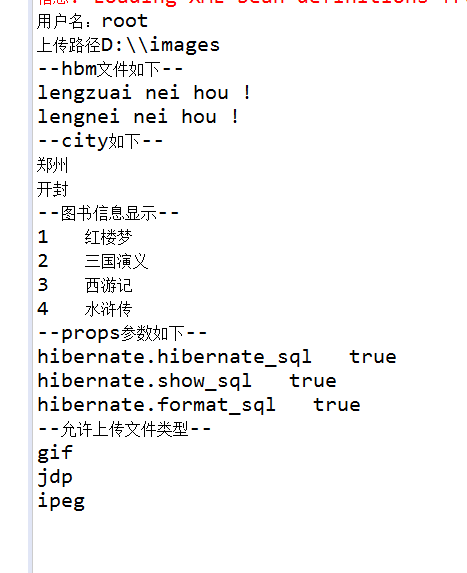
运行结果图
Spring各种类型数据的注入的更多相关文章
- spring集合类型的setter注入的一个简单例子
在项目中我们有时候会为集合类型设定一些默认的值,使用spring后,我们可以通过配置文件的配置,用setter方式为对象的集合属性提供一些默认值,下面就是一个简单的例子. 首先我们创建了一个名为Col ...
- Spring学习笔记之 Spring IOC容器(二) 之注入参数值,自动组件扫描方式,控制Bean实例化方式,使用注解方式
本节主要内容: 1. 给MessageBean注入参数值 2. 测试Spring自动组件扫描方式 3. 如何控制ExampleBean实例化方式 4. 使用注解方式重构Jdb ...
- Spring MVC自动为对象注入枚举数据
一.实现转换工厂,定义转换实现,如下: package com.mafwo; import org.springframework.core.convert.converter.Convert ...
- Spring 让 LOB 数据操作变得简单易行,LOB 代表大对象数据,包括 BLOB 和 CLOB 两种类型
转自:https://www.ibm.com/developerworks/cn/java/j-lo-spring-lob/index.html 概述 LOB 代表大对象数据,包括 BLOB 和 CL ...
- Spring、基本类型属性和集合类型属性的注入
Spring 还可以对基本属性和集合类型属性进行注入: public interface PersonIService { public String getBaseProperty(); publi ...
- spring集合类型注入
spring集合类型注入 <?xml version="1.0" encoding="UTF-8"?> <!DOCTYPE beans PUB ...
- Spring学习日记02_IOC_属性注入_其他类型属性
ICO操作Bean管理(xml注入其它类型属性) 字面量 null值 <property name="address"> <null></null&g ...
- Spring:所有依赖项注入的类型
一.前言 Spring文档严格只定义了两种类型的注入:构造函数注入和setter注入.但是,还有更多的方式来注入依赖项,例如字段注入,查找方法注入.下面主要是讲使用Spring框架时可能发生的类型. ...
- 【Spring】SpringMVC中浅析Date类型数据的传递
在控制器中加入如下代码: @InitBinder public void initBinder(ServletRequestDataBinder bin){ SimpleDateFormat sdf ...
随机推荐
- RabbitMQ入门教程(三):Hello World
原文:RabbitMQ入门教程(三):Hello World 版权声明:本文为博主原创文章,遵循CC 4.0 BY-SA版权协议,转载请附上原文出处链接和本声明. 本文链接:https://blog. ...
- javaSql面试题(10题)
有如下四张表: 学生表Student(stuId,stuName,stuAge,stuSex): 课程表Course(courseId,courseName,teacherId): 成绩表Scores ...
- 单元测试 - tox 使用
1. 问题一 $ tox -e pep8 -- testdemo.server pep8 installed: alembic==,amqp==,appdirs==,Babel==,beautiful ...
- 阿里云云效平台使用——Windows上使用阿里云云效(RDC)Git拉取代码
转载:https://blog.csdn.net/for_my_life/article/details/88700696 SSH key配置 1.首先从开始菜单里面打开刚刚安装完成的Git目录下Gi ...
- vue引入jquery插件
在vue中使用jquery插件 1.引入jquery 第一种方法:全局引入jquery 在webpack.base.conf.js,新增以下代码 plugins: [ new webpack.opti ...
- celery开发中踩的坑
celery开发中踩的坑 celery连接redis 当使用redis做broker,redis连接需要密码时: BROKER_URL='redis://:xxxxx@127.0.0.1:6379/0 ...
- 白话算法:时间复杂度和大O表示法
转自:https://www.jianshu.com/p/59d09b9cee58 每一个优秀的开发者脑中都有时间概念.他们想给用户更多的时间让用户做他们想做的事情.他们通过最小化时间复杂度来实现这一 ...
- jenkins打包maven工程发现有些包下载不下来
将这些依赖的jar包放到mvn的本地仓库中,通常是用户主目录下的.m2/repository https://blog.csdn.net/taiyangdao/article/details/5228 ...
- CF 1272F Two Bracket Sequences (括号dp)
题目地址 洛谷CF1272F Solution 首先题目中有两个括号串 \(s\) 和 \(t\) ,考虑先设计两维表示 \(s\) 匹配到的位置和 \(t\) 匹配到的位置. 接着根据 括号dp的一 ...
- bootstrap-table给每一行数据添加按钮,并绑定事件
https://blog.csdn.net/mht1829/article/details/72633100 https://blog.csdn.net/qq_39215166/article/det ...