
firewall&iptables
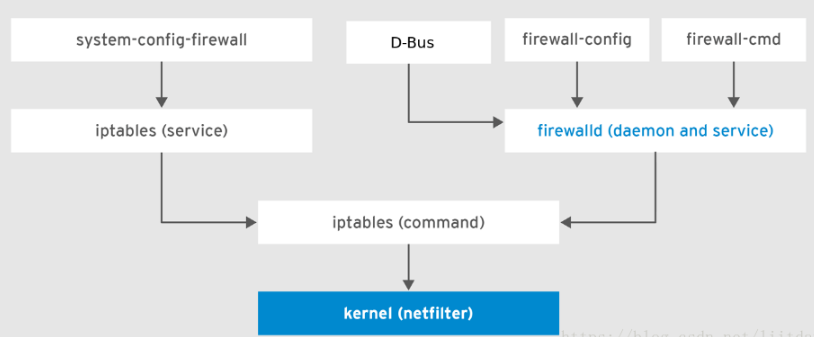
一、firewall
查看firewall状态
firewall-cmd --state
如果firewall为关闭状态,先启动firewall
systemctl start firewalld
添加firewall指令
firewall-cmd --permanent --add-rich-rule='rule family=ipv4 forward-port port=162 protocol=udp to-port=20162'
firewall-cmd --permanent --add-rich-rule='rule family=ipv4 forward-port port=161 protocol=udp to-port=20161'
firewall-cmd --permanent --add-rich-rule='rule family=ipv4 forward-port port=514 protocol=udp to-port=20514'
firewall-cmd --permanent --zone=public --add-port=8885/tcp
firewall-cmd --permanent --zone=public --add-port=9092/tcp
firewall-cmd --permanent --zone=public --add-port=161/tcp
firewall-cmd --permanent --zone=public --add-port=162/tcp
firewall-cmd --permanent --zone=public --add-port=514/udp
firewall-cmd --permanent --zone=public --add-port=20161/tcp
firewall-cmd --permanent --zone=public --add-port=20162/tcp
firewall-cmd --permanent --zone=public --add-port=20514/udp
firewall-cmd --permanent --zone=public --add-port=9996/udp
firewall-cmd --permanent --zone=public --add-port=8082/tcp删除指令
firewall-cmd --permanent --remove-rich-rule 'rule family="ipv4" forward-port="514" protocol="udp" tp-port="20514" '
重新加载firewall策略
firewall-cmd --reload
查看新策略是否生效
firewall-cmd --list-all
二、Iptables
- 安装iptables
yum install iptables-services - 启动iptables
service iptables restart - 查看iptables状态
systemctl status firewalld.service - 添加iptables端口转发策略
iptables -t nat -A PREROUTING -p udp -m udp --dport 162 -j REDIRECT --to-ports 20162
iptables -t nat -A PREROUTING -p udp -m udp --dport 161 -j REDIRECT --to-ports 20161
iptables -t nat -A PREROUTING -p udp -m udp --dport 514 -j REDIRECT --to-ports 20514
- 查看新策略是否生效
iptables -t nat -L -n --line-numbers
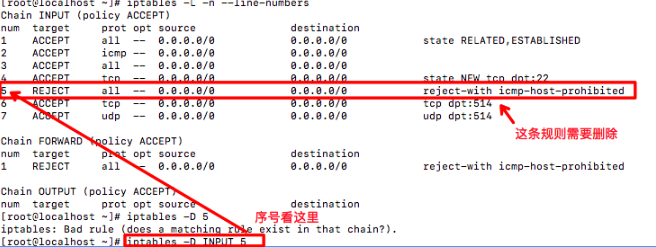
- 删除规则
iptables -L -n --line-numbers
firewall&iptables的更多相关文章
- firewall&iptables小记
一.firewall 查看firewall状态 firewall-cmd --state 防火墙开启: 防火墙关闭: 如果firewall为关闭状态,先启动firewall systemctl sta ...
- 防火墙 firewall iptables
firewalld FirewallD 使用服务service 和区域zone来代替 iptables 的规则rule和链chain,默认情况下,有以下的区域zone可用: drop – 丢弃所有传入 ...
- [Firewall] iptables Configuration
iptables usage: Add Rules: iptables -I INPUT -p tcp --dport -j ACCEPT iptables -I INPUT -p tcp --dpo ...
- Neutron 理解 (9): OpenStack 是如何实现 Neutron 网络 和 Nova虚机 防火墙的 [How Nova Implements Security Group and How Neutron Implements Virtual Firewall]
学习 Neutron 系列文章: (1)Neutron 所实现的虚拟化网络 (2)Neutron OpenvSwitch + VLAN 虚拟网络 (3)Neutron OpenvSwitch + GR ...
- iptables rule
和H3C中的acl很像,或者就是一会事,这就是不知道底层的缺陷,形式一变,所有的积累都浮云了 参考准确的说copy from http://www.ibm.com/developerworks/cn/ ...
- Linux: 20 Iptables Examples For New SysAdmins
Linux comes with a host based firewall called Netfilter. According to the official project site: net ...
- [转] XEN, KVM, Libvirt and IPTables
http://cooker.techsnail.com/index.php/XEN,_KVM,_Libvirt_and_IPTables XEN, KVM, Libvirt and IPTables ...
- Iptables 指南 1.1.19
Iptables 指南 1.1.19 Oskar Andreasson oan@frozentux.net Copyright © 2001-2003 by Oskar Andreasson 本文在符 ...
- ubuntu 中 iptables 和 ufw 的关系
我突然发现,自己平常使用的 iptables 和 ufw 到底是啥关系?平常其实iptables和ufw在配置防火墙,开启端口是,还是偶尔会使用到的. 没去思考过这两者是啥关系,哎...,这就不够好了 ...
随机推荐
- Flask学习 2修改路由规则 传入参数访问url
#!/usr/bin/env python # encoding: utf-8 """ @version: v1.0 @author: cxa @file: flask0 ...
- MongoDB数据迁移
将集合user从192.168.1.12:27017导入到192.168.1.120:27017 数据的导出:mongoexport 数据的导入:mongoimport 导出集合user的过程: [r ...
- Netty精进01
为什么要学习Netty? 目前基于Netty实现的一些优秀的开源框架:Dubbo.RocketMQ.Spark.Spring5.Flink.ElasticSearch.gRPC……这些还说明不了为什么 ...
- Redux生态系统
生态系统 Redux 是一个体小精悍的库,但它相关的内容和 API 都是精挑细选的,足以衍生出丰富的工具集和可扩展的生态系统. 如果需要关于 Redux 所有内容的列表,推荐移步至 Awesome R ...
- CodeForce-1196D2-RGB Substring (hard version)
原题链接 题目大意与上题完全一样,只是数据规模更大. 思路: 再用上题的暴力肯定TLE,所以需要优化一下搜索过程.上一题我们是外层遍历n,内层遍历3种情况.这题我们外层遍历3种情况,内层遍历数组,记录 ...
- 4期Web安全基础
介绍了web安全的各种常见漏洞.视频卡顿,建议直接看网易出品的白帽子视频. 类似的教程还有,网易白帽子的教程:参考简书https://www.jianshu.com/p/1b372ca96b87 在看 ...
- java.lang.IllegalStateException: Cannot forward after response has been committed
jjava.lang.IllegalStateException: Cannot forward after response has been committed at org.apache.cat ...
- Emacs中的前进后退jump-tree
Emacs中的前进后退jump-tree */--> code {color: #FF0000} pre.src {background-color: #002b36; color: #8394 ...
- 3、NumPy 数组属性
1.秩.维度 NumPy 数组的维数称为秩(rank),一维数组的秩为 1,二维数组的秩为 2,以此类推. 在 NumPy中,每一个线性的数组称为是一个轴(axis),也就是维度(dimensions ...
- Numpy Ndarray对象1
标准安装的Python中用列表(list)保存一组值,可以用来当作数组使用,不过由于列表的元素可以是任何对象,因此列表中所保存的是对象的指 针.这样为了保存一个简单的[1,2,3],需要有3个指针和三 ...