
后台任务hangfire
Installation
There are a couple of packages for Hangfire available on NuGet. To install Hangfire into your ASP.NET application withSQL Server storage, type the following command into the Package Manager Console window:
PM> Install-Package Hangfire
Configuration
After installing the package, add or update the OWIN Startup class with the following lines:
using Hangfire;

// ...

public void Configuration(IAppBuilder app)

{

    GlobalConfiguration.Configuration.UseSqlServerStorage("<connection string or its name>");

    app.UseHangfireDashboard();

    app.UseHangfireServer();

}
Authorization configuration required
By default only local access is permitted to the Hangfire Dashboard. Dashboard authorization must be configured in order to allow remote access.
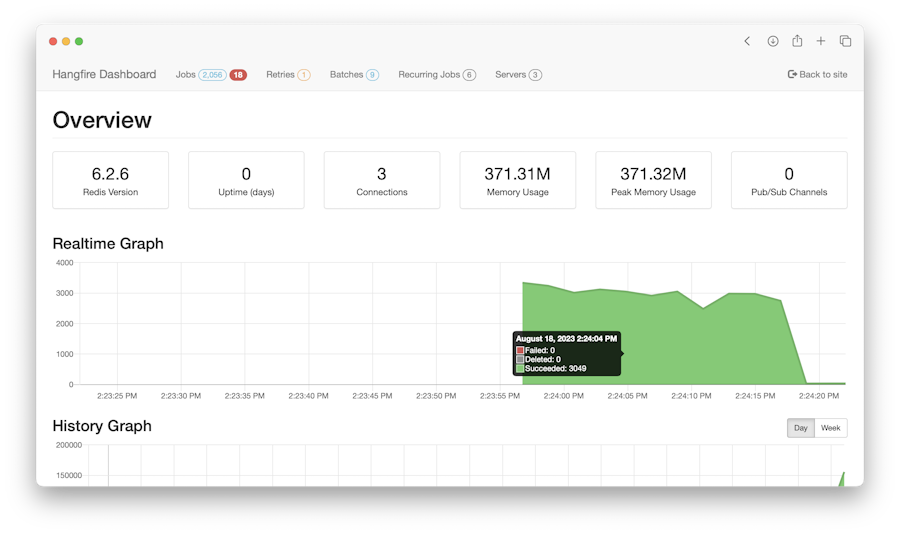
Then open the Hangfire Dashboard to test your configuration. Please, build the project and open the following URL in a browser:
Usage
Add a job…
Hangfire handles different types of background jobs, and all of them are invoked on a separate execution context.
Fire-and-forget
This is the main background job type, persistent message queues are used to handle it. Once you create a fire-and-forget job, it is saved to its queue ("default" by default, but multiple queues supported). The queue is listened by a couple of dedicated workers that fetch a job and perform it.
BackgroundJob.Enqueue(() => Console.WriteLine("Fire-and-forget"));
Delayed
If you want to delay the method invocation for a certain type, call the following method. After the given delay the job will be put to its queue and invoked as a regular fire-and-forget job.
BackgroundJob.Schedule(() => Console.WriteLine("Delayed"), TimeSpan.FromDays(1));
Recurring
To call a method on a recurrent basis (hourly, daily, etc), use the RecurringJob class. You are able to specify the schedule using CRON expressions to handle more complex scenarios.
RecurringJob.AddOrUpdate(() => Console.WriteLine("Daily Job"), Cron.Daily);
Continuations
Continuations allow you to define complex workflows by chaining multiple background jobs together.
var id = BackgroundJob.Enqueue(() => Console.WriteLine("Hello, "));

BackgroundJob.ContinueWith(id, () => Console.WriteLine("world!"));

http://docs.hangfire.io/en/latest/quick-start.html#installation
后台任务hangfire的更多相关文章
- ASP.NET Core开发-后台任务利器Hangfire使用
ASP.NET Core开发系列之后台任务利器Hangfire 使用. Hangfire 是一款强大的.NET开源后台任务利器,无需Windows服务/任务计划程序. 可以使用于ASP.NET 应用也 ...
- 执行后台任务的利器——Hangfire
今年1月31日,在微软的MVP 2015社区大讲堂上,我给大家分享了一个演讲:在ASP.NET应用中执行后台任务.其中介绍了三种技术的应用:QueueBackgroundWorkItem.Hangfi ...
- Core开发-后台任务利器Hangfire使用
Core开发-后台任务利器Hangfire使用 ASP.NET Core开发系列之后台任务利器Hangfire 使用. Hangfire 是一款强大的.NET开源后台任务利器,无需Windows服务/ ...
- .NET Core开源组件:后台任务利器之Hangfire
一.简述 Hangfire作为一款高人气且容易上手的分布式后台执行服务,支持多种数据库.在.net core的环境中,由Core自带的DI管理着生命周期,免去了在NF4.X环境中配置always ru ...
- mvc中使用Hangfire处理后台任务
考虑下如下代码,在数据保存后,需要发送邮件,发送邮件是个耗时的工作. 我们的目的是,数据保存成功后,就可以返回响应了,发送邮件不重要,不需要等待邮件发送成功 [HttpPost] public Act ...
- 执行后台任务的利器——Hangfire
Hangfire是一个开源且商业免费使用的工具函数库.可以让你非常容易地在ASP.NET应用(也可以不在ASP.NET应用)中执行多种类型的后台任务,而无需自行定制开发和管理基于Windows Ser ...
- 后台任务利器之Hangfire
后台任务利器之Hangfire 一.简述 Hangfire作为一款高人气且容易上手的分布式后台执行服务,支持多种数据库.在.net core的环境中,由Core自带的DI管理着生命周期,免去了在NF4 ...
- ASP.NET Core-组件-后台任务:Hangfire
ylbtech-ASP.NET Core-组件-后台任务:Hangfire Hangfire作为一款高人气且容易上手的分布式后台执行服务,支持多种数据库.在.net core的环境中,由Core自带的 ...
- .NET Core开源组件:后台任务利器之Hangfire 转载 https://www.cnblogs.com/chenug/p/6655636.html
.NET Core开源组件:后台任务利器之Hangfire 一.简述 Hangfire作为一款高人气且容易上手的分布式后台执行服务,支持多种数据库.在.net core的环境中,由Core自带的D ...
随机推荐
- python3的unittest中使用test suite(测试套件)执行指定测试用例
示例代码 module.py class baidumodule(): def __init__(self,driver,): self.dr = driver #不能在类中再次导入webdriver ...
- python 全栈开发,Day30(第一次面向对象考试)
月考题: python 全栈11期月考题 一 基础知识:(70分) 1.文件操作有哪些模式?请简述各模式的作用(2分) 2.详细说明tuple.list.dict的用法,以及它们的特点(3分) 3.解 ...
- 2018-2019-2 网络对抗技术 20165333 Exp1 PC平台逆向破解
1 逆向及Bof基础实践说明 1.1 实践目标 本次实践的对象是一个名为pwn1的linux可执行文件.该程序正常执行流程是:main调用foo函数,foo函数会简单回显任何用户输入的字符串.该程序同 ...
- 关于asp.net mvc中的httpModules 与 httpHandler
ASP.NET对请求处理的过程: 当请求一个*.aspx文件的时候,这个请求会被inetinfo.exe进程截获,它判断文件的后缀(aspx)之后,将这个请求转交给ASPNET_ISAPI.dll,A ...
- Java编程的逻辑 (12) - 函数调用的基本原理
本系列文章经补充和完善,已修订整理成书<Java编程的逻辑>,由机械工业出版社华章分社出版,于2018年1月上市热销,读者好评如潮!各大网店和书店有售,欢迎购买,京东自营链接:http:/ ...
- Oracle GoldenGate常用配置端口
1 简介 Oracle Golden Gate软件是一种基于日志的结构化数据复制备份软件,它通过解析源数据库在线日志或归档日志获得数据的增量变化,再将这些变化应用到目标数据库,从而实现源数据库与目标数 ...
- [转] Anaconda使用总结
机器上的不同用户完全可以安装.配置自己的Anaconda,不会互相影响. 对于Mac.Linux系统,Anaconda安装好后,实际上就是在主目录下多了个文件夹(~/anaconda)而已,Windo ...
- Jenkins Pipline语法
引用自:http://baijiahao.baidu.com/s?id=1582812185263227836&wfr=spider&for=pc 引用自:https://www.cn ...
- Nightmare HDU1072
非常标准的BFS 第一次写错了很多 1.到达4时设置为墙就好了 避免了死循环 2.不用开d数组 在结构体里面就行了 3.结构体初始化函数的写法: Node(int x=0,int y=0,int ...
- python爬虫之分析Ajax请求抓取抓取今日头条街拍美图(七)
python爬虫之分析Ajax请求抓取抓取今日头条街拍美图 一.分析网站 1.进入浏览器,搜索今日头条,在搜索栏搜索街拍,然后选择图集这一栏. 2.按F12打开开发者工具,刷新网页,这时网页回弹到综合 ...