
使用angular/react/vue实现相同的面试题组件
面试题要求如下所示
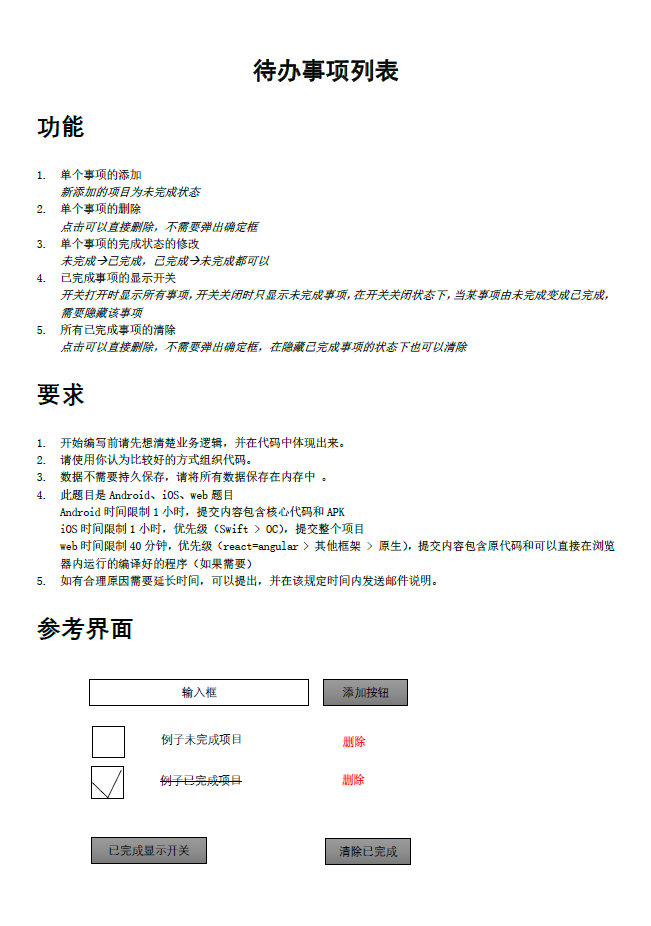
1、angular:
<!DOCTYPE html>
<html lang="en">
<head>
<meta charset="UTF-8">
<title>Document</title>
<script src="angular-1.4.6.js"></script>
<style>
.del{
text-decoration: line-through;
color: red;
}
.in1{
margin-left: 40px;
}
</style>
</head>
<body ng-app="app" ng-controller="my-ctrl">
<input type="text" ng-model="val">
<button ng-click="add()">添加</button>
<ul>
<li ng-repeat="(key,item) in items" ng-show="flag||!items[key].labs" ng-class={true:'del',false:'unselected'}[items[key].labs]><input type="checkbox" ng-click="labe()" ng-model="lab">{{item.text}}<input type="button" value="删除" ng-click="delate()" class="in1"></li>
</ul>
<button type="button" ng-click="showall()">已完成开关显示</button>
<button type="button" ng-click="delateall()">清除已完成</button>
</body>
<script type="text/javascript">
var myapp = angular.module("app",[]);
myapp.controller("my-ctrl",function($scope){
$scope.items = [];
$scope.flag = 1;
$scope.add=function(){
$scope.items.unshift({text:$scope.val,labs:0});
}
$scope.delate=function(){
$scope.items.splice(this.$index,1);
}
$scope.labe=function(){
$scope.items[this.$index].labs=this.lab;
}
$scope.showall=function(){
if($scope.flag == 0){
$scope.flag = 1;
}
else{
$scope.flag = 0;
}
}
//倒序删除数组元素
$scope.delateall=function(){
for(var i=$scope.items.length-1;i>=0;i--){
if($scope.items[i].labs==true){
$scope.items.splice(i,1);
}
}
}
})
</script>
</html>
2、react:
import React, { Component } from 'react';
import './App.css';
class App extends Component {
constructor(){
super();
this.state={
alll:[],
values:'',
flag:true
}
}
add(e){
let arr1 = this.state.alll;
arr1.push({msg:this.state.values,check1:false});
this.setState({
alll:arr1
})
console.log(this.state.alll);
}
change(e){
this.setState({
values:e.nativeEvent.target.value
})
}
delate(e){
let index1 = e.target.parentNode.id;
let arr1 = [];
for(var i =0;i<this.state.alll.length;i++){
arr1.push(JSON.parse(JSON.stringify(this.state.alll[i])));
}
arr1.splice(index1,1);
console.log(arr1);
this.setState(
{alll: arr1},
() =>{
alert(1);
console.log(this.state.alll)
}
)
}
checktoggle(e){
let index1 = e.target.parentNode.id;
let arr1 = this.state.alll;
arr1[index1].check1 = !arr1[index1].check1;
this.setState({
alll:arr1
})
console.log(this.state.alll);
}
hideandshow(e){
this.setState({
flag : !this.state.flag
})
}
removeAll(){
let arr1 = [];
for(var i =0;i<this.state.alll.length;i++){
arr1.push(JSON.parse(JSON.stringify(this.state.alll[i])));
}
for(let i = arr1.length-1;i>-1;i--){
console.log(i);
if(arr1[i].check1 === true){
arr1.splice(i,1);
}
}
this.setState({
alll:arr1
})
console.log(this.state.alll);
}
render() {
var result = [];
for(let i = 0;i<this.state.alll.length;i++){
result.push(<div key={i} id={i} className={this.state.flag||!this.state.alll[i].check1?'dis1':'disn'}><input type="checkbox" onClick={this.checktoggle.bind(this)} checked={this.state.alll[i].check1} name={i} /><span className={this.state.alll[i].check1?'del1':''}>{this.state.alll[i].msg}</span><input type="button" value="删除" onClick={this.delate.bind(this)} className="in" /></div>)
}
return (
<div className="App">
{this.state.values}
<input type="text" placeholder="请添加事件" className="in" onChange={this.change.bind(this)} />
<input type="button" value="添加" onClick={this.add.bind(this)}/>
<ul ref="ul1">
{result}
</ul>
<input type="button" value="已完成显示开关" className="in" onClick={this.hideandshow.bind(this)}/>
<input type="button" value="清除已完成" className="in" onClick={this.removeAll.bind(this)}/>
</div>
);
}
}
export default App;
3、vue2.0:
<!DOCTYPE html>
<html lang="en">
<head>
<meta charset="UTF-8">
<title>Document</title>
<script src="vue2.0.js"></script>
<style>
.in{
margin:20px;
}
.cl1{
text-decoration: line-through;
color: red;
}
.cl2{
}
</style>
</head>
<body>
<div id="app">
<input type="text" placeholder="请添加事件" class="in" v-model="msg"/>
<input type="button" value="添加" @click="add()"/>
<div v-for="(item,index) in alll" :key="index" :id="index" v-if="flag1||!item.check1">
<input type="checkbox" class="in" @click="clickChecked" :checked="item.check1"/>
<span>{{item.msg1}}</span>
<input type="button" value="删除" class="in" @click="delate"/>
</div>
<div>
<input type="button" value="已完成显示开关" class="in" @click="showAll"/>
<input type="button" value="清除已完成" class="in" @click="removeAll($event)"/>
</div>
</div>
<script>
new Vue({
el:'#app',
data:{
msg:'',
alll:[],
flag1:true,
},
methods:{
add(){
this.alll.unshift({msg1:this.msg,check1:false});
console.log(this.alll)
},
delate(e){
let index1 = e.target.parentNode.id;
this.alll.splice(index1,1);
console.log(this.alll);
},
clickChecked(e){
let index1 = e.target.parentNode.id;
this.alll[index1].check1 = !this.alll[index1].check1;
},
showAll(){
this.flag1 = !this.flag1;
},
removeAll(){
console.log(this.alll);
for(var i =this.alll.length-1;i>-1;i--){
if(this.alll[i].check1==true){
this.alll.splice(i,1);
}
}
// for(let i = 0;i<this.alll.length;i++){
// if(this.alll[i].check1==true){
// this.alll.splice(i,1);
// }
// }//由于vue的数据双向绑定,从前到后遍历删除存在错误。
}
}
})
</script>
</body>
</html>

使用angular/react/vue实现相同的面试题组件的更多相关文章
- 前端三大框架Angular & React & Vue
前端三大框架: Angular[Google]:一套框架,多种平台移动端 & 桌面端.学会用Angular构建应用,然后把这些代码和能力复用在多种多种不同平台的应用上 —— Web.移动 We ...
- angular react vue 浏览器兼容情况汇总
一.逻辑层 框架 (1)angular Angular早在1.3版本就抛弃了对ie8的支持. (2)react React 早在0.14.x 版本就抛弃了对ie8的支持. (3)vue Vue就没打算 ...
- Liferay 7:如何在Liferay Portlet中使用Angular, React, Vue.js等前端框架
https://web.liferay.com/zh/web/ivan.zaera/blog/-/blogs/modern-frontend-workflows-in-liferay-portal L ...
- Angular React 和 Vue的比较
Angular(1&2),React,Vue对比 一 数据流 数据绑定 Angular 使用双向绑定即:界面的操作能实时反映到数据,数据的变更能实时展现到界面. 实现原理: $scope变量中 ...
- Jerry的碎碎念:SAPUI5, Angular, React和Vue
去年我去一个国内客户现场时,曾经和他们IT部门的一位架构师聊到关于在SAP平台上进行UI应用的二次开发时,UI框架是选用UI5还是Vue这个话题. 我们代表SAP, 向客户推荐使用UI5是基于以下六点 ...
- Jenkins gitlab vue,angular,react 自动化构建【原】
大致思路,(本篇主要讲vue ,当然了 angular react 也是一样配置) ,转发请注明原链接,谢谢 :) 1. 服务器上面配置jenkins (安装配置,不介绍) 2.新建item 自由风格 ...
- 【转】前端框架天下三分:Angular React 和 Vue的比较
前端框架天下三分:Angular React 和 Vue的比较 原文链接:http://blog.csdn.net/haoshidai/article/details/52346865 前端这几年的技 ...
- 【repost】前端学习总结(二十三)——前端框架天下三分:Angular React 和 Vue的比较
目录(?)[+] 前端这几年的技术发展很快,细分下来,主要可以分成四个方面: 1.开发语言技术,主要是ES6&7,coffeescript,typescript等: 2.开发框架,如Ang ...
- React vs Angular vs Vue 2019
React vs Angular vs Vue 看待这三个主流框架给出的想法 Angular is the entire kitchen that gives you all the tools ne ...
随机推荐
- SpringMVC框架学习笔记(5)——数据处理
1.提交数据的处理 a)提交的域名称和参数名称一致 http://localhost:8080/foward/hello.do?name=zhangsan 处理方法 @RequestMapping(v ...
- koala 编译scss不支持中文(包括中文注释),解决方案如下
进入Koala安装目录,例如:C:\Program Files (x86)\Koala\rubygems\gems\sass-3.4.9\lib\sass 找到engine.rb文件,在该文件中找到最 ...
- Git 忽略提交 .gitignore
在使用Git的过程中,我们喜欢有的文件比如日志,临时文件,编译的中间文件等不要提交到代码仓库,这时就要设置相应的忽略规则,来忽略这些文件的提交. Git 忽略文件提交的方法 有三种方法可以实现忽略Gi ...
- tomcat更改端口号
apache-tomcat-8文件下的conf文件下的server.xml文件打开将 <Connector port="8080" protocol="HTT ...
- 从零开始学习前端JAVASCRIPT — 5、JavaScript基础BOM
1:BOM(Browser Object Model)概念 window对象是BOM中所有对象的核心. 2:window属性(较少用) self:self代表自己,相当于window. windo ...
- 邓_mysql_面试
问题1:你如何确定 MySQL 是否处于运行状态? 答案: Debian 上运行命令service mysql status,在RedHat 上运行命令service mysqld status.然后 ...
- Python自建logging模块
本章将介绍Python内建模块:日志模块,更多内容请从参考:Python学习指南 简单使用 最开始,我们用最短的代码体验一下logging的基本功能. import logging logger = ...
- 人人都是CEO
在这个互联网崛起的时代有些流行说法,比如:人人都是产品经理,人人都是程序员以突显行业繁荣的特点,但从更基本的出发点,难道人人不都是 CEO 么?个人的 CEO. 从这个名字套路出发,我沿着想了下去,作 ...
- winform打开本地html页面
有时候为了提高开发效率和后期可维护性,把cs里面嵌套了远程网页,这样方便后期升级.比如,美图秀秀,qq音乐PC都嵌套了本地和远程网页.在页面拖入控件System.Windows.Forms.WebBr ...
- 转-Linux硬件装置和磁盘分区MBR
1 各硬件装置在Linux中的文件名 『在Linux系统中,每个装置都被当成一个文件来对待』 举例来说,SATA接口的硬盘的文件名即为/dev/sd[a-d],其中, 括号内的字母为a-d当中的任意一 ...