
nim_duilib(10)之slider、progress and circleprogress
introduction
- 更多控件用法,请参考 here 和 源码。
- 本文的代码基于这里
- 本文将介绍3个控件: slider,progress和circleprogress.具体的用法,请参考源码提供的函数。
- 本文演示结果:滑动滑块,进度条和环形进度条随着slider的值变化而变化。
样式
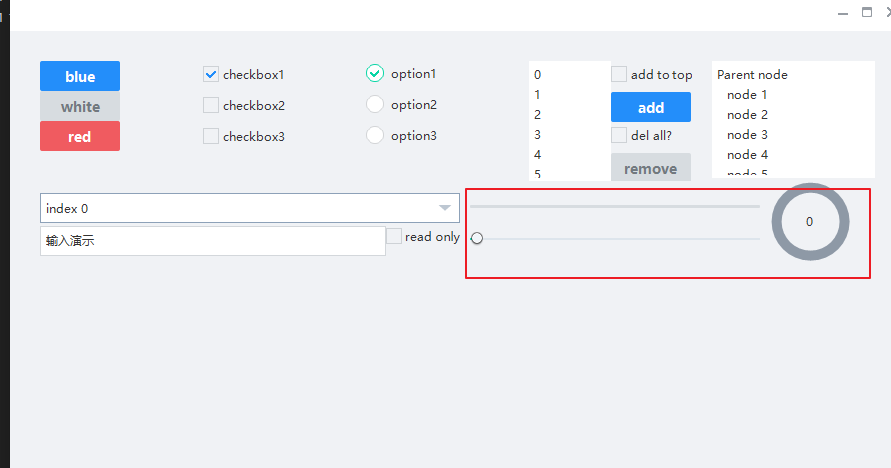
xml文件添加代码
基于上一篇, 继续向basic.xml中添加下面的代码。 xml完整源码在文末。
        <HBox>

          <VBox>

            <!-- Progress -->

            <HBox margin="0,10" height="32">

              <Progress class="progress_blue" name="progress" value="0" margin="10"/>

            </HBox>

            <!-- Slider -->

            <HBox margin="0,0,0,10" height="32">

              <Slider class="slider_green" name="slider" value="0" margin="10"/>

            </HBox>

          </VBox>

          <VBox width="120">

            <CircleProgress name="circle_progress" circular="true"  height="80" width="80"

            circlewidth="10" bgcolor="gray" fgcolor="green" value="0"  clockwise="true"  min="1" max="100" margin="10"

            textpadding="10,32,10,10" normaltextcolor="darkcolor" indicator="logo_18x18.png"/>

          </VBox>

        </HBox>

      </HBox>
这里,创建了slider,progress和circleprogress控件,如上图样式显示。
代码中关联
BasicForm.h
- 打开BasicForm.h,类中添加下面的代码用于关联界面控件。
	// progressbar

	ui::Progress*  pprogress_;

	// slider

	ui::Slider*		pslider_;

	// 圆形进度条

	ui::CircleProgress* pcircle_progress_;
监听选择子项事件
类中继续添加下面的代码,用于监听滑块的值发生变化
	// 用于处理slider值变化时设置进度条和环形进度条的值

	bool OnSliderValueChanged(ui::EventArgs* msg);
BasicForm.cpp
InitWindow函数
- 转到BasicForm.cpp,找到 InitWindow 函数,向其增加下面的代码
void BasicForm::InitWindow()

{

  	......

	// 9.关联progress控件

	//----------------------------------------------------------------------------------------

	pprogress_		= dynamic_cast<ui::Progress*>(FindControl(L"progress"));

	// 10.关联slider控件

	//----------------------------------------------------------------------------------------

	pslider_		= dynamic_cast<ui::Slider*>(FindControl(L"slider"));

	if (pslider_)

	{

		pslider_->AttachValueChange(nbase::Bind(&BasicForm::OnSliderValueChanged, this, std::placeholders::_1));

	}

	// 11. 关联环形进度条

	//----------------------------------------------------------------------------------------

	pcircle_progress_ = dynamic_cast<ui::CircleProgress*>(FindControl(L"circle_progress"));

	if (pcircle_progress_)

	{

		pcircle_progress_->SetValue(0);

		pcircle_progress_->SetText(L"0");

	}

	// 设置最大和最小值

	//----------------------------------------------------------------------------------------

	// 因为slider和circlieprogress控件都是继承的Progress

	auto set_progress_border = [](ui::Progress* pcontrol)

	{

		if (pcontrol)

		{

			pcontrol->SetMinValue(min_val_0);

			pcontrol->SetMaxValue(max_val_100);

		}

	};

	set_progress_border(pprogress_);

	set_progress_border(pslider_);

	set_progress_border(pcircle_progress_);

}
OnSliderValueChanged
OnSliderValueChanged函数源码如下:
bool BasicForm::OnSliderValueChanged(ui::EventArgs* msg)

{

	if (pprogress_ && pslider_ && pcircle_progress_)

	{

		double cur_val = pslider_->GetValue();

		// 设置进度条显示

		pprogress_->SetValue(cur_val);

		// 设置环形进度条

		pcircle_progress_->SetValue(cur_val);

		TCHAR szBuffer[32] = { 0 };

		swprintf_s(szBuffer, _T("%.0f%%"), cur_val);

		pcircle_progress_->SetText(szBuffer);

	}

	return false;

}
运行结果
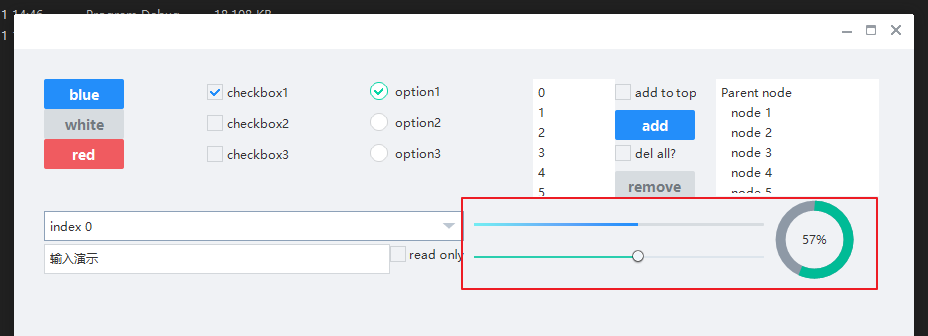
xml完整源码
<?xml version="1.0" encoding="UTF-8"?>

<Window size="900,600" caption="0,0,0,35">

  <VBox bkcolor="bk_wnd_darkcolor">

    <HBox width="stretch" height="35" bkcolor="bk_wnd_lightcolor">

      <Control />

        <Button class="btn_wnd_min" name="minbtn" margin="4,6,0,0" />

        <Box width="21" margin="4,6,0,0">

          <Button class="btn_wnd_max" name="maxbtn"/>

          <Button class="btn_wnd_restore" name="restorebtn" visible="false"/>

        </Box>

      <Button class="btn_wnd_close" name="closebtn" margin="4,6,8,0"/>

    </HBox>

    <!--下面是中间的控件-->

    <VBox padding="30, 30, 30, 30" >

      <HBox height="120">

        <VBox>

          <!-- Buttons -->

          <Button class="btn_global_blue_80x30" name="btn_blue" text="blue" />

          <Button class="btn_global_white_80x30" name="btn_white" text="white"/>

          <Button class="btn_global_red_80x30" name="btn_red" text="red"/>

        </VBox>

        <!--checkbox-->

        <VBox>

          <CheckBox class="checkbox_font12" name="checkbox1" text="checkbox1" margin="0,5,0,10" selected="true"/>

          <CheckBox class="checkbox_font12" name="checkbox2" text="checkbox2" margin="0,5,0,10"/>

          <CheckBox class="checkbox_font12" name="checkbox3" text="checkbox3" margin="0,5,0,10"/>

        </VBox>

        <!-- option-->

        <VBox>

          <Option class="circle_option_2" name="option1" group="option_group" text="option1" margin="0,3,0,10" selected="true"/>

          <Option class="circle_option_2" name="option2" group="option_group" text="option2" margin="0,3,0,10"/>

          <Option class="circle_option_2" name="option3" group="option_group" text="option3" margin="0,3,0,10"/>

        </VBox>

        <HBox>

          <!-- List -->

          <VListBox class="list" name="list" padding="5,3,5,3">

          </VListBox>

          <VBox>

            <!-- Buttons -->

            <CheckBox class="checkbox_font12" name="list_checkbox_add_to_top" text="add to top" margin="0,5,0,10"/>

            <Button class="btn_global_blue_80x30" name="list_btn_add" text="add" />

            <CheckBox class="checkbox_font12" name="list_checkbox_remove_all" text="del all?" margin="0,5,0,10"/>

            <Button class="btn_global_white_80x30" name="list_btn_remove" text="remove"/>

          </VBox>

        </HBox>

        <!-- TreeView -->

        <TreeView class="list" name="tree" padding="5,3,5,3" margin="20">

        </TreeView>

      </HBox>

      <!--第二行控件开始-->

      <HBox height="85">

        <VBox>

          <!--combobox-->

          <Combo class="list" name="combo" height="30" margin="0,12,0,0" padding="6" bkimage="file='../public/combo/normal.png' corner='5,5,30,5'"/>

          <HBox>

            <RichEdit class="simple input" name="rich_edit_1" text="输入演示" height="30" margin="0,3" padding="6,6,6" promptmode="true" prompttext="Single line text control" promptcolor="lightcolor"/>

            <CheckBox class="checkbox_font12" name="rich_edit_readonly" text="read only" margin="0,5,0,10"/>

          </HBox>

        </VBox>

        <HBox>

          <VBox>

            <!-- Progress -->

            <HBox margin="0,10" height="32">

              <Progress class="progress_blue" name="progress" value="0" margin="10"/>

            </HBox>

            <!-- Slider -->

            <HBox margin="0,0,0,10" height="32">

              <Slider class="slider_green" name="slider" value="0" margin="10"/>

            </HBox>

          </VBox>

          <VBox width="120">

            <CircleProgress name="circle_progress" circular="true"  height="80" width="80"

            circlewidth="10" bgcolor="gray" fgcolor="green" value="0"  clockwise="true"  min="1" max="100" margin="10"

            textpadding="10,32,10,10" normaltextcolor="darkcolor" indicator="logo_18x18.png"/>

          </VBox>

        </HBox>

      </HBox>

    </VBox> <!--下面是中间的控件 结束-->

  </VBox>

</Window>
nim_duilib(10)之slider、progress and circleprogress的更多相关文章
- nim_duilib(11)之menu(1)
introduction 更多控件用法,请参考 here 和 源码. 本文的代码基于这里 本文将介绍menu控件 xml文件添加代码 基于上一篇, 继续向basic.xml中添加下面的代码. xml完 ...
- Cocos Creator Slider(进度条)的三种实现
实现原理: 方法一:动态计算,slider上增加背景图,根据滑动的进度动态计算背景图的大小:方法二:slider+progress,根据slider滑动的进度,动态改变progress的显示进度:方法 ...
- 10 款基于 jQuery 的切换效果插件推荐
本文整理了 10 款非常好用的 jQuery 切换效果插件,包括平滑切换和重叠动画等,这些插件可以实现不同元素之间的动态切换. 1. InnerFade 这是一个基于 jQuery 的小插件,可以实现 ...
- Windows 10 Certified with Oracle E-Business Suite
Microsoft Windows 10 (32-bit and 64-bit) is certified as a desktop client operating system for end-u ...
- Xamarin XAML语言教程通过数据绑定使用Progress属性
Xamarin XAML语言教程通过数据绑定使用Progress属性 开发者除了可以为ProgressBar定义的Progress属性直接赋双精度类型的值外,还可以通过数据绑定的方式为该属性赋值,此时 ...
- Xamarin XAML语言教程使用Progress属性数据绑定设置进度条进度
Xamarin XAML语言教程使用Progress属性数据绑定设置进度条进度 开发者除了可以为ProgressBar定义的Progress属性直接赋双精度类型的值外,还可以通过数据绑定的方式为该属性 ...
- 神奇的CSS3按钮特效
点击这里查看效果 以下是源代码: <!doctype html> <html> <!-- author: @simurai --> <head> < ...
- 圆形CD绘制 (扇形)
参考: Egret教程Arc是使用示例:http://edn.egret.com/cn/article/index/id/673 我封装的工具类: /** * 圆形进度 * @author chenk ...
- Java视频播放器的制作
----------------siwuxie095 使用 Java Swing 框架制作一个简单的视频播放器: 首先到 Vid ...
随机推荐
- ubuntu20.04安装EasyConnect兼容性问题解决
目录 1. 命令行启动EasyConnect 2. 降级pango 3. 重新启动EasyConnect,即可成功启动 Ubuntu20.04安装EasyConnect后无法启动的解决方案 工作使用操 ...
- 28-Merge Two Sorted Lists
easy 21. Merge Two Sorted Lists Merge two sorted linked lists and return it as a new list. The new l ...
- adblock plus-看下图你就懂
- 强化学习实战 | 表格型Q-Learning玩井字棋(一)
在 强化学习实战 | 自定义Gym环境之井子棋 中,我们构建了一个井字棋环境,并进行了测试.接下来我们可以使用各种强化学习方法训练agent出棋,其中比较简单的是Q学习,Q即Q(S, a),是状态动作 ...
- 二叉树——Java实现
1 package struct; 2 3 interface Tree{ 4 //插入元素 5 void insert(int value); 6 //中序遍历 7 void inOrder(); ...
- 如果你不想让pthread_join阻塞你的进程,那么请调用pthread_detach
如果你不想让pthread_join阻塞你的进程,那么请调用pthread_detach 2016年01月13日 16:04:20 炸鸡叔 阅读数:7277 转发自:http://baike.ba ...
- java中super的几种用法,与this的区别
1. 子类的构造函数如果要引用super的话,必须把super放在函数的首位. class Base { Base() { System.out.println("Base"); ...
- Handler与多线程
1.Handler介绍 在Android开发中,我们常会使用单独的线程来完成某些操作,比如用一个线程来完成从网络上下的图片,然后显示在一个ImageView上,在多线程操作时,Android中必须保证 ...
- mybatis错误 Mapped Statements collection does not contain value for
java.lang.IllegalArgumentException: Mapped Statements collection does not contain value for 在unit里测试 ...
- 登录界面.jsp
<!DOCTYPE html><html lang="zh-CN"> <head> <meta charset="utf-8&q ...