
Springboot集成SpringSecurity
一、Spring security 是什么?
Spring Security是一个能够为基于Spring的企业应用系统提供声明式的安全访问控制解决方案的安全框架。
它提供了一组可以在Spring应用上下文中配置的Bean,充分利用了Spring IoC,DI(控制反转Inversion of Control ,DI:Dependency Injection 依赖注入)和AOP(面向切面编程)功能,为应用系统提供声明式的安全访问控制功能,减少了为企业系统安全控制编写大量重复代码的工作。
二、Spring security 怎么使用?
使用Spring Security很简单,只要在pom.xml文件中,引入spring security的依赖就可以了。
<!-- spring security依赖 -->

<dependency>

    <groupId>org.springframework.boot</groupId>

    <artifactId>spring-boot-starter-security</artifactId>

</dependency>
什么都不做,直接运行程序,这时你访问任何一个URL,都会弹出一个“需要授权”的验证框,如图:

spring security 会默认使用一个用户名为:user 的用户,密码就是 启动的时候生成的(通过控制台console中查看),如图
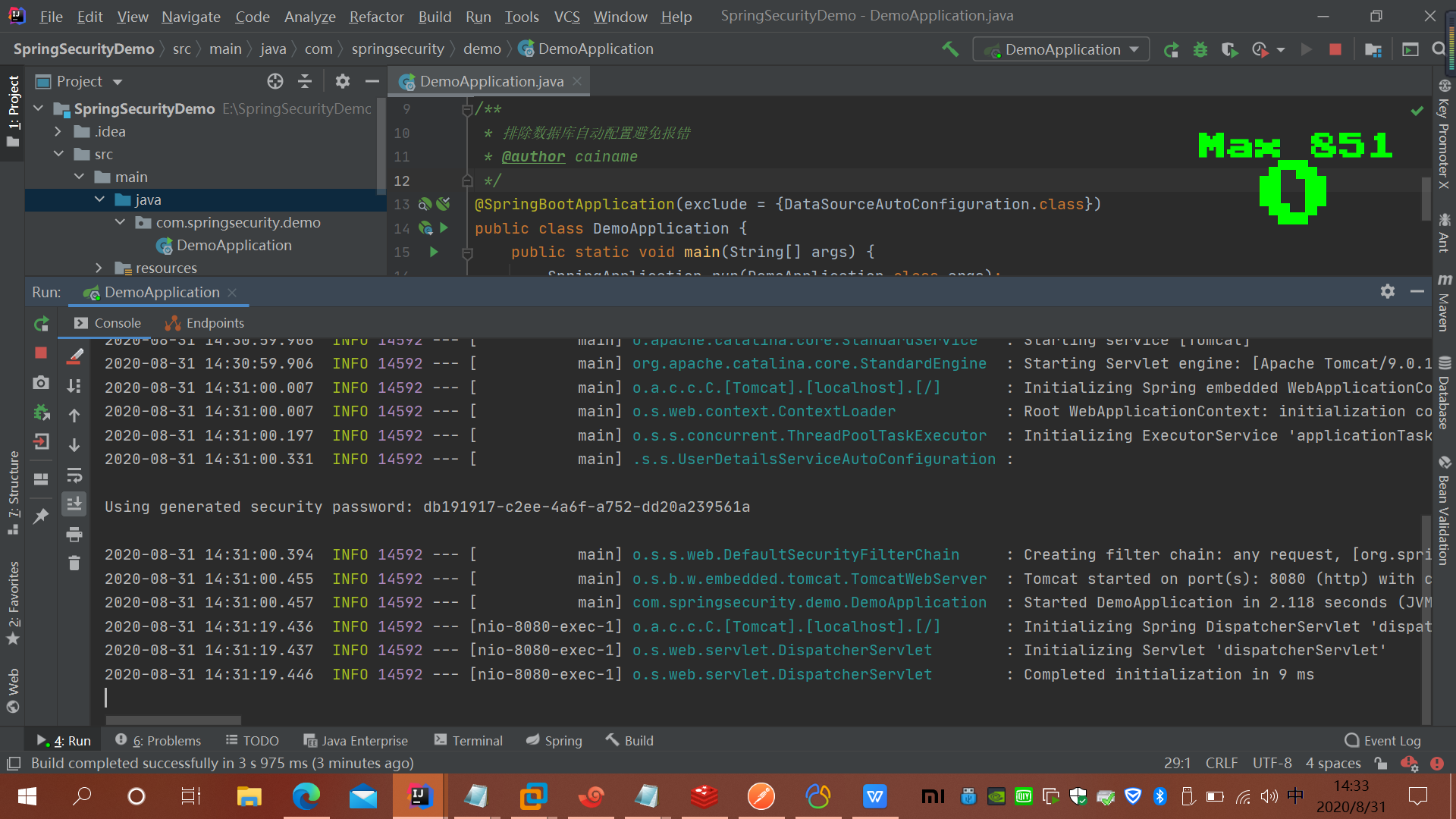
很显然这根本不是我们想要的,接下来我们需要一步一步的改造
改造1 使用页面表单登录
@Override

    protected void configure(HttpSecurity http) throws Exception {

        /**

         * loginPage("/login")表示登录时跳转的页面,因为登录页面我们不需要登录认证,所以我们需要添加 permitAll() 方法

         * permitAll()表示这个不需要验证 登录页面,登录失败页面

         * loginProcessingUrl处理登陆的url

         * failureUrl:失败的处理url

         */

        http.formLogin()

                .loginPage("/login")

                .loginProcessingUrl("/login/form")

                .failureUrl("/login-error")

                .permitAll().

                and().authorizeRequests().anyRequest().authenticated().

                and().csrf().disable();

    }
改造2、自定义用户名和密码
很显然,这样改造之后,虽然登录页面是好看了,但还远远不能满足我们的应用需求,所以第二步,我们改造自定义的用户名和密码。
自定义用户名和密码有2种方式,一种是在代码中写死,这也是官方的demo,另一种是使用数据库
/**

     * 自定义密码

     * @param auth

     * @throws Exception

     */

    @Override

    public void configure(AuthenticationManagerBuilder auth)throws Exception {

        auth.inMemoryAuthentication().passwordEncoder(new BCryptPasswordEncoder())

                .withUser("admin").password(new BCryptPasswordEncoder().encode("123456")).roles("USER");

    }
spring security的原理就是使用很多的拦截器对URL进行拦截,以此来管理登录验证和用户权限验证
用户登陆,会被AuthenticationProcessingFilter拦截,调用AuthenticationManager的实现,而且AuthenticationManager会调用ProviderManager来获取用户验证信息(不同的Provider调用的服务不同,因为这些信息可以是在数据库上,可以是在LDAP服务器上,可以是xml配置文件上等),如果验证通过后会将用户的权限信息封装一个User放到spring的全局缓存SecurityContextHolder中,以备后面访问资源时使用。
所以我们要自定义用户的校验机制的话,我们只要实现自己的AuthenticationProvider就可以了。
在用AuthenticationProvider 这个之前,我们需要提供一个获取用户信息的服务,实现 UserDetailsService 接口
用户名密码->Authentication(未认证) -> AuthenticationManager ->AuthenticationProvider->UserDetailService->UserDetails->Authentication(已认证)
public class UserInfo implements Serializable, UserDetails {

    private static final long serialVersionUID = 1L;

    /**

     * 用户名

     */

    private String username;

    /**

     * 用户密码

     */

    private String password;

    /**

     * 用户角色

     */

    private String role;

    private boolean accountNonExpired;

    private boolean accountNonLocked;

    private boolean credentialsNonExpired;

    private boolean enabled;

    public UserInfo(String username, String password, String role, boolean accountNonExpired, boolean accountNonLocked,

                    boolean credentialsNonExpired, boolean enabled) {

        // TODO Auto-generated constructor stub

        this.username = username;

        this.password = password;

        this.role = role;

        this.accountNonExpired = accountNonExpired;

        this.accountNonLocked = accountNonLocked;

        this.credentialsNonExpired = credentialsNonExpired;

        this.enabled = enabled;

    }

    /**

     * 权限

     * @return

     */

    @Override

    public Collection<? extends GrantedAuthority> getAuthorities() {

        return AuthorityUtils.commaSeparatedStringToAuthorityList(role);

    }

    @Override

    public String getPassword() {

        return password;

    }

    @Override

    public String getUsername() {

        return username;

    }

    @Override

    public boolean isAccountNonExpired() {

        return accountNonExpired;

    }

    @Override

    public boolean isAccountNonLocked() {

        return accountNonLocked;

    }

    @Override

    public boolean isCredentialsNonExpired() {

        return credentialsNonExpired;

    }

    @Override

    public boolean isEnabled() {

        return enabled;

    }

}
然后实现第2个类 UserService 来返回这个UserInfo的对象实例
package com.springsecurity.demo.service;

import com.springsecurity.demo.entity.UserInfo;

import org.springframework.security.core.userdetails.UserDetails;

import org.springframework.security.core.userdetails.UserDetailsService;

import org.springframework.security.core.userdetails.UsernameNotFoundException;

import org.springframework.security.crypto.bcrypt.BCryptPasswordEncoder;

import org.springframework.stereotype.Component;

import sun.security.rsa.RSASignature;

/**

 * @author cainame

 */

@Component

public class MyUserDetailsService implements UserDetailsService {

    /**

     * 这里可以可以通过username(登录时输入的用户名)然后到数据库中找到对应的用户信息,并构建成我们自己的UserInfo来返回

     * @param username

     * @return

     * @throws UsernameNotFoundException

     */

    @Override

    public UserDetails loadUserByUsername(String username) throws UsernameNotFoundException {

        if(username.equals("admin"))

        {

            UserInfo userInfo=new UserInfo("admin", "123456", "ROLE_ADMIN", true,true,true, true);

            return userInfo;

        }

        return null;

    }

}
到这里为止,我们自己定义的UserInfo类和从数据库中返回具体的用户信息已经实现,接下来我们要实现的,我们自己的 AuthenticationProvider
@Component

public class MyAuthenticationProvider implements AuthenticationProvider {

    @Autowired

    private MyUserDetailsService userDetailService;

    @Override

    public Authentication authenticate(Authentication authentication) throws AuthenticationException {

        /**

         * 这个获取表单输入中返回的用户名;

         */

        String userName = authentication.getName();

        /**

         * 这个是表单中输入的密码;

         */

        String password = (String) authentication.getCredentials();

        /**

         * 调用服务获取用户信息

         */

        UserInfo userInfo = (UserInfo) userDetailService.loadUserByUsername(userName);

        if (userInfo == null) {

            throw new BadCredentialsException("用户名不存在");

        }

        if (!userInfo.getPassword().equals("123456")) {

            throw new BadCredentialsException("密码不正确");

        }

        /**

         * 获取权限

         */

        Collection<? extends GrantedAuthority> authorities = userInfo.getAuthorities();

        return new UsernamePasswordAuthenticationToken(userInfo, password, authorities);

    }

    @Override

    public boolean supports(Class<?> aClass) {

        return true;

    }

}
到此为止,我们的用户信息的获取,校验部分已经完成了。接下来要让它起作用,则我们需要在配置文件中修改,让他起作用。回到我的SecurityConfig代码文件,修改如下:
1、注入我们自己的AuthenticationProvider
2、修改配置的方法:
 @Override

    public void configure(AuthenticationManagerBuilder auth)throws Exception {

        auth.authenticationProvider(provider);

    }
3.获取当前登陆的用户
Object object = SecurityContextHolder.getContext().getAuthentication().getPrincipal();
改造3、自定义登录成功和失败的处理逻辑
在现在的大多数应用中,一般都是前后端分离的,所以我们登录成功或失败都需要用json格式返回,或者登录成功之后,跳转到某个具体的页面。
为了实现这个功能,我们需要写2个类,分别继承SavedRequestAwareAuthenticationSuccessHandler和SimpleUrlAuthenticationFailureHandler2个类,并重写其中的部分方法即可。
校验成功
@Component("myAuthenticationSuccessHandler")

public class MyAuthenticationSuccessHandler extends SavedRequestAwareAuthenticationSuccessHandler {

    @Autowired

    private ObjectMapper objectMapper;

    /**

     * 登陆成功之后的处理方法

     * @param request

     * @param response

     * @param authentication

     * @throws ServletException

     * @throws IOException

     */

    @Override

    public void onAuthenticationSuccess(HttpServletRequest request, HttpServletResponse response, Authentication authentication) throws ServletException, IOException {

        SecurityContextHolder.getContext().setAuthentication(authentication);

        Map<String,Object> map=new HashMap<>();

        map.put("code", "200");

        map.put("msg", "登录成功");

        map.put("user",SecurityContextHolder.getContext());

        response.setContentType("application/json;charset=UTF-8");

        response.getWriter().write(objectMapper.writeValueAsString(map));

        new DefaultRedirectStrategy().sendRedirect(request, response, "/index");

    }

}
error:
package com.springsecurity.demo.config;

import com.fasterxml.jackson.databind.ObjectMapper;

import org.slf4j.Logger;

import org.slf4j.LoggerFactory;

import org.springframework.beans.factory.annotation.Autowired;

import org.springframework.http.HttpStatus;

import org.springframework.security.core.AuthenticationException;

import org.springframework.security.web.authentication.SimpleUrlAuthenticationFailureHandler;

import org.springframework.stereotype.Component;

import javax.servlet.ServletException;

import javax.servlet.http.HttpServletRequest;

import javax.servlet.http.HttpServletResponse;

import java.io.IOException;

import java.util.HashMap;

import java.util.Map;

/**

 * @author cainame

 */

@Component("myAuthenticationFailHander")

public class MyAuthenticationFailHander extends SimpleUrlAuthenticationFailureHandler {

    @Autowired

    private ObjectMapper objectMapper;

    private Logger logger = LoggerFactory.getLogger(getClass());

    @Override

    public void onAuthenticationFailure(HttpServletRequest request, HttpServletResponse response, AuthenticationException exception) throws IOException, ServletException {

        logger.info("登录失败");

        //以Json格式返回

        Map<String,String> map=new HashMap<>();

        map.put("code", "201");

        map.put("msg", "登录失败");

        response.setStatus(HttpStatus.INTERNAL_SERVER_ERROR.value());

        response.setContentType("application/json");

        response.setCharacterEncoding("UTF-8");

        response.getWriter().write(objectMapper.writeValueAsString(map));

    }

}
配置:
@Override

    protected void configure(HttpSecurity http) throws Exception {

        /**

         * loginPage("/login")表示登录时跳转的页面,因为登录页面我们不需要登录认证,所以我们需要添加 permitAll() 方法

         * permitAll()表示这个不需要验证 登录页面,登录失败页面

         * loginProcessingUrl处理登陆的url

         * failureUrl:失败的处理url

         */

        http.formLogin()

                .loginPage("/login")

                .loginProcessingUrl("/login/form")

                .failureUrl("/login-error")

                .successHandler(myAuthenticationSuccessHandler)

                .failureHandler(myAuthenticationFailHander)

                .permitAll().

                and().authorizeRequests().anyRequest().authenticated().

                and().csrf().disable();

    }
改造4、添加权限控制
之前的代码我们用户的权限没有加以利用,现在我们添加权限的用法。
之前的登录验证通俗的说,就是来判断你是谁(认证),而权限控制就是用来确定:你能做什么或者不能做什么(权限)
在讲这个之前,我们简单说下,对于一些资源不需要权限认证的,那么就可以在Config中添加 过滤条件,如:
.and().authorizeRequests().antMatchers("/index").permitAll()
那么我们直接访问 /index 就不会跳转到登录页面,这样我们就可以把一些不需要验证的资源以这种方式过滤,比如图片,脚本,样式文件之类的。
我们先来看第一种:在编码中写死的。
那其实权限控制也是通过这种方式来实现
.antMatchers("/whoim").hasRole("ADMIN")
这个用户的角色哪里来,就是我们自己的UserDetailsService中返回的用户信息中的角色权限信息,这里需要注意一下就是 .hasRole("ADMIN"),那么给用户的角色时就要用:ROLE_ADMIN
.antMatchers 这里也可以限定HttpMethod的不同要求不同的权限(用于适用于Restful风格的API).
.antMatchers("/whoim").hasRole("ADMIN").antMatchers(HttpMethod.POST,"/user/*").hasRole("ADMIN")
.antMatchers(HttpMethod.GET,"/user/*").hasRole("USER")
Spring Security 的校验的原理:左手配置信息,右手登录后的用户信息,中间投票器。
从我们的配置信息中获取相关的URL和需要的权限信息,然后获得登录后的用户信息
然后经过:AccessDecisionManager 来验证,这里面有多个投票器:
AccessDecisionVoter,(默认有几种实现:比如:1票否决(只要有一个不同意,就没有权限),全票通过,才算通过;只要有1个通过,就全部通过。类似这种的。
WebExpressionVoter 是Spring Security默认提供的的web开发的投票器。(表达式的投票器)
Spring Security 默认的是 AffirmativeBased 只要有一个通过,就通过。
有兴趣的可以 从FilterSecurityInterceptor这个过滤器入口,来查看这个流程。
内嵌的表达式有:permitAll denyAll 等等。
每一个权限表达式都对应一个方法。
如果需要同时满足多个要求的,不能连写如 ,我们有个URL需要管理员权限也同时要限定IP的话,不能:.hasRole("ADMIN").hasIPAddress("192.168.1.1");
而是需要用access方法 .access("hasRole('ADMIN') and hasIpAddress('192.168.1.1')");这种。
.antMatchers("/whoim").access("hasRole('ADMIN') and hasIpAddress('192.168.119.1')")
那我们可以自己写权限表达式吗? 可以,稍后。。。这些都是硬编码的实现,都是在代码中写入的,这样的灵活性不够。所以我们接下来继续改造
改造4、添加基于RBAC(role-Based-access control)权限控制
这个大家可以去百度一下,一般都是由 3个部分组成,一个是用户,一个是角色 ,一个是资源(菜单,按钮),然后就是 用户和角色的关联表,角色和资源的关联表
核心就是判断当前的用户所拥有的URL是否和当前访问的URL是否匹配。
首先我们自己提供一个判断的接口和实现,代码如下:
public interface RbacService {

    boolean hasPermission(HttpServletRequest request, Authentication authentication);

}
实现:
@Component("rbacService")

public class RbacServiceImpl implements RbacService {

    private AntPathMatcher antPathMatcher = new AntPathMatcher();

    @Override

    public boolean hasPermission(HttpServletRequest request, Authentication authentication) {

        Object principal = authentication.getPrincipal();

        boolean hasPermission = false;

        if (principal instanceof UserDetails) { //首先判断先当前用户是否是我们UserDetails对象。

            String userName = ((UserDetails) principal).getUsername();

            Set<String> urls = new HashSet<>();

            urls.add("/whoim");// 数据库读取 //读取用户所拥有权限的所有URL

            // 注意这里不能用equal来判断,因为有些URL是有参数的,所以要用AntPathMatcher来比较

            for (String url : urls) {

                if (antPathMatcher.match(url, request.getRequestURI())) {

                    hasPermission = true;

                    break;

                }

            }

        }

        return hasPermission;

    }

}
修改配置文件:
.anyRequest().access("@rbacService.hasPermission(request,authentication)")
其中 @rbacService 就是我们自己声明的bean,在RbacServiceImpl实现类的头部注解中。
改造5、记住我的功能Remeber me
本质是通过token来读取用户信息,所以服务端需要存储下token信息
根据官方的文档,token可以通过数据库存储 数据库脚本
CREATE TABLE persistent_logins (

    username VARCHAR(64) NOT NULL,

    series VARCHAR(64) NOT NULL,

    token VARCHAR(64) NOT NULL,

    last_used TIMESTAMP NOT NULL,

    PRIMARY KEY (series)

);
然后,配置好token 的存储 及数据源 引入jdbc启动器
        <dependency>

            <groupId>org.springframework.boot</groupId>

            <artifactId>spring-boot-starter-jdbc</artifactId>

        </dependency>
增加前端checkbox
 <tr>

      <td>记住我</td>

      <td><input type="checkbox" name="remember-me" value="true"/></td>

 </tr>
配置
@Bean

    public PersistentTokenRepository persistentTokenRepository() {

        JdbcTokenRepositoryImpl tokenRepository = new JdbcTokenRepositoryImpl();

        tokenRepository.setDataSource(dataSource);

        return tokenRepository;

    }
设置
.rememberMe()

           .rememberMeParameter("remember-me").userDetailsService(myUserDetailsService)

           .tokenRepository(persistentTokenRepository())

           .tokenValiditySeconds(60)
Springboot集成SpringSecurity的更多相关文章
- SpringBoot 集成SpringSecurity JWT
目录 1. 简介 1.1 SpringSecurity 1.2 OAuth2 1.3 JWT 2. SpringBoot 集成 SpringSecurity 2.1 导入Spring Security ...
- 【使用篇二】SpringBoot集成SpringSecurity(22)
SpringSecurity是专门针对基于Spring项目的安全框架,充分利用了依赖注入和AOP来实现安全管控.在很多大型企业级系统中权限是最核心的部分,一个系统的好与坏全都在于权限管控是否灵活,是否 ...
- SpringBoot集成Spring Security(5)——权限控制
在第一篇中,我们说过,用户<–>角色<–>权限三层中,暂时不考虑权限,在这一篇,是时候把它完成了. 为了方便演示,这里的权限只是对角色赋予权限,也就是说同一个角色的用户,权限是 ...
- SpringBoot集成Spring Security(4)——自定义表单登录
通过前面三篇文章,你应该大致了解了 Spring Security 的流程.你应该发现了,真正的 login 请求是由 Spring Security 帮我们处理的,那么我们如何实现自定义表单登录呢, ...
- 【springBoot】springBoot集成redis的key,value序列化的相关问题
使用的是maven工程 springBoot集成redis默认使用的是注解,在官方文档中只需要2步; 1.在pom文件中引入即可 <dependency> <groupId>o ...
- SpringBoot集成security
本文就SpringBoot集成Security的使用步骤做出解释说明.
- springboot集成Actuator
Actuator监控端点,主要用来监控与管理. 原生端点主要分为三大类:应用配置类.度量指标类.操作控制类. 应用配置类:获取应用程序中加载的配置.环境变量.自动化配置报告等与SpringBoot应用 ...
- SpringBoot集成Shiro并用MongoDB做Session存储
之前项目鉴权一直使用的Shiro,那是在Spring MVC里面使用的比较多,而且都是用XML来配置,用Shiro来做权限控制相对比较简单而且成熟,而且我一直都把Shiro的session放在mong ...
- SpringBoot集成redis的key,value序列化的相关问题
使用的是maven工程 springBoot集成redis默认使用的是注解,在官方文档中只需要2步; 1.在pom文件中引入即可 <dependency> <groupId>o ...
随机推荐
- LeetCode刷题 二分专题
二分专题 二分的题目类型 对于满足二段性的题目的两套模板 模板一 模板如下 模板二 模板如下 解决二分题目的一般流程 LeeCode实战 LC69.x的平方根 解法思路 LC35.搜索插入位置 解法思 ...
- Spring Data Redis Stream的使用
一.背景 Stream类型是 redis5之后新增的类型,在这篇文章中,我们实现使用Spring boot data redis来消费Redis Stream中的数据.实现独立消费和消费组消费. 二. ...
- Effective C++ 总结笔记(二)
二.构造/析构/赋值运算 05.了解C++默默编写并调用那些函数 如果自己不声明, 编译器就会暗自为class创建一个default构造函数.一个copy构造函数.一个copy assignment操 ...
- 百度ueditor编辑器注入漏洞修补查杀程序
百度ueditor编辑器注入查杀程序,用于对百度ueditor的漏洞补丁进行查杀,使用时需要保证本地正确部署了.net 4.0服务. 百度ueditor编辑器是目前网上比较流行的一个网站编辑器,但由于 ...
- Python 函数 参数传递
参数传递 在 python 中,类型属于对象,变量是没有类型的: a=[1,2,3] a="Runoob" 以上代码中,[1,2,3] 是 ...
- [luogu5537]系统设计
考虑哈希,令$h[x]$表示根到$x$路径的哈希值,那么有$h[x]+hash(l,r)=h[ans]$ 考虑用线段树维护$a_{i}$的区间哈希值,并用map去找到对应的$ans$ 但还有一个问题, ...
- [nowcoder5671D]Data structure
问题相当于统计$且\sum_{l\le x<y\le r且lca(x,y)=x}1=c(sz[x],2)-\sum_{son}c(sz[son],2)$,考虑用莫队来维护区间,那么相当于要支持: ...
- 深度揭秘Netty中的FastThreadLocal为什么比ThreadLocal效率更高?
阅读这篇文章之前,建议先阅读和这篇文章关联的内容. 1. 详细剖析分布式微服务架构下网络通信的底层实现原理(图解) 2. (年薪60W的技巧)工作了5年,你真的理解Netty以及为什么要用吗?(深度干 ...
- app如何测试
你的app是如何测试? 考虑UI界面测试,在测试主体的功能模块,考虑异常测试,关机,卡死,重启..., 交互性测试,手机常用操作,打电话,短信..,适配性测试,原来我们的公司就买了华为mate8 ...
- web渗透工程师学习
职位描述: 对公司网站.业务系统进行安全评估测试(黑盒.白盒测试): 对公司各类系统进行安全加固: 对公司安全事件进行响应,清理后门,根据日志分析攻击途径: 安全技术研究,包括安全防范技术,黑客技术等 ...