
[转]iOS学习之UINavigationController详解与使用(二)页面切换和segmentedController
转载地址:http://blog.csdn.net/totogo2010/article/details/7682433
iOS学习之UINavigationController详解与使用(一)添加UIBarButtonItem是上篇,我们接着讲UINavigationController的重要作用,页面的管理和切换。
1、RootView 跳到SecondView
首先我们需要新一个View。新建SecondView,按住Command键然后按N,弹出新建页面,我们新建SecondView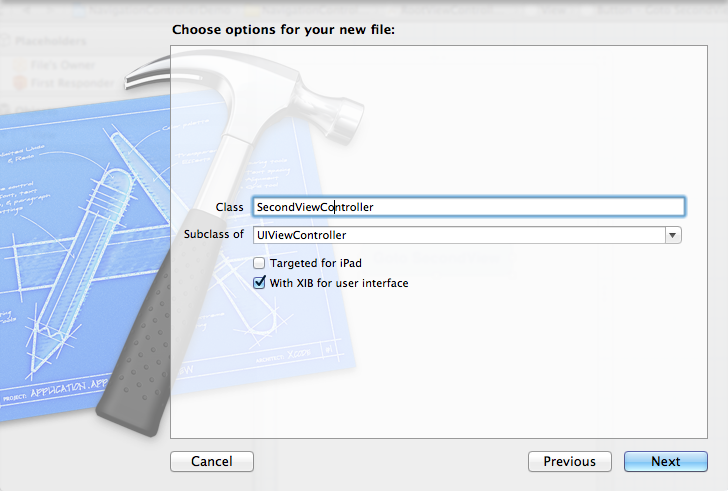
2、为Button 添加点击事件,实现跳转
在RootViewController.xib中和RootViewController.h文件建立连接

在RootViewController.m中实现代码,alloc一个SecondViewController,用pushViewController到navigationController中去,并为
SecondViewController这是title为 secondView.title =@"Second View"; 默认情况下,titie为下个页面返回按钮的名字。
- - (IBAction)gotoSecondView:(id)sender {
- SecondViewController *secondView = [[SecondViewController alloc] init];
- [self.navigationController pushViewController:secondView animated:YES];
- secondView.title = @"Second View";
- }
这是点击GotoSecondView 按钮,出现
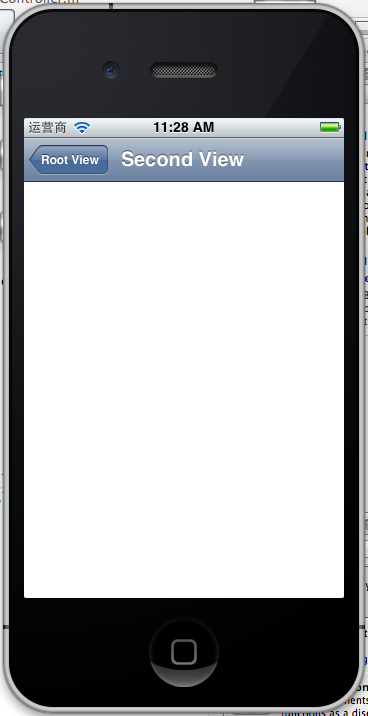
这就是SecondView了。
3、添加segmentedController
在nav bar这样的效果是如何实现的呢?
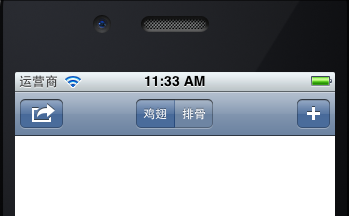
这就是segmentedController。
3.1在RootViewController.m的viewDidLoad添加如下代码:
- NSArray *array = [NSArray arrayWithObjects:@"鸡翅",@"排骨", nil];
- UISegmentedControl *segmentedController = [[UISegmentedControl alloc] initWithItems:array];
- segmentedController.segmentedControlStyle = UISegmentedControlSegmentCenter;
- [segmentedController addTarget:self action:@selector(segmentAction:) forControlEvents:UIControlEventValueChanged];
- self.navigationItem.titleView = segmentedController;
3.2[segmentedController addTarget:selfaction:的实现
- -(void)segmentAction:(id)sender
- {
- switch ([sender selectedSegmentIndex]) {
- case 0:
- {
- UIAlertView *alter = [[UIAlertView alloc] initWithTitle:@"提示" message:@"你点击了鸡翅" delegate:self cancelButtonTitle:@"确定" otherButtonTitles:nil, nil];
- [alter show];
- }
- break;
- case 1:
- {
- UIAlertView *alter = [[UIAlertView alloc] initWithTitle:@"提示" message:@"你点击了排骨" delegate:self cancelButtonTitle:@"确定" otherButtonTitles:nil, nil];
- [alter show];
- }
- break;
- default:
- break;
- }
- }
这样就能响应鸡翅和排骨按钮了
4、自定义backBarButtonItem
左上角的返回上级View的barButtonitem的名字是上级目录的Title,如果title或者适合做button的名字,怎么办呢?我们可以自己定义
代码如下:
- UIBarButtonItem *backButton = [[UIBarButtonItem alloc] initWithTitle:@"根视图" style:UIBarButtonItemStyleDone target:nil action:nil];
- self.navigationItem.backBarBu
效果:

6、自定义title
UINavigationController的title可以用别view替代,比如用UIButton UILable等,下面我用UIButton.
在SecondViewController.m中添加下面如下。
- - (void)viewDidLoad
- {
- [super viewDidLoad];
- UIButton *button = [UIButton buttonWithType: UIButtonTypeRoundedRect];
- [button setTitle: @"自定义title" forState: UIControlStateNormal];
- [button sizeToFit];
- self.navigationItem.titleView = button;}
运行程序,goto secondView,运行效果
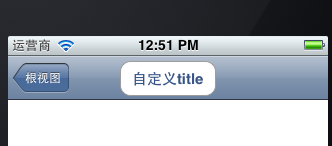
下篇文件讲下Navigation 的Toobar如何显示和如何自己定义。
[转]iOS学习之UINavigationController详解与使用(二)页面切换和segmentedController的更多相关文章
- iOS学习之UINavigationController详解与使用(二)页面切换和segmentedController
iOS学习之UINavigationController详解与使用(一)添加UIBarButtonItem是上篇,我们接着讲UINavigationController的重要作用,页面的管理和切换. ...
- [转]iOS学习之UINavigationController详解与使用(三)ToolBar
转载地址:http://blog.csdn.net/totogo2010/article/details/7682641 iOS学习之UINavigationController详解与使用(二)页面切 ...
- iOS学习之UINavigationController详解与使用(一)添加UIBarButtonItem
http://blog.csdn.net/totogo2010/article/details/7681879 1.UINavigationController导航控制器如何使用 UINavigati ...
- iOS学习之UINavigationController详解与使用(三)ToolBar
1.显示Toolbar 在RootViewController.m的- (void)viewDidLoad方法中添加代码,这样Toobar就显示出来了. [cpp] view plaincopy [ ...
- [转]iOS学习之UINavigationController详解与使用(一)添加UIBarButtonItem
转载地址:http://blog.csdn.net/totogo2010/article/details/7681879 1.UINavigationController导航控制器如何使用 UINav ...
- JavaScript学习笔记-实例详解-类(二)
实例详解-类(二) //===给Object.prototype添加只读\不可枚举\不可配置的属性objectId(function(){ Object.defineProperty(Object ...
- IOS开发之UINavigationController详解
UINavigationController是IOS编程中比较常用的一种容器view controller,很多系统的控件(如UIImagePickerViewController)以及很多有名的AP ...
- [转]iOS学习笔记(2)--Xcode6.1创建仅xib文件无storyboard的hello world应用
转载地址:http://www.mamicode.com/info-detail-514151.html 由于Xcode6之后,默认创建storyboard而非xib文件,而作为初学,了解xib的加载 ...
- UINavigationController详解一(转)UIBarButtonItem
本文出自:http://www.cnblogs.com/smileEvday/archive/2012/05/14/2495153.html 特别感谢. 1.UINavigationControlle ...
随机推荐
- ipmi使用
1.安装ipmitool Linux: yum -y install OpenIPMI-tools 备注:Linux机器也可以安装ipmi yum -y install OpenIPMI OpenI ...
- 主机OS重装的节点加回RAC集群步骤示例(11gR2 RAC)
原文地址: https://blogs.oracle.com/Database4CN/entry/%E4%B8%BB%E6%9C%BAos%E9%87%8D%E8%A3%85%E7%9A%84%E8% ...
- 《30天自制操作系统》06_day_学习笔记
harib03a: 内容没有变化 :P109 从这里开始,代码开始工程化了. 将原本300多行的bootpack.c分割成了三部分: graphic.c : 用来处理界面图像 dsctbl. ...
- 学习OpenCV——ORB简化版&Location加速版
根据前面surf简化版的结构,重新把ORB检测的代码给简化以下,发现虽然速度一样,确实能省好多行代码,关键是有 BruteForceMatcher<HammingLUT>matcher的帮 ...
- Iterator和ListIterator主要区别(转)
Iterator和ListIterator主要区别有: 一.ListIterator有add()方法,可以向List中添加对象,而Iterator不能. 二.ListIterator和Iterator ...
- 在EditText前面添加一个搜索的小图片
1,这是EditText中的一个小的属性 代码: android:drawableLeft="@drawable/searchico" 效果图如下:
- Oracle重置序列(不删除重建方式)
Oracle中一般将自增sequence重置为初始1时,都是删除再重建,这种方式有很多弊端,依赖它的函数和存储过程将失效,需要重新编译. 不过还有种巧妙的方式,不用删除,利用步长参数,先查出seque ...
- 夺命雷公狗---node.js---10之POST的接收
首先我们在项目下创建一个表单,代码如下所示: <!DOCTYPE html> <html lang="en"> <head> <meta ...
- android怎么换背景图片
我不晓得一般是怎么做的,但是至少可以用两种方法,一种是用一个全屏的ImageView来当作背景,通过修改imageview来修改背景图片,一种是将你xml中最外层的那个布局,LinerLayout之类 ...
- PAT乙级 1023. 组个最小数 (20)
1023. 组个最小数 (20) 时间限制 100 ms 内存限制 65536 kB 代码长度限制 8000 B 判题程序 Standard 作者 CAO, Peng 给定数字0-9各若干个.你可以以 ...