
Vue SSR初探
因为之前用nuxt开发过应用程序,但是nuxt早就达到了开箱即用的目的,所以一直对vue ssr的具体实现存在好奇。
构建步骤
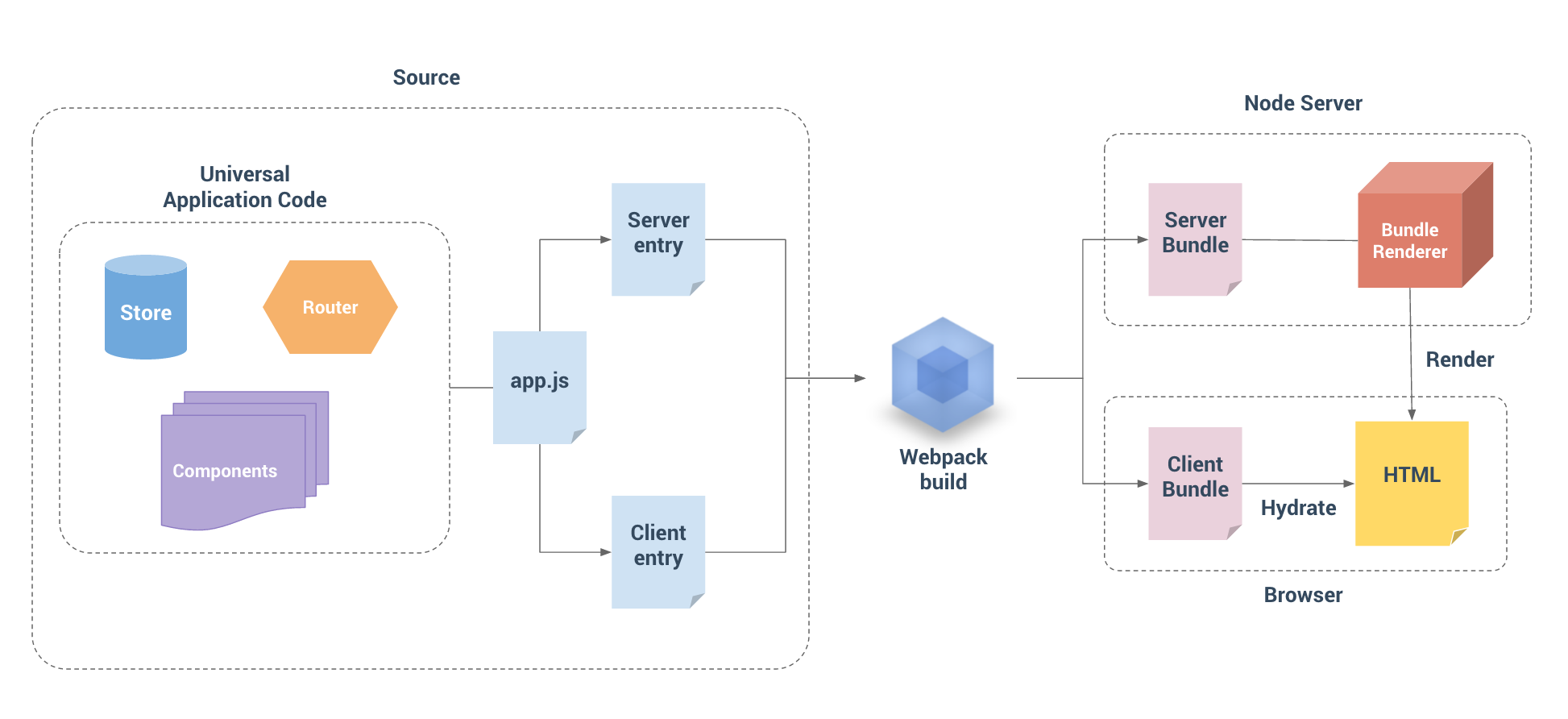
我们通过上图可以看到,vue ssr 也是离不开 webpack 的打包。
利用 webpack的打包将 vue 应用程序生成 Server Bundle 和 Client Bundle。 有了Client manifest (Client Bundle的产物)和 Server Bundle,Bundle Renderer 现在具有了服务器和客户端的构建信息,因此它可以自动推断和注入资源预加载 / 数据预取指令(preload / prefetch directive),以及 css 链接 / script 标签到所渲染的 HTML。
项目结构

build 文件构建配置
public 模板文件
src 项目文件
通过上面可以看出整体和平时的vue项目区别不是很大,主要集中在 build 中 存在了 webpack.server.config.js 文件 以及 src 文件下的 entry-client.js 和 entry-server.js, 在这里特殊说下 src 下的 app.js 和 template.html 与我们平时写的vue项目中的也有所区别。
template.html
<!DOCTYPE html>
<html lang="en">
  <head><title>Hello</title></head>
  <body>
    <!--vue-ssr-outlet-->
  </body>
</html>
当在渲染 Vue 应用程序时,renderer 只会生成 HTML 标记, 我们需要用一个额外的 HTML 页面包裹容器,来包裹生成的 HTML 标记,一般直接在创建 renderer 时提供一个页面模板。
- 注意
<!--vue-ssr-outlet-->注释 这里将是应用程序 HTML 标记注入的地方。
app.js
  import Vue from 'vue'
  import App from './App.vue'
  import { createRouter } from '@/router'

  import { createStore } from '@/store'
  import { sync } from 'vuex-router-sync'

  // 导出一个工厂函数,用于创建新的
  // 应用程序、router 和 store 实例
  export function createApp () {
    // 创建 router 实例
    const router = createRouter()
    // 创建 store 实例
    const store = createStore()

    // 同步路由状态(route state)到 store
    sync(store, router)

    const app = new Vue({
      // 根实例简单的渲染应用程序组件。
      router,
      store,
      render: h => h(App)
    })

    return { app, router, store }
}在服务器端渲染(SSR),本质上是在渲染应用程序的"快照",所以如果应用程序依赖于一些异步数据,那么在开始渲染过程之前,需要先预取和解析好这些数据。
而且对于客户端渲染,在挂载 (mount) 到客户端应用程序之前,客户端需要获取到与服务器端应用程序完全相同的数据。
为了解决以上问题,获取的数据需要位于视图组件之外,即放置在专门的数据预取存储容器(data store)或"状态容器(state container))"中。首先,在服务器端,我们可以在渲染之前预取数据,并将数据填充到 store 中。此外,我们将在 HTML 中序列化(serialize)和内联预置(inline)状态。这样,在挂载(mount)到客户端应用程序之前,可以直接从 store 获取到内联预置(inline)状态。
当编写纯客户端 (client-only) 代码时,我们习惯于每次在新的上下文中对代码进行取值。但是,Node.js 服务器是一个长期运行的进程。当我们的代码进入该进程时,它将进行一次取值并留存在内存中。这意味着如果创建一个单例对象,它将在每个传入的请求之间共享。
我们为每个请求创建一个新的根 Vue 实例。这与每个用户在自己的浏览器中使用新应用程序的实例类似。如果我们在多个请求之间使用一个共享的实例,很容易导致交叉请求状态污染 (cross-request state pollution)。
因此,我们不应该直接创建一个应用程序实例,而是应该暴露一个可以重复执行的工厂函数,为每个请求创建新的应用程序实例。
entry-client.js
import { createApp } from '@/app'

const { app, router, store } = createApp()

if (window.__INITIAL_STATE__) {
  store.replaceState(window.__INITIAL_STATE__)
}

router.onReady(() => {
  // 添加路由钩子函数,用于处理 asyncData.
  // 在初始路由 resolve 后执行,
  // 以便我们不会二次预取(double-fetch)已有的数据。
  // 使用 `router.beforeResolve()`,以便确保所有异步组件都 resolve。
  router.beforeResolve((to, from, next) => {
    const matched = router.getMatchedComponents(to)
    const prevMatched = router.getMatchedComponents(from)

    // 我们只关心非预渲染的组件
    // 所以我们对比它们,找出两个匹配列表的差异组件
    let diffed = false
    const activated = matched.filter((c, i) => {
      return diffed || (diffed = (prevMatched[i] !== c))
    })

    if (!activated.length) {
      return next()
    }

    // 这里如果有加载指示器 (loading indicator),就触发

    Promise.all(activated.map(c => {
      if (c.asyncData) {
        return c.asyncData({ store, route: to })
      }
    })).then(() => {

      // 停止加载指示器(loading indicator)

      next()
    }).catch(next)
  })

  app.$mount('#app')
})
当服务端渲染完毕后,Vue 在浏览器端接管由服务端发送的静态 HTML,使其变为由 Vue 管理的动态 DOM (即:客户端激活)。
entry-server.js
import { createApp } from '@/app'

const isDev = process.env.NODE_ENV !== 'production'

// This exported function will be called by `bundleRenderer`.
// This is where we perform data-prefetching to determine the
// state of our application before actually rendering it.
// Since data fetching is async, this function is expected to
// return a Promise that resolves to the app instance.
export default context => {
  return new Promise((resolve, reject) => {
    const s = isDev && Date.now()
    const { app, router, store } = createApp()

    const { url } = context

    const { fullPath } = router.resolve(url).route

    if (fullPath !== url) {
      return reject({ url: fullPath })
    }

    // set router's location
    router.push(url)
    console.log(router)

    // wait until router has resolved possible async hooks
    router.onReady(() => {
      const matchedComponents = router.getMatchedComponents()

      console.log(matchedComponents)
      // no matched routes
      if (!matchedComponents.length) {
        return reject({ code: 404 })
      }
      // Call fetchData hooks on components matched by the route.
      // A preFetch hook dispatches a store action and returns a Promise,
      // which is resolved when the action is complete and store state has been
      // updated.

      Promise.all(matchedComponents.map(({ asyncData }) => asyncData && asyncData({
        store,
        route: router.currentRoute
      }))).then(() => {
        isDev && console.log(`data pre-fetch: ${Date.now() - s}ms`)
        // After all preFetch hooks are resolved, our store is now
        // filled with the state needed to render the app.
        // Expose the state on the render context, and let the request handler
        // inline the state in the HTML response. This allows the client-side
        // store to pick-up the server-side state without having to duplicate
        // the initial data fetching on the client.
        context.state = store.state
        resolve(app)
      }).catch(reject)
    }, reject)
  })
}
可以通过路由获得与 router.getMatchedComponents() 相匹配的组件,如果组件暴露出 asyncData,就调用这个方法。然后我们需要将解析完成的状态,附加到渲染上下文(render context)中。
当使用 template 时,context.state 将作为 window.__INITIAL_STATE__ 状态,自动嵌入到最终的 HTML 中。而在客户端,在挂载到应用程序之前,store 就应该获取到状态。
server.js
const fs = require('fs')
const path = require('path')
const LRU = require('lru-cache')
const express = require('express')
const compression = require('compression')
const microcache = require('route-cache')
const resolve = file => path.resolve(__dirname, file)
const { createBundleRenderer } = require('vue-server-renderer')

const isProd = process.env.NODE_ENV === 'production'
const useMicroCache = process.env.MICRO_CACHE !== 'false'
const serverInfo =
  `express/${require('express/package.json').version} ` +
  `vue-server-renderer/${require('vue-server-renderer/package.json').version}`

const app = express()

function createRenderer (bundle, options) {
  // https://github.com/vuejs/vue/blob/dev/packages/vue-server-renderer/README.md#why-use-bundlerenderer
  return createBundleRenderer(bundle, Object.assign(options, {
    // for component caching
    cache: LRU({
      max: 1000,
      maxAge: 1000 * 60 * 15
    }),
    // this is only needed when vue-server-renderer is npm-linked
    basedir: resolve('./dist'),
    // recommended for performance
    runInNewContext: false
  }))
}

let renderer
let readyPromise
const templatePath = resolve('./public/index.template.html')
if (isProd) {
  // In production: create server renderer using template and built server bundle.
  // The server bundle is generated by vue-ssr-webpack-plugin.
  const template = fs.readFileSync(templatePath, 'utf-8')
  const bundle = require('./dist/vue-ssr-server-bundle.json')
  // The client manifests are optional, but it allows the renderer
  // to automatically infer preload/prefetch links and directly add <script>
  // tags for any async chunks used during render, avoiding waterfall requests.
  const clientManifest = require('./dist/vue-ssr-client-manifest.json')
  renderer = createRenderer(bundle, {
    template,
    clientManifest
  })
} else {
  // In development: setup the dev server with watch and hot-reload,
  // and create a new renderer on bundle / index template update.
  readyPromise = require('./build/setup-dev-server')(
    app,
    templatePath,
    (bundle, options) => {
      renderer = createRenderer(bundle, options)
    }
  )
}

const serve = (path, cache) => express.static(resolve(path), {
  maxAge: cache && isProd ? 1000 * 60 * 60 * 24 * 30 : 0
})

app.use(compression({ threshold: 0 }))
app.use('/dist', serve('./dist', true))
app.use('/public', serve('./public', true))
app.use('/manifest.json', serve('./manifest.json', true))
app.use('/service-worker.js', serve('./dist/service-worker.js'))

// since this app has no user-specific content, every page is micro-cacheable.
// if your app involves user-specific content, you need to implement custom
// logic to determine whether a request is cacheable based on its url and
// headers.
// 1-second microcache.
// https://www.nginx.com/blog/benefits-of-microcaching-nginx/
app.use(microcache.cacheSeconds(1, req => useMicroCache && req.originalUrl))

function render (req, res) {
  const s = Date.now()

  res.setHeader("Content-Type", "text/html")
  res.setHeader("Server", serverInfo)

  const handleError = err => {
    if (err.url) {
      res.redirect(err.url)
    } else if (err.code === 404) {
      res.status(404).send('404 | Page Not Found')
    } else {
      // Render Error Page or Redirect
      res.status(500).send('500 | Internal Server Error')
      console.error(`error during render : ${req.url}`)
      console.error(err.stack)
    }
  }

  const context = {
    title: 'Vue HN 2.0', // default title
    url: req.url
  }
  renderer.renderToString(context, (err, html) => {
    if (err) {
      return handleError(err)
    }
    res.send(html)
    if (!isProd) {
      console.log(`whole request: ${Date.now() - s}ms`)
    }
  })
}

app.get('*', isProd ? render : (req, res) => {
  readyPromise.then(() => render(req, res))
})

const port = process.env.PORT || 8888
app.listen(port, () => {
  console.log(`server started at localhost:${port}`)
})
通过 vue-server-renderer 将我们打包出来的 server bundle 渲染成 html 返回响应。
服务器代码使用了一个 * 处理程序,它接受任意 URL。这允许我们将访问的 URL 传递到我们的 Vue 应用程序中,然后对客户端和服务器复用相同的路由配置。
构建代码
webpack.base.config.js
const path = require('path')
const webpack = require('webpack')
const ExtractTextPlugin = require('extract-text-webpack-plugin')
const FriendlyErrorsPlugin = require('friendly-errors-webpack-plugin')
const { VueLoaderPlugin } = require('vue-loader')

const isProd = process.env.NODE_ENV === 'production'

module.exports = {
  devtool: isProd
    ? false
    : '#cheap-module-source-map',
  output: {
    path: path.resolve(__dirname, '../dist'),
    publicPath: '/dist/',
    filename: '[name].[chunkhash].js'
  },
  mode: isProd ? 'production' : 'development',
  resolve: {
    alias: {
      'public': path.resolve(__dirname, '../public'),
      vue$: 'vue/dist/vue.esm.js',
      '@': path.resolve('src')
    },
    extensions: ['.js', '.vue', '.json']
  },
  module: {
    noParse: /es6-promise\.js$/, // avoid webpack shimming process
    rules: [
      {
        test: /\.vue$/,
        loader: 'vue-loader',
        options: {
          compilerOptions: {
            preserveWhitespace: false
          }
        }
      },
      {
        test: /\.js$/,
        loader: 'babel-loader',
        exclude: /node_modules/
      },
      {
        test: /\.(png|jpg|gif|svg)$/,
        loader: 'url-loader',
        options: {
          limit: 10000,
          name: '[name].[ext]?[hash]'
        }
      },
      {
        test: /\.styl(us)?$/,
        use: isProd
          ? ExtractTextPlugin.extract({
            use: [
              {
                loader: 'css-loader',
                options: { minimize: true }
              },
              'stylus-loader'
            ],
            fallback: 'vue-style-loader'
          })
          : ['vue-style-loader', 'css-loader', 'stylus-loader']
      },
    ]
  },
  performance: {
    hints: false
  },
  plugins: isProd
    ? [
      new VueLoaderPlugin(),
      // new webpack.optimize.UglifyJsPlugin({
      //   compress: { warnings: false }
      // }),
      new webpack.optimize.ModuleConcatenationPlugin(),
      new ExtractTextPlugin({
        filename: 'common.[chunkhash].css'
      })
    ]
    : [
      new VueLoaderPlugin(),
      new FriendlyErrorsPlugin()
    ]
}
基础构建过程
webpack.client.config.js
const webpack = require('webpack')
const merge = require('webpack-merge')
const baseConfig = require('./webpack.base.config')
const VueSSRClientPlugin = require('vue-server-renderer/client-plugin')

module.exports = merge(baseConfig, {
  entry: {
    app: './src/entry-client.js'
  },
  plugins: [
    new webpack.DefinePlugin({
      'process.env.NODE_ENV': JSON.stringify(process.env.NODE_ENV || 'development'),
      'process.env.VUE_ENV': '"client"'
    }),
    // 重要信息:这将 webpack 运行时分离到一个引导 chunk 中,
    // 以便可以在之后正确注入异步 chunk。
    // 这也为你的 应用程序/vendor 代码提供了更好的缓存。
    // new webpack.optimize.CommonsChunkPlugin({
    //   name: "manifest",
    //   minChunks: Infinity
    // }),
    // 此插件在输出目录中
    // 生成 `vue-ssr-client-manifest.json`。
    new VueSSRClientPlugin()
  ],
  optimization: {
    // Automatically split vendor and commons
    splitChunks: {
      chunks: 'all',
      name: 'vendors'
    },
    // Keep the runtime chunk seperated to enable long term caching
    runtimeChunk: true
  }
})
配置 client bundle 的构建过程
webpack.server.config.js
const merge = require('webpack-merge')
const nodeExternals = require('webpack-node-externals')
const baseConfig = require('./webpack.base.config')
const VueSSRServerPlugin = require('vue-server-renderer/server-plugin')

module.exports = merge(baseConfig, {
  // 将 entry 指向应用程序的 server entry 文件
  entry: './src/entry-server.js',

  // 这允许 webpack 以 Node 适用方式(Node-appropriate fashion)处理动态导入(dynamic import),
  // 并且还会在编译 Vue 组件时,
  // 告知 `vue-loader` 输送面向服务器代码(server-oriented code)。
  target: 'node',

  // 对 bundle renderer 提供 source map 支持
  devtool: 'source-map',

  // 此处告知 server bundle 使用 Node 风格导出模块(Node-style exports)
  output: {
    libraryTarget: 'commonjs2'
  },

  // https://webpack.js.org/configuration/externals/#function
  // https://github.com/liady/webpack-node-externals
  // 外置化应用程序依赖模块。可以使服务器构建速度更快,
  // 并生成较小的 bundle 文件。
  externals: nodeExternals({
    // 不要外置化 webpack 需要处理的依赖模块。
    // 你可以在这里添加更多的文件类型。例如,未处理 *.vue 原始文件,
    // 你还应该将修改 `global`(例如 polyfill)的依赖模块列入白名单
    whitelist: /\.css$/
  }),

  // 这是将服务器的整个输出
  // 构建为单个 JSON 文件的插件。
  // 默认文件名为 `vue-ssr-server-bundle.json`
  plugins: [
    new VueSSRServerPlugin()
  ]
})
配置 server bundle 的构建过程
setup-dev-server.js
const fs = require('fs')
const path = require('path')
const MFS = require('memory-fs')
const webpack = require('webpack')
const chokidar = require('chokidar')
const clientConfig = require('./webpack.client.config')
const serverConfig = require('./webpack.server.config')

const readFile = (fs, file) => {
  try {
    return fs.readFileSync(path.join(clientConfig.output.path, file), 'utf-8')
  } catch (e) { }
}

module.exports = function setupDevServer (app, templatePath, cb) {
  let bundle
  let template
  let clientManifest

  let ready
  const readyPromise = new Promise(r => { ready = r })
  const update = () => {
    if (bundle && clientManifest) {
      ready()
      cb(bundle, {
        template,
        clientManifest
      })
    }
  }

  // read template from disk and watch
  template = fs.readFileSync(templatePath, 'utf-8')
  chokidar.watch(templatePath).on('change', () => {
    template = fs.readFileSync(templatePath, 'utf-8')
    console.log('index.html template updated.')
    update()
  })

  // modify client config to work with hot middleware
  clientConfig.entry.app = ['webpack-hot-middleware/client', clientConfig.entry.app]
  clientConfig.output.filename = '[name].js'
  clientConfig.plugins.push(
    new webpack.HotModuleReplacementPlugin(),
    new webpack.NoEmitOnErrorsPlugin()
  )

  // dev middleware
  const clientCompiler = webpack(clientConfig)
  const devMiddleware = require('webpack-dev-middleware')(clientCompiler, {
    publicPath: clientConfig.output.publicPath,
    noInfo: true
  })
  app.use(devMiddleware)
  clientCompiler.plugin('done', stats => {
    stats = stats.toJson()
    stats.errors.forEach(err => console.error(err))
    stats.warnings.forEach(err => console.warn(err))
    if (stats.errors.length) return
    clientManifest = JSON.parse(readFile(
      devMiddleware.fileSystem,
      'vue-ssr-client-manifest.json'
    ))
    update()
  })

  // hot middleware
  app.use(require('webpack-hot-middleware')(clientCompiler, { heartbeat: 5000 }))

  // watch and update server renderer
  const serverCompiler = webpack(serverConfig)
  const mfs = new MFS()
  serverCompiler.outputFileSystem = mfs
  serverCompiler.watch({}, (err, stats) => {
    if (err) throw err
    stats = stats.toJson()
    if (stats.errors.length) return

    // read bundle generated by vue-ssr-webpack-plugin
    bundle = JSON.parse(readFile(mfs, 'vue-ssr-server-bundle.json'))
    update()
  })

  return readyPromise
}
用于 dev 状态下 热更新
到此,基本上上vue ssr的基本结构以了解完毕。但是还是有很多可以做的事情,比如类似于 nuxt 的根据文件目录动态生成 route 等等
后续让我们继续探究...
Vue SSR初探的更多相关文章
- 转载一篇好理解的vue ssr文章
转载:原文链接https://www.86886.wang/detail/5b8e6081f03d630ba8725892,谢谢作者的分享 前言 大多数Vue项目要支持SSR应该是为了SEO考虑,毕竟 ...
- Vue SSR不可不知的问题
Vue SSR不可不知的问题 本文主要介绍Vue SSR(vue服务端渲染)的应用场景,开发中容易遇到的一些问题,提升ssr性能的方法,以及ssr的安全性问题. ssr的应用场景 1.SEO需求 SE ...
- Vue SSR 配合Java的Javascript引擎j2v8实现服务端渲染2创建Vue2+webpack4项目
前提 安装好nodejs并配置好环境变量,最好是 node10,https://nodejs.org/en/download/ 参考我之前的文章 debian安装nodejs Yarn &&a ...
- Vue SSR常见问题、异常处理以及优化方案
本文主要介绍Vue SSR(vue服务端渲染)的应用场景,开发中容易遇到的一些问题,提升ssr性能的方法,以及ssr的安全性问题. SSR的应用场景 1.SEO需求 SEO(Search Engine ...
- Vue(SPA) WebPack模块化打包、SEO优化(Vue SSR服务端同构直出)、全浏览器兼容完整解决方案
白驹过隙,时光荏苒 大概去年这个时候写了angular 结合webpack的一套前端方案,今年此时祭出vue2结合webpack的一套前端方案. 明年的这个时候我又是在做什么... 读在最前面: 1. ...
- Vue SSR的渲染性能
一.前言 前端技术年年有新宠,Vue.js 2.0以其轻量级.渐进式.简洁的语法在MVVM框架中脱颖而出,一经推出便很受业界青睐. 为了提高首屏渲染速度 缓存+直出 是必不可少的.在Vue 1× 时代 ...
- 理解vue ssr原理,自己搭建简单的ssr框架
前言 大多数Vue项目要支持SSR应该是为了SEO考虑,毕竟对于WEB应用来说,搜索引擎是一个很大的流量入口.Vue SSR现在已经比较成熟了,但是如果是把一个SPA应用改造成SSR应用,成本还是有些 ...
- vue ssr
https://mp.weixin.qq.com/s/v1c69bJ5PxGcqt-ZU4FVXw https://juejin.im/entry/590ca74b2f301e006c10465f h ...
- vue SSR 部署详解
先用vue cli初始化一个项目吧. 输入命令行开始创建项目: vue create my-vue-ssr 记得不要选PWA,不知为何加了这个玩意儿就报错. 后续选router模式记得选 histor ...
随机推荐
- 3D场景中的鼠标响应事件
原文:3D场景中的鼠标响应事件 今天要讲的是3D场景中的鼠标响应事件的处理,首先Button的响应是大家熟知的,只要加上一个click事件,然后写一个响应的处理时间就行了.对于二维平面上的一些控件也很 ...
- 机器学习: TensorFlow with MLP 笑脸识别
Tensor Flow 是一个采用数据流图(data flow graphs),用于数值计算的开源软件库.节点(Nodes)在图中表示数学操作,图中的线(edges)则表示在节点间相互联系的多维数据数 ...
- 5亿英镑!Imagination同意出售给私募机构Canyon Bridge
集微网最新消息,据外媒 FT 报道,Imagination Technologies Group Plc(以下简称“Imagination”)同意由中国背景的私募基金Canyon Bridge Cap ...
- SIIA CODIE AWARDS 2017
Business Technology Best Advertising or Campaign Management Platform Albert, Albert Choozle, Choozle ...
- WPF Button控件模板
<Window x:Class="ControlTemplateDemo.MainWindow" xmlns="http://schemas.m ...
- js的位置和执行情况
放到<head>中的<script>在body加载之前就已经运行了. 写在body中的<script>是随着页面的加载而一个个执行的.
- iOS9 Spotlight使用
1.Spotloight是什么? Spotlight在iOS9上做了一些新的改进, 也就是开放了一些新的API, 通过Core Spotlight Framework你可以在你的app中集成Spotl ...
- 深入理解Delphi的消息机制(别人写的,简明扼要,用来复习)
永远记住,无论你是用 SDK 还是借用 VCL 来创建窗口,都要遵循 Windows 的游戏规则,即先注册窗口类,然后再创建窗口实例,在消息循环中写实现代码.你还要知道 Windows 已经为了我们预 ...
- 【转】微信退款时候报”请求被中止: 未能创建 SSL/TLS 安全通道“或”The request was aborted: Could not create SSL/TLS secure channel“的错误
退款测试在我本机测试一切都是正常的,但是发布到了服务器就报这样的一个错啦 但是无论百度或者google或者bing,你能够搜索到的结果都很类似,综合起来就是加这样一些代码,如下 ServicePoin ...
- SMC状态机笔记
%class 状态机所作用的类 %package 类所在的包 %fsmclass 生成类的类名 %fsmfile 生成类的文件名 %access 生成类的可访问级别 %start 指定状态机的开始状态 ...