
Android 手机卫士--设置密码对话框
本文实现初次设置密码验证过程,首先实现如下效果
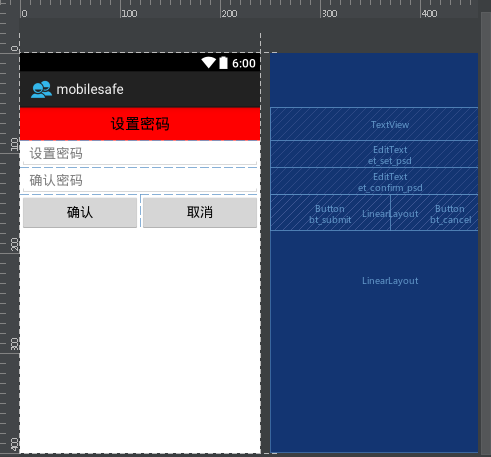
本文地址:http://www.cnblogs.com/wuyudong/p/5939823.html,转载请注明出处。
布局如下:
<?xml version="1.0" encoding="utf-8"?>

<LinearLayout xmlns:android="http://schemas.android.com/apk/res/android"

    android:layout_width="match_parent"

    android:layout_height="match_parent"

    android:orientation="vertical">

    <TextView

        style="@style/TitleStyle"

        android:background="#f00"

        android:text="设置密码"

        />

    <EditText

        android:id="@+id/et_set_psd"

        android:layout_width="match_parent"

        android:layout_height="wrap_content"

        android:hint="设置密码"

        />

    <EditText

        android:id="@+id/et_confirm_psd"

        android:layout_width="match_parent"

        android:layout_height="wrap_content"

        android:hint="确认密码"

        />

    <LinearLayout

        android:layout_width="match_parent"

        android:layout_height="wrap_content">

        <Button

            android:id="@+id/bt_submit"

            android:layout_width="0dp"

            android:layout_height="wrap_content"

            android:layout_weight="1"

            android:text="确认" />

        <Button

            android:id="@+id/bt_cancel"

            android:layout_width="0dp"

            android:layout_height="wrap_content"

            android:layout_weight="1"

            android:text="取消" />

    </LinearLayout>

</LinearLayout>
其中TitleStyle的代码如下:
<resources>

    <!--

        Base application theme, dependent on API level. This theme is replaced

        by AppBaseTheme from res/values-vXX/styles.xml on newer devices.

    -->

    <style name="AppBaseTheme" parent="android:Theme.Light">

        <!--

            Theme customizations available in newer API levels can go in

            res/values-vXX/styles.xml, while customizations related to

            backward-compatibility can go here.

        -->

    </style>

    <!-- Application theme. -->

    <style name="AppTheme" parent="AppBaseTheme">

        <!-- 在去头的同时还保持高版本的样式主题 -->

        <!-- All customizations that are NOT specific to a particular API-level can go here. -->

        <item name="android:windowNoTitle">true</item>

    </style>

    <style name="TitleStyle">

        <item name="android:gravity">center</item>

        <item name="android:textSize">20sp</item>

        <item name="android:textColor">#000</item>

        <item name="android:padding">10dp</item>

        <item name="android:background">#0f0</item>

        <item name="android:layout_width">match_parent</item>

        <item name="android:layout_height">wrap_content</item>

    </style>

</resources>
Android 手机卫士--设置密码对话框的更多相关文章
- [android] 手机卫士自定义对话框布局
手机防盗页面部分 点击手机防盗,进行判断,如果没有设置密码,显示一个设置密码的对话框,如果已经设置密码了,弹出输入密码对话框 密码保存在SharedPreferences中,数据取出进行判断 自定义一 ...
- Android 手机卫士--确认密码对话框编写
本文接着实现“确认密码”功能,也即是用户以前设置过密码,现在只需要输入确认密码 本文地址:http://www.cnblogs.com/wuyudong/p/5940718.html,转载请注明出处. ...
- Android 手机卫士--弹出对话框
在<Android 手机卫士--解析json与消息机制发送不同类型消息>一文中,消息机制发送不同类型的信息还没有完全实现,在出现异常的时候,应该弹出吐司提示异常,代码如下: private ...
- Android 手机卫士--设置界面&功能列表界面跳转逻辑处理
在<Android 手机卫士--md5加密过程>中已经实现了加密类,这里接着实现手机防盗功能 本文地址:http://www.cnblogs.com/wuyudong/p/5941959. ...
- Android 手机卫士--参照文档编写选择器
本文来实现<Android 手机卫士--导航界面1的布局编写>中的图片选择器部分的代码. 本文地址:http://www.cnblogs.com/wuyudong/p/5944356.ht ...
- Android 手机卫士--签名文件说明&包名说明
在<Android 手机卫士--打包生成apk维护到服务器>一文中,实现了新版本的apk到服务器,当打开客户端apk的时候,发现有新版本,提示更新.还实现了利用xutils工具实现了从服务 ...
- android手机卫士、3D指南针、动画精选、仿bilibli客户端、身份证银行卡识别等源码
Android精选源码 android身份证.银行卡号扫描源码 android仿bilibili客户端 android一款3D 指南针 源码 android手机卫士app源码 android提醒应用, ...
- Android 手机卫士--对话初次设置密码验证过程
本文实现设置密码对话框的逻辑判断 本文地址:http://www.cnblogs.com/wuyudong/p/5940551.html,转载请注明出处. 首先添加上图按钮的监听事件代码 /** * ...
- Android 手机卫士--是否有密码区分对话框类型
本文开始逐步实现设置中心的“手机防盗”功能模块 本文地址:/www.cnblogs.com/wuyudong/p/5939123.html,转载请注明出处. 点击“手机防盗”,如果之前没有设置过密码, ...
随机推荐
- Android 设置对话框全屏
1.在styles.xml中添加一个style: <style name="Dialog_Fullscreen"> <item name="androi ...
- Android之genymotion模拟器安装于配置
今天是双休日,可怜没人陪,只好一个人玩电脑了,之前别人一直给我推荐genymotion模拟器,说各种方便,秒杀Android自带模拟器,所以就趁这个周末搞了一下,总体感觉还挺不错的,确实比Androi ...
- 【原创】开源Math.NET基础数学类库使用(06)直接求解线性方程组
本博客所有文章分类的总目录:[总目录]本博客博文总目录-实时更新 开源Math.NET基础数学类库使用总目录:[目录]开源Math.NET基础数学类库使用总目录 前言 ...
- Android自定义View 画弧形,文字,并增加动画效果
一个简单的Android自定义View的demo,画弧形,文字,开启一个多线程更新ui界面,在子线程更新ui是不允许的,但是View提供了方法,让我们来了解下吧. 1.封装一个抽象的View类 B ...
- 修复bootstrap daterangepicker中的3个问题
最近项目中使用了一个基于Bootstrap的daterangepicker控件. 1.点击页面其他空白的地方,会把之前在日历上选中的日期选择上. 具体描述: 1.点击打开日期选择框 2.选择一个日期范 ...
- 自己在总结前人经验下弄的几个opencv封装函数
第一个是增加对比度的函数,就是变亮. IplImage* EqualizeHistColorImage(IplImage *pImage) { IplImage *pEquaImage = cvCre ...
- 将DataTable转换成CSV文件
DataTable用于在.net项目中,用于缓存数据,DataTable表示内存中数据的一个表.CSV文件最早用在简单的数据库里,由于其格式简单,并具备很强的开放性,所以起初被扫图家用作自己图集的标记 ...
- eclipse maven update error 解决方法
eclipse maven update error 解决方法 本来真不想写这篇博文的,但是eclipse和maven真的是太操蛋了,动不动就出了一些乱七八糟的问题,记录一下.希望公司能早 ...
- Moon.Orm常见问题问答FAQ
有问题在评论,我看到邮件会尽快回复 1.重点了解Db里面的方法.这是核心. 2.关于查询语句MQL:http://www.cnblogs.com/humble/p/3380065.html 3.关于如 ...
- html5手机端的点击弹出侧边滑动菜单代码
效果预览:http://hovertree.com/texiao/html5/19/ 本效果适用于移动设备,可以使用手机等浏览效果. 源码下载:http://hovertree.com/h/bjaf/ ...