
Directx11教程(10) 画一个简易坐标轴
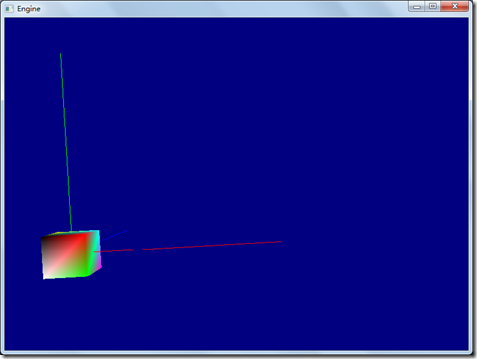
本篇教程中,我们将在三维场景中,画一个简易的坐标轴,分别用红、绿、蓝三种颜色表示x,y,z轴的正向坐标轴。
为此,我们要先建立一个AxisModelClass类,来表示坐标轴顶点。
现在系统类之间的关系图如下:
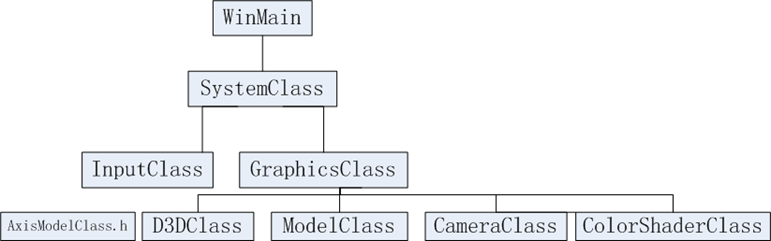
AxisModelClass类和前面的ModelClass类相似,只是创建顶点缓冲和索引缓冲时,指定了3条线段,表示三个坐标轴。
AxisModelClass.h的主要代码如下:
#pragma once
#include <d3d11.h>
#include <d3dx10math.h>
#include "common.h"
class AxisModelClass
{
…
void RenderBuffers(ID3D11DeviceContext*);
//顶点缓冲和顶点索引缓冲
ID3D11Buffer *m_vertexBuffer, *m_indexBuffer;
int m_vertexCount, m_indexCount;
};
AxisModelClass.cpp的主要代码如下:
#include "AxisModelClass.h"
…
bool AxisModelClass::InitializeBuffers(ID3D11Device* device)
{
VertexType* vertices;
unsigned long* indices;
D3D11_BUFFER_DESC vertexBufferDesc, indexBufferDesc;
D3D11_SUBRESOURCE_DATA vertexData, indexData;
HRESULT result;
//首先,我们创建2个临时缓冲存放顶点和索引数据,以便后面使用。.
// 设置顶点缓冲大小为6
m_vertexCount = 6;
// 设置索引缓冲大小.
m_indexCount = 6;
// 创建顶点临时缓冲.
vertices = new VertexType[m_vertexCount];
if(!vertices)
{
return false;
}
// 创建索引缓冲.
indices = new unsigned long[m_indexCount];
if(!indices)
{
return false;
}
// 设置顶点数据.
//x轴,红色
vertices[0].position = D3DXVECTOR3(0.0f, 0.0f, 0.0f);
vertices[0].color = RED;
vertices[1].position = D3DXVECTOR3(10.0f, 0.0f, 0.0f);
vertices[1].color = RED;
//y轴,绿色
vertices[2].position = D3DXVECTOR3(0.0f, 0.0f, 0.0f);
vertices[2].color = GREEN;
vertices[3].position = D3DXVECTOR3(0.0f, 10.0f, 0.0f);
vertices[3].color = GREEN;
//z轴,蓝色
vertices[4].position = D3DXVECTOR3(0.0f, 0.0f, 0.0f);
vertices[4].color = BLUE;
vertices[5].position = D3DXVECTOR3(0.0f, 0.0f, 10.0f);
vertices[5].color = BLUE;
// 设置索引缓冲数据.
indices[0] = 0;
indices[1] = 1;
indices[2] = 2;
indices[3] = 3;
indices[4] = 4;
indices[5] = 5;
…
return true;
}
void AxisModelClass::RenderBuffers(ID3D11DeviceContext* deviceContext)
{
unsigned int stride;
unsigned int offset;
// 设置顶点缓冲跨度和偏移.
stride = sizeof(VertexType);
offset = 0;
//在input assemberl阶段绑定顶点缓冲,以便能够被渲染
deviceContext->IASetVertexBuffers(0, 1, &m_vertexBuffer, &stride, &offset);
//在input assemberl阶段绑定索引缓冲,以便能够被渲染
deviceContext->IASetIndexBuffer(m_indexBuffer, DXGI_FORMAT_R32_UINT, 0);
// 设置体元语义,渲染线段,画出坐标轴
注意:这儿指定画的体元为线段列表
deviceContext->IASetPrimitiveTopology(D3D11_PRIMITIVE_TOPOLOGY_LINELIST);
return;
}
为了使用颜色宏定义,我么去掉了上篇文章在ModelClass.h 中定义的颜色,而新建一个common.h文件,
ModelClass.h中将包含common.h
ModelClass.h代码改变如下:
#pragma once
#include <d3d11.h>
#include <d3dx10math.h>
#include "common.h"
class ModelClass
{
…
};
common.h的代码如下:
//定义一些常用颜色
#include <d3d11.h>
#include <d3dx10math.h>
const D3DXVECTOR4 WHITE(1.0f, 1.0f, 1.0f, 1.0f);
const D3DXVECTOR4 BLACK(0.0f, 0.0f, 0.0f, 1.0f);
const D3DXVECTOR4 RED(1.0f, 0.0f, 0.0f, 1.0f);
const D3DXVECTOR4 GREEN(0.0f, 1.0f, 0.0f, 1.0f);
const D3DXVECTOR4 BLUE(0.0f, 0.0f, 1.0f, 1.0f);
const D3DXVECTOR4 YELLOW(1.0f, 1.0f, 0.0f, 1.0f);
const D3DXVECTOR4 CYAN(0.0f, 1.0f, 1.0f, 1.0f); //蓝绿色
const D3DXVECTOR4 MAGENTA(1.0f, 0.0f, 1.0f, 1.0f); //洋红色
const D3DXVECTOR4 BEACH_SAND(1.0f, 0.96f, 0.62f, 1.0f);
const D3DXVECTOR4 LIGHT_YELLOW_GREEN(0.48f, 0.77f, 0.46f, 1.0f);
const D3DXVECTOR4 DARK_YELLOW_GREEN(0.1f, 0.48f, 0.19f, 1.0f);
const D3DXVECTOR4 DARKBROWN(0.45f, 0.39f, 0.34f, 1.0f);
GraphicsClass.h修改的代码如下:
#pragma once
…
#include "modelclass.h"
#include "AxisModelClass.h"
#include "colorshaderclass.h"
…
class GraphicsClass
{
…
ModelClass* m_Model;
AxisModelClass* m_AxisModel;
ColorShaderClass* m_ColorShader;
};
GraphicsClass.cpp代码如下:
#include "GraphicsClass.h"
GraphicsClass::GraphicsClass(void)
{
m_D3D = 0;
m_Camera = 0;
m_Model = 0;
m_AxisModel = 0;
m_ColorShader = 0;
}
bool GraphicsClass:: Initialize(int screenWidth, int screenHeight, HWND hwnd)
{
…
// 创轴建模型对象.
m_AxisModel = new AxisModelClass;
if(!m_AxisModel)
{
return false;
}
// 初始化坐标轴模型对象.
result = m_AxisModel->Initialize(m_D3D->GetDevice());
if(!result)
{
MessageBox(hwnd, L"Could not initialize the axis model object.", L"Error", MB_OK);
return false;
}
…
return true;
}
bool GraphicsClass::Frame()
{
bool result;
// 调用Render函数,渲染3D场景
// Render是GraphicsClass的私有函数.
result = Render();
if(!result)
{
return false;
}
return true;
}
bool GraphicsClass::Render()
{
D3DXMATRIX viewMatrix, projectionMatrix, worldMatrix;
bool result;
// 设置framebuffer.为浅蓝色
m_D3D->BeginScene(0.0f, 0.0f, 0.5f, 1.0f);
// 得到3个矩阵.
m_Camera->getViewMatrix(&viewMatrix);
m_D3D->GetWorldMatrix(worldMatrix);
m_D3D->GetProjectionMatrix(projectionMatrix);
m_AxisModel->Render(m_D3D->GetDeviceContext());
// 用shader渲染.
result = m_ColorShader->Render(m_D3D->GetDeviceContext(), m_AxisModel->GetIndexCount(), worldMatrix, viewMatrix, projectionMatrix);
if(!result)
{
return false;
}
// 把模型顶点和索引缓冲放入管线,准备渲染.
m_Model->Render(m_D3D->GetDeviceContext());
// 用shader渲染.
result = m_ColorShader->Render(m_D3D->GetDeviceContext(), m_Model->GetIndexCount(), worldMatrix, viewMatrix, projectionMatrix);
if(!result)
{
return false;
}
//把framebuffer中的图像present到屏幕上.
m_D3D->EndScene();
return true;
}
程序执行后,如下图所示:
完整的代码请参考:
工程文件myTutorialD3D11_9
代码下载:
http://files.cnblogs.com/mikewolf2002/myTutorialD3D11.zip
Directx11教程(10) 画一个简易坐标轴的更多相关文章
- Directx11教程(19) 画一个简单的地形
原文:Directx11教程(19) 画一个简单的地形 通常我们在xz平面定义一个二维的网格,然后y的值根据一定的函数计算得到,比如正弦.余弦函数的组合等等,可以得到一个看似不错的地形或者 ...
- Directx11教程(7) 画一个颜色立方体
原文:Directx11教程(7) 画一个颜色立方体 前面教程我们通过D3D11画了一个三角形,本章我们将画一个颜色立方体,它的立体感更强.主要的变动是ModelClass类,在Model ...
- Directx11教程(6) 画一个简单的三角形(2)
原文:Directx11教程(6) 画一个简单的三角形(2) 在上篇教程中,我们实现了在D3D11中画一个简单的三角形,但是,当我们改变窗口大小时候,三角形形状却随着窗口高宽比例改变而改变, ...
- Directx11教程(5) 画一个简单的三角形(1)
原文:Directx11教程(5) 画一个简单的三角形(1) 在本篇教程中,我们将通过D3D11画一个简单的三角形.在D3D11中,GPU的渲染主要通过shader来操作(当然还有一些操作 ...
- Directx11教程(56) 建立一个skydome
原文:Directx11教程(56) 建立一个skydome 本章建立一个skydome(天空穹),主要学习如何使用cube mapping. cube map就是把六张纹理当作 ...
- Directx11教程(11) 增加一个debug宏
原文:Directx11教程(11) 增加一个debug宏 现在我们在common.h中增加一个debug的宏,在每个d3d11函数后调用,如果d3d函数出错,它能够给出程序中错误的代码行 ...
- Directx11教程(9) 增加一个TimerClass类
原文:Directx11教程(9) 增加一个TimerClass类 在上篇教程代码的基础上,我们增加一个TimerClass类,这个类的功能很简单,就是可以计算相邻2帧的时间差.利用这个时间 ...
- 使用Python画一个带坐标轴的圆
Download Microsoft Visual Studio Microsoft Visual Studio enables you develop your python Application ...
- Directx11教程40 纹理映射(10)
原文:Directx11教程40 纹理映射(10) 本章尝试使用纹理行列式,或者说纹理数组,在ps中,使用2个纹理,最终的像素颜色,是光照颜色*纹理1采样颜色*纹理2采样颜色,主要是想达到如 ...
随机推荐
- 通过Angular-cli创建新项目
前提:已经安装Git 方法一:(推荐) 1.在需要创建项目的文件夹中右键打开 Git Bush Here ,在此输入 ng new ‘项目名’ --skip-install (如下my-app ...
- 【DM642】ICELL Interface—Cells as Algorithm Containers
ICELL Interface—Cells as Algorithm Containers: DSP的算法标准(XDAIS)为算法提供了一个标准的接口.这样我们就可以使用第三方的算法.For tech ...
- oracle pl/sql远程连接过程
之前没用过oracle,现在公司用到就记录下安装过程吧.安装PL/SQL工具,安装oracle11G工具.打开PL/SQL 进行配置.
- spring源码学习之容器的扩展(二)
六 BeanFactory的后处理BeanFactory作为spring容器的基础,用于存放所有已经加载的bean,为了保证程序上的高扩展性,spring针对BeanFactory做了大量的扩展,比如 ...
- JS字符串的相关方法
1.字符方法 charAt()和charCodeAt(),都接收一个参数,charAt()返回的是给定位置的字符,charCodeAt()返回的是给定位置字符的字符编码.如: <script&g ...
- table使用display:block时会多出一条边框
在静态页面中添加一个table,然后设置table的显示隐藏,当使用display:block显示table时出现了如下情况,详情请点击链接: http://jsbin.com/pinovorahu/ ...
- UML类图解释
那个动物矩形框,它就代表一个类(Class).类图分三层,第一层显示类的名称,如果是抽象类,则就用斜体显示.第二层是类的特性,通常是字段和属性.第三层是类的操作,通常是方法或行为.注意前面的符号,“+ ...
- 移动端“响应式布局”’--rem
使用目的:为了让移动设计稿在大部分的移动设备上看起来有一致的展示效果,我们使用rem的像素单位. 方法一: 1.在页面引入js,获取屏幕大小,更新rem基准. (function () { var c ...
- Cesium 1.50重量级新功能测评
概要 既Cesium 1.49中3dtile加载性能大幅提升以后,Cesium 1.50再次迎来几个重量级新功能: 1 地球裁切,这下相当于可以截取一部分地形影像数据,当作一个平面场景来用了! 2 射 ...
- Docker搭建的MySQL容器出现 "Too many connections 1040" 最大连接数修改完未生效的解决方案
原文:Docker搭建的MySQL容器出现 "Too many connections 1040" 最大连接数修改完未生效的解决方案 版权声明:本文为博主原创文章,未经博主允许不得 ...