
解决MVC Json序列化的循环引用问题/EF Json序列化循引用问题---Newtonsoft.Json
1..Net开源Json序列化工具Newtonsoft.Json中提供了解决序列化的循环引用问题:
方式1:指定Json序列化配置为 ReferenceLoopHandling.Ignore
方式2:指定 JsonIgnore忽略 引用对象
实例1,解决MVC的Json序列化引用方法:
step1:在项目上添加引用 Newtonsoft.Json程序包,命令:Insert-Package Newtonsoft.Json
step2:在项目中添加一个类,继承JsonResult,代码如下:
/// <summary>

/// 继承JsonResut,重写序列化方式

/// </summary>

public class JsonNetResult : JsonResult

{

    public JsonSerializerSettings Settings { get; private set; }

    public JsonNetResult()

    {

        Settings = new JsonSerializerSettings

        {

            //这句是解决问题的关键,也就是json.net官方给出的解决配置选项.

            ReferenceLoopHandling = ReferenceLoopHandling.Ignore

        };

    }

    public override void ExecuteResult(ControllerContext context)

    {

        if (context == null)

            throw new ArgumentNullException("context");

        if (this.JsonRequestBehavior == JsonRequestBehavior.DenyGet && string.Equals(context.HttpContext.Request.HttpMethod, "GET", StringComparison.OrdinalIgnoreCase))

            throw new InvalidOperationException("JSON GET is not allowed");

        HttpResponseBase response = context.HttpContext.Response;

        response.ContentType = string.IsNullOrEmpty(this.ContentType) ? "application/json" : this.ContentType;

        if (this.ContentEncoding != null)

            response.ContentEncoding = this.ContentEncoding;

        if (this.Data == null)

            return;

        var scriptSerializer = JsonSerializer.Create(this.Settings);

        using (var sw = new StringWriter())

        {

            scriptSerializer.Serialize(sw, this.Data);

            response.Write(sw.ToString());

        }

    }

}
step3:在项目添加BaseController,重写Json()方法,代码如下:
public class BaseController : Controller

{

    public StudentContext _Context = new StudentContext();

    /// <summary>

    /// 重写,Json方法,使之返回JsonNetResult类型

    /// </summary>

    protected override JsonResult Json(object data, string contentType,

        Encoding contentEncoding, JsonRequestBehavior behavior)

    {

        return new JsonNetResult

        {

            Data = data,

            ContentType = contentType,

            ContentEncoding = contentEncoding,

            JsonRequestBehavior = behavior

        };

    }

}
step4.向平时一样使用就可以了
//获取列表

public JsonResult GetList()

{

    List<student> list = _Context.students.Where(q => q.sno == "").ToList();

    //方法1

    return Json(list);

    //方法2

    //return new JsonNetResult() {

    //    Data=list

    //};

}
获取的结果,说明,这种方式指定忽略循环引用,是在指定循环级数后忽略,返回的json数据中还是有部分循环的数据
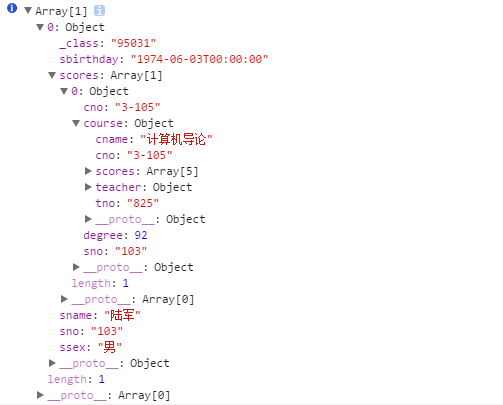
解决EF Json序列化循环引用方法2,在指定的关联对象上,添加JsonIgnore 方法注释
[JsonIgnore]

public virtual ICollection<score> scores { get; set; }
返回结果中,没有关联表数据

相关文章:
Newtonsoft.Json简介:http://blog.csdn.net/u011127019/article/details/51706619
EF的Json序列化,循环引用:http://blog.csdn.net/u011127019/article/details/51706659
自引用:https://my.oschina.net/tianma3798/blog/673159
解决MVC Json序列化的循环引用问题/EF Json序列化循引用问题---Newtonsoft.Json的更多相关文章
- 解决MVC中Model上的特性在EF框架刷新时清空的问题
MVC中关于前端数据的效验一般都是通过在Model中相关的类上打上特性来实现. 但是在我们数据库发生改变,EF框架需要刷新时会把我们在Model上的特性全部清除,这样的话,我们前端的验证就会失效. 因 ...
- 未能加载文件或程序集 Newtonsoft.Json, Version=4.5.0.0 的报错,解决方法
使用httpclient测试webapi的时候客户端报错: {"未能加载文件或程序集“Newtonsoft.Json, Version=4.5.0.0, Culture=neutral, P ...
- .Net使用Newtonsoft.Json.dll(JSON.NET)对象序列化成json、反序列化json示例教程
JSON作为一种轻量级的数据交换格式,简单灵活,被很多系统用来数据交互,作为一名.NET开发人员,JSON.NET无疑是最好的序列化框架,支持XML和JSON序列化,高性能,免费开源,支持LINQ查询 ...
- Newtonsoft—Json.NET常用方法简述
Json.NET常用方法汇总(可解决日常百分之90的需求) 0.Json.NET基础用法 首先去官网下载最新的Newtonsoft.Json.dll(也可以使用VS自带的NuGet搜索Json.NET ...
- Newtonsoft.Json(Json.net)的基本用法
Newtonsoft.Json(Json.net)的基本用法 其它资料 JSON详解 添加引用: 使用NuGet,命令:install-package Newtonsoft.Json 实体类: pub ...
- Newtonsoft.Json 的基本用法
Ø 前言 说起 C# 对 JSON 的操作(序列化与反序列化),大家都会想到 JavaScriptSerializer.DataContractJsonSerializer 与 Newtonsoft ...
- Newtonsoft.Json[C#]
C# Newtonsoft.Json JsonSerializerSettings配置序列化操作 https://blog.csdn.net/u011127019/article/details/72 ...
- Newtonsoft.Json高级篇:TypeNameHandling设置
原文:Newtonsoft.Json高级篇:TypeNameHandling设置 此示例使用TypeNameHandling 设置在序列化JSON和读取类型信息时包含类型信息,以便在反序列化JSON时 ...
- 关于Newtonsoft.Json引用报错
自己运行的vs版本是2012,然后同事用了2017的,我把代码发给他后运行发现报以下错误: {未能加载文件或程序集"Newtonsoft.Json, Version=4.5.0.0, Cul ...
- C# 中Newtonsoft.Json的安装和使用
官网参考:http://json.codeplex.com/ 在程序包管理控制台,键入NuGet命令 install-package Newtonsoft.Json 安装Newtonsoft.Js ...
随机推荐
- Dp解决数组中连续子数组的最大和
#include<iostream> ]; ;i<size;i++) { TempSum = CurSum; ) ...
- 9.DataPager
ListView搭配DataPager控件实现分页.有两种使用方式:一是将DataPager声明到ListView中:一种是DataPager\ListView没有嵌套关系,然后将DataPager的 ...
- IntegerCache详解
IntegerCache是Integer的内部类,用来将-128——high之间的对象进行实例化 private static class IntegerCache { static f ...
- The Embarrassed Cryptographer(高精度取模+同余模定理)
Time Limit: 2000MS Memory Limit: 65536K Total Submissions: 11435 Accepted: 3040 Description The ...
- 关于SVN的操作批处理示例
关于SVN的操作批处理示例 为了一句话:不要动手做机器能够做的事情. 天天工作用svn,更新啥的打开目录啥的动作天天在重复.每次写些命令也蛮无聊的,不说了,看下面: 1 @echo off 2 rem ...
- 从字符串总分离文件路径、命名、扩展名,Substring(),LastIndexOf()的使用;替换某一类字符串,Replace()的用法
一:从字符串总分离文件路径.命名.扩展名,上图 二:代码 using System; using System.Collections.Generic; using System.ComponentM ...
- 手机app
手机app是什么? 由于iPhone.三星等智能手机的逐步流行和广泛普及,手机app这个词语开始频繁的出现在广大手机网民的视线中.也许你们还不知道什么是手机app,但你一定下载过手机app,你的手机里 ...
- POJ 1861 Network
题意:有n个点,部分点之间可以连接无向边,每条可以连接的边都有一个权值.求一种连接方法将这些点连接成一个连通图,且所有连接了的边中权值最大的边权值最小. 解法:水题,直接用Kruskal算法做一遍就行 ...
- Selenium终极自动化测试环境搭建(二)Selenium+Eclipse+Python
Selenium终极自动化测试环境搭建(二)Selenium+Eclipse+Python 前面举例了Selenium+Eclipse+Junit+TestNG自动化测试环境的搭建,在前一篇的基础上, ...
- Solr多核的配置
Solr 多核(MultiCore)配置 Solr Multicore意义 Solr Multicore 是 solr 1.3 的新特性.其目的一个solr实例,可以有多个搜索应用.< xmln ...