
Python编写的记事本小程序
用Python中的Tkinter模块写的一个简单的记事本程序,Python2.x和Python3.x的许多内置函数有所改变,所以以下分为Python2.x和Python3.x版本。
一.效果展示:
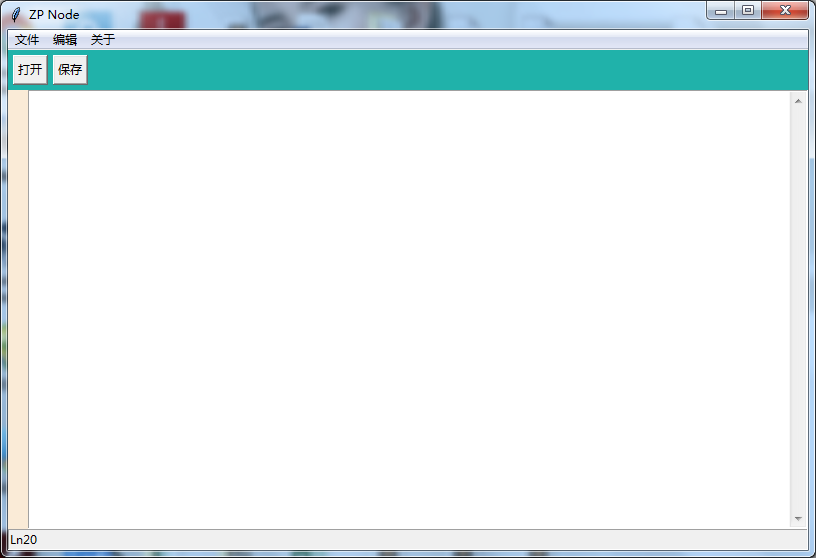
二.Python3.x版本的记事本程序
 #创建一个记事本

 #__author__='ZhangP'

 #-*- encoding:utf8 -*-

 from tkinter import *

 import tkinter.messagebox

 import tkinter.filedialog

 import os

 root=Tk()

 root.title('ZP Node')

 #初始大小显示以及定位位置,注意一定要使用x而非*

 root.geometry("800x500+100+100")

 filename=''

 #定义版权子菜单对应的相关函数

 def author():

     tkinter.messagebox.askokcancel('作者信息','本软件由加油AlwaysWin开发')

 def about():

     tkinter.messagebox.askokcancel('版权信息.Copyright','本软件没有版权,随便用')

 #定义文件子菜单对应的相关函数

 def openfile():

     global filename

     filename=tkinter.filedialog.askopenfilename(defaultextension = '.txt')

     if filename == '':

         filename=None

     else:

         root.title('FileName:'+os.path.basename(filename))

         textPad.delete(1.0,END)

         f=open(filename,'r',encoding='utf-8')   #注意后面要加上读取的编码格式,否则报编码错误

         textPad.insert(1.0,f.read())

         f.close()

 def new():

     global filename

     root.title("未命名文件")

     filename=None

     textPad.delete(1.0,END)

 def save():

     global filename

     try:

         f=open(filename,'w')

         msg=textPad.get(1.0,END)

         f.write(msg)

         f.close()

     except:

         saveas()

 def saveas():

     f=tkinter.filedialog.asksaveasfilename(initialfile='未命名.txt',defaultextension='.txt')

     global filename

     filename=f

     fh=open(f,'w')

     msg=textPad.get(1.0,END)

     fh.write(msg)

     fh.close()

     root.title('FileName:'+os.path.basename(f))

 #创建编辑子菜单的对应函数

 def cut():

     textPad.event_generate('<<Cut>>')

 def copy():

     textPad.event_generate('<<Copy>>')

 def paste():

     textPad.event_generate('<<Paste>>')

 def redo():

     textPad.event_generate('<<Redo>>')

 def undo():

     textPad.event_generate('<<Undo>>')

 def selectAll():

     textPad.tag_add('sel','1.0',END)

 def search():

     topsearch=Toplevel(root)

     topsearch.geometry('300x30+200+250')

     label1=Label(topsearch,text='Find')

     label1.grid(row=0,column=0,padx=5)

     entry1=Entry(topsearch,width=20)

     entry1.grid(row=0,column=1,padx=5)

     button1=Button(topsearch,text='查找')

     button1.grid(row=0,column=2)

 #创建主菜单

 menubar=Menu(root)

 root.config(menu=menubar)

 #创建文件子菜单

 filemenu=Menu(menubar)

 filemenu.add_command(label='新建',accelerator='Ctrl+N',command=new)

 filemenu.add_command(label='打开',accelerator='Ctrl+O',command=openfile)

 filemenu.add_command(label='保存',accelerator='Ctrl+S',command=save)

 filemenu.add_command(label='另存为',accelerator='Ctrl+Shift+S',command=saveas)

 menubar.add_cascade(label='文件',menu=filemenu)

 #创建编辑子菜单

 editmenu=Menu(menubar)

 editmenu.add_command(label='撤消',accelerator='Ctrl+z',command=undo)

 editmenu.add_command(label='重做',accelerator='Ctrl+y',command=redo)

 #添加分割线

 editmenu.add_separator()

 editmenu.add_command(label='剪切',accelerator='Ctrl+X',command=cut)

 editmenu.add_command(label='复制',accelerator='Ctrl+C',command=copy)

 editmenu.add_command(label='粘贴',accelerator='Ctrl+V',command=paste)

 editmenu.add_separator()

 editmenu.add_command(label='查找',accelerator='Ctrl+F',command=search)

 editmenu.add_command(label='全选',accelerator='Ctrl+A',command=selectAll)

 menubar.add_cascade(label='编辑',menu=editmenu)

 #添加版权子菜单

 aboutmenu=Menu(menubar)

 aboutmenu.add_command(label='作者',command=author)

 aboutmenu.add_command(label='版权',command=about)

 menubar.add_cascade(label='关于',menu=aboutmenu)

 #添加工具栏

 toolbar=Frame(root,height=25,bg='light sea green')

 shortButton=Button(toolbar,text='打开',command=openfile)

 shortButton.pack(side=LEFT,padx=5,pady=5)

 shortButton=Button(toolbar,text='保存',command=save)

 shortButton.pack(side=LEFT)

 toolbar.pack(expand=NO,fill=X)

 #添加状态栏

 status=Label(root,text="Ln20",bd=1,relief=SUNKEN,anchor=W)

 status.pack(side=BOTTOM,fill=X)

 #添加编辑界面以及滚动条

 lnlabel=Label(root,width=2,bg='antique white')

 lnlabel.pack(side=LEFT,fill=Y)

 textPad=Text(root,undo=True)

 textPad.pack(expand=YES,fill=BOTH)

 scroll=Scrollbar(textPad)

 textPad.config(yscrollcommand=scroll.set)

 scroll.config(command=textPad.yview)

 scroll.pack(side=RIGHT,fill=Y)

 #显示页面

 root.mainloop()
三.Python2.x版本的记事本程序
 #创建一个记事本

 #__author__='ZhangP'

 #-*- encoding:utf8 -*-

 from Tkinter import *

 from tkMessageBox import *

 from tkFileDialog import *

 import os

 root=Tk()

 root.title('ZP Node')

 #初始大小显示以及定位位置,注意一定要使用x而非*

 root.geometry("800x500+100+100")

 filename=''

 #定义版权对应的相关函数

 def author():

     showinfo('作者信息','本软件由加油AlwaysWin开发')

 def about():

     showinfo('版权信息.Copyright','本软件没有版权,随便用')

 #定义文件子菜单对应的相关函数

 def openfile():

     global filename

     filename=askopenfilename(defaultextension = '.txt')

     if filename == '':

         filename=None

     else:

         root.title('FileName:'+os.path.basename(filename))

         textPad.delete(1.0,END)

         f=open(filename,'r')

         textPad.insert(1.0,f.read())

         f.close()

 def new():

     global filename

     root.title("未命名文件")

     filename = None

     textPad.delete(1.0, END)

 def save():

     global filename

     try:

         f=open(filename,'w')

         msg=textPad.get(1.0,END)

         f.write(msg)

         f.close()

     except:

         saveas()

 def saveas():

     f=asksaveasfilename(initialfile='未命名.txt',defaultextension='.txt')

     global filename

     filename=f

     fh=open(f,'w')

     msg=textPad.get(1.0,END)

     fh.write(msg)

     fh.close()

     root.title('FileName:'+os.path.basename(f))

 #创建编辑子菜单的对应函数

 def cut():

     textPad.event_generate('<<Cut>>')

 def copy():

     textPad.event_generate('<<Copy>>')

 def paste():

     textPad.event_generate('<<Paste>>')

 def redo():

     textPad.event_generate('<<Redo>>')

 def undo():

     textPad.event_generate('<<Undo>>')

 def selectAll():

     textPad.tag_add('sel','1.0',END)

 def search():

     topsearch=Toplevel(root)

     topsearch.geometry('300x30+200+250')

     label1=Label(topsearch,text='Find')

     label1.grid(row=0,column=0,padx=5)

     entry1=Entry(topsearch,width=20)

     entry1.grid(row=0,column=1,padx=5)

     button1=Button(topsearch,text='查找')

     button1.grid(row=0,column=2)

 #创建主菜单

 menubar=Menu(root)

 root.config(menu=menubar)

 #创建文件子菜单

 filemenu=Menu(menubar)

 filemenu.add_command(label='新建',accelerator='Ctrl+N',command=new)

 filemenu.add_command(label='打开',accelerator='Ctrl+O',command=openfile)

 filemenu.add_command(label='保存',accelerator='Ctrl+S',command=save)

 filemenu.add_command(label='另存为',accelerator='Ctrl+Shift+S',command=saveas)

 menubar.add_cascade(label='文件',menu=filemenu)

 #创建编辑子菜单

 editmenu=Menu(menubar)

 editmenu.add_command(label='撤消',accelerator='Ctrl+z',command=undo)

 editmenu.add_command(label='重做',accelerator='Ctrl+y',command=redo)

 #添加分割线

 editmenu.add_separator()

 editmenu.add_command(label='剪切',accelerator='Ctrl+X',command=cut)

 editmenu.add_command(label='复制',accelerator='Ctrl+C',command=copy)

 editmenu.add_command(label='粘贴',accelerator='Ctrl+V',command=paste)

 editmenu.add_separator()

 editmenu.add_command(label='查找',accelerator='Ctrl+F',command=search)

 editmenu.add_command(label='全选',accelerator='Ctrl+A',command=selectAll)

 menubar.add_cascade(label='编辑',menu=editmenu)

 #添加版权子菜单

 aboutmenu=Menu(menubar)

 aboutmenu.add_command(label='作者',command=author)

 aboutmenu.add_command(label='版权',command=about)

 menubar.add_cascade(label='关于',menu=aboutmenu)

 #添加工具栏

 toolbar=Frame(root,height=25,bg='light sea green')

 shortButton=Button(toolbar,text='打开',command=openfile)

 shortButton.pack(side=LEFT,padx=5,pady=5)

 shortButton=Button(toolbar,text='保存',command=save)

 shortButton.pack(side=LEFT)

 toolbar.pack(expand=NO,fill=X)

 #添加状态栏

 status=Label(root,text="Ln20",bd=1,relief=SUNKEN,anchor=W)

 status.pack(side=BOTTOM,fill=X)

 #添加编辑界面以及滚动条

 lnlabel=Label(root,width=2,bg='antique white')

 lnlabel.pack(side=LEFT,fill=Y)

 textPad=Text(root,undo=True)

 textPad.pack(expand=YES,fill=BOTH)

 scroll=Scrollbar(textPad)

 textPad.config(yscrollcommand=scroll.set)

 scroll.config(command=textPad.yview)

 scroll.pack(side=RIGHT,fill=Y)

 #显示页面

 root.mainloop()
Python编写的记事本小程序的更多相关文章
- 使用Python编写打字训练小程序【华为云技术分享】
版权声明:本文为博主原创文章,遵循CC 4.0 BY-SA版权协议,转载请附上原文出处链接和本声明.本文链接:https://blog.csdn.net/devcloud/article/detail ...
- 使用Python编写打字训练小程序
你眼中的程序猿 别人眼中的程序猿,是什么样子?打字如飞,各种炫酷的页面切换,一个个好似黑客般的网站破解.可现实呢? 二指禅的敲键盘,写一行代码,查半天百度-那么如何能让我们从外表上变得更像一个程序猿呢 ...
- python实现串口通讯小程序(GUI界面)
python实现串口通讯小程序(GUI界面) 使用python实现串口通讯需要使用python的pyserial库来实现,这个库在安装python的时候没有自动进行安装,需要自己进行安装. 1.安装p ...
- Python flask构建微信小程序订餐系统
第1章 <Python Flask构建微信小程序订餐系统>课程简介 本章内容会带领大家通览整体架构,功能模块,及学习建议.让大家在一个清晰的开发思路下,进行后续的学习.同时领着大家登陆ht ...
- Python flask构建微信小程序订餐系统☝☝☝
Python flask构建微信小程序订餐系统☝☝☝ 一.Flask MVC框架结构 1.1实际项目结构 1.2application.py 项目配置文件 Flask之flask-script模块使 ...
- Python flask构建微信小程序订餐系统✍✍✍
Python flask构建微信小程序订餐系统 整个课程都看完了,这个课程的分享可以往下看,下面有链接,之前做java开发也做了一些年头,也分享下自己看这个视频的感受,单论单个知识点课程本身没问题, ...
- python爬取微信小程序(实战篇)
python爬取微信小程序(实战篇) 本文链接:https://blog.csdn.net/HeyShHeyou/article/details/90452656 展开 一.背景介绍 近期有需求需要抓 ...
- Python爬取微信小程序(Charles)
Python爬取微信小程序(Charles) 本文链接:https://blog.csdn.net/HeyShHeyou/article/details/90045204 一.前言 最近需要获取微信小 ...
- Python的安装与小程序的编写
Python的安装 在此之前,我完全不了解Python,为了完成任务,在慌忙之中了解了一下Python,通过百度,一步步安装好Python 过程 1.从官网中找到下载菜单并下载最新版本 2.双击pyt ...
随机推荐
- archer docker安装部署
1.准备配置文件从archer项目官网下载/archer/settings.py文件,根据自己情况放到相应的目录我下载后放到如下目录[root@lenovo opt]# mkdir -p /opt/a ...
- redux&&createStore
const createStore = (reducer,presetState, enhancer) => { if (typeof presetState === "functio ...
- MySQL按年度、季度、月度、周、日SQL统计查询
说明 SELECT YEAR('2014-10-29') //2014 SELECT MONTH('2014-10-29') //10 SELECT DAY('2014-10-29') //29 SE ...
- react的this.setState没有触发render
一.浅比较 出现情况: 明明改变了值, 并且回调函数也触发了, 但是就是不触发render import React, { PureComponent } from 'react' import { ...
- 上传图片组件封装 element ui
// element ui 文档地址: http://element.eleme.io/#/zh-CN <template> <div> <div class=" ...
- filesystem type ntfs not configured in kernel
移动硬盘是NTFS格式的,挂载时候kernel不支持这格式 出现:filesystem type ntfs not configured in kernel 解决:通过sudo yum install ...
- 算法笔记--Splay && Link-Cut-Tree
Splay 参考:https://tiger0132.blog.luogu.org/slay-notes 普通模板: ; ], val[N], cnt[N], fa[N], sz[N], lazy[N ...
- js点滴3 vs vue
web Components 学习之路 https://www.cnblogs.com/zhaowinter/p/5447246.html vue学习指路. vue全局配置. ignoredEleme ...
- Django 建立用户的视图(搜索 )
在web应用上,有两个关于搜索获得巨大成功的故事:Google和Yahoo,通过搜索,他们建立了几十亿美元的业务.几乎每个网站都有很大的比例访问量来自这两个搜索引擎.甚至,一个网站是否成功取决于其站内 ...
- 20175317 《Java程序设计》第六周学习总结
20175317 <Java程序设计>第六周学习总结 教材学习内容总结 第六周我学习了教材第七章与第十章的内容,了解了内部类.异常类与输入输出流的知识,学到了以下内容: 什么是内部类 如何 ...