
基本的CRUD操作

导入包---实体类------数据库连接----数据库操作----service层数据操作----网页对service层可视化实现
model
package com.ij34.model;

public class article {

   private int id;

   private String title;

   private String content;

public int getId() {

    return id;

}

public void setId(int id) {

    this.id = id;

}

public String getTitle() {

    return title;

}

public void setTitle(String title) {

    this.title = title;

}

public String getContent() {

    return content;

}

public void setContent(String content) {

    this.content = content;

}

}
dao
package com.ij34.dao;

import java.sql.DriverManager;

import com.mysql.jdbc.Connection;

public class DbConn {

    private static String username="root";

    private static String password="123456";

    private static String url="jdbc:mysql://localhost:3306/articles?useUnicode=true&characterEncoding=UTF-8";

    private static Connection conn=null;

    public static Connection getConnection(){

        if(conn==null){

            try {

                Class.forName("com.mysql.jdbc.Driver");

                conn=(Connection) DriverManager.getConnection(url, username, password);

            } catch (Exception e) {

                // TODO: handle exception

                e.printStackTrace();

            }

        }

        return conn;

    }

    //test connection

    public static void main(String[] args) {

        DbConn db=new DbConn();

        System.out.println(db.toString());

    }

}
package com.ij34.dao;

import java.sql.ResultSet;

import java.util.ArrayList;

import java.util.List;

import com.ij34.model.article;

import com.mysql.jdbc.Connection;

import com.mysql.jdbc.PreparedStatement;

public class ArticleDao {

    public List<article> getfindAll(){  //查All,返回list

        List<article> list=new ArrayList<article>();

        String sql="select * from article";

        Connection conn=DbConn.getConnection();

        try {

            PreparedStatement pstm=(PreparedStatement) conn.prepareStatement(sql);

            ResultSet rs=pstm.executeQuery();

            while(rs.next()){

                article art=new article();

                art.setId(rs.getInt("id"));

                art.setTitle(rs.getString("title"));

                art.setContent(rs.getString("content"));

                list.add(art);

            }

            rs.close();

            pstm.close();

        } catch (Exception e) {

            // TODO: handle exception

            e.printStackTrace();

        }

        return list;

    }

    public boolean addArticle(article art){ //增

        String sql="insert into article(title,content)values(?,?)";

        Connection conn=DbConn.getConnection();

        try {

            PreparedStatement pstm=(PreparedStatement) conn.prepareStatement(sql);

            pstm.setString(1, art.getTitle());

            pstm.setString(2, art.getContent());

            int count=pstm.executeUpdate();

            pstm.close();

            if(count>0) return true;

            else return false;

        } catch (Exception e) {

            // TODO: handle exception

            e.printStackTrace();

        }

        return false;

    }

    public boolean updateArticle(article art){ //修改

        String sql="update article set title=?,content=? where id=?";

        Connection conn=DbConn.getConnection();

        try {

            PreparedStatement pstm=(PreparedStatement) conn.prepareStatement(sql);

            pstm.setString(1, art.getTitle());

            pstm.setString(2, art.getContent());

            pstm.setInt(3, art.getId());

            int count=pstm.executeUpdate();

            pstm.close();

            if(count>0) return true;

            else return false;

        } catch (Exception e) {

            // TODO: handle exception

            e.printStackTrace();

        }

        return false;

    }

    public boolean deleteArticle(int id){  //删除,根据id

        String sql="delete from article where id=?";

        //String sql="delete from article where id='"+id+"'";

        Connection conn=DbConn.getConnection();

        try {

            PreparedStatement pstm=(PreparedStatement) conn.prepareStatement(sql);

            pstm.setInt(1, id);

            int count=pstm.executeUpdate();

            pstm.close();

            if(count>0) return true;

            else return false;

        } catch (Exception e) {

            e.printStackTrace();

        }

        return false;

    }

    public article selectById(int id){//根据id查找

        String sql="select * from article where id="+id;

        Connection conn=DbConn.getConnection();

        article art=null;

        try {

            PreparedStatement pstm=(PreparedStatement) conn.prepareStatement(sql);

            ResultSet rs=pstm.executeQuery();

            while(rs.next()){

                art=new article();

                art.setId(rs.getInt("id"));

                art.setTitle(rs.getString("title"));

                art.setContent(rs.getString("content"));

            }

            rs.close();

            pstm.close();

        } catch (Exception e) {

            e.printStackTrace();

        }

        return art;

    }

}
service
add
package com.ij34.service;

import java.io.IOException;

import javax.servlet.ServletException;

import javax.servlet.http.HttpServlet;

import javax.servlet.http.HttpServletRequest;

import javax.servlet.http.HttpServletResponse;

import com.ij34.dao.ArticleDao;

import com.ij34.model.article;

public class addArticle extends HttpServlet{

    /**

     *

     */

    private static final long serialVersionUID = 1L;

    @Override

    protected void doGet(HttpServletRequest req, HttpServletResponse resp) throws ServletException, IOException {

        // TODO Auto-generated method stub

        this.doPost(req, resp);

    }

    @Override

    protected void doPost(HttpServletRequest req, HttpServletResponse resp) throws ServletException, IOException {

        // TODO Auto-generated method stub

        article art=new article();

        String title=req.getParameter("title");

        String content=req.getParameter("content");

        art.setTitle(new String(title.getBytes("ISO-8859-1"),"UTF-8"));

        art.setContent(new String(content.getBytes("ISO-8859-1"),"UTF-8"));

        ArticleDao ad=new ArticleDao();

        ad.addArticle(art);

        req.getRequestDispatcher("showArticle").forward(req, resp);

    }

}
del
package com.ij34.service;

import java.io.IOException;

import javax.servlet.ServletException;

import javax.servlet.http.HttpServlet;

import javax.servlet.http.HttpServletRequest;

import javax.servlet.http.HttpServletResponse;

import com.ij34.dao.ArticleDao;

public class deleteArticle extends HttpServlet{

    /**

     *

     */

    private static final long serialVersionUID = 1L;

    @Override

    protected void doGet(HttpServletRequest req, HttpServletResponse resp) throws ServletException, IOException {

        // TODO Auto-generated method stub

        this.doPost(req, resp);

    }

    @Override

    protected void doPost(HttpServletRequest req, HttpServletResponse resp) throws ServletException, IOException {

        // TODO Auto-generated method stub

        String idStr=req.getParameter("id");

        if(idStr!=null&&!idStr.equals("")){

            int id=Integer.valueOf(idStr);

            ArticleDao ad=new ArticleDao();

            ad.deleteArticle(id);

        }

        req.getRequestDispatcher("showArticle").forward(req, resp);

    }

}
find
package com.ij34.service;

import java.io.IOException;

import java.util.List;

import javax.servlet.ServletException;

import javax.servlet.http.HttpServlet;

import javax.servlet.http.HttpServletRequest;

import javax.servlet.http.HttpServletResponse;

import com.ij34.dao.ArticleDao;

import com.ij34.model.article;

public class showArticle extends HttpServlet{

    /**

     *

     */

    private static final long serialVersionUID = 1L;

    @Override

    protected void doGet(HttpServletRequest req, HttpServletResponse resp) throws ServletException, IOException {

        // TODO Auto-generated method stub

        this.doPost(req, resp);

    }

    @Override

    protected void doPost(HttpServletRequest req, HttpServletResponse resp) throws ServletException, IOException {

        // TODO Auto-generated method stub

        ArticleDao ad=new ArticleDao();

        List<article> list=ad.getfindAll();

        req.setAttribute("list", list);

        req.getRequestDispatcher("show.jsp").forward(req, resp);

    }

}
update
package com.ij34.service;

import java.io.IOException;

import javax.servlet.ServletException;

import javax.servlet.http.HttpServlet;

import javax.servlet.http.HttpServletRequest;

import javax.servlet.http.HttpServletResponse;

import com.ij34.dao.ArticleDao;

import com.ij34.model.article;

public class updateArticle extends HttpServlet{

    /**

     *

     */

    private static final long serialVersionUID = 1L;

    @Override

    protected void doGet(HttpServletRequest req, HttpServletResponse resp) throws ServletException, IOException {

        // TODO Auto-generated method stub

        String idStr=req.getParameter("id");

        if(idStr!=null&&!idStr.equals("")){

            ArticleDao ad=new ArticleDao();

            int id=Integer.valueOf(idStr);

           article art=ad.selectById(id);

           req.setAttribute("article", art);

        }

          req.getRequestDispatcher("update.jsp").forward(req, resp);

    }

    @Override

    protected void doPost(HttpServletRequest req, HttpServletResponse resp) throws ServletException, IOException {

        // TODO Auto-generated method stub

        article art=new article();

        String idStr=req.getParameter("id");

        String title=req.getParameter("title");

        String content=req.getParameter("content");

        art.setId(Integer.valueOf(idStr));

        art.setTitle(new String(title.getBytes("ISO-8859-1"),"UTF-8"));

        art.setContent(new String(content.getBytes("ISO-8859-1"),"UTF-8"));

        ArticleDao ad=new ArticleDao();

        ad.updateArticle(art);

        req.getRequestDispatcher("showArticle").forward(req, resp);

    }

}
web.xml
<?xml version="1.0" encoding="UTF-8"?>

<web-app xmlns:xsi="http://www.w3.org/2001/XMLSchema-instance" xmlns="http://java.sun.com/xml/ns/javaee" xsi:schemaLocation="http://java.sun.com/xml/ns/javaee http://java.sun.com/xml/ns/javaee/web-app_2_5.xsd" id="WebApp_ID" version="2.5">

  <display-name>Articles</display-name>

  <welcome-file-list>

    <welcome-file>index.jsp</welcome-file>

  </welcome-file-list>

  <servlet>

    <servlet-name>addArticle</servlet-name>

    <servlet-class>com.ij34.service.addArticle</servlet-class>

  </servlet>

  <servlet-mapping>

    <servlet-name>addArticle</servlet-name>

    <url-pattern>/addArticle</url-pattern>

  </servlet-mapping>

    <servlet>

    <servlet-name>deleteArticle</servlet-name>

    <servlet-class>com.ij34.service.deleteArticle</servlet-class>

  </servlet>

  <servlet-mapping>

    <servlet-name>deleteArticle</servlet-name>

    <url-pattern>/deleteArticle</url-pattern>

  </servlet-mapping>

    <servlet>

    <servlet-name>showArticle</servlet-name>

    <servlet-class>com.ij34.service.showArticle</servlet-class>

  </servlet>

  <servlet-mapping>

    <servlet-name>showArticle</servlet-name>

    <url-pattern>/showArticle</url-pattern>

  </servlet-mapping>

    <servlet>

    <servlet-name>updateArticle</servlet-name>

    <servlet-class>com.ij34.service.updateArticle</servlet-class>

  </servlet>

  <servlet-mapping>

    <servlet-name>updateArticle</servlet-name>

    <url-pattern>/updateArticle</url-pattern>

  </servlet-mapping>

</web-app>
网页
index
<%@ page language="java" contentType="text/html; charset=UTF-8"

    pageEncoding="UTF-8"%>

<jsp:forward page="showArticle"/>  //要写doget
add
<%@ page language="java" contentType="text/html; charset=UTF-8"

    pageEncoding="UTF-8"%>

<%@ taglib prefix="c" uri="http://java.sun.com/jsp/jstl/core"%>

<!DOCTYPE html PUBLIC "-//W3C//DTD HTML 4.01 Transitional//EN" "http://www.w3.org/TR/html4/loose.dtd">

<html>

<head>

<meta http-equiv="Content-Type" content="text/html; charset=UTF-8">

<title>添 加</title>

</head>

<body>

<form action="addArticle" method="post">

  <table align="center">

        <tr>

           <td colspan="2"><center><h4>添加</h4></center></td>

        </tr>

        <tr>

           <td>标 题:</td><td><input type="text" name="title"/></td>

        </tr>

                <tr>

           <td>内 容:</td><td><input type="text" name="content"/></td>

        </tr>

        <tr>

          <td><input type="submit" value="提  交"/></td><td><input type="reset" value="重 置"/></td>

        </tr>

  </table>

</form>

</body>

</html>
update
<%@ page language="java" contentType="text/html; charset=UTF-8"%>

<%@ taglib prefix="c" uri="http://java.sun.com/jsp/jstl/core"%>

<!DOCTYPE html PUBLIC "-//W3C//DTD HTML 4.01 Transitional//EN" "http://www.w3.org/TR/html4/loose.dtd">

<html>

<head>

<meta http-equiv="Content-Type" content="text/html; charset=UTF-8">

<title>修 改</title>

</head>

<body>

<form action="updateArticle" method="post">

  <table align="center">

        <tr>

           <td colspan="2"><center><h4>修 改</h4></center></td>

        </tr>

                <tr>

           <td>编 号:</td><td><input type="text" name="id" value="${article.id }" readonly="readonly"/></td>

        </tr>

        <tr>

           <td>标 题:</td><td><input type="text" name="title" value="${article.title }"/></td>

        </tr>

                <tr>

           <td>内 容:</td><td><input type="text" name="content" value="${article.content }"></td>

        </tr>

        <tr>

          <td><input type="submit" value="提  交"/></td><td><input type="button" value="返回" onclick="history.go(-1)"/></td>

        </tr>

  </table>

</form>

</body>

</html>
show
<%@ page language="java" contentType="text/html; charset=UTF-8"

    pageEncoding="UTF-8"%>

<%@ taglib prefix="c" uri="http://java.sun.com/jsp/jstl/core"%>

<!DOCTYPE html PUBLIC "-//W3C//DTD HTML 4.01 Transitional//EN" "http://www.w3.org/TR/html4/loose.dtd">

<html>

<head>

<meta http-equiv="Content-Type" content="text/html; charset=UTF-8">

<title>显示</title>

</head>

<body>

<form action="showArticle" method="post">

  <table align="center">

   <tr>

   <th>编  号 </th>

   <th>标  题 </th>

   <th>   内               容       </th>

   <th> 操     作 </th>

   </tr>

   <c:forEach var="li" items="${list}">

   <tr>

   <td>${li.id} </td>

   <td> ${li.title} </td>

   <td> ${li.content} </td>

   <td><a href="deleteArticle?id=${li.id}">删除</a>|<a href="updateArticle?id=${li.id}">修改</a></td>

   </tr>

   </c:forEach>

   <tr>

   <td align="center"><a href="add.jsp"> 添  加 </a></td>

   </tr>

  </table>

</form>

</body>

</html>
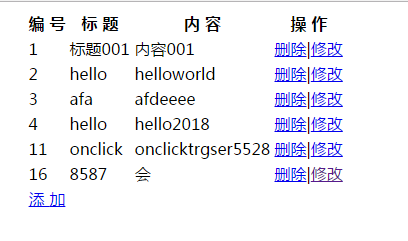
结果
基本的CRUD操作的更多相关文章
- 【翻译】MongoDB指南/CRUD操作(四)
[原文地址]https://docs.mongodb.com/manual/ CRUD操作(四) 1 查询方案(Query Plans) MongoDB 查询优化程序处理查询并且针对给定可利用的索引选 ...
- 【翻译】MongoDB指南/CRUD操作(三)
[原文地址]https://docs.mongodb.com/manual/ CRUD操作(三) 主要内容: 原子性和事务(Atomicity and Transactions),读隔离.一致性和新近 ...
- 【翻译】MongoDB指南/CRUD操作(二)
[原文地址]https://docs.mongodb.com/manual/ MongoDB CRUD操作(二) 主要内容: 更新文档,删除文档,批量写操作,SQL与MongoDB映射图,读隔离(读关 ...
- 【翻译】MongoDB指南/CRUD操作(一)
[原文地址]https://docs.mongodb.com/manual/ MongoDB CRUD操作(一) 主要内容:CRUD操作简介,插入文档,查询文档. CRUD操作包括创建.读取.更新和删 ...
- ASP.NET Core Web API Cassandra CRUD 操作
在本文中,我们将创建一个简单的 Web API 来实现对一个 “todo” 列表的 CRUD 操作,使用 Apache Cassandra 来存储数据,在这里不会创建 UI ,Web API 的测试将 ...
- MongoDB的CRUD操作
1. 前言 在上一篇文章中,我们介绍了MongoDB.现在,我们来看下如何在MongoDB中进行常规的CRUD操作.毕竟,作为一个存储系统,它的基本功能就是对数据进行增删改查操作. MongoDB中的 ...
- 【Java EE 学习 44】【Hibernate学习第一天】【Hibernate对单表的CRUD操作】
一.Hibernate简介 1.hibernate是对jdbc的二次开发 2.jdbc没有缓存机制,但是hibernate有. 3.hibernate的有点和缺点 (1)优点:有缓存,而且是二级缓存: ...
- 使用MyBatis对表执行CRUD操作
一.使用MyBatis对表执行CRUD操作——基于XML的实现 1.定义sql映射xml文件 userMapper.xml文件的内容如下: <?xml version="1.0&quo ...
- MyBatis学习总结(二)——使用MyBatis对表执行CRUD操作(转载)
本文转载自:http://www.cnblogs.com/jpf-java/p/6013540.html 上一篇博文MyBatis学习总结(一)--MyBatis快速入门中我们讲了如何使用Mybati ...
- MyBatis入门学习教程-使用MyBatis对表执行CRUD操作
上一篇MyBatis学习总结(一)--MyBatis快速入门中我们讲了如何使用Mybatis查询users表中的数据,算是对MyBatis有一个初步的入门了,今天讲解一下如何使用MyBatis对use ...
随机推荐
- [Swift]LeetCode732. 我的日程安排表 III | My Calendar III
Implement a MyCalendarThree class to store your events. A new event can always be added. Your class ...
- [Swift]LeetCode749. 隔离病毒 | Contain Virus
A virus is spreading rapidly, and your task is to quarantine the infected area by installing walls. ...
- [Swift]LeetCode823. 带因子的二叉树 | Binary Trees With Factors
Given an array of unique integers, each integer is strictly greater than 1. We make a binary tree us ...
- [Swift]LeetCode998. 最大二叉树 II | Maximum Binary Tree II
We are given the root node of a maximum tree: a tree where every node has a value greater than any o ...
- ThinkPHP 数据库操作(二) : 增删改查
基本使用 可以直接使用数据库运行原生SQL操作了,支持 query (查询操作)和 execute (写入操作)方法,并且支持参数绑定. Db::query('select * from think_ ...
- war包部署到腾讯云中报404的排错经历
项目完成了部分功能,需要把项目放到公网上,方便演示讨论.本来以为挺简单的,直接将war包放到腾讯云服务器tomcat中,结果报错404,第一次碰到这种情况,于是想办法解决,花了一天的时间,终于解决了问 ...
- 【Docker】(6)---Dockerfile文件
springboot项目打包镜像中的Dockerfile文件 在讲Dockerfile文件之前应该先讲下maven的一个插件叫:dockerfile-maven-plugin.他们是组合一起用的 一. ...
- 使用npm安装配置vue
npm安装很慢(国外服务器),所以一般推荐使用npm淘宝镜像cnpm,先安装下cnpm: npm install -g cnpm --registry=https://registry.npm.tao ...
- Redis分区
数据是怎样分布在多个Redis实例上的 分区是将你的数据分布在多个Redis实例上,以至于每个实例只包含一部分数据. 为什么分区是有用的呢 Redis分区有两个主要目标: 它允许更大的数据库,用许多计 ...
- 【offer收割机必备】我简历上的Java项目都好low,怎么办?
这篇文章我们来聊一聊,在系统设计和项目经验这两块,应该如何充分的准备,才能拿出有技术含量的项目经验战胜跟你同台竞技的其他工程师,征服你的面试官,收获各种心仪的offer. (1)高级工程师必备:系统设 ...