
RelativeLayout.LayoutParams
通过id设置相对兄弟元素对齐。
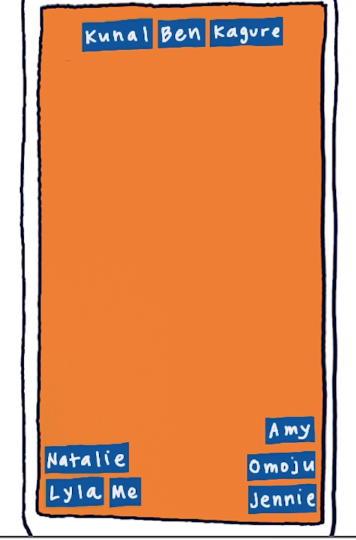
<RelativeLayout

    xmlns:android="http://schemas.android.com/apk/res/android"

    android:layout_width="match_parent"

    android:layout_height="match_parent">

    <TextView

        android:id="@+id/lyla_text_view"

        android:layout_width="wrap_content"

        android:layout_height="wrap_content"

        android:layout_alignParentBottom="true"

        android:layout_alignParentLeft="true"

        android:textSize="24sp"

        android:text="Lyla" />

    <TextView

        android:id="@+id/me_text_view"

        android:layout_width="wrap_content"

        android:layout_height="wrap_content"

        android:layout_alignParentBottom="true"

        android:layout_toRightOf="@id/lyla_text_view"

        android:textSize="24sp"

        android:text="Me" />

    <TextView

        android:id="@+id/natalie_text_view"

        android:layout_width="wrap_content"

        android:layout_height="wrap_content"

        android:layout_above="@id/lyla_text_view"

        android:textSize="24sp"

        android:text="Natalie" />

    <TextView

        android:id="@+id/jennie_text_view"

        android:layout_width="wrap_content"

        android:layout_height="wrap_content"

        android:layout_alignParentBottom="true"

        android:layout_alignParentRight="true"

        android:textSize="24sp"

        android:text="Jennie" />

    <TextView

        android:id="@+id/omoju_text_view"

        android:layout_width="wrap_content"

        android:layout_height="wrap_content"

        android:layout_alignParentRight="true"

        android:layout_above="@id/jennie_text_view"

        android:textSize="24sp"

        android:text="Omoju" />

    <TextView

        android:id="@+id/amy_text_view"

        android:layout_width="wrap_content"

        android:layout_height="wrap_content"

        android:layout_alignParentBottom="true"

        android:layout_above="@id/omoju_text_view"

        android:layout_alignParentRight="true"

        android:textSize="24sp"

        android:text="Amy" />

    <TextView

        android:id="@+id/ben_text_view"

        android:layout_width="wrap_content"

        android:layout_height="wrap_content"

        android:layout_alignParentTop="true"

        android:layout_centerHorizontal="true"

        android:textSize="24sp"

        android:text="Ben" />

    <TextView

        android:id="@+id/kunal_text_view"

        android:layout_width="wrap_content"

        android:layout_height="wrap_content"

        android:layout_alignParentTop="true"

        android:layout_toLeftOf="@id/ben_text_view"

        android:textSize="24sp"

        android:text="Kunal" />

    <TextView

        android:id="@+id/kagure_text_view"

        android:layout_width="wrap_content"

        android:layout_height="wrap_content"

        android:layout_alignParentTop="true"

        android:layout_alignParentRight="true"

        android:layout_toRightOf="@id/ben_text_view"

        android:textSize="24sp"

        android:text="Kagure" />

</RelativeLayout>
相对兄弟节点(id)放置
XML属性 |
|
|---|---|
android:layout_above |
将此视图的下边缘定位在给定锚点视图ID上方。 |
android:layout_alignBaseline |
将此视图的基线定位在给定锚点视图ID的基线上。 |
android:layout_alignBottom |
使此视图的下边缘与给定锚点视图ID的下边缘匹配。 |
android:layout_alignEnd |
使此视图的结束边缘与给定锚点视图ID的结束边缘匹配。 |
android:layout_alignLeft |
使此视图的左边缘与给定锚点视图ID的左边缘匹配。 |
android:layout_alignParentBottom |
如果为true,则使此视图的下边缘与父级的下边缘匹配。 |
android:layout_alignParentEnd |
如果为true,则使此视图的结束边缘与父级的结束边缘匹配。 |
android:layout_alignParentLeft |
如果为true,则使此视图的左边缘与父窗口的左边缘匹配。 |
android:layout_alignParentRight |
如果为true,则使此视图的右边缘与父级的右边缘匹配。 |
android:layout_alignParentStart |
如果为true,则使此视图的起始边缘与父级的起始边缘匹配。 |
android:layout_alignParentTop |
如果为true,则使此视图的上边缘与父级的上边缘匹配。 |
android:layout_alignRight |
使此视图的右边缘与给定锚点视图ID的右边缘匹配。 |
android:layout_alignStart |
使此视图的起始边缘与给定锚点视图ID的起始边缘匹配。 |
android:layout_alignTop |
使此视图的上边缘与给定锚点视图ID的上边缘匹配。 |
android:layout_alignWithParentIfMissing |
如果设置为true,则在无法找到layout_toLeftOf,layout_toRightOf等的锚点时,父项将用作锚点。 |
android:layout_below |
将此视图的上边缘定位在给定锚点视图ID下方。 |
android:layout_centerHorizontal |
如果为true,则将此子项水平居中于其父级。 |
android:layout_centerInParent |
如果为true,则将此子项在其父级中水平和垂直居中。 |
android:layout_centerVertical |
如果为true,则将此子项垂直居中于其父项中。 |
android:layout_toEndOf |
将此视图的起始边缘定位到给定锚点视图ID的末尾。 |
android:layout_toLeftOf |
将此视图的右边缘定位在给定锚点视图ID的左侧。 |
android:layout_toRightOf |
将此视图的左边缘定位到给定锚点视图ID的右侧。 |
android:layout_toStartOf |
将此视图的结束边缘定位到给定锚点视图ID的开头。 |
RelativeLayout.LayoutParams的更多相关文章
- RelativeLayout.LayoutParams.addRule()方法
1.应用场景 在使用RelativeLayout布局的时候,通常在载入布局之前在相关的XML文件中进行静态设置即可.但是,在有些情况下,我们需要动态的设置布局 的属性,在不同条件下设置不同的布局排列方 ...
- Android 动态改变布局属性RelativeLayout.LayoutParams.addRule()
我们知道,在 RelativeLayout 布局中有很多特殊的属性,通常在载入布局之前,在相关的xml文件中进行静态设置即可. 但是,在有些情况下,我们需要动态设置布局的属性,在不同的条件下设置不同的 ...
- 代码中动态改变布局属性RelativeLayout.LayoutParams.addRule()
我们知道,在 RelativeLayout 布局中有很多特殊的属性,通常在载入布局之前,在相关的xml文件中进行静态设置即可. 但是,在有些情况下,我们需要动态设置布局的属性,在不同的条件下设置不同的 ...
- java.lang.ClassCastException: android.widget.RelativeLayout$LayoutParams cannot be cast to android.widget.AbsListView$LayoutParams
java.lang.ClassCastException: android.widget.RelativeLayout$LayoutParams cannot be cast to android.w ...
- java.lang.ClassCastException android.widget.RelativeLayout LayoutParams 异常
1.在xml布局文件如下所示: <RelativeLayout android:layout_width="match_parent" android:layout_heig ...
- 用代码设置 RelativeLayout.LayoutParams
1.注意 不能在RelativeLayout容器本身和他的子元素之间产生循环依赖,比如说,不能将RelativeLayout的高设置成为WRAP_CONTENT的时候将子元素的高设置成为 ALIGN_ ...
- Exception: java.lang.ClassCastException: android.widget.RelativeLayout$LayoutParams
RelativeLayout title_bg = (RelativeLayout)FTU_Bluetooth.this.findViewById(R.id.titlebar); LinearLayo ...
- 为什么relativelayout.layoutParams的width为-1
源码里看下就知道了.. -1不代表宽度,代表MATCH_PARENT常量的值public static final int FILL_PARENT = -1; public static final ...
- java写RelativeLayout 的属性
有时项目需要动态的调整一下布局,需要改变一些view的位置属性等等. 直接下代码 RelativeLayout.LayoutParams params=new RelativeLayout.Layou ...
随机推荐
- vim自动缩进设置
需要软件 vim 下载地址 http://www.vim.org code_complete.vim 插件 http://www.vim.org/scripts/script.php?script ...
- mac使用phpize进行安装的时候碰到的问题
问题: grep: /usr/include/php/main/php.h: No such file or directory grep: /usr/include/php/Zend/zend_mo ...
- 使用itext直接替换PDF中的文本
直接说问题,itext没有直接提供替换PDF中文本的接口(查看资料得到的结论是PDF不支持这种操作),不过存在解决思路:在需要替换的文本上覆盖新的文本.按照这个思路我们需要解决以下几个问题: itex ...
- 【MySQL】MySQL存储过程介绍
目录结构: contents structure [-] 存储过程简介 关于MySQL的存储过程 MySQL存储过程的创建 格式 声明分割符 参数 变量 注释 MySQL存储过程的调用 MySQL存储 ...
- 【java】解析java类加载与反射机制
目录结构: contents structure [+] 类的加载.连接和初始化 类的加载 类的连接 类的初始化 类加载器 类加载器机制 自定义类加载器 URLClassLoader类 反射的常规操作 ...
- 【Algorithm】堆排序
堆是一种完全二叉树结构,并且其满足一种性质:父节点存储值大于(或小于)其孩子节点存储值,分别称为大顶堆.小顶堆.堆一般采用数组进行存储(从下标为0开始).则父节点位置为i,那么其左孩子为2*i + 1 ...
- WARNING: The host 'r6' could not be looked up with /usr/local/mysql/bin/resolveip.
初始化MySQL数据库提示以下信息: # /usr/local/mysql/scripts/mysql_install_db \ > --defaults-file=/etc/my.cnf \ ...
- glide 镜像
运行glide install 失败 国内墙的原因, 某些网站上不去 [ERROR]Update failed for golang.org/x/crypto: Cannot detect VCS ...
- Java 打印程序设计实例
3.1 打印文本 3.1.1 应用场景 假设我们需要打印一个窗体的某个文本编辑域(可能只有几行,也可能包含多页)的内容,并且每页最多打印 54 行,如何实现呢? 3.1.2 解决方法 基本思路如下:首 ...
- 看MySQL官方文档的示例SQL有感
[背景] 周末比较闲,我这个人又没有什么爱好,当然了读书除外:前一些天我一个同事说:“你一个dba想去写一本“django”书,合适吗?” 我想也是,一个人不能忘了本,所以MySQL还是要好好的搞一搞 ...