
react-native 项目实战 -- 新闻客户端(2) -- 完善TabBar
1.创建 drawable-xxhdpi 文件夹,保存 TabBar 的 icon图标
android -- app -- src -- main -- res -- drawable-xxhdpi
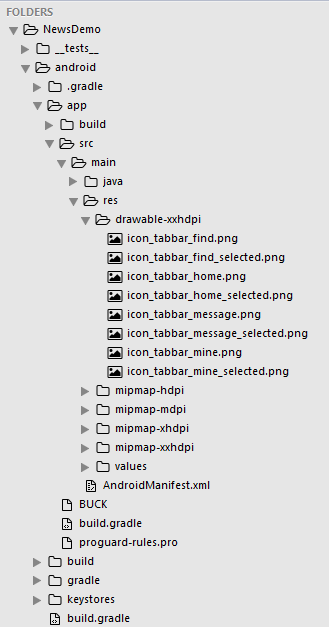
2.修改后的 Main.js
/**

 * 主页面

 */

import React, { Component } from 'react';

import {

    StyleSheet,

    Text,

    View,

    Image,

    Platform,  //判断当前运行的系统

} from 'react-native';

/*=============导入外部组件类==============*/

import TabNavigator from 'react-native-tab-navigator';

// 引入外部的组件(此处注意是相当于了项目根目录)

var Home = require('../Component/Home');

var Message = require('../Component/Message');

var Find = require('../Component/Find');

var Mine = require('../Component/Mine');

// ES5

var Main = React.createClass({

    // 初始化函数(变量是可以改变的,充当状态机的角色)

    getInitialState(){

        return{

            selectedTab:'home' // 默认选中的tabBar

        }

    },

    render() {

        return (

            <TabNavigator>

                {/*--首页--*/}

                <TabNavigator.Item

                    title="首页"

                    renderIcon={() => <Image source={{uri:"icon_tabbar_home"}} style={styles.iconStyle} />}

                    renderSelectedIcon={() => <Image source={{uri:"icon_tabbar_home_selected"}} style={styles.iconStyle} />}

                    selected={this.state.selectedTab === "home"}

                    onPress={() => this.setState({ selectedTab: "home" })}

                    selectedTitleStyle={styles.selectedTitleStyle} //tabBarItem选中的文字样式

                    badgeText="1"

                >

                    <Home />

                </TabNavigator.Item>

                {/*--消息--*/}

                <TabNavigator.Item

                    title="消息"

                    renderIcon={() => <Image source={{uri:"icon_tabbar_message"}} style={styles.iconStyle} />}

                    renderSelectedIcon={() => <Image source={{uri:"icon_tabbar_message_selected"}} style={styles.iconStyle} />}

                    selected={this.state.selectedTab === "message"}

                    onPress={() => this.setState({ selectedTab: "message" })}

                    selectedTitleStyle={styles.selectedTitleStyle} //tabBarItem选中的文字样式

                    badgeText="2"

                >

                    <Message />

                </TabNavigator.Item>

                {/*--发现--*/}

                <TabNavigator.Item

                    title="发现"

                    renderIcon={() => <Image source={{uri:"icon_tabbar_find"}} style={styles.iconStyle} />}

                    renderSelectedIcon={() => <Image source={{uri:"icon_tabbar_find_selected"}} style={styles.iconStyle} />}

                    selected={this.state.selectedTab === "find"}

                    onPress={() => this.setState({ selectedTab: "find" })}

                    selectedTitleStyle={styles.selectedTitleStyle} //tabBarItem选中的文字样式

                >

                    <Find />

                </TabNavigator.Item>

                {/*--我的--*/}

                <TabNavigator.Item

                    title="我的"

                    renderIcon={() => <Image source={{uri:"icon_tabbar_mine"}} style={styles.iconStyle} />}

                    renderSelectedIcon={() => <Image source={{uri:"icon_tabbar_mine_selected"}} style={styles.iconStyle} />}

                    selected={this.state.selectedTab === "mine"}

                    onPress={() => this.setState({ selectedTab: "mine" })}

                    selectedTitleStyle={styles.selectedTitleStyle} //tabBarItem选中的文字样式

                >

                    <Mine />

                </TabNavigator.Item>

            </TabNavigator>

        );

    },

});

const styles = StyleSheet.create({

    // icon默认样式

    iconStyle:{

        width: Platform.OS === 'ios' ? 30 : 25,

        height:Platform.OS === 'ios' ? 30 : 25,

    },

    // tabBarItem选中的文字样式

    selectedTitleStyle:{

        color: 'rgba(212,97,0,1)',

    }

});

// 输出

module.exports = Main;
3.效果图
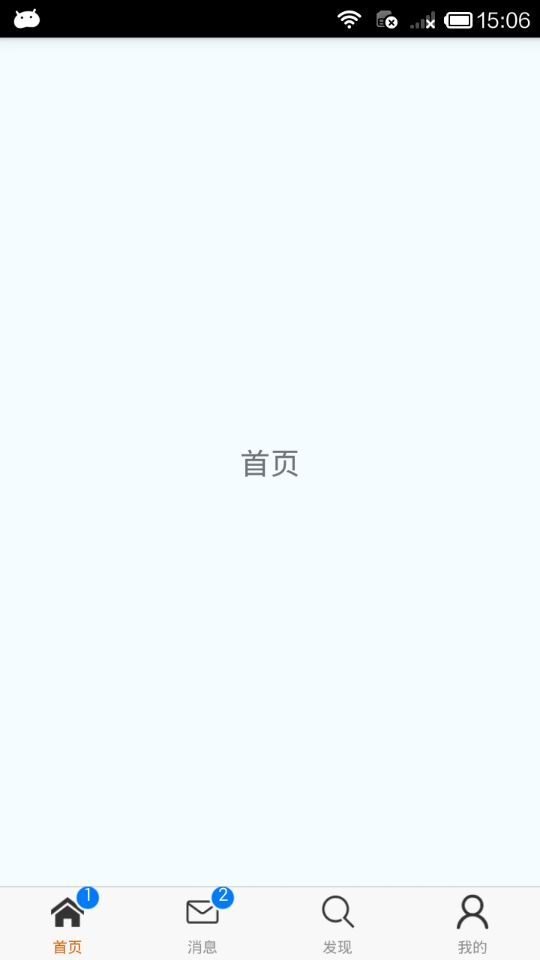
.
react-native 项目实战 -- 新闻客户端(2) -- 完善TabBar的更多相关文章
- 【腾讯Bugly干货分享】React Native项目实战总结
本文来自于腾讯bugly开发者社区,非经作者同意,请勿转载,原文地址:http://dev.qq.com/topic/577e16a7640ad7b4682c64a7 “8小时内拼工作,8小时外拼成长 ...
- React Native 项目实战-Tamic
layout: post title: React Native 项目实战 date: 2016-10-18 15:02:29 +0800 comments: true categories: Rea ...
- React Native 项目实战 -- DoubanProject
引言:本文是我研究react-native时写的一个简单的demo,代码里有详细的注释,好废话不多说,直接上代码. 1.项目目录 2.index.android.js /** * index.andr ...
- React Native项目实战
算是学习React Native的一次项目总结吧,目的还是提高自己. 包含的内容: 1>仿"美团"页面的实现; 2>封装项目中和自己常用的一些组件; 3>学习别人 ...
- react-native 项目实战 -- 新闻客户端(6) -- 完善ListView头部视图
1.因为需要定时器,所以我们要cd到当前项目根目录下安装这个类库: $ npm i react-timer-mixin --save 2.Component/ScrollImage.js /** * ...
- react-native 项目实战 -- 新闻客户端(5) -- 完善首页列表数据
1.Home.js: /** * 首页 */ import React, { Component } from 'react'; import { AppRegistry, StyleSheet, T ...
- react-native 项目实战 -- 新闻客户端(7) -- 新闻详情页
http://c.3g.163.com/nc/article/BUH64L0J00031H2L/full.html 观察这个地址,BUH64L0J00031H2L 就是每条新闻数据里的postid. ...
- react-native 项目实战 -- 新闻客户端(4) -- 请求网络数据
1.Home.js /** * 首页 */ import React, { Component } from 'react'; import { AppRegistry, StyleSheet, Te ...
- react-native 项目实战 -- 新闻客户端(3) -- 包装导航控制器
1.修改后的 Main.js /** * 主页面 */ import React, { Component } from 'react'; import { StyleSheet, Text, Vie ...
随机推荐
- 全自动google检索后台
是不是每天为了找后台,伤破了蛋,每次在google输入”site:www.xxx.com intitle:登陆”.是不是手都累麻了,无聊又浪费时间.有了它,你的蛋就不用在碎了 直接上源码 1 2 3 ...
- 【Tomcat】一台电脑上运行多个tomcat
效果: 1.首先需要安装Tomcat7,Tomcat8. Tomcat7: Tomcat8: 2.添加两个环境变量,添加CATALINA_HOME1和CATALINA_BASE1指向E:\tomcat ...
- centos dhcp获取不到ip解决方法 Bringing up interface eth0: Device eth0 does not seem to be present,delaying initialization.
1.删除文件: /etc/udev/rules.d/70-persistent-net.rules 2.编辑 /etc/sysconfig/network-scripts/ifcfg-eth0 删除H ...
- Codeforces #105 DIV2 ABCDE
开始按照顺序刷刷以前的CF. #include <map> #include <set> #include <list> #include <cmath> ...
- 华为上机测试题(地铁换乘-java)
PS:自己写的,自测试OK,供大家参考. /* 高级题样题:地铁换乘描述:已知2条地铁线路,其中A为环线,B为东西向线路,线路都是双向的.经过的站点名分别如下,两条线交叉的换乘点用T1.T2表示.编写 ...
- [Oracle] 关系型数据库排序算法和数据结构以及关联查询
关系型数据库排序算法和数据结构以及关联查询 1. Merge sort 理解merge sort算法将有助于更好地理解数据库join操作 - merge join 算法逻辑 将2个有序的大小为N/2的 ...
- [Oracle] oracle统计信息
Oracle统计信息 Oracle数据库里的统计信息可以分为6种类型: 表的统计信息 索引的统计信息 列的统计信息 系统统计信息 数据字典统计信息 内部对象统计信息 图 1: Oracle统计信息 基 ...
- MyBatis报错 Parameter '0' not found. Available parameters are [arg1, arg0, param1, param2]
修改 <update id="updateStatusById" parameterType="java.lang.Integer"> update ...
- hdu 5142(数学-进制转换)
NPY and FFT Time Limit: 2000/1000 MS (Java/Others) Memory Limit: 32768/32768 K (Java/Others)Total ...
- Mac下安装node.js , Ionic
访问node.js官网(https://nodejs.org/en/download/),下载相应的版本. 下载完,点击安装 [默认目录] Node.js v8.9.3 to /usr/local/ ...