
关于在Struts2框架下实现文件的上传功能
struts2的配置过程
(1)在项目中加入jar包
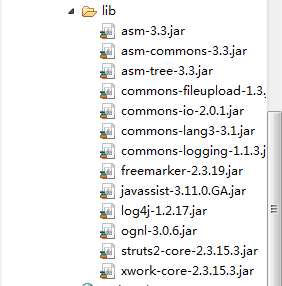
(2)web.xml中filter(过滤器)的配置
<?xml version="1.0" encoding="UTF-8"?>

<web-app version="2.5"

	xmlns="http://java.sun.com/xml/ns/javaee"

	xmlns:xsi="http://www.w3.org/2001/XMLSchema-instance"

	xsi:schemaLocation="http://java.sun.com/xml/ns/javaee

	http://java.sun.com/xml/ns/javaee/web-app_2_5.xsd">

  <display-name></display-name>

    <filter>

    <filter-name>struts2</filter-name>

    <filter-class>org.apache.struts2.dispatcher.ng.filter.StrutsPrepareAndExecuteFilter</filter-class>

  </filter>

  <filter-mapping>

    <filter-name>struts2</filter-name>

    <url-pattern>/*</url-pattern>

  </filter-mapping>

</web-app>
(3)struts.xml配置文件的编写
<?xml version="1.0" encoding="UTF-8"?>

<web-app version="2.5"

	xmlns="http://java.sun.com/xml/ns/javaee"

	xmlns:xsi="http://www.w3.org/2001/XMLSchema-instance"

	xsi:schemaLocation="http://java.sun.com/xml/ns/javaee

	http://java.sun.com/xml/ns/javaee/web-app_2_5.xsd">

  <display-name></display-name>

    <filter>

    <filter-name>struts2</filter-name>

    <filter-class>org.apache.struts2.dispatcher.ng.filter.StrutsPrepareAndExecuteFilter</filter-class>

  </filter>

  <filter-mapping>

    <filter-name>struts2</filter-name>

    <url-pattern>/*</url-pattern>

  </filter-mapping>

</web-app>
(4)action类的编写
package com.xmgc.sc.action;

import java.io.File;

import java.io.FileInputStream;

import java.io.FileOutputStream;

import java.io.IOException;

import org.apache.struts2.ServletActionContext;

public class MyUpLoadAction {

	private String title;

	private File upload;//与form表单中的file文件类型的名字是一样的

	private String uploadContentType;//前缀必须要是上面的upload

	private String uploadFileName;

	public String getTitle() {

		return title;

	}

	public void setTitle(String title) {

		this.title = title;

	}

	public File getUpload() {

		return upload;

	}

	public void setUpload(File upload) {

		this.upload = upload;

	}

	public String getUploadContentType() {

		return uploadContentType;

	}

	public void setUploadContentType(String uploadContentType) {

		this.uploadContentType = uploadContentType;

	}

	public String getUploadFileName() {

		return uploadFileName;

	}

	public void setUploadFileName(String uploadFileName) {

		this.uploadFileName = uploadFileName;

	}

/*	public String getSavePath() {

		//ServletContext cxt=ServletActionContext.getServletContext();

		//String path=cxt.getRealPath("/");

		//这个获取的path为:http://localhost:8080/sc

		//上传以后变为E:\software\apache-tomcat-6.0.45\webapps\sc

		return savePath;

	}

	public void setSavePath(String savePath) {

		//E:\software\apache-tomcat-6.0.45\webapps\sc/myupload

		this.savePath = ServletActionContext.getServletContext().getRealPath("/myupload");

	}*/

	public String execute() throws IOException{

		System.out.println(title);//标题

		System.out.println(uploadContentType);//准备上传的文件的文件类型

		System.out.println(uploadFileName);//准备上传的文件的文件名,记住还有扩展名

		System.out.println(upload);

		String realPath=ServletActionContext.getServletContext().getRealPath("/");

		String path=realPath+"myupload/"+uploadFileName;

		System.out.println(realPath);

		System.out.println(path);

		FileInputStream fis=new FileInputStream(upload);

		FileOutputStream fos=new FileOutputStream(path);

		byte[] bytes=new byte[1024];//定义一个1024大小的字节数组

		int len=-1;//用来做标志位

		while((len=fis.read(bytes))>0){

			fos.write(bytes, 0, len);

		}

		return null;

	}

}
(5)JSP页面的编写
<%@ page contentType="text/html;charset=utf-8"%>

<!-- enctype="multipart/form-data",这个是最重要的配置 -->

<form action="myupload.action" enctype="multipart/form-data" method="post">

      文件名:<input type="text" name="title"/><br/>

         上传:<input type="file" name="upload"/><br/>

        <input type="submit" value="上传"/>

</form>
经过这次总结,感觉struts2框架下的单文件的上传还是非常简单的,只要获取要存储在什么地方的地址,再通过输入输出流,写到这个地址中去就行了。绝大部分工作,struts2已经帮我们做好了
关于在Struts2框架下实现文件的上传功能的更多相关文章
- 在SpringMVC框架下实现文件的 上传和 下载
在eclipse中的javaEE环境下:导入必要的架包 web.xml的配置文件: <?xml version="1.0" encoding="UTF-8" ...
- Struts2框架下的文件上传文件类型、名称约定
Struts2框架下的文件上传机制:1.通过multipart/form-data form提交文件到服务器2.文件名是通过什么地方设置的?在strust2的FileUploadInterceptor ...
- JavaWeb框架_Struts2_(七)----->文件的上传和下载
这个章节是Struts2框架应用最广泛的三个版块(上传下载.国际化.校验输入)之一,所以这一版块的学习还蛮重要的. 1. 章节目录 Struts2文件上传 单文件上传 拦截器实现文件过滤 文件上传常量 ...
- [原创]java WEB学习笔记72:Struts2 学习之路-- 文件的上传下载,及上传下载相关问题
本博客的目的:①总结自己的学习过程,相当于学习笔记 ②将自己的经验分享给大家,相互学习,互相交流,不可商用 内容难免出现问题,欢迎指正,交流,探讨,可以留言,也可以通过以下方式联系. 本人互联网技术爱 ...
- Struts2基础学习(六)—文件的上传和下载
一.文件的上传 1.单个文件上传 Struts2使用拦截器完成了文件的上传,而且底层使用的也是FileUpload开源组件. 客户端注意事项: (1)method="post&qu ...
- android下大文件分割上传
由于android自身的原因,对大文件(如影视频文件)的操作很容易造成OOM,即:Dalvik堆内存溢出,利用文件分割将大文件分割为小文件可以解决问题. 文件分割后分多次请求服务. //文件分割上传 ...
- asp.net 如何实现大文件断点上传功能?
之前仿造uploadify写了一个HTML5版的文件上传插件,没看过的朋友可以点此先看一下~得到了不少朋友的好评,我自己也用在了项目中,不论是用户头像上传,还是各种媒体文件的上传,以及各种个性的业务需 ...
- SSM框架下,使用ajax请求上传文件(doc\docx\excel\图片等)
1.准备工作 1.1.添加上传必要jar包 <dependency> <groupId>commons-io</groupId> <artifactId> ...
- asynchttpClient框架关于多文件批量上传的问题,改用xUtil
RequestParams params = new RequestParams(); params.add("ordernum",ordernum); params.add(&q ...
随机推荐
- S3
S3是Amazon EMR的一部分,它提供了一些Wikipedia的浏览统计数据,这些浏览数据的格式便于Spark测试.
- UVALive 3956 Key Task (bfs+状态压缩)
Key Task 题目链接: http://acm.hust.edu.cn/vjudge/contest/129733#problem/D Description The Czech Technica ...
- 题目连接:http://acm.zznu.edu.cn/problem.php?id=1329
题目大意: 定理:把一个至少两位的正整数的个位数字去掉,再从余下的数中减去个位数的5倍.当且仅当差是17的倍数时,原数也是17的倍数 . 例如,34是17的倍数,因为3-20=-17是17的倍数:20 ...
- 使用SQLCOMMAND以及SQLADAPERT 调用存储过程
使用SQLCommand调用的基本方法如下: SqlCommand comm = new SqlCommand("P_GetCompanyInfo", conn); comm.Co ...
- LA4329 Ping pong(树状数组与组合原理)
N (3N20000)ping pong players live along a west-east street(consider the street as a line segment). E ...
- gb2312和UTF-8的区别
GB2312编码大约包含6000多汉字(不包括特殊字符),编码范围为第一位b0-f7,第二位编码范围为a1-fe(第一位为cf时,第二位为a1-d3),计算一下汉字个数为6762个汉字.当然还有其他的 ...
- iis配置好后,解决打开服务器要输入用户名和密码的问题
[转]IIS网站访问需要输入用户名和密码 xp系统下安装IIS5,并设置好网站路径,但是访问网站时需要输入用户名和密码,这个问题极大可能是因为你网站放置在一个文件系统为NTFS的盘符上,而IIS默认的 ...
- CCPC总结
[印象·南阳] 10月15日出发,威海—烟台—郑州—南阳,一路上欢声笑语,从谁是卧底到各类纸牌游戏,也是欢乐.在从郑州到南阳的车上,对面的好像是河南当地的学长,感叹道工作不易的样子,说还是学生时代最为 ...
- Spring REST实践之客户端和测试
RestTemplate 可参考spring实战来写这部分. RestTemplate免于编写乏味的样板代码,RestTemplate定义了33个与REST资源交互的方法,涵盖了HTTP动作的各种形式 ...
- 无责任Windows Azure SDK .NET开发入门篇三[使用Azure AD 管理用户信息--3.2 Create创建用户]
3.2 Create创建用户 [HttpPost, Authorize] public async Task<ActionResult> Create( [Bind(Include = & ...