
iOS7下滑动返回与ScrollView共存二三事
【转载请注明出处】 = =不是整篇复制就算注明出处了亲。。。
iOS7下滑动返回与ScrollView共存二三事
【前情回顾】
去年的时候,写了这篇帖子iOS7滑动返回。文中提到,对于多页面结构的应用,可以替换interactivePopGestureRecognizer的delegate以统一管理应用中所有页面滑动返回的开关,比如在UINavigationController的派生类中
 //我是一个NavigationController的派生类

 - (id)initWithRootViewController:(UIViewController *)rootViewController

 {

     self = [super initWithRootViewController:rootViewController];

     if (self)

     {

         //在naviVC中统一处理栈中各个vc是否支持滑动返回的情况

         //当前仅最底层的vc关闭滑动返回

         self.interactivePopGestureRecognizer.delegate = (id<UIGestureRecognizerDelegate>)self;

     }

     return self;

 }
然后在委托中控制滑动返回的开关
 - (BOOL)gestureRecognizerShouldBegin:(UIGestureRecognizer *)gestureRecognizer

 {

     if (self.viewControllers.count == )//关闭主界面的右滑返回

     {

         return NO;

     }

     else

     {

         return YES;

     }

 }
【问题所在】
看上去挺美好的。。。。直到遇到了ScrollView。
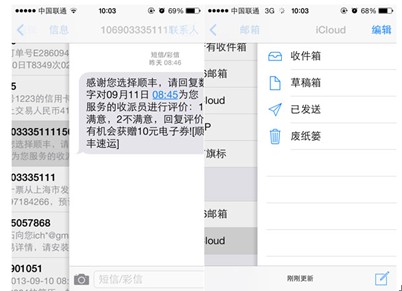
替换了delegate后,在使用时ScrollView,在屏幕左边缘就无法触发滑动返回效果了,如图

【问题原因】
滑动返回事实上也是由存在已久的UIPanGestureRecognizer来识别并响应的,它直接与UINavigationController的view(方便起见,下文中以UINavigationController.view表示)进行绑定,因此上图中存在如下关系:
UIPanGestureRecognizer ——bind—— UIScrollView
UIScreenEdgePanGestureRecognizer ——bind—— UINavigationController.view
滑动返回无法触发,说明UIScreenEdgePanGestureRecognizer并没有接收到手势事件。
根据apple君的官方文档,UIGestureRecognizer和UIView是多对一的关系(具体点这里),UIGestureRecognizer一定要和view进行绑定才能发挥作用。因此不难想象,UIGestureRecognizer对于屏幕上的手势事件,其接收顺序和UIView的层次结构是一致的。同样以上图为例
(我是Z轴)-------------------------------------------------------------------------------------------------------------------------------------->
UINavigationController.view —> UIViewController.view —> UIScrollView —> Screen and User's finger
即UIScrollView的panGestureRecognizer先接收到了手势事件,直接就地处理而没有往下传递。
实际上这就是两个panGestureRecognizer共存的问题。
【解决方案】
苹果以UIGestureRecognizerDelegate的形式,支持多个UIGestureRecognizer共存。其中的一个方法是:
 // called when the recognition of one of gestureRecognizer or otherGestureRecognizer would be blocked by the other

 // return YES to allow both to recognize simultaneously. the default implementation returns NO (by default no two gestures can be recognized simultaneously)

 //

 // note: returning YES is guaranteed to allow simultaneous recognition. returning NO is not guaranteed to prevent simultaneous recognition, as the other gesture's delegate may return YES

 - (BOOL)gestureRecognizer:(UIGestureRecognizer *)gestureRecognizer shouldRecognizeSimultaneouslyWithGestureRecognizer:(UIGestureRecognizer *)otherGestureRecognizer;
一句话总结就是此方法返回YES时,手势事件会一直往下传递,不论当前层次是否对该事件进行响应。
看看UIScrollView的头文件,有如下描述:
 // Use these accessors to configure the scroll view's built-in gesture recognizers.

 // Do not change the gestures' delegates or override the getters for these properties.

 @property(nonatomic, readonly) UIPanGestureRecognizer *panGestureRecognizer NS_AVAILABLE_IOS(5_0);
UIScrollView本身是其panGestureRecognizer的delegate,且apple君明确表明不能修改它的delegate(修改的时候也会有警告)。
那么只好曲线救国。
UIScrollView作为delegate,说明UIScrollView中实现了上文提到的shouldRecognizeSimultaneouslyWithGestureRecognizer方法,返回了NO。创建一个UIScrollView的category,由于category中的同名方法会覆盖原有.m文件中的实现,使得可以自定义手势事件的传递,如下:
 @implementation UIScrollView (AllowPanGestureEventPass)

 - (BOOL)gestureRecognizer:(UIGestureRecognizer *)gestureRecognizer shouldRecognizeSimultaneouslyWithGestureRecognizer:(UIGestureRecognizer *)otherGestureRecognizer

 {

     if ([gestureRecognizer isKindOfClass:[UIPanGestureRecognizer class]]

         && [otherGestureRecognizer isKindOfClass:[UIScreenEdgePanGestureRecognizer class]])

     {

         return YES;

     }

     else

     {

         return  NO;

     }

 }
再次运行demo,看看效果: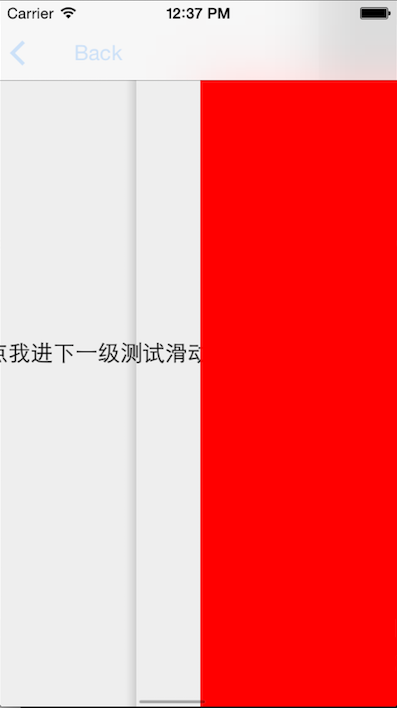
嗯,滑动返回已经成功触发,鼓掌!
等会等会。。。
好像不太对。。。
scrollView怎么也滚动了!!!!!
O。。。只是做到了将手势事件往下传递,而没有关闭掉在边缘时UIScrollView对事件的响应。
事实上,对UIGestureRecognizer来说,它们对事件的接收顺序和对事件的响应是可以分开设置的,即存在接收链和响应链。接收链如上文所述,和UIView绑定,由UIView的层次决定接收顺序。
而响应链在apple君的定义下,逻辑出奇的简单,只有一个方法可以设置多个gestureRecognizer的响应关系:
// create a relationship with another gesture recognizer that will prevent this gesture's actions from being called until otherGestureRecognizer transitions to UIGestureRecognizerStateFailed

// if otherGestureRecognizer transitions to UIGestureRecognizerStateRecognized or UIGestureRecognizerStateBegan then this recognizer will instead transition to UIGestureRecognizerStateFailed

// example usage: a single tap may require a double tap to fail

- (void)requireGestureRecognizerToFail:(UIGestureRecognizer *)otherGestureRecognizer;
每个UIGesturerecognizer都是一个有限状态机,上述方法会在两个gestureRecognizer间建立一个依托于state的依赖关系,当被依赖的gestureRecognizer.state = failed时,另一个gestureRecognizer才能对手势进行响应。
所以,只需要
[_scrollView.panGestureRecognizer requireGestureRecognizerToFail:screenEdgePanGestureRecognizer];
即可。
再次运行demo,看看效果: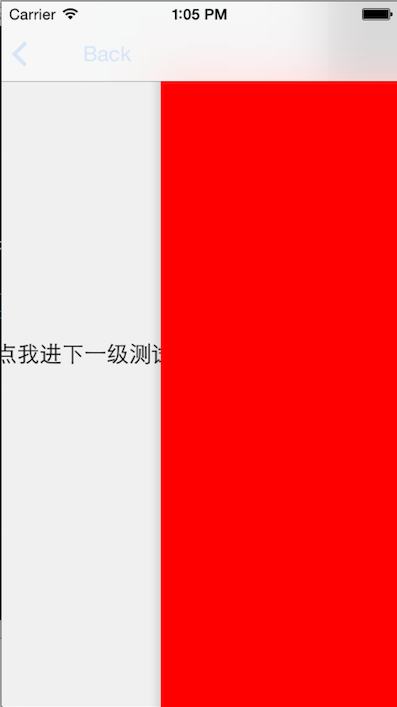
Works like a Charm!!
P.S:screenEdgePanGestureRecognizer是和UINavigationController.view绑定的,因此可以遍历UINavigationController.view.gestureRecognizers来获取,如下:
- (UIScreenEdgePanGestureRecognizer *)screenEdgePanGestureRecognizer

{

    UIScreenEdgePanGestureRecognizer *screenEdgePanGestureRecognizer = nil;

    if (self.view.gestureRecognizers.count > )

    {

        for (UIGestureRecognizer *recognizer in self.view.gestureRecognizers)

        {

            if ([recognizer isKindOfClass:[UIScreenEdgePanGestureRecognizer class]])

            {

                screenEdgePanGestureRecognizer = (UIScreenEdgePanGestureRecognizer *)recognizer;

                break;

            }

        }

    }

    return screenEdgePanGestureRecognizer;

}
demo地址:https://github.com/cDigger/CoExistOfScrollViewAndBackGesture/tree/master
【总结】
写了这么多,只是为了最初统一管理滑动返回的一点点便利,似乎很有些得不偿失。
我并不建议直接在项目中使用这种非常规手段。
但使用apple君提供的积木,自己拼出系统中的新功能,也是iOS开发的乐趣之一啊。
iOS7下滑动返回与ScrollView共存二三事的更多相关文章
- 禁用ios7 手势滑动返回功能
禁用ios7 手势滑动返回功能 版权声明:本文为博主原创文章,未经博主允许不得转载. 在有的时候,我们不需要手势返回功能,那么可以在页面中添加以下代码: - (void)viewDidAppear:( ...
- iOS开发解决页面滑动返回跟scrollView左右划冲突
-(BOOL)gestureRecognizer:(UIGestureRecognizer *)gestureRecognizer shouldRecognizeSimultaneouslyWithG ...
- iOS7上leftBarButtonItem无法实现滑动返回的完美解决方案
今天遇到了在iOS7上使用leftBarButtonItem却无法响应滑动返回事件的问题,一番谷歌,最后终于解决了,在这里把解决方案分享给大家. 在iOS7之前的系统,如果要自定义返回按钮,直接设置b ...
- iOS6下实现滑动返回
[转载请注明出处] 之前在看iOS7滑动返回时,发现了一个iOS6 SDK下的第三方实现,今天偶然间发现了作者在其博客上对该实现的一些心得,读来深觉之前的思考太过肤浅,许多实际的问题没有考虑到.帖子链 ...
- Android-通过SlidingMenu高仿微信6.2最新版手势滑动返回(二)
转载请标明出处: http://blog.csdn.net/hanhailong726188/article/details/46453627 本文出自:[海龙的博客] 一.概述 在上一篇博文中,博文 ...
- ios7下二维码功能的实现
苹果公司升级到IOS7后自己的PassBook自带二维码扫描功能,所以现在使用二维码功能不需要在借助第三方库了 使用前请先导入AVFoundation.frameWork // // YHQView ...
- UINavigationController侧滑滑动返回 卡死问题
UINavigationController滑动返回,有需要的朋友可以参考下. 最近做了UINavigationController的滑动返回(IOS7及以后系统默认支持的), 主要分成以下几步以及碰 ...
- iOS开发——实用技术OC篇&8行代码教你搞定导航控制器全屏滑动返回效果
8行代码教你搞定导航控制器全屏滑动返回效果 前言 如果自定了导航控制器的自控制器的leftBarButtonItem,可能会引发边缘滑动pop效果的失灵,是由于 self.interactivePop ...
- iOS之手势滑动返回功能-b
iOS中如果不自定义UINavigationBar,通过手势向右滑是可以实现返回的,这时左边的标题文字提示的是上一个ViewController的标题,如果需要把文字改为简约风格,例如弄过箭头返回啥的 ...
随机推荐
- BIND的安装配置
简介 bind是dns协议的一种实现,也就是说,bind仅仅是实现DNS协议的一种应用程序 bind运行后的进程名叫named,不叫bind bind bind的配置文件在:/etc/named.co ...
- 微信小程序组件 自定义单选
<view class='userperson'> <view class='f30 flexca'>请选择您的注册身份</view> <view class ...
- C# 委托和事件高级进阶
本篇文章主要采用理论和代码实例相结合方式来论述委托和事件,涉及到一些边界技术,如软件架构的OCP原则(开-闭原则), 软件架构解耦,设计模式(Sender-Order)和事件驱动模型,有一定难度和深度 ...
- android Eclipse there no select
点mainactivity类 右键 run as 进行 配置 就可运行
- 简单配置AAA认证与telnet图解
不罗嗦,直接上图
- lb route 相关的一些问题
lb route 相关的一些问题 ========================== 查看系统平台和版本 > show hardware Platform: NetScaler Virtual ...
- WIN7 右下角音量图标不见了
1.呼叫出 任务管理器,结束掉 explorer.exe 进程 2.新建任务,浏览,找到 C:/windows/system32/systray.exe,确定加载 3.新建任务,输入explorer ...
- [洛谷P4341][BJWC2010]外星联络
题目大意:给你一个长度为$n(n\leqslant3\times10^3)$的字符串,要你求出其中出现次数大于$1$的子串,并按字典序输出次数. 题解:建$SAM$后求出每个点的$size$,最后按字 ...
- 洛谷 P4319 变化的道路 解题报告
P4319 变化的道路 题目描述 小 w 和小 c 在 H 国,近年来,随着 H 国的发展,H 国的道路也在不断变化着 根据 H 国的道路法,H 国道路都有一个值 \(w\),表示如果小 w 和小 c ...
- spark(四)
一. spark 2 版本 相对于以前版本的变化 spark core : Accumulators (累加器):性能更好,页面上也可以看到累加器的信息 spark sql: 1. 2.DataS ...