
Java基础-JVM调优策略简介
Java基础-JVM调优策略简介
作者:尹正杰
版权声明:原创作品,谢绝转载!否则将追究法律责任。
一.JVM结构分析
1>.JVM结构图
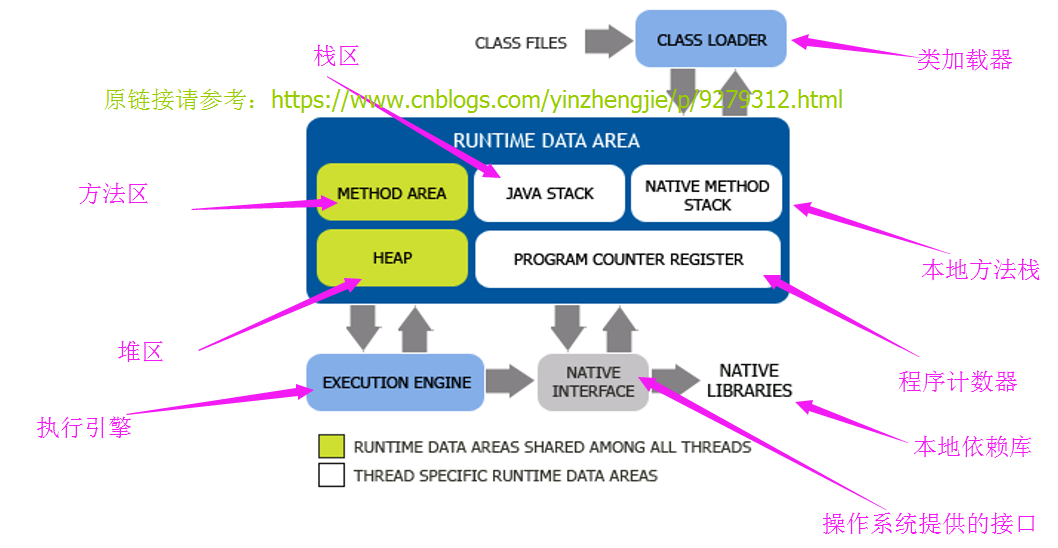
2>.JVM运行时数据区功能说明
JVM管理的内存段可分为两大类:线程共享内存和线程私有内存。
2.1:线程共享内存
方法区:存储jvm加载class,常量,静态变量,即时编译器编译后的代码等。
java堆:存储Java的所有对象实例,数组等;
2.2:线程私有内存
程序计数寄存器:每个线程有自己的计数存寄器,存储当前线程执行字节码的地址;
jvm栈:jvm会为每个运行线程分配一个栈区,线程调用方法时和方法返回时和方法返回时会进行入栈和出栈操作;
本地方法栈区:与jvm stack类似,只不过此区域是为调用本地方法服务。
由于每个线程都有自己的私有内存,我们去一一调试他们的内存的话,很显然是不合适的。因此,我们重点关注的对象是线程共享内存的调优。
二.JVM进程的内存结构
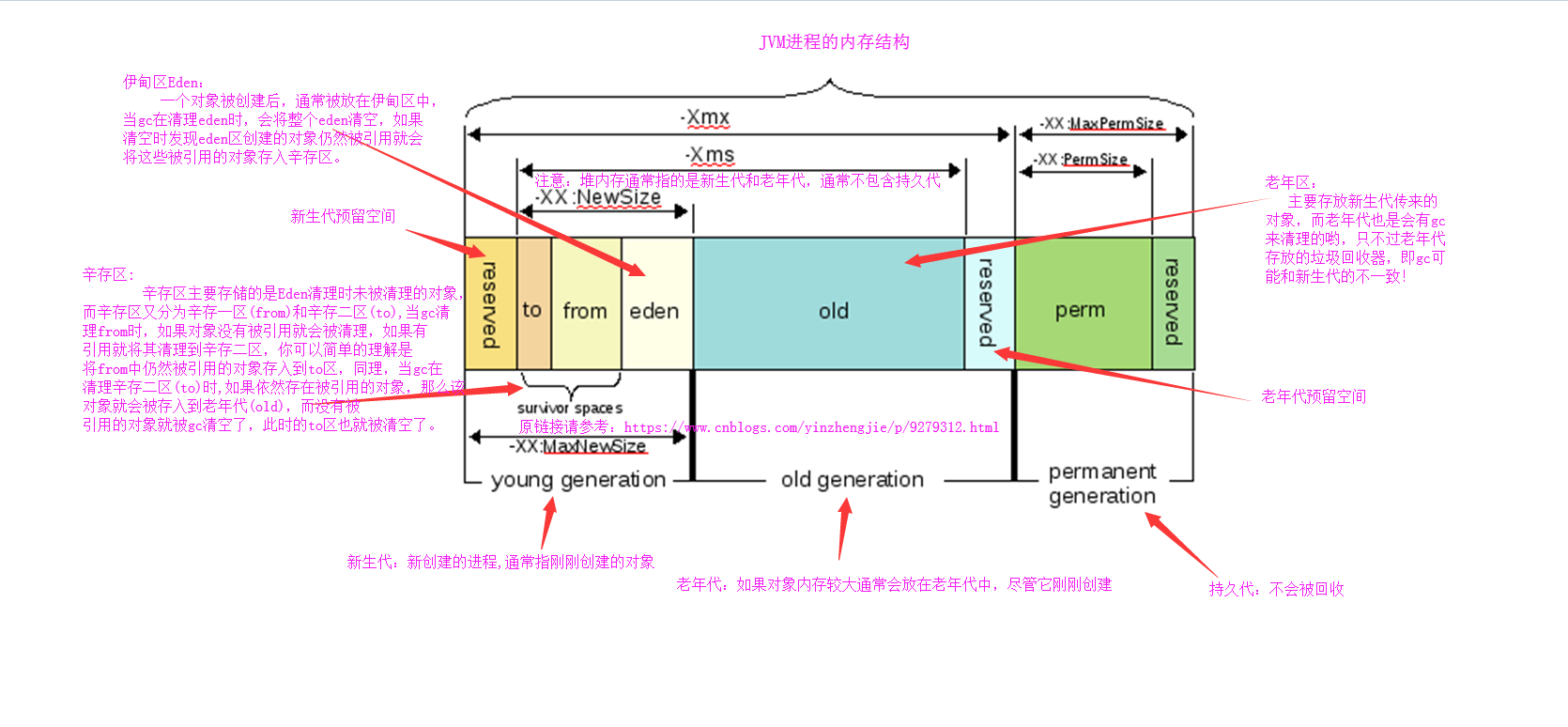
新生代:新创建的进程,通常指刚刚创建的对象

老年代:如果对象内存较大通常会放在老年代中,尽管它刚刚创建

持久代:不会被回收

伊甸区Eden:一个对象被创建后,通常被放在伊甸区中,当gc在清理eden时,会将整个eden清空,如果清空时发现eden区创建的对象仍然被引用就会将这些引用对象存入辛存区。

辛存区:

    辛存区主要存储的是Eden清理时未被清理的对象,而辛存区又分为辛存一区(from)和辛存二区(to),当gc清理from时,如果对象没有被引用就会被清理,如果有引用就将其清理到辛存二区,你可以简单的理解是将from中仍然被引用的对象存入到to区,同理,当gc在清理辛存二区(to)时,如果依然存在被引用的对象,那么该对象就会被存入到老年

老年区:

    主要存放新生代传来的对象,而老年代也是会有gc来清理的哟,只不过老年代的垃圾回收器(gc),即gc可能和新生代的不一致。
三.JAVA调优介绍
1>.Categories of java hotspot VM options
1.1:JavaStaveVM重新定义的标准选项在Java应用程序启动器页面上描述,用于Windows、Solaris和Linux;
1.2:"-X"是非标准选项,其有以下两个显著特点:
第一:不保证在所有VM实现上得到支持‘;
第二:在JDK的后续版本中,如有更改,恕不另行通知;
1.3:"-XX"选项不稳定,如有更改,恕不另行通知。
1.4:jinfo -flags 指令
[root@yinzhengjie ~]# jps

 Jps

 Bootstrap

[root@yinzhengjie ~]#

[root@yinzhengjie ~]# jinfo -flags

Attaching to process ID , please wait...

Debugger attached successfully.

Server compiler detected.

JVM version is 25.131-b11

Non-default VM flags: -XX:CICompilerCount= -XX:InitialHeapSize= -XX:MaxHeapSize= -XX:MaxNewSize= -XX:MinHeapDeltaBytes= -XX:NewSize= -XX:OldSize= -XX:+UseCompressedClassPointers -XX:+UseCompressedOops -XX:+UseFastUnorderedTimeStamps -XX:+UseParallelGC

Command line:  -Djava.util.logging.config.file=/usr/local/tomcat/conf/logging.properties -Djava.util.logging.manager=org.apache.juli.ClassLoaderLogManager -Djdk.tls.ephemeralDHKeySize= -Djava.protocol.handler.pkgs=org.apache.catalina.webresources -Dorg.apache.catalina.security.SecurityListener.UMASK= -Dignore.endorsed.dirs= -Dcatalina.base=/usr/local/tomcat -Dcatalina.home=/usr/local/tomcat -Djava.io.tmpdir=/usr/local/tomcat/temp

[root@yinzhengjie ~]#
查看Java线程([root@yinzhengjie ~]# jinfo -flags 2635)
2>.Java堆大小内存选项
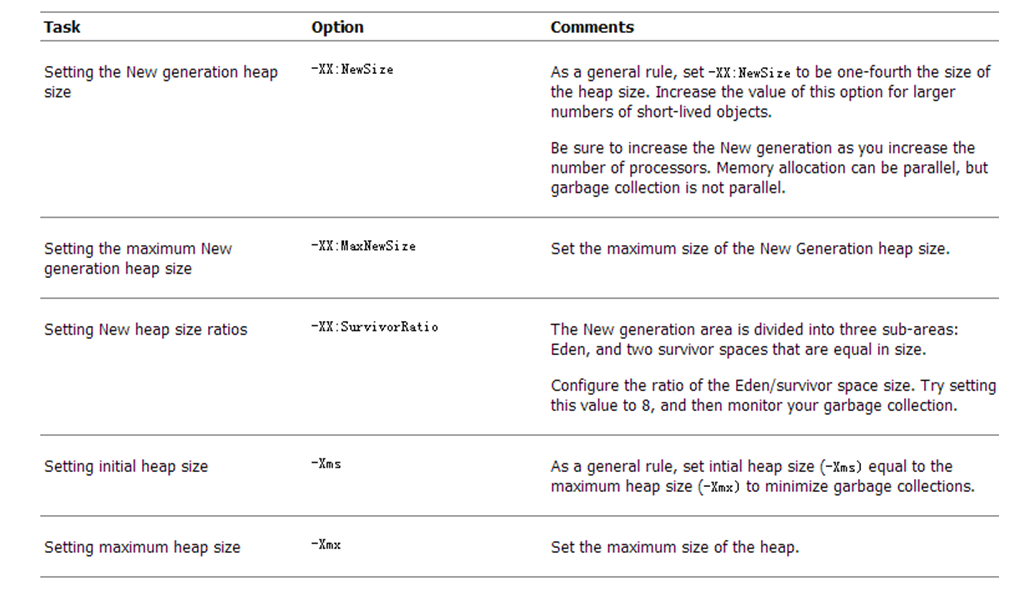
堆内存调试的常用参数总结:

-xms:堆内存空间的初始大小

--XX:NewSize:新生代的初始空间大小

-Xmx:堆内存的最大值

--XX:MaxNewSize:新生代空间的最大值

--XX:PermSize:持久带的初始值

--XX:MaxPermSize:持久带的最大值

--XX:SurvivorRatio:在新生代内部Eden/survivor的值
三.JVM调参案例展示
1>.查看tomcat的调优配置
[root@yinzhengjie ~]# head - /usr/local/tomcat/bin/catalina.sh

#!/bin/sh

# Licensed to the Apache Software Foundation (ASF) under one or more

# contributor license agreements.  See the NOTICE file distributed with

# this work for additional information regarding copyright ownership.

# The ASF licenses this file to You under the Apache License, Version 2.0

# (the "License"); you may not use this file except in compliance with

# the License.  You may obtain a copy of the License at

#

#     http://www.apache.org/licenses/LICENSE-2.0

#

# Unless required by applicable law or agreed to in writing, software

# distributed under the License is distributed on an "AS IS" BASIS,

# WITHOUT WARRANTIES OR CONDITIONS OF ANY KIND, either express or implied.

# See the License for the specific language governing permissions and

# limitations under the License.

# -----------------------------------------------------------------------------

# Control Script for the CATALINA Server

#

# Environment Variable Prerequisites

#

#   Do not set the variables in this script. Instead put them into a script

#   setenv.sh in CATALINA_BASE/bin to keep your customizations separate.

#

#   CATALINA_HOME   May point at your Catalina "build" directory.

#

#   CATALINA_BASE   (Optional) Base directory for resolving dynamic portions

#                   of a Catalina installation.  If not present, resolves to

#                   the same directory that CATALINA_HOME points to.

#

#   CATALINA_OUT    (Optional) Full path to a file where stdout and stderr

#                   will be redirected.

#                   Default is $CATALINA_BASE/logs/catalina.out

#

#   CATALINA_OPTS   (Optional) Java runtime options used when the "start",

#                   "run" or "debug" command is executed.

#                   Include here and not in JAVA_OPTS all options, that should

#                   only be used by Tomcat itself, not by the stop process,

#                   the version command etc.

#                   Examples are heap size, GC logging, JMX ports etc.

#

#   CATALINA_TMPDIR (Optional) Directory path location of temporary directory

#                   the JVM should use (java.io.tmpdir).  Defaults to

#                   $CATALINA_BASE/temp.

#

#   JAVA_HOME       Must point at your Java Development Kit installation.

#                   Required to run the with the "debug" argument.

#

#   JRE_HOME        Must point at your Java Runtime installation.

#                   Defaults to JAVA_HOME if empty. If JRE_HOME and JAVA_HOME

#                   are both set, JRE_HOME is used.

#

#   JAVA_OPTS       (Optional) Java runtime options used when any command

#                   is executed.

#                   Include here and not in CATALINA_OPTS all options, that

#                   should be used by Tomcat and also by the stop process,

#                   the version command etc.

#                   Most options should go into CATALINA_OPTS.

#

#   JAVA_ENDORSED_DIRS (Optional) Lists of of colon separated directories

#                   containing some jars in order to allow replacement of APIs

#                   created outside of the JCP (i.e. DOM and SAX from W3C).

#                   It can also be used to update the XML parser implementation.

#                   This is only supported for Java <= .

#                   Defaults to $CATALINA_HOME/endorsed.

#

#   JPDA_TRANSPORT  (Optional) JPDA transport used when the "jpda start"

#                   command is executed. The default is "dt_socket".

#

#   JPDA_ADDRESS    (Optional) Java runtime options used when the "jpda start"

#                   command is executed. The default is localhost:.

#

#   JPDA_SUSPEND    (Optional) Java runtime options used when the "jpda start"

#                   command is executed. Specifies whether JVM should suspend

#                   execution immediately after startup. Default is "n".

#

#   JPDA_OPTS       (Optional) Java runtime options used when the "jpda start"

#                   command is executed. If used, JPDA_TRANSPORT, JPDA_ADDRESS,

#                   and JPDA_SUSPEND are ignored. Thus, all required jpda

#                   options MUST be specified. The default is:

#

#                   -agentlib:jdwp=transport=$JPDA_TRANSPORT,

#                       address=$JPDA_ADDRESS,server=y,suspend=$JPDA_SUSPEND

#

#   JSSE_OPTS       (Optional) Java runtime options used to control the TLS

#                   implementation when JSSE is used. Default is:

#                   "-Djdk.tls.ephemeralDHKeySize=2048"

#

#   CATALINA_PID    (Optional) Path of the file which should contains the pid

#                   of the catalina startup java process, when start (fork) is

#                   used

#

#   LOGGING_CONFIG  (Optional) Override Tomcat's logging config file

#                   Example (all one line)

#                   LOGGING_CONFIG="-Djava.util.logging.config.file=$CATALINA_BASE/conf/logging.properties"

#

#   LOGGING_MANAGER (Optional) Override Tomcat's logging manager

#                   Example (all one line)

#                   LOGGING_MANAGER="-Djava.util.logging.manager=org.apache.juli.ClassLoaderLogManager"

#

#   UMASK           (Optional) Override Tomcat's default UMASK of 0027

#

#   USE_NOHUP       (Optional) If set to the string true the start command will

#                   use nohup so that the Tomcat process will ignore any hangup

#                   signals. Default is "false" unless running on HP-UX in which

#                   case the default is "true"

# -----------------------------------------------------------------------------

[root@yinzhengjie ~]#
[root@yinzhengjie ~]# head -108 /usr/local/tomcat/bin/catalina.sh
2>.配置tomcat的启动脚本
[root@yinzhengjie ~]# more /etc/init.d/tomcat

#!/bin/sh

# Tomcat init script for Linux.

#@author :yinzhengjie

#blog:http://www.cnblogs.com/yinzhengjie

#EMAIL:y1053419035@qq.com

#

# chkconfig:

# description: The Apache Tomcat servlet/JSP container.

JAVA_OPTS='-Xms64m -Xmx128m'

JAVA_HOME=/usr/java/jdk1.

CATALINA_HOME=/usr/local/apache-tomcat-9.0.

export JAVA_OPTS JAVA_HOME CATALINA_HOME

case $ in

    start)

        exec    $CATALINA_HOME/bin/catalina.sh start

        ;;

    stop)

        exec    $CATALINA_HOME/bin/catalina.sh stop

        ;;

    restart)

        $CATALINA_HOME/bin/catalina.sh stop

        sleep

        exec    $CATALINA_HOME/bin/catalina.sh start

        ;;

    *)

        exec $CATALINA_HOME/bin/catalina.sh *

        ;;

esac

[root@yinzhengjie ~]#

[root@yinzhengjie ~]# chmod +x /etc/init.d/tomcat

[root@yinzhengjie ~]#

[root@yinzhengjie ~]# ll /etc/init.d/tomcat

-rwxr-xr-x  root root  Sep   : /etc/init.d/tomcat

[root@yinzhengjie ~]#
3>.测试启动脚本
[root@yinzhengjie ~]# jps

 Jps

[root@yinzhengjie ~]#

[root@yinzhengjie ~]# /etc/init.d/tomcat start

Using CATALINA_BASE:   /usr/local/apache-tomcat-9.0.

Using CATALINA_HOME:   /usr/local/apache-tomcat-9.0.

Using CATALINA_TMPDIR: /usr/local/apache-tomcat-9.0./temp

Using JRE_HOME:        /usr/java/jdk1.

Using CLASSPATH:       /usr/local/apache-tomcat-9.0./bin/bootstrap.jar:/usr/local/apache-tomcat-9.0./bin/tomcat-juli.jar

Tomcat started.

[root@yinzhengjie ~]#

[root@yinzhengjie ~]# jps

 Bootstrap

 Jps

[root@yinzhengjie ~]#

[root@yinzhengjie ~]# /etc/init.d/tomcat stop    #温馨提示:和start之间执行频率不宜过快!

Using CATALINA_BASE:   /usr/local/apache-tomcat-9.0.

Using CATALINA_HOME:   /usr/local/apache-tomcat-9.0.

Using CATALINA_TMPDIR: /usr/local/apache-tomcat-9.0./temp

Using JRE_HOME:        /usr/java/jdk1.

Using CLASSPATH:       /usr/local/apache-tomcat-9.0./bin/bootstrap.jar:/usr/local/apache-tomcat-9.0./bin/tomcat-juli.jar

[root@yinzhengjie ~]# jps

 Jps

[root@yinzhengjie ~]#
四.观测垃圾回收器的回收机制
1>.垃圾回收器的适用场景
1.1>.并行垃圾收集器(Parallel GC)
优势在于有着很高的吞吐能力(Best Throughput)
1.2>.Cpncurrent GC
优势在于有着更好的暂停能力(Best Pause)
1.3>.增量垃圾收集器(Incremental GC,即Train模型)
优势在于有着更好的暂停方式(Bestter Pause)
1.4>.标记回收算法(Mark-compact)
优势在于有着更好的吞吐能力(Better throughput)
2>.通过命令行jstat工具观察Java的回收机制
[root@yinzhengjie ~]# jps

 Jps

[root@yinzhengjie ~]#

[root@yinzhengjie ~]# /etc/init.d/tomcat start

Using CATALINA_BASE:   /usr/local/apache-tomcat-9.0.

Using CATALINA_HOME:   /usr/local/apache-tomcat-9.0.

Using CATALINA_TMPDIR: /usr/local/apache-tomcat-9.0./temp

Using JRE_HOME:        /usr/java/jdk1.

Using CLASSPATH:       /usr/local/apache-tomcat-9.0./bin/bootstrap.jar:/usr/local/apache-tomcat-9.0./bin/tomcat-juli.jar

Tomcat started.

[root@yinzhengjie ~]#

[root@yinzhengjie ~]# jps

 Bootstrap

 Jps

[root@yinzhengjie ~]#

[root@yinzhengjie ~]# jstat -gc  1s

 S0C    S1C    S0U    S1U      EC       EU        OC         OU       MC     MU    CCSC   CCSU   YGC     YGCT    FGC    FGCT     GCT

2560.0 2560.0 2528.1  0.0   32768.0  14705.1   44032.0     5294.3   15360.0 14687.6 1792.0 1625.2          0.016         0.000    0.016

2560.0 2560.0 2528.1  0.0   32768.0  14705.1   44032.0     5294.3   15360.0 14687.6 1792.0 1625.2          0.016         0.000    0.016

2560.0 2560.0 2528.1  0.0   32768.0  14705.1   44032.0     5294.3   15360.0 14687.6 1792.0 1625.2          0.016         0.000    0.016

2560.0 2560.0 2528.1  0.0   32768.0  14705.2   44032.0     5294.3   15360.0 14687.6 1792.0 1625.2          0.016         0.000    0.016

2560.0 2560.0 2528.1  0.0   32768.0  14705.2   44032.0     5294.3   15360.0 14687.6 1792.0 1625.2          0.016         0.000    0.016

2560.0 2560.0 2528.1  0.0   32768.0  14705.2   44032.0     5294.3   15360.0 14687.6 1792.0 1625.2          0.016         0.000    0.016

2560.0 2560.0 2528.1  0.0   32768.0  14705.3   44032.0     5294.3   15360.0 14687.6 1792.0 1625.2          0.016         0.000    0.016

2560.0 2560.0 2528.1  0.0   32768.0  14705.3   44032.0     5294.3   15360.0 14687.6 1792.0 1625.2          0.016         0.000    0.016

2560.0 2560.0 2528.1  0.0   32768.0  14705.3   44032.0     5294.3   15360.0 14687.6 1792.0 1625.2          0.016         0.000    0.016

2560.0 2560.0 2528.1  0.0   32768.0  14705.4   44032.0     5294.3   15360.0 14687.6 1792.0 1625.2          0.016         0.000    0.016

[root@yinzhengjie ~]#
3>.通过jconsole和jvisualvm,jmap等工具查看Java垃圾回收机制
详情请参考:https://www.cnblogs.com/yinzhengjie/p/9279283.html。
Java基础-JVM调优策略简介的更多相关文章
- 深入了解java虚拟机(JVM) 第八章 常见的jvm调优策略
一般来说,jvm的调优策略是没有一种固定的方法,只有依靠我们的知识和经验来对项目中出现的问题进行分析,正如吉德林法则那样当你已经把问题清楚写出来,就已经解决了一半.虽然JVM调优中没有固定的策略,但是 ...
- Java基础-JVM内存回收
Sun的JVMGenerationalCollecting(垃圾回收)原理是这样的:把对象分为年青代(Young).年老代(Tenured).持久代(Perm),对不同生命周期的对象使用不同的算法.( ...
- java基础(1)----简介
基础语法. 面向对象. 字符串和集合. IO流. 接口. lambda. 方法引用. Stream. 模块化. 一.java的前世今生: J2SE:标准体验版.J2EE:企业版.J2ME:小型版(移动 ...
- Java基础-JVM篇
1.1 .线程 这里所说的线程指程序执行过程中的一个线程实体.JVM 允许一个应用并发执行多个线程.Hotspot JVM 中的 Java 线程与原生操作系统线程有直接的映射关系.当线程本地存储. ...
- Java基础-JVM堆与栈
首先看一个解析列子 JVM的内存空间: (1). Heap 堆空间:分配对象 new Student() (2). Stack 栈空间:临时变量 Student stu (3).Code 代码区 :类 ...
- Java基础-JVM类加载机制
JVM的类加载是通过ClassLoader及其子类来完成的,类的层次关系和加载顺序可以由下图来描述: 1)Bootstrap ClassLoader /启动类加载器 $JAVA_HOME中jre/li ...
- Java基础-JVM
jvm=> java虚拟机 一.java虚拟机的生命周期: Java虚拟机的生命周期 一个运行中的Java虚拟机有着一个清晰的任务:执行Java程序.程序开始执行时他才运行,程序结束时他就停止. ...
- Java基础——JVM内存结构
推荐阅读:https://www.cnblogs.com/wangjzh/p/5258254.html 一.内存结构图 先导知识: 一个 Java 源程序文件,会被编译为字节码文件(以 class 为 ...
- Java之JVM调优案例分析与实战(1) - 高性能硬件上的程序部署策略
本JVM系列均来源于<深入理解Java虚拟机>一书中,版权归该书作者所有. 环境:一个15万PV/天左右的在线文档类型网站最近更换了硬件系统,新系统硬件为4个CPU.16GB物理内存.OS ...
随机推荐
- vue-cli 3.0 图片路径问题(何时使用 public 文件夹)
1. 图片放入public文件夹下时 参考:https://cli.vuejs.org/zh/guide/html-and-static-assets.html#public-%E6%96%87%E4 ...
- HTML 中使 footer 始终处于页面底部
通常在页面中,需要使页脚 footer 部分始终处于底部.当页面高度不够 100% 时, footer 处于页面最底部,当页面内容高于 100% 时,页脚元素可以被撑到最底部. 方法一:绝对定位 &l ...
- Django高并发负载均衡
1 什么是负载均衡? 当一台服务器的性能达到极限时,我们可以使用服务器集群来提高网站的整体性能.那么,在服务器集群中,需要有一台服务器充当调度者的角色,用户的所有请求都会首先由它接收,调度者再根据每台 ...
- web网站的并发量级别
web网站的并发量级别 评价一个网站的“大小”,处于视角的不同,有很多种衡量的方法,类似文章数,页面数之类的数据非常明显,也没有什么可以争议的.但对于并发来说,争议非常之多,这里就从一个技术的角度开始 ...
- effective c++ 笔记 (31-34)
//---------------------------15/04/20---------------------------- //#32 确定你的public继承塑膜出 is-a 关系 { ...
- stl源码剖析 详细学习笔记 算法(2)
//---------------------------15/03/29---------------------------- //****************************set相 ...
- startActivity时报错Calling startActivity() from outside of an Activity context requires the FLAG_ACTIVI
原代码如下: Intent intent = new Intent(); intent.setClass(mContext, PhotoView.class); Bundle bundle = new ...
- Siki_Unity_2-9_C#高级教程(未完)
Unity 2-9 C#高级教程 任务1:字符串和正则表达式任务1-1&1-2:字符串类string System.String类(string为别名) 注:string创建的字符串是不可变的 ...
- 我用Python爬虫挣钱的那些事
在下写了10年Python,期间写了各种奇葩爬虫,挣各种奇葩的钱,写这篇文章总结下几种爬虫挣钱的方式. 1.最典型的就是找爬虫外包活儿. 这个真是体力活,最早是在国外各个freelancer网站上找适 ...
- 最近在研究google的angularjs
最近在研究google的angularjs,先做个简单的例子来试试. <!doctype html> <html lang="en" ng-app="m ...