
第23课 - #error 和 #line 使用分析
第23课 - #error 和 #line 使用分析

1. #error 的用法
(1)#error 是一个预处理器指示字,用于生成一个编译错误消息,这个消息最终会传递到编译器(gcc)
在思考这一点的过程中,领悟到了两个点:
① 使用 gcc 编译代码,输出的错误(警告)信息,是由预处理器、编译器、汇编器、链接器产生的。
② gcc表示整个编译过程,它会调用 预处理器程序 -> 编译器程序 -> 汇编器程序 -> 链接器程序
(2)使用方法:#error message // 不需要在message上使用双引号
(3)#error 编译指示字用于自定义程序员特有的编译错误消息。类似的,#warning 用于生成编译警告错误
(4)#error 可用于提示编译条件是否满足。编译过程中的任何错误意味着无法生成最终的可执行程序。
下面我们通过一个示例程序来说明 #error 的用法:
下面是一段C++ 的代码,如果我们错误的使用gcc对其进行编译就会报错
 #include <stdio.h>

 class CppClass

 {

 private:

     int m_nValue;

 public:

     CppClass(){};

     ~CppClass(){};

 };

 int main()

 {

     return ;

 }
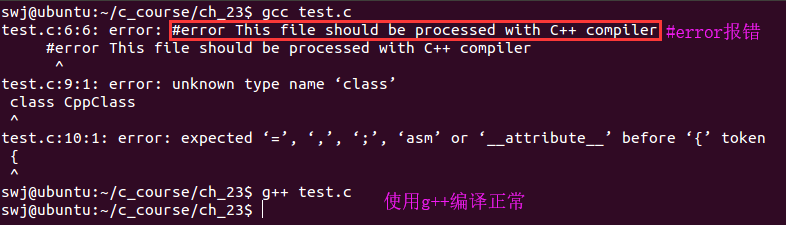
使用gcc编译该代码报错

那如何解决这个问题呢?答案就是使用 条件编译 + #error
 #include <stdio.h>

 // __cplusplus宏是C++编译器内置的一个宏,C编译器中是没有的

 // 如果使用C编译器编译该程序#error就会报编译报错

 #ifndef __cplusplus

     #error This file should be processed with C++ compiler

 #endif

 class CppClass

 {

 private:

     int m_nValue;

 public:

     CppClass(){};

     ~CppClass(){};

 };

 int main()

 {

     return ;

 }
在上篇文章的最后,我们分析了一个通过条件编译区分产品版本的小程序,在那个代码中我们没有考虑一种情况,那就是如果没有定义PRODUCT这个宏会怎么样?
#include <stdio.h>

void f()

{

#if (PRODUCT == 1)

    printf("This is a low level product!\n");

#elif (PROUDCT == 2)

    printf("This is a middle level product!\n");

#elif (PRODUCT == 3)

    printf("This is a high level product!\n");

#endif

}

int main()

{

    f();

    printf("1. Query Information.\n");

    printf("2. Record Information.\n");

    printf("3. Delete Information.\n");

#if (PRODUCT == 1)

    printf("4. Exit.\n");

#elif (PRODUCT == 2)

    printf("4. High Level Query.\n");

    printf("5. Exit.\n");

#elif (PRODUCT == 3)

    printf("4. High Level Query.\n");

    printf("5. Mannual Service.\n");

    printf("6. Exit.\n");

#endif

    return ;

}
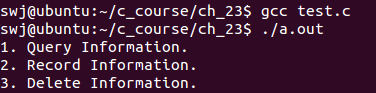
如果我们在编译该程序时没有通过-DPRODUCT指定这个宏的值,编译并不会报错但是执行结果就有问题了。
使用 #error 完善该程序,如果没有定义PRODUCT或者PRODUCT的值不为1、2、3中的一个,程序在编译时就会报错。
 #include <stdio.h>

 void f()

 {

 #if (PRODUCT == 1)

     printf("This is a low level product!\n");

 #elif (PROUDCT == 2)

     printf("This is a middle level product!\n");

 #elif (PRODUCT == 3)

     printf("This is a high level product!\n");

 #else

     // 如果PRODUCT未定义或定义了但!=1 != 2 != 3

     #error The PRODUCT macro is NOT defined!

 #endif

 }

 int main()

 {

     f();

     printf("1. Query Information.\n");

     printf("2. Record Information.\n");

     printf("3. Delete Information.\n");

 #if (PRODUCT == 1)

     printf("4. Exit.\n");

 #elif (PRODUCT == 2)

     printf("4. High Level Query.\n");

     printf("5. Exit.\n");

 #elif (PRODUCT == 3)

     printf("4. High Level Query.\n");

     printf("5. Mannual Service.\n");

     printf("6. Exit.\n");

 #else

     // 如果PRODUCT未定义或定义了但!=1 != 2 != 3

     #error The PRODUCT macro is NOT defined!

 #endif

     return ;

 }

2. #line 的用法
(1)#line 用于强制指定新的行号和编译文件名,并对源程序的代码重新编号
(2)用法:
① #line number newFilename
② #line number // 不改变文件名,只改变行号
(3)#line 编译指示字的本质是重定义 __LINE__ 和 __FILE__
 #include <stdio.h>

 int main()

 {

     printf("%s : %d\n", __FILE__, __LINE__);

     #line 1 "new_line.c"    // 这里改变了行号和文件名,行号为1(下一行行号为1)、文件名为new_line.c(注意这里需要使用用双引号)

     printf("%s : %d\n", __FILE__, __LINE__);

     return ;

 }

// 输出结果
swj@ubuntu:~/c_course/ch_23$ ./a.out
line.c : 5
new_line.c : 2
#line 是C语言早期的产物(在当今的软件工程中已经不使用了),那时候代码量比较小,通常放到一个文件中。如果这个程序由几个人分工协作完成的话,就是每个人先各写各的,最后再统一放到一个文件中。
那如果编译发生错误,如何知道错误的代码是谁写的呢?这个就要使用 #line 预处理指令了。
 #include <stdio.h>

 // The code section is written by A.

 // Begin

 #line 1 "a.c"

 // End

 // The code section is written by B.

 // Begin

 #line 1 "b.c"

 // End

 // The code section is written by Scott.

 // Begin

 #line 1 "scott_shi.c"

 int main()

 {

     printf("%s : %d\n", __FILE__, __LINE__);

     printf("%s : %d\n", __FILE__, __LINE__)    // 这里编译会报错

     return ;

 }

 // End
编译报错,提示是 scott_shi.c 这个文件的 第9行 发生错误,这样就定位了是哪个人写的。

第23课 - #error 和 #line 使用分析的更多相关文章
- 第23课 #error和#line使用分析
#error的用法: 示例程序: #include <stdio.h> #ifndef __cplusplus #error This file should be processed w ...
- #error和#line使用分析
#error的用法 #error用于生成一个编译错误消息 用法:error message(不需要用双引号包围) #error编译指示字用于自定义程序员特有的编译错误,消息类似的 #warning用于 ...
- Error on line -1 of document : Premature end of file. Nested exception: Premature end of file.
启动tomcat, 出现, ( 之前都是好好的... ) [lk ] ERROR [08-12 15:10:02] [main] org.springframework.web.context.Con ...
- 关于xml加载提示: Error on line 1 of document : 前言中不允许有内容
我是在java中做的相关测试, 首先粘贴下报错: 读取xml配置文件:xmls\property.xml org.dom4j.DocumentException: Error on line 1 of ...
- (转载)Flash Loader加载完成不发送COMPLETE和ERROR事件的问题分析
(转载)http://blog.dou.li/flash-loader%E5%8A%A0%E8%BD%BD%E5%AE%8C%E6%88%90%E4%B8%8D%E5%8F%91%E9%80%81co ...
- error on line 1 at column 6: XML declaration allowed only at the start of the document
This page contains the following errors: error on line 1 at column 6: XML declaration allowed only a ...
- "fatal: protocol error: bad line length character: No This"
git clone 远程地址时候出现 "fatal: protocol error: bad line length character: No This" 错误 在stackov ...
- Parse Fatal Error at line 41 column 24: 元素类型 "url-pattern" 必须由匹配的结束标记 "</url-pattern>" 终止
1.错误描述 严重: Parse Fatal Error at line 41 column 24: 元素类型 "url-pattern" 必须由匹配的结束标记 "< ...
- (转)Windows 平台下解决httpd.exe: syntax error on line 39
近来在研究PHP,结果为了Apache的安装伤神不已...小白我在安装后,启动Apache的服务虽然可以,不过,在Apache sevice monitor 中启动services时就会出现如下的问题 ...
随机推荐
- Linux下安装Readis
Redis的官方下载网址是:http://redis.io/download (这里下载的是Linux版的Redis源码包) Redis服务器端的默认端口是6379. 首先我们先把整体的流程先书写下 ...
- 36 个JS 面试题
1.JS中let和const有什么用? 在现代js中,let&const是创建变量的不同方式. 在早期的js中,咱们使用var关键字来创建变量. let&const关键字是在ES6版本 ...
- Chevereto免费图床搭建教程 | vps搭建免费图床教程
Chevereto免费图床搭建教程 | vps搭建免费图床教程 本文首发于:https://chens.life/How-to-build-a-free-image-bed.html 前言 自从有了个 ...
- SpringSecurity权限管理系统实战—七、处理一些问题
目录 SpringSecurity权限管理系统实战-一.项目简介和开发环境准备 SpringSecurity权限管理系统实战-二.日志.接口文档等实现 SpringSecurity权限管理系统实战-三 ...
- 动态数组java实现
数组是一种顺序存储的线性表,所有元素的内存地址是连续的. 动态数组相对于一般数组的优势是可以灵活地添加或删除元素.而一般数组则受限于固定的内存空间.只能有限的添加元素 动态数组(Dynamic Arr ...
- golang学习笔记:Interface类型断言详情
原文链接:https://www.2cto.com/kf/201712/703563.html 1. 用于判断变量类型 demo如下: switch t := var.(type){ case str ...
- 文华财经赢顺外盘期货行情数据API接口开放代码
文华财经赢顺外盘期货行情数据API接口开放代码 怎么才能获取到外盘期货行情数据API接口呢?不少朋友就会考虑到文华财经行情API接口,本身文华财经就是一个软件提供商,提供行情API接口也 ...
- Discovering Reinforcement Learning Algorithms
郑重声明:原文参见标题,如有侵权,请联系作者,将会撤销发布! arXiv:2007.08794v1 [cs.LG] 17 Jul 2020 Abstract 强化学习(RL)算法根据经过多年研究手动发 ...
- wordpress个人常用标签调用
wordpress常见标签调用,老是容易忘记,又要找半天,干脆搬到网站上. <?php bloginfo('name');?>网站名称 url <?php echo home_url ...
- Combine 框架,从0到1 —— 1.核心概念
本文首发于 Ficow Shen's Blog,原文地址: Combine 框架,从0到1 -- 1.核心概念. 内容概览 前言 核心概念 RxSwift Combine 总结 参考内容 ...