
Salesforce LWC学习(十九) 针对 lightning-input-field的label值重写
本篇参考:
https://developer.salesforce.com/docs/component-library/bundle/lightning-input-field/documentation
https://www.lightningdesignsystem.com/components/input/
在https://www.cnblogs.com/zero-zyq/p/11380449.html 篇中,我们了解了 LDS的使用,其中让我们用起来很爽的莫过于使用lightning-input-field。
我们在Account表中创建两个字段,分别为User_For_LookUp__c关联到User表以及Contact_For_Lookup__c用来关联到Contact表。
eventCreate.html:用于关联需要创建Event的几个字段,因为Event不能使用 lightning-record-edit-form,所以将 暂时绑定 到Account,OwnerId使用 User_For_LookUp__c借壳绑定,WhoId使用Contact_For_Lookup__c绑定。
<template>

    <lightning-card>

        <lightning-record-edit-form

            object-api-name='Account'

            onsubmit={saveEvent}

        >

            <lightning-layout multiple-rows="true">

                <lightning-layout-item size="6" padding="around-small" flexibility='auto'>

                    <lightning-input type="text" label="Subject" name="subject" value={eventWrapper.subject} onchange={handleInputChange}></lightning-input>

                </lightning-layout-item>

                <lightning-layout-item size="6" padding="around-small" flexibility='auto'>

                </lightning-layout-item>

                <lightning-layout-item padding="around-small" flexibility='auto' size='6'>

                    <lightning-input label="Start Date" type="datetime" name="startDateTime" value={eventWrapper.startDateTime} date-style="long" required onchange={handleInputChange}></lightning-input>

                </lightning-layout-item>

                <lightning-layout-item padding="around-small" flexibility='auto' size='6'>

                    <lightning-input label="End Date" type="datetime" name="endDateTime" value={eventWrapper.endDateTime} date-style="long" required onchange={handleInputChange}></lightning-input>

                </lightning-layout-item>

                <lightning-layout-item size="6" padding="around-small" flexibility='auto'>

                    <lightning-input-field

                        field-name="User_For_LookUp__c"

                        variant="label-stacked"

                    ></lightning-input-field>

                </lightning-layout-item>

                <lightning-layout-item size="6" padding="around-small" flexibility='auto'>

                    <lightning-input-field

                        field-name="Contact_For_Lookup__c"

                        variant="label-stacked"

                    ></lightning-input-field>

                </lightning-layout-item>

            </lightning-layout>

            <lightning-layout>

                <lightning-layout-item>

                    <lightning-button-group>

                        <lightning-button type="submit" label="Submit"></lightning-button>

                        <lightning-button label="cancel"></lightning-button>

                    </lightning-button-group>

                </lightning-layout-item>

            </lightning-layout>

        </lightning-record-edit-form>

    </lightning-card>

</template>
eventCreate.js:当 saveEvent方法时,先组织默认提交,通过event.detail.fields可以获取到 record-edit-form中的所有的 lightning-input-field的绑定值内容,在给自定义的wrapper字段赋值传递到后台即可。
import { LightningElement,track } from 'lwc';

export default class EventCreate extends LightningElement {

    @track eventWrapper = {

        subject : '',

        whoId : '',

        ownerId : '',

        startDateTime : '',

        endDateTime : ''

    };

    handleInputChange(event) {

        let eventSourceName = event.target.name;

        if(eventSourceName === 'subject') {

            this.eventWrapper.subject = event.target.value;

        } else if(eventSourceName === 'startDateTime') {

            this.eventWrapper.startDateTime = event.target.value;

        } else if(eventSourceName === 'endDateTime') {

            this.eventWrapper.endDateTime = event.target.value;

        }

    }

    saveEvent(event) {

        event.preventDefault();

        const allFields = event.detail.fields;

        this.eventWrapper.whoId = allFields.User_For_LookUp__c;

        this.eventWrapper.ownerId = allFields.Contact_For_Lookup__c;

        console.log(JSON.stringify(this.eventWrapper));

    }

}
效果展示:当我们录入完基本信息点击 submit按钮以后,console栏展示了返回的内容。
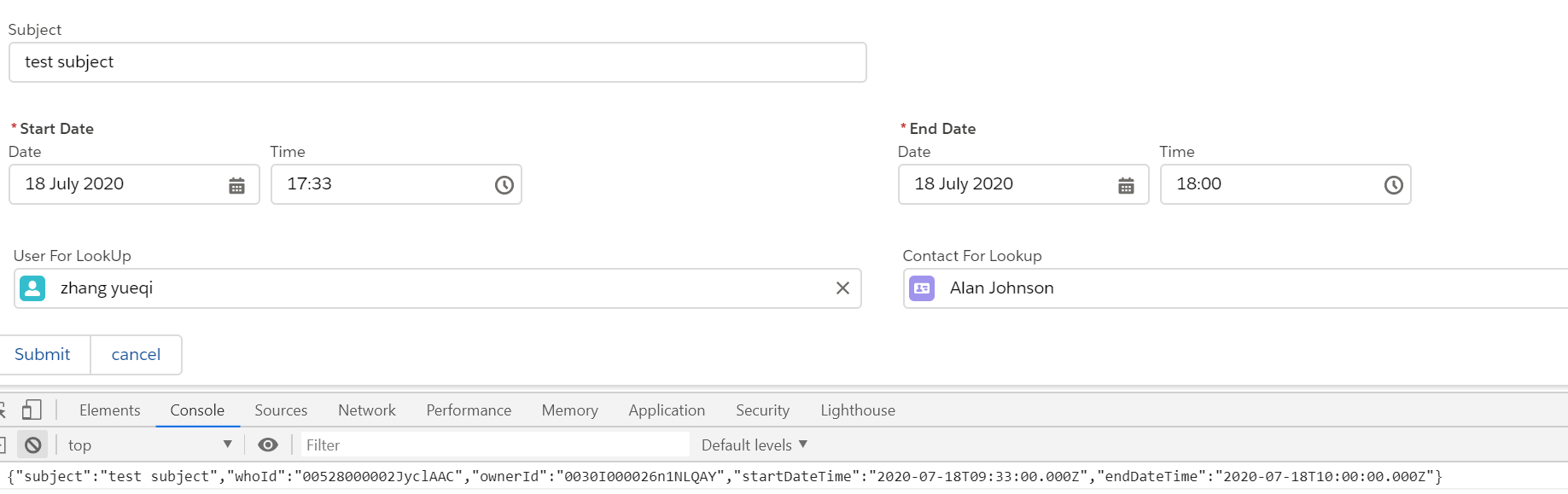
上面我们使用的variant是label-stacked,可以看到User_For_LookUp__c字段展示的 label是 User For LookUp,但是我们想要展示他的值是 Owner Id,然而lightning-input-field中没有任何属性可以更改其label值,应该如何操作呢?这个时候可以看前辈们提供的方法了,原操作可以查看片头链接。
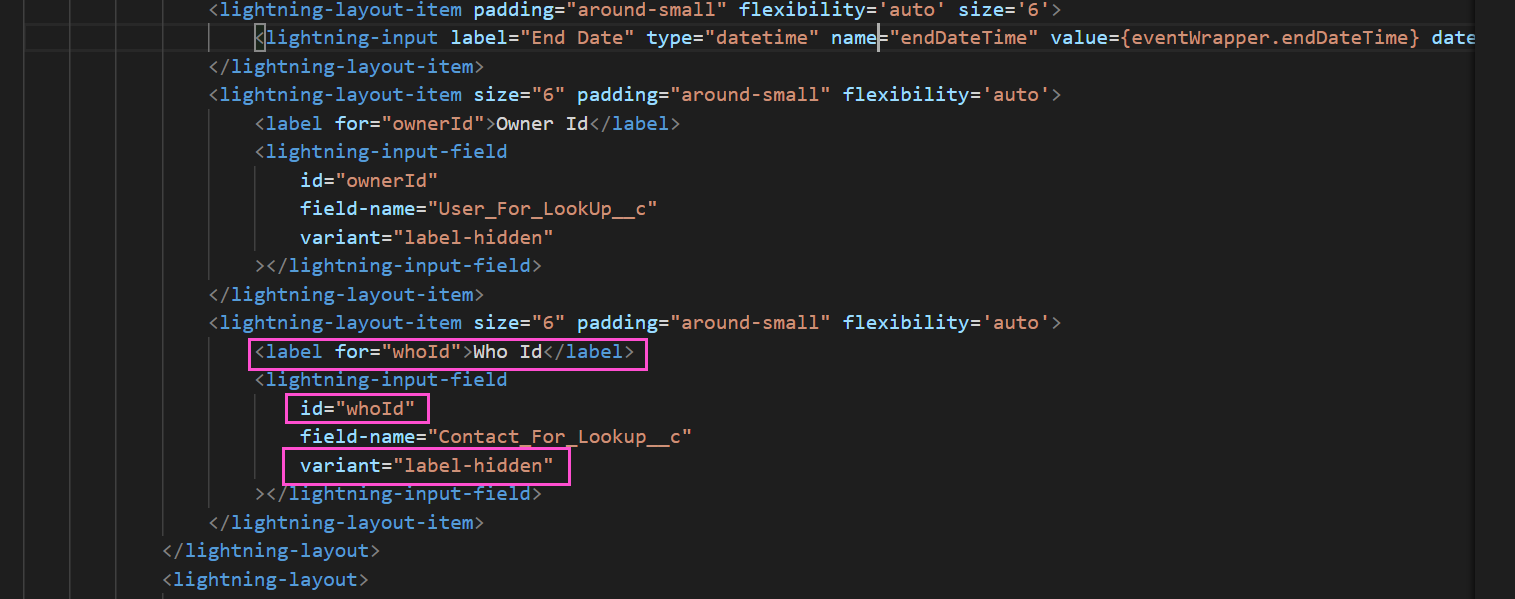
秘密就在variant中,lwc针对此组件存在一个variant为label-hidden,即不展示 label信息,我们只需要隐藏这个字段的label值,然后通过lightning design system中的提供方式重新布局展示想要的label信息即可,优化后代码如下:
修改之后的展示效果:

总结:篇中主要描述如何对 lightning-input-field的label值进行修改,允许修改以后可以极大程度上保证了字段的复用性和可扩展性。篇中有错误地方欢迎指出,有不懂欢迎留言。
Salesforce LWC学习(十九) 针对 lightning-input-field的label值重写的更多相关文章
- Salesforce LWC学习(十) 前端处理之 list 处理
本篇参看:https://developer.mozilla.org/zh-CN/docs/Web/JavaScript/Reference/Global_Objects/Array list是我们经 ...
- Salesforce LWC学习(十五) Async 以及 Picklist 公用方法的实现
本篇参考:salesforce 零基础学习(六十二)获取sObject中类型为Picklist的field values(含record type) https://developer.salesfo ...
- Salesforce LWC学习(十六) Validity 在form中的使用浅谈
本篇参考: https://developer.salesforce.com/docs/component-library/bundle/lightning-input/documentation h ...
- Salesforce LWC学习(十八) datatable展示 image
本篇参看: https://developer.salesforce.com/docs/component-library/bundle/lightning-datatable/documentati ...
- Salesforce LWC学习(十四) Continuation进行异步callout获取数据
本篇参考: https://developer.salesforce.com/docs/component-library/documentation/en/lwc/lwc.apex_continua ...
- Salesforce LWC学习(三十九) lwc下quick action的recordId的问题和解决方案
本篇参考: https://developer.salesforce.com/docs/component-library/bundle/force:hasRecordId/documentation ...
- Salesforce LWC学习(四十) dynamic interaction 浅入浅出
本篇参考: Configure a Component for Dynamic Interactions in the Lightning App Builder - Salesforce Light ...
- Salesforce LWC学习(三十) lwc superbadge项目实现
本篇参考:https://trailhead.salesforce.com/content/learn/superbadges/superbadge_lwc_specialist 我们做lwc的学习时 ...
- Salesforce LWC学习(十七) 前端知识之 onclick & onblur & onmousedown
在Salesforce LWC学习(八) Look Up组件实现篇中,我们实现了公用的lookup组件,使用的过程中,会发现当我们输入内容以后,搜索出来的列表便无法被清空. 针对此种情况我们打算优化一 ...
随机推荐
- 阿里面试官最喜欢问的21个HashMap面试题
1.HashMap 的数据结构? A:哈希表结构(链表散列:数组+链表)实现,结合数组和链表的优点.当链表长度超过 8 时,链表转换为红黑树. transient Node<K,V>\[\ ...
- 斐讯N1搭建高性能博客
前些日子我在网上淘到了一台斐讯n1,Amlogic S905D的板子让这个盒子平滑地用上了Armbian系统,有了linux的加持,让这个设备的玩法又上升了一个层次,网上大多都是把他作为旁路由用来富强 ...
- 专家解读:利用Angular项目与数据库融合实例
摘要:面对如何在现有的低版本的框架服务上,运行新版本的前端服务问题,华为云前端推出了一种融合方案,该方案能让独立的Angular项目整体运行在低版本的框架服务上,通过各种适配手段,让Angular项目 ...
- JavaWeb网上图书商城完整项目--23.注册页面之html实现
我们来分析下这个页面的代码如何实现: 我们来分下下层次结构: 1.首先最外层是一个大的div,然后又包括两个小的div,第一个div中包括一个span,第二个div是一个table表 我们来看程序的代 ...
- mysql 中order by的优化
当时看了尚硅谷周阳老师的mysql视频优化在order by 优化的时候还存在一点问题:后来阅读了mysql的官方文档,对该问题已经测定研究清楚了 内容如下: http://blog.51cto.co ...
- robot framework使用小结(三)
robot framework采用行为驱动 新建测试案例baidu04,添加Library:Selenium2Library 右键项目名robotProject-->New Resource-- ...
- Python 简明教程 --- 8,Python 字符串函数
微信公众号:码农充电站pro 个人主页:https://codeshellme.github.io 好代码本身就是最好的文档.当你需要添加一个注释时,你应该考虑如何修改代码才能不需要注释. -- St ...
- python文件处理-根据csv文件内容,将对应图像拷贝到指定文件夹
内容涉及:文件遍历,读取csv指定列,拷贝文件,清理和创建文件 # -*- coding: utf-8 -*- import csv import os import sys import numpy ...
- 【树形dp】Bzoj 1040骑士
Description Z国的骑士团是一个很有势力的组织,帮会中汇聚了来自各地的精英.他们劫富济贫,惩恶扬善,受到社会各界的赞扬.最近发生了一件可怕的事情,邪恶的Y国发动了一场针对Z国的侵略战争.战火 ...
- 【FastDFS】如何打造一款高可用的分布式文件系统?这次我明白了!!
写在前面 前面我们学习了如何基于两台服务器搭建FastDFS环境,而往往在生产环境中,需要FastDFS做到高可用,那如何基于FastDFS打造一款高可用的分布式文件系统呢?别急,今天,我们就一起来基 ...