
WPF 基础 - 绘画 2) Path
1. Path 霸中霸
既可以替代其他几种图形,也可以将直线、圆弧、贝尔赛曲线组合起来;
重要属性:Geometry Data;
其中 Geometry 为抽象类,不可实例化,可使用其子类:
LineGeometry、RectangleGeometry、EllipseGeometry、PathGeometry、
StreamGeometry、CombinedGeometry、GeometryGroup
<StackPanel Margin="20 5">

    <StackPanel.Resources>

        <LinearGradientBrush x:Key="DefaultColor">

            <GradientStop Color="#ff4b1f" Offset="0.1"/>

            <GradientStop Color="#1fddff" Offset="1"/>

        </LinearGradientBrush>

    </StackPanel.Resources>

        <StackPanel Margin="4 0">

        <Line Stroke="{StaticResource DefaultColor}" StrokeThickness="1" Margin="0 5"

              X1="0" Y1="0" X2="20" Y2="20" />

        <Path Stroke="{StaticResource DefaultColor}" StrokeThickness="1">

            <Path.Data>

                <LineGeometry StartPoint="0,0" EndPoint="20,20"/>

            </Path.Data>

        </Path>

    </StackPanel>

    <StackPanel Margin="4 0">

        <Rectangle Stroke="{StaticResource DefaultColor}" StrokeThickness="1" VerticalAlignment="Top" Margin="0 5"

                   Width="20" Height="20"/>

        <Path Stroke="{StaticResource DefaultColor}" StrokeThickness="1">

            <Path.Data>

                <RectangleGeometry Rect="0.5,0.5 19,19"/>

            </Path.Data>

        </Path>

    </StackPanel>

    <StackPanel Margin="4 0">

        <Ellipse StrokeThickness="1" Stroke="{StaticResource DefaultColor}" VerticalAlignment="Top" Margin="0 5"

                 Width="20" Height="20" />

        <Path Stroke="{StaticResource DefaultColor}" StrokeThickness="1">

            <Path.Data>

                <EllipseGeometry RadiusX="10" RadiusY="10" Center="10,10"/>

            </Path.Data>

        </Path>

    </StackPanel>

    <Path Stroke="{StaticResource DefaultColor}" StrokeThickness="1">

        <Path.Data>

            <PathGeometry>

                <PathFigure StartPoint="0,5" IsClosed="True" >

                    <LineSegment Point="15,10"></LineSegment>

                    <ArcSegment Point="30,20" Size="20,30" SweepDirection="Counterclockwise"></ArcSegment>

                    <BezierSegment Point1="30,45" Point2="50,30" Point3="40,50"></BezierSegment>

                </PathFigure>

            </PathGeometry>

        </Path.Data>

    </Path>

</StackPanel>
效果:

PathGeometry 的 Figures 属性可以容纳 PathFigure 对象,PathFigure 的 Segments 属性又可以容纳各种线段用于结合成复杂图形;
默认内容属性可以简化标签写法。
1.1 线段类型
- LineSegment 直线段
- ArgSegment 圆弧
- BezierSegment 贝塞尔曲线段
- QuadraticBezierSegment 二次方贝塞尔曲线段
- PolyLineSegment 多直线段
- PolyBezierSegment 多贝塞尔曲线段
- PolyQuadraticBezierSegment 多二次方贝塞尔曲线段
这些线段都以上一个线段的终点作为自己的起点,而第一个线段你的起点就是 PathFigure 的 StartPoint。
LineSegment : Point 表示终点

ArcSegment : Size 属性是完成椭圆的横、纵轴半径,

             SweepDirection 表明圆弧是顺/逆时针,Clockwise/Counterclockwise

             IsLargeArc 属性用于指明是否使用大弧去连接,

             RotationAngle 圆弧母椭圆的旋转角度

BezierSegment : Point1 表示起点先沿 Point1 点的方向走

                Point2 表示再沿 Point2 点的方向走

                Point3 最后到达 Point3 点(的平滑曲线)

QuadraticBezierSegment : 比 BezierSegment 少一个控制点
1.2 GeometryGroup
GeometryGroup 可以把多个 PathGeometry 的形状叠在一起。
1.3 路径标记语法
一条线段是一条标签,路径标记语法避免一个图形包括数十条线段导致数十行代码。
"M" 表示起点

<LineSegment Point="150, 50"/> = "L 150,50"

"H 180" 表示一条水平线段,横坐标到 180

"V 180" 表示垂直

"A 180,80 45 1 1 150,150" 圆弧 Size、

                               RotationAngle、

                               IsLargeArc(1=True)、

                               SweepDirection(1=Clockwise)、

                               Point

"C 250,0 50,200 300,200" 三次方贝塞尔BezierSegment Point1、Point2、Point3

"Q 150,-100 300,200" 二次方贝塞尔QuadraticBezierSegment Point1、Point2、Point3

"S 100,200 200,300" 平滑三次贝塞尔

"T 200,300" 平滑二次贝塞尔

"Z" 表示闭合
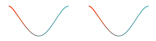
S、T 比较特殊,S 以前一条贝塞尔曲线的最后一个控制点以起点为对称中心的对称点作为自己的第一控制点,细品。平滑。
两者等价

<Path Data="M 0,0 C 6,0 18,30 30,30 S 51,0 60,0" Stroke="{StaticResource DefaultColor}" Margin="10 0"/>

<Path Data="M 0,0 C 6,0 18,30 30,30 C 42,30 51,0 60,0" Stroke="{StaticResource DefaultColor}"/>
效果:
1.4 Clip 窗口剪影
<Window x:Class="WpfAppTemplate.BrushWindow"

        xmlns="http://schemas.microsoft.com/winfx/2006/xaml/presentation"

        xmlns:x="http://schemas.microsoft.com/winfx/2006/xaml"

        xmlns:d="http://schemas.microsoft.com/expression/blend/2008"

        xmlns:mc="http://schemas.openxmlformats.org/markup-compatibility/2006"

        xmlns:coll="clr-namespace:System.Collections;assembly=mscorlib"

        mc:Ignorable="d"

        Title="BrushWindow" Height="700" Width="700">

    <StackPanel>

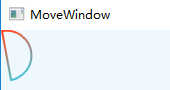
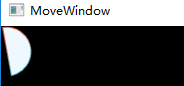
        <Path x:Name="PP" Visibility="Collapsed" Data="M 10,10 A 130,130 0 1 1 100,500 Z"/>

        <Button Content="Clip the Window" Width="90" Height="40" Click="Button_Click_1"/>

    </StackPanel>

</Window>

private void Button_Click_1(object sender, RoutedEventArgs e)

{

    this.Clip = this.PP.Data;

}
 =>
=> 
WPF 基础 - 绘画 2) Path的更多相关文章
- WPF 基础 - 绘画 1) 线段、矩形、圆弧及填充色
1. 绘画 1.1 图形类型 Line X1.Y1.X2.Y2,Stroke,StrokeThickness Rectangle 矩形 Ellipse 椭圆 Polygon 多边形(自动闭合) Pol ...
- [Qt扒手] PyQt5 基础绘画例子
[说明] 好吧,坦白从宽,我是Qt扒手(不要鄙视我).这是我根据qt官网提供的C++版本的例子(http://doc.qt.io/qt-5/qtwidgets-painting-basicdrawin ...
- WPF基础到企业应用系列6——布局全接触
本文转自:http://knightswarrior.blog.51cto.com/1792698/365351 一. 摘要 首先很高兴这个系列能得到大家的关注和支持,这段时间一直在研究Windows ...
- WPF 基础到企业应用系列索引
转自:http://www.cnblogs.com/zenghongliang/archive/2010/07/09/1774141.html WPF 基础到企业应用系列索引 WPF 基础到企业应用系 ...
- WPF笔记(1.1 WPF基础)——Hello,WPF!
原文:WPF笔记(1.1 WPF基础)--Hello,WPF! Example 1-1. Minimal C# WPF application// MyApp.csusing System;using ...
- WPF编程,通过Path类型制作沿路径运动的动画一种方法。
原文:WPF编程,通过Path类型制作沿路径运动的动画一种方法. 版权声明:我不生产代码,我只是代码的搬运工. https://blog.csdn.net/qq_43307934/article/de ...
- WPF编程,通过Path类型制作沿路径运动的动画另一种方法。
原文:WPF编程,通过Path类型制作沿路径运动的动画另一种方法. 版权声明:我不生产代码,我只是代码的搬运工. https://blog.csdn.net/qq_43307934/article/d ...
- C# WPF基础巩固
时间如流水,只能流去不流回. 学历代表你的过去,能力代表你的现在,学习能力代表你的将来. 学无止境,精益求精. 一.写作目的 做C# WPF开发,无论是工作中即将使用,还是只应付跳槽面试,开发基础是非 ...
- WPF基础知识、界面布局及控件Binding(转)
WPF是和WinForm对应的,而其核心是数据驱动事件,在开发中显示的是UI界面和逻辑关系相分离的一种开放语言.UI界面是在XAML语言环境下开发人员可以进行一些自主设计的前台界面,逻辑关系还是基于c ...
随机推荐
- docker的企业级仓库-harbor
Harbor 一.背景 Docker中要使用镜像,我们一般都会从本地.Docker Hub公共仓库或者其它第三方的公共仓库中下载镜像,但是出于安全和一些内外网的原因考虑,企业级上不会轻易使用.普通的D ...
- DNS域名解析10步
第一步:浏览器缓存中检查有没有对应这个域名的解析过的IP地址,如有,结束 第二步:如浏览器缓存没有查到,则访问本地操作系统,window下通过C:\Windows\System32\drivers\e ...
- 334A Candy Bags
A. Candy Bags time limit per test 1 second memory limit per test 256 megabytes input standard input ...
- 2017.8.11 think list
递推式与模数不互质,如何利用中国剩余定理综合答案
- apt 和 apt-get 之间有什么区别?
使用ubuntu的朋友一定会接触一个命令就是apt-get . 使用该工具安装各种应用程序那叫一个爽. 在 Ubuntu 16.04 发行后,apt使用渐渐频繁起来. 那么,apt-get 与 apt ...
- 可迭代对象&迭代器&生成器
在python中,可迭代对象&迭代器&生成器的关系如下图: 即:生成器是一种特殊的迭代器,迭代器是一种特殊的可迭代对象. 可迭代对象 如上图,这里x是一个列表(可迭代对象),其实正如第 ...
- 大数据开发--Hbase协处理器案例
大数据开发--Hbase协处理器案例 1. 需求描述 在社交网站,社交APP上会存储有大量的用户数据以及用户之间的关系数据,比如A用户的好友列表会展示出他所有的好友,现有一张Hbase表,存储就是当前 ...
- Pycharm+任务栏悬浮+docked mode
先点下所想改变模式的模块, 然后: Window -> Activate tool window -> docked mode.
- Linux bash script regex auto replace
Linux bash script regex auto replace 自动替换 /assets/css/0.styles.96df394b.css => ./assets/css/0.sty ...
- 最新 Markdown for GitHub教程
Markdown 教程 Markdown 是什么? Markdown 是一种方便记忆.书写的纯文本标记语言,用户可以使用这些标记符号以最小的输入代价生成极富表现力的文档:譬如您正在阅读的这份文档. 它 ...