
Windows Phone 8.1 FilePicker API
在 Windows Phone 8.1 中,增加了 FilePicker 的方式与文件打交道,最大的亮点在于这种方式不仅可以浏览手机上的文件,还可以浏览符合协议的应用里的文件!
比如点击 OneDrive 就会打开 OneDrive 应用:
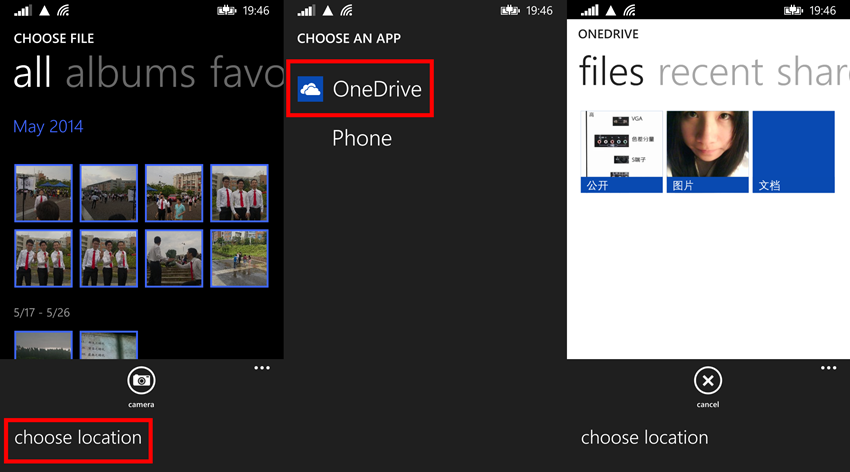
(1)FileOpenPicker
FileOpenPicker 也就是选择文件,可以设置打开单选界面或多选界面。
1)实例化 FileOpenPicker 对象,并设置 ContinuationData
private void openFileButton_Click(object sender, RoutedEventArgs e)

{

    FileOpenPicker imageOpenPicker = new FileOpenPicker();

    imageOpenPicker.FileTypeFilter.Add(".jpg");

    imageOpenPicker.FileTypeFilter.Add(".png");

    imageOpenPicker.SuggestedStartLocation = PickerLocationId.PicturesLibrary;

    imageOpenPicker.ContinuationData["Operate"] = "OpenImage";

    imageOpenPicker.PickSingleFileAndContinue();

}
FileOpenPicker 可以设置 FileTypeFilter,方便文件的浏览;还可以设置选择界面的开始目录(SuggestedStartLocation)。
因为在打开选择文件的界面后当前应用会挂起,所以需要 ContinuationData 来记录一些信息,以保证当应用恢复时能够保持之前的信息。
2)重写 App.xaml.cs 的 OnActivated 方法
当用户选择了文件之后会返回到之前的应用,这时需要重写 OnActivated 方法让应用跳转到指定页面,并传递用户选择的文件。
protected override void OnActivated(IActivatedEventArgs args)

{

    if( args is FileOpenPickerContinuationEventArgs )

    {

        Frame rootFrame = Window.Current.Content as Frame;

        if( rootFrame == null )

        {

            rootFrame = new Frame();

            rootFrame.CacheSize = ;

            Window.Current.Content = rootFrame;

        }

        if( rootFrame.Content == null )

        {

            if( rootFrame.ContentTransitions != null )

            {

                this.transitions = new TransitionCollection();

                foreach( var c in rootFrame.ContentTransitions )

                {

                    this.transitions.Add(c);

                }

            }

            rootFrame.ContentTransitions = null;

            rootFrame.Navigated += this.RootFrame_FirstNavigated;

            if( !rootFrame.Navigate(typeof(MainPage)) )

            {

                throw new Exception("Failed to create first page");

            }

        }

        if( !rootFrame.Navigate(typeof(MainPage)) )

        {

            throw new Exception("Failed to create target page");

        }

        MainPage targetPage = rootFrame.Content as MainPage;

        targetPage.FilePickerEventArgs = (FileOpenPickerContinuationEventArgs)args;

        Window.Current.Activate();

    }

}
首先是要判断之前的行为是不是 FileOpenPicker 引起的,然后获取 Frame 并跳转到指定页面,将包含用户选择文件的信息 args 传递到指定页面中。
3)添加 FileOpenPickerContinuationEventArgs 属性和 ContinuFileOpenPicker 方法
当应用将 args 传递到页面去后,剩下的就是处理文件了:
private FileOpenPickerContinuationEventArgs filePickerEventArgs;

public FileOpenPickerContinuationEventArgs FilePickerEventArgs

{

    get { return filePickerEventArgs; }

    set

    {

        filePickerEventArgs = value;

        ContinuFileOpenPicker(filePickerEventArgs);

    }

}

private async void ContinuFileOpenPicker(FileOpenPickerContinuationEventArgs args)

{

    if( args.ContinuationData["Operate"] as string == "OpenImage" && args.Files != null && args.Files.Count >  )

    {

        StorageFile file = args.Files[];

        BitmapImage image = new BitmapImage();

        await image.SetSourceAsync(await file.OpenAsync(FileAccessMode.Read));

        myImage.Source = image;

    }

}
(2)AccessCache
AccessCache 也就是指对用户选择文件或文件夹的缓存,包括 MostRecentlyUsedList 和 FutureAccessList。
MostRecentlyUsedList 可以保存 25 项,并会根据用户使用情况自动排序,当新的进来后超过 25 项了则会自动将最旧的删除。
FutureAccessList 则可以保存 1000 项,但不会自动排序,需要开发者自行管理。
保存方法:
private async void ContinuFileOpenPicker(FileOpenPickerContinuationEventArgs args)

{

    if( args.ContinuationData["Image"] as string == "OpenImage" && args.Files != null && args.Files.Count >  )

    {

        StorageFile file = args.Files[];

        BitmapImage image = new BitmapImage();

        await image.SetSourceAsync(await file.OpenAsync(FileAccessMode.Read));

        myImage.Source = image;

        StorageApplicationPermissions.MostRecentlyUsedList.Add(file, "");

        StorageApplicationPermissions.FutureAccessList.Add(file, "");

    }

}
读取方法:
private async void NavigationHelper_LoadState(object sender, LoadStateEventArgs e)

{

    var mruList = StorageApplicationPermissions.MostRecentlyUsedList.Entries;

foreach( var item in mruList )

    {

        StorageFile file = await StorageApplicationPermissions.MostRecentlyUsedList.GetFileAsync(item.Token);

        BitmapImage image = new BitmapImage();

        await image.SetSourceAsync(await file.OpenAsync(FileAccessMode.Read));

        Image img = new Image();

        img.Source = image;

        img.Stretch = Stretch.Uniform;

        img.Margin = new Thickness(, , , );

        imagesStackPanel.Children.Add(img);

    }

}
开发者可以灵活使用这两个列表,方便用户浏览最近使用过的文件。
(3)FileSavePicker
既然有 OpenPicker,自然就有 SavePicker。
FileSavePicker 的使用方法与 FileOpenPicker 非常相似。
1)实例化 FileSavePicker 对象,并设置 ContinuationData
private void saveButton_Click(object sender, RoutedEventArgs e)

{

    FileSavePicker imageSavePicker = new FileSavePicker();

    imageSavePicker.SuggestedStartLocation = PickerLocationId.DocumentsLibrary;

    imageSavePicker.SuggestedFileName = "Test";

    imageSavePicker.FileTypeChoices.Add("Txt", new List<string>() { ".txt" });

    imageSavePicker.ContinuationData["Txt"] = "SaveTxt";

    imageSavePicker.PickSaveFileAndContinue();

}
实例化 FileSavePicker 对象后,设置 FileName 和 FileType。
当用户选择了某个文件夹后,系统就会在该文件夹中新建一个该 FileName 和 FileType 的文件,并将该文件放到 FileSavePickerContinuationEventArgs 中。
2)重写 App.xaml.cs 的 OnActivated 方法
与 FileOpenPicker 一样,同样需要重写 OnActivated 方法,这次要检查的 args 类型为 FileSavePickerContinuationEventArgs:
protected override void OnActivated(IActivatedEventArgs args)

{

    if( args is FileSavePickerContinuationEventArgs )

    {

        Frame rootFrame = Window.Current.Content as Frame;

        // 不要在窗口已包含内容时重复应用程序初始化,

        // 只需确保窗口处于活动状态

        if( rootFrame == null )

        {

            // 创建要充当导航上下文的框架,并导航到第一页

            rootFrame = new Frame();

            // TODO: 将此值更改为适合您的应用程序的缓存大小

            rootFrame.CacheSize = ;

            if( args.PreviousExecutionState == ApplicationExecutionState.Terminated )

            {

                // TODO: 从之前挂起的应用程序加载状态

            }

            // 将框架放在当前窗口中

            Window.Current.Content = rootFrame;

        }

        if( rootFrame.Content == null )

        {

            // 删除用于启动的旋转门导航。

            if( rootFrame.ContentTransitions != null )

            {

                this.transitions = new TransitionCollection();

                foreach( var c in rootFrame.ContentTransitions )

                {

                    this.transitions.Add(c);

                }

            }

            rootFrame.ContentTransitions = null;

            rootFrame.Navigated += this.RootFrame_FirstNavigated;

            // 当导航堆栈尚未还原时,导航到第一页,

            // 并通过将所需信息作为导航参数传入来配置

            // 新页面

            if( !rootFrame.Navigate(typeof(MainPage)) )

            {

                throw new Exception("Failed to create initial page");

            }

        }

        if( !rootFrame.Navigate(typeof(MainPage)) )

        {

            throw new Exception("Failed to create target page");

        }

        MainPage targetPage = rootFrame.Content as MainPage;

        targetPage.SavePickerArgs = (FileSavePickerContinuationEventArgs)args;

        // 确保当前窗口处于活动状态

        Window.Current.Activate();

    }

}
OnActivated
3)添加 FileSavePickerContinuationEventArgs 属性和 ContinuFileSavePicker 方法
最后在 ContinuFileSavePicker 方法中对要保存的文件进行操作:
private FileSavePickerContinuationEventArgs savePickerArgs;

public FileSavePickerContinuationEventArgs SavePickerArgs

{

    get { return savePickerArgs; }

    set

    {

        savePickerArgs = value;

        ContinuFileSavePicker(savePickerArgs);

    }

}

private async void ContinuFileSavePicker(FileSavePickerContinuationEventArgs args)

{

    if( args.ContinuationData["Txt"] as string == "SaveTxt" && args.File != null )

    {

        StorageFile txt = args.File;

await FileIO.WriteTextAsync(txt, "");

    }

}
Windows Phone 8.1 FilePicker API的更多相关文章
- Windows 和 Linux 的IPC API对应表
原文出处:http://blog.csdn.net/zhengdy/article/details/5485472 ...
- Windows Phone 8 - Runtime Location API - 2
原文:Windows Phone 8 - Runtime Location API - 2 在<Windows Phone 8 - Runtime Location API - 1>介绍基 ...
- Windows Phone 8 - Runtime Location API - 1
原文:Windows Phone 8 - Runtime Location API - 1 在Windows Phone里要做Background Service的方式,除了Background Ag ...
- windows service承载的web api宿主搭建(Microsoft.Owin+service)
今天突然想起改良一下以前搭建的“windows service承载的web api”服务,以前也是直接引用的类库,没有使用nuget包,时隔几年应该很旧版本了吧.所以本次把需要nuget获取的包记录一 ...
- 【windows核心编程】一个API拦截的例子
API拦截 修改PE文件导入段中的导入函数地址 为 新的函数地址 这涉及PE文件格式中的导入表和IAT,PE文件中每个隐式链接的DLL对应一个IMAGE_IMPORT_DESCRIPTOR描述符结构, ...
- [Windows Azure] Using the Graph API to Query Windows Azure AD
Using the Graph API to Query Windows Azure AD 4 out of 4 rated this helpful - Rate this topic This d ...
- Windows 10 16251 添加的 api
本文主要讲微软最新的sdk添加的功能,暂时还不能下载,到 7月29 ,现在可以下载是 16232 ,支持Neon效果 实际上设置软件最低版本为 16232 就自动支持 Neon 效果. 主要添加了 A ...
- 在Windows 下如何使用 AspNetCore Api 和 consul
一.概念:什么是consul: Consul 是有多个组件组成的一个整体,作用和Eureka,Zookeeper相当,都是用来做服务的发现与治理. Consul的特性: 1. 服务的发现:consul ...
- windows服务中对外提供API接口
public class SendMqService { private static bool isExcute = true; private static HttpListener listen ...
随机推荐
- Android学习笔记进阶十一图片动画播放(AnimationDrawable)
大家平时见到的最多的可能就是Frame动画了,Android中当然也少不了它.它的使用更加简单,只需要创建一个 AnimationDrawabledF对象来表示Frame动画,然后通过addFrame ...
- 用VXE保护Linux系统安全
本文被转载在:http://www.linuxso.com/a/linuxxitongguanli/161.html 650) this.width=650;" onclick=&quo ...
- 版本管理系统:svn和git
svn是常用的版本管理系统,解决团队协作开发和版本管理问题, 一.服务器端:是一个文件存储仓库,可以设置用户并管理其访问的权限.主要功能包括 ①设置文件存储路径,是管理文件版本的基础 ②设置用户:可以 ...
- cookie和session笔记
1.http协议是无连接的,即每一次http请求都是新的,和上一次没有联系,这不利于和用户的交互.针对这一缺点产生了cookie. 2.cookie是一段保存在客户端上的验证信息,同一个域使用同一个c ...
- Spring源码分析专题 —— 阅读指引
阅读源码的意义 更深入理解框架原理,印象更深刻 学习优秀的编程风格.编程技巧.设计思想 解决实际问题,如修复框架中的bug,或是参考框架源码,结合实际业务需求编写一个独有的框架 阅读源码的方法 首先是 ...
- Vue 打包后报错 Uncaught TypeError: Cannot redefine property: $router
原因:就如报错提示所描述的,不能重新定义$router,说明是重复定了$router.通常是因为在项目中安装了vue-router的依赖并且用Vue.use()使用了vue-router,还在inde ...
- JavaScript学习总结(3)——JavaScript函数(function)
一.函数基本概念 为完成某一功能的程序指令(语句)的集合,称为函数. 二.JavaScript函数的分类 1.自定义函数(我们自己编写的函数),如:function funName(){} 2.系统函 ...
- php设置http请求头信息和响应头信息
php设置http请求头信息和响应头信息 设置请求服务器的头信息可以用fsockopen,curl组件,header函数只能用来设置客户端响应的头信息,不能设置服务器的头信息. 例子; 一.head ...
- Spring MVC handler interceptors example--转载
原文地址:http://www.mkyong.com/spring-mvc/spring-mvc-handler-interceptors-example/ Spring MVC allow you ...
- MyBatis学习总结(13)——Mybatis查询之resultMap和resultType区别
MyBatis的每一个查询映射的返回类型都是ResultMap,只是当我们提供的返回类型属性是resultType的时候,MyBatis对自动的给我们把对应的值赋给resultType所指定对象的属性 ...