
Spring Cloud 系列之 Netflix Hystrix 服务监控
Actuator
Hystrix 除了可以实现服务容错之外,还提供了近乎实时的监控功能,将服务执行结果和运行指标,请求数量成功数量等等这些状态通过 Actuator 进行收集,然后访问 /actuator/hystrix.stream 即可看到实时的监控数据。
添加依赖
在需要开启数据监控的项目中添加 actuator 依赖。
<!-- spring boot actuator 依赖 -->

<dependency>

    <groupId>org.springframework.boot</groupId>

    <artifactId>spring-boot-starter-actuator</artifactId>

</dependency>
配置文件
在配置文件中开启 hystrix.stream 端点。如果希望所有端点暴露,配置为 '*'。
# 度量指标监控与健康检查

management:

  endpoints:

    web:

      exposure:

        include: hystrix.stream
启动类
package com.example;

import org.springframework.boot.SpringApplication;

import org.springframework.boot.autoconfigure.SpringBootApplication;

import org.springframework.cloud.client.circuitbreaker.EnableCircuitBreaker;

import org.springframework.cloud.client.loadbalancer.LoadBalanced;

import org.springframework.context.annotation.Bean;

import org.springframework.web.client.RestTemplate;

// 开启熔断器注解 2 选 1,@EnableHystrix 封装了 @EnableCircuitBreaker

// @EnableHystrix

@EnableCircuitBreaker

@SpringBootApplication

public class OrderServiceRestApplication {

    @Bean

    @LoadBalanced

    public RestTemplate restTemplate() {

        return new RestTemplate();

    }

    public static void main(String[] args) {

        SpringApplication.run(OrderServiceRestApplication.class, args);

    }

}
访问
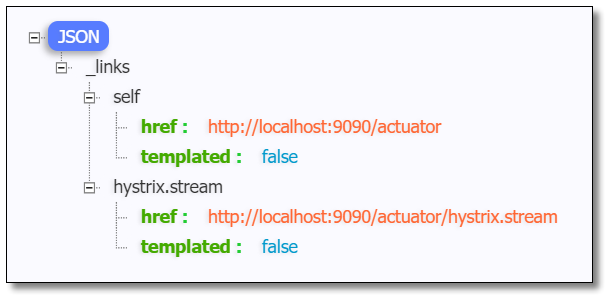
访问:http://localhost:9090/actuator 可以看到已经开启了 hystrix.stream 端点。
访问:http://localhost:9090/actuator/hystrix.stream 结果如下:
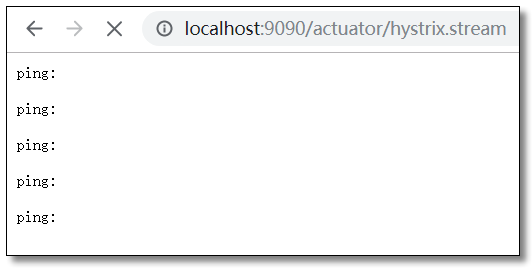
此时并没有获取到 Hystrix 的数据。接下来请求一个肯定会出错的方法产生服务熔断降级处理后,结果如下:

对于这种纯 JSON 的查看方式非常不方便我们直观的观察到服务的运行状态。我们可以使用 Hystrix 监控中心来进行查看。
监控中心
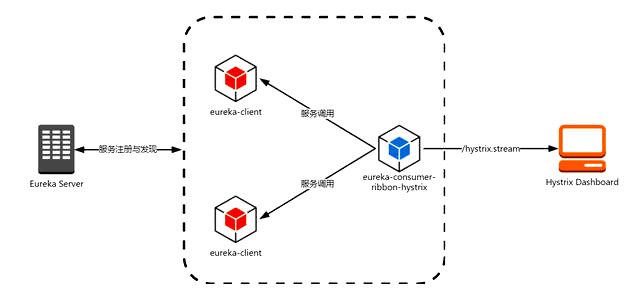
所谓的监控中心就是 Hystrix 提供的一套可视化系统 Hystrix-Dashboard ,可以非常友好的看到当前环境中服务运行的状态。Hystrix-Dashboard 是一款针对 Hystrix 进行实时监控的工具,通过 Hystrix-Dashboard 我们可以直观地看到各 Hystrix Command 的请求响应时间,请求成功率等数据。
添加依赖
在需要开启数据监控的项目中添加 dashboard 依赖。
<!-- spring boot actuator 依赖 -->

<dependency>

    <groupId>org.springframework.boot</groupId>

    <artifactId>spring-boot-starter-actuator</artifactId>

</dependency>

<!-- spring cloud netflix hystrix 依赖 -->

<dependency>

    <groupId>org.springframework.cloud</groupId>

    <artifactId>spring-cloud-starter-netflix-hystrix</artifactId>

</dependency>

<!-- spring cloud netflix hystrix dashboard 依赖 -->

<dependency>

    <groupId>org.springframework.cloud</groupId>

    <artifactId>spring-cloud-starter-netflix-hystrix-dashboard</artifactId>

</dependency>
启动类
在需要开启数据监控的项目启动类中添加 @EnableHystrixDashboard 注解。
package com.example;

import org.springframework.boot.SpringApplication;

import org.springframework.boot.autoconfigure.SpringBootApplication;

import org.springframework.cloud.client.circuitbreaker.EnableCircuitBreaker;

import org.springframework.cloud.client.loadbalancer.LoadBalanced;

import org.springframework.cloud.netflix.hystrix.dashboard.EnableHystrixDashboard;

import org.springframework.context.annotation.Bean;

import org.springframework.web.client.RestTemplate;

// 开启熔断器注解 2 选 1,@EnableHystrix 封装了 @EnableCircuitBreaker

// @EnableHystrix

@EnableCircuitBreaker

// 开启数据监控注解

@EnableHystrixDashboard

@SpringBootApplication

public class OrderServiceRestApplication {

    @Bean

    @LoadBalanced

    public RestTemplate restTemplate() {

        return new RestTemplate();

    }

    public static void main(String[] args) {

        SpringApplication.run(OrderServiceRestApplication.class, args);

    }

}
访问
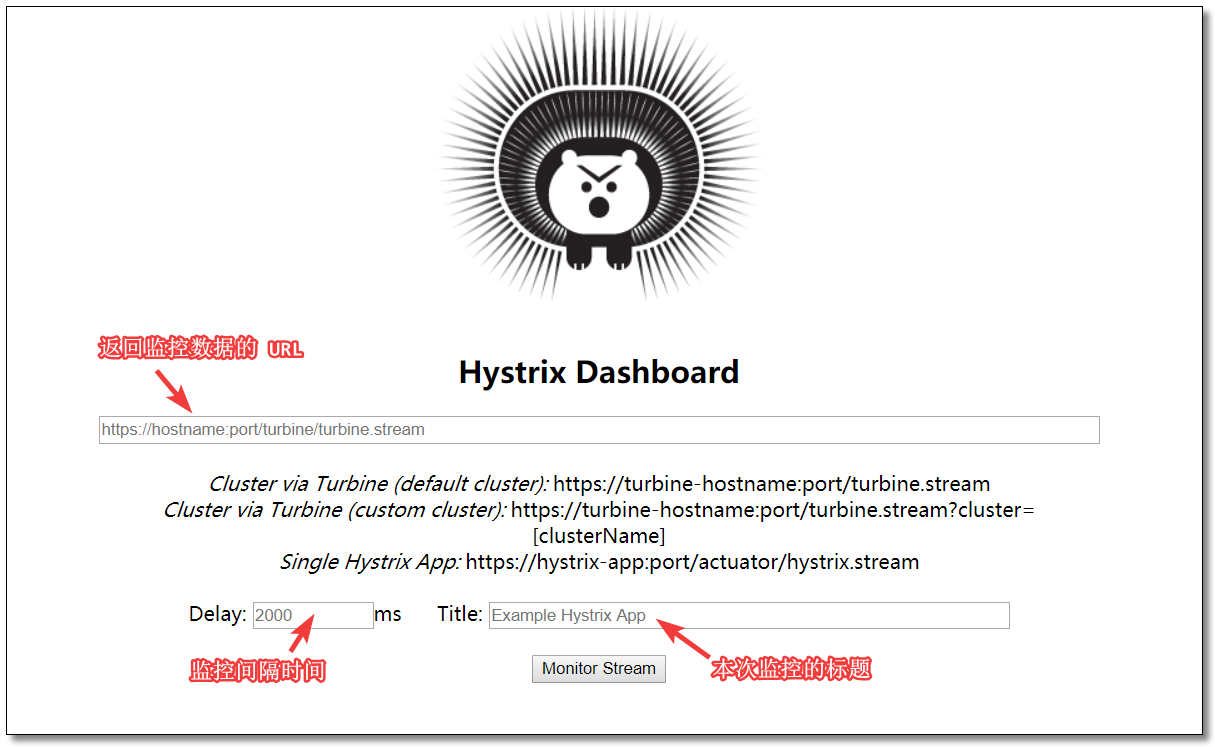
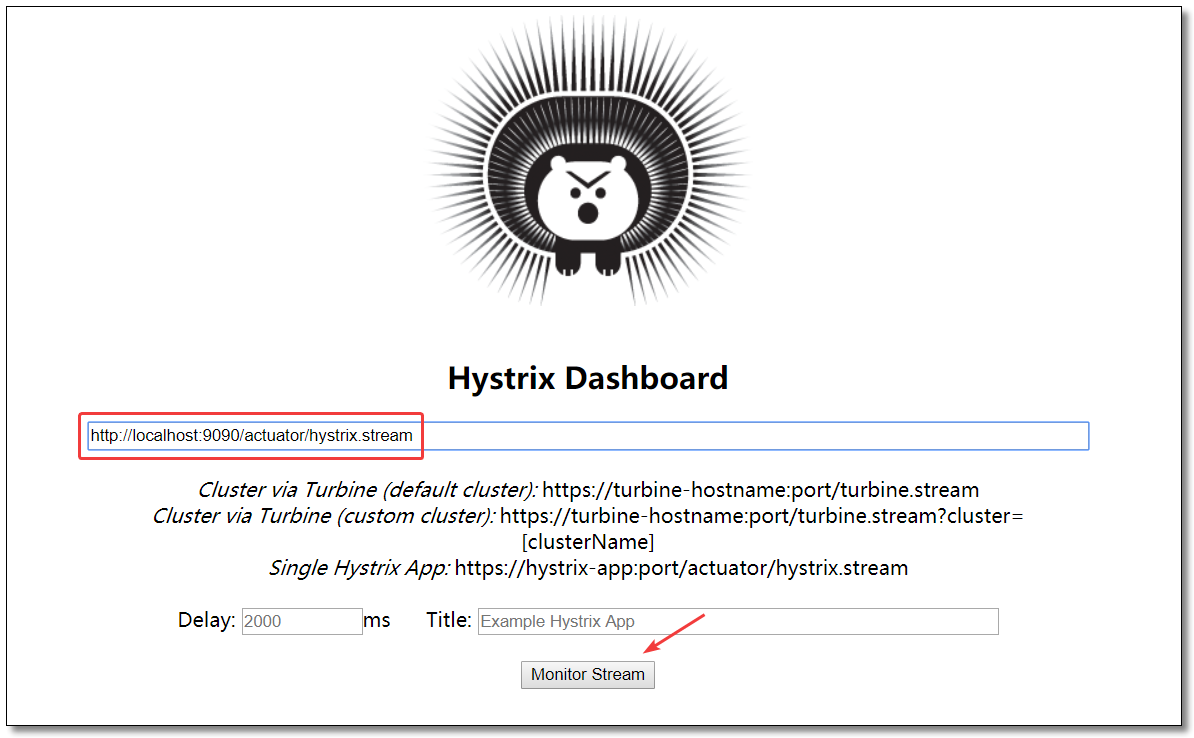
访问:http://localhost:9090/hystrix 监控中心界面如下:
查看数据
输入能够返回监控数据的URL:http://localhost:9090/actuator/hystrix.stream
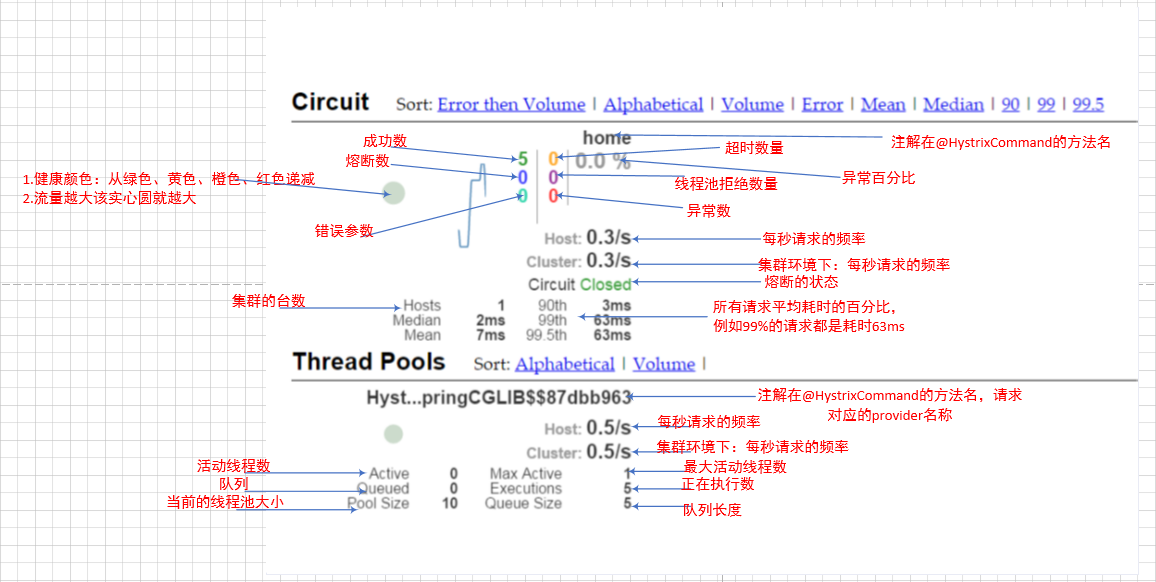
监控中心图解
聚合监控
点击链接观看:聚合监控视频(获取更多请关注公众号「哈喽沃德先生」)
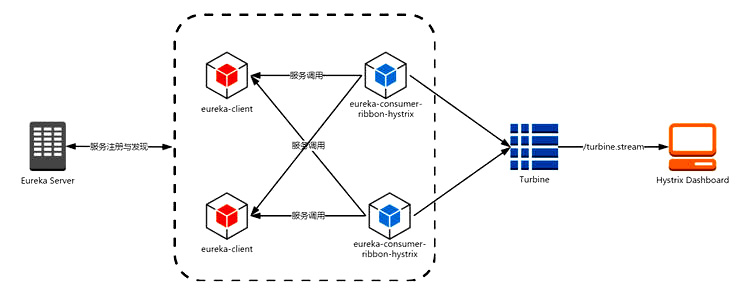
Turbine 是聚合服务器发送事件流数据的一个工具,dashboard 只能监控单个节点,实际生产环境中都为集群,因此可以通过 Turbine 来监控集群服务。
创建项目
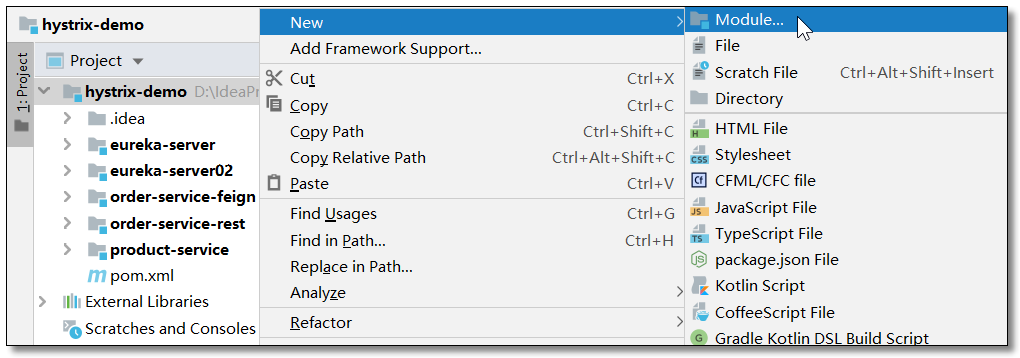
在 hystrix-demo 父工程下创建 hystrix-turbine 工程。

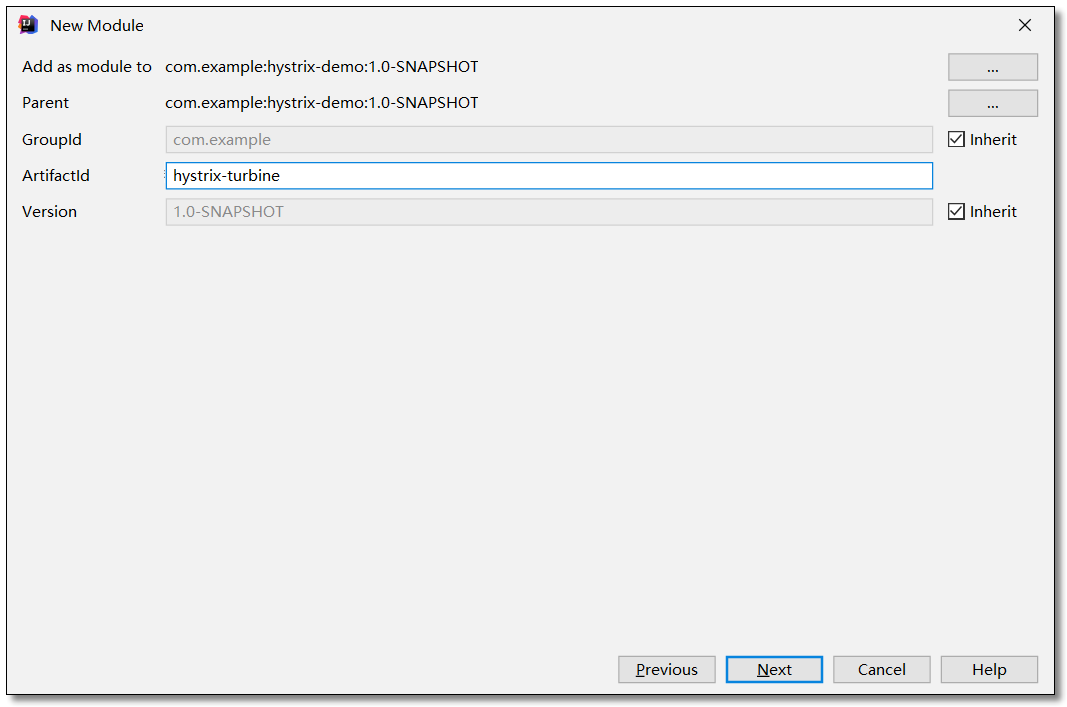

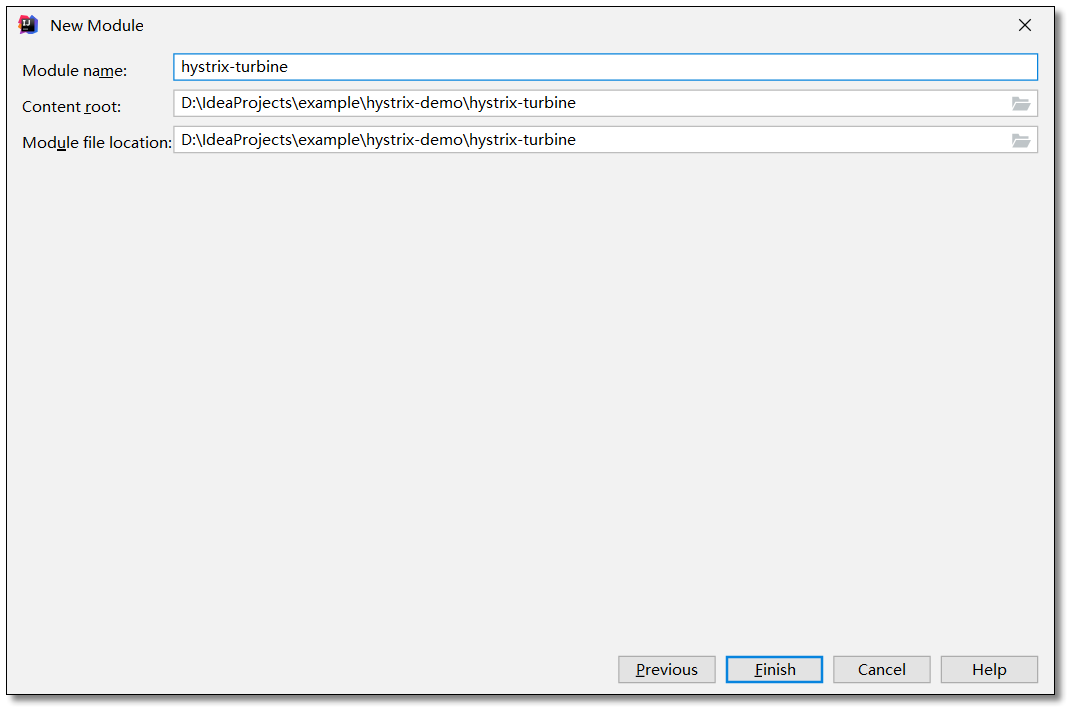
添加依赖
项目引入 hystrix、dashboard、turbine 三个依赖。
<?xml version="1.0" encoding="UTF-8"?>

<project xmlns="http://maven.apache.org/POM/4.0.0" xmlns:xsi="http://www.w3.org/2001/XMLSchema-instance"

         xsi:schemaLocation="http://maven.apache.org/POM/4.0.0 http://maven.apache.org/xsd/maven-4.0.0.xsd">

    <modelVersion>4.0.0</modelVersion>

    <groupId>com.example</groupId>

    <artifactId>hystrix-turbine</artifactId>

    <version>1.0-SNAPSHOT</version>

    <!-- 继承父依赖 -->

    <parent>

        <groupId>com.example</groupId>

        <artifactId>hystrix-demo</artifactId>

        <version>1.0-SNAPSHOT</version>

    </parent>

    <!-- 项目依赖 -->

    <dependencies>

        <!-- spring-cloud netflix hystrix 依赖 -->

        <dependency>

            <groupId>org.springframework.cloud</groupId>

            <artifactId>spring-cloud-starter-netflix-hystrix</artifactId>

        </dependency>

        <!-- spring cloud netflix hystrix dashboard 依赖 -->

        <dependency>

            <groupId>org.springframework.cloud</groupId>

            <artifactId>spring-cloud-starter-netflix-hystrix-dashboard</artifactId>

        </dependency>

        <!-- spring cloud netflix turbine 依赖 -->

        <dependency>

            <groupId>org.springframework.cloud</groupId>

            <artifactId>spring-cloud-starter-netflix-turbine</artifactId>

        </dependency>

    </dependencies>

</project>
配置文件
application.yml
server:

  port: 8181 # 端口

spring:

  application:

    name: hystrix-turbine # 应用名称

# 配置 Eureka Server 注册中心

eureka:

  instance:

    prefer-ip-address: true       # 是否使用 ip 地址注册

    instance-id: ${spring.cloud.client.ip-address}:${server.port} # ip:port

  client:

    service-url:                  # 设置服务注册中心地址

      defaultZone: http://localhost:8761/eureka/,http://localhost:8762/eureka/

# 聚合监控

turbine:

  # 要监控的服务列表,多个用逗号分隔

  app-config: order-service-rest,order-service-feign

  # 指定集群名称

  cluster-name-expression: "'default'"
启动类
启动类需要开启 @EnableHystrix、@EnableHystrixDashboard、@EnableTurbine 三个注解。
package com.example;

import org.springframework.boot.SpringApplication;

import org.springframework.boot.autoconfigure.SpringBootApplication;

import org.springframework.cloud.client.circuitbreaker.EnableCircuitBreaker;

import org.springframework.cloud.netflix.hystrix.dashboard.EnableHystrixDashboard;

import org.springframework.cloud.netflix.turbine.EnableTurbine;

// 开启熔断器注解 2 选 1,@EnableHystrix 封装了 @EnableCircuitBreaker

// @EnableHystrix

@EnableCircuitBreaker

// 开启数据监控注解

@EnableHystrixDashboard

// 开启聚合监控注解

@EnableTurbine

@SpringBootApplication

public class HystrixTurbineApplication {

    public static void main(String[] args) {

        SpringApplication.run(HystrixTurbineApplication.class, args);

    }

}
访问
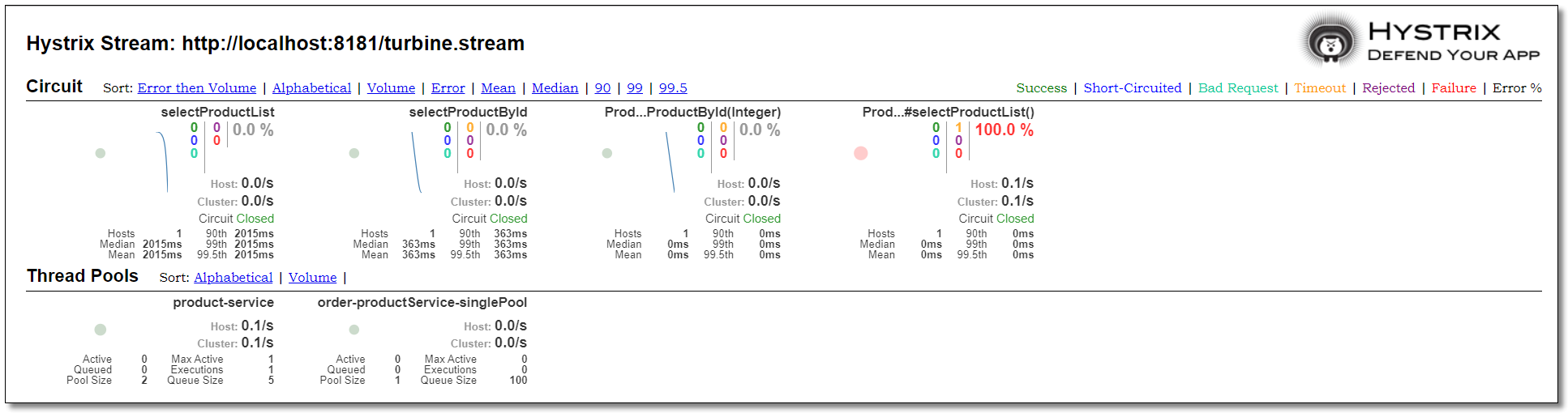
order-service-rest 和 order-service-feign 都配置监控中心,最终环境如下:
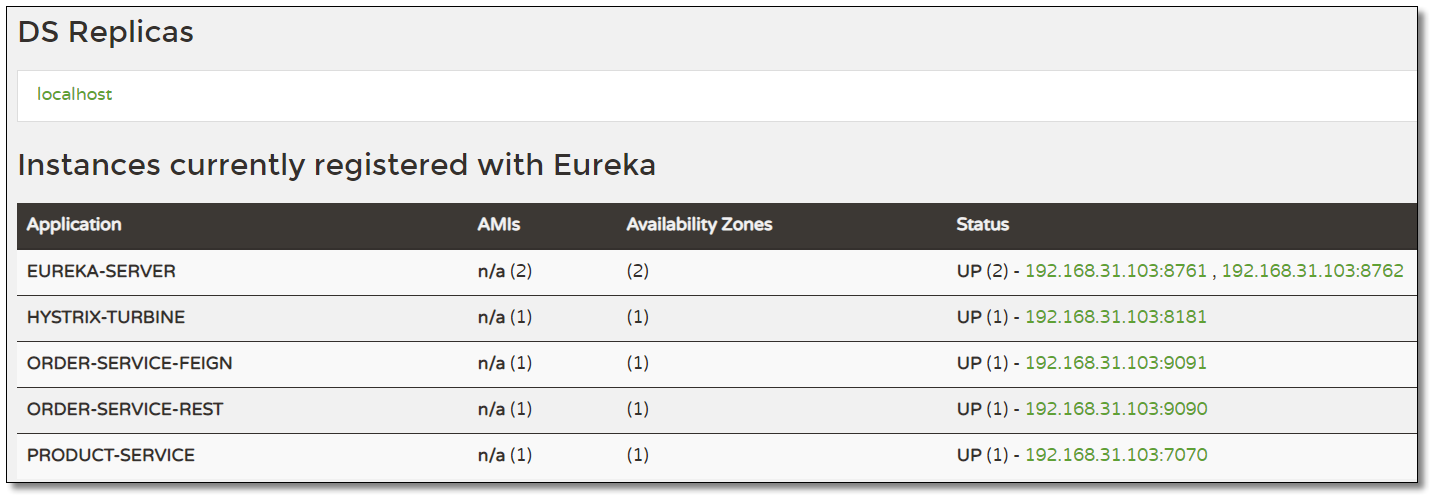
访问:http://localhost:8181/turbine.stream 多节点服务状态数据如下:

访问:http://localhost:8181/hystrix
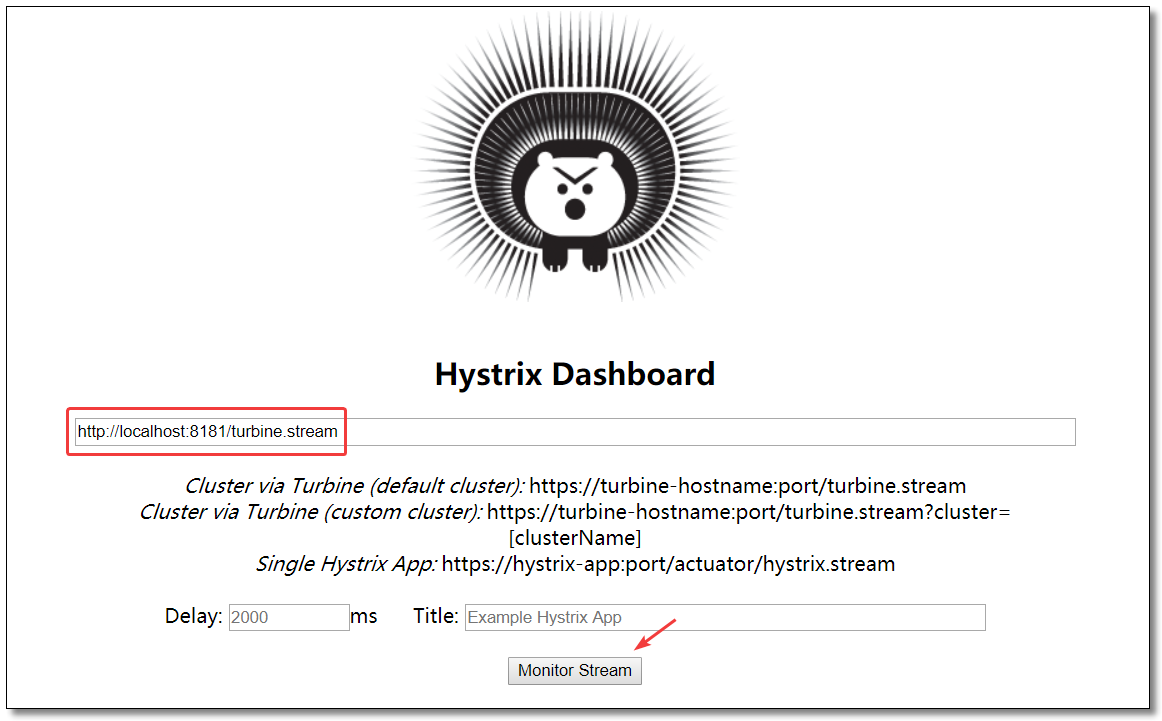
order-service-rest 和 order-service-feign 两个服务的运行状态如下:
至此 Hystrix 服务监控知识点就讲解结束了。

本文采用 知识共享「署名-非商业性使用-禁止演绎 4.0 国际」许可协议。
大家可以通过 分类 查看更多关于 Spring Cloud 的文章。
Spring Cloud 系列之 Netflix Hystrix 服务监控的更多相关文章
- Spring Cloud 系列之 Netflix Hystrix 服务容错
什么是 Hystrix Hystrix 源自 Netflix 团队于 2011 年开始研发.2012年 Hystrix 不断发展和成熟,Netflix 内部的许多团队都采用了它.如今,每天在 Netf ...
- Spring Cloud 系列之 Netflix Zuul 服务网关
什么是 Zuul Zuul 是从设备和网站到应用程序后端的所有请求的前门.作为边缘服务应用程序,Zuul 旨在实现动态路由,监视,弹性和安全性.Zuul 包含了对请求的路由和过滤两个最主要的功能. Z ...
- Spring Cloud (5)hystrix 服务监控
1.pom 2.启动类 3. 微服务提供方 pom 4. 监控------已成功启动 --------------------------------------------------------- ...
- Spring Cloud 系列之 Eureka 实现服务注册与发现
如果你对 Spring Cloud 体系还不是很了解,可以先读一下 Spring Cloud 都有哪些模块 Eureka 是 Netflix 开源的服务注册发现组件,服务发现可以说是微服务架构的核心功 ...
- Spring Cloud 系列之 Alibaba Sentinel 服务哨兵
前文中我们提到 Netflix 中多项开源产品已进入维护阶段,不再开发新的版本,就目前来看是没有什么问题的.但是从长远角度出发,我们还是需要考虑是否有可替代产品使用.比如本文中要介绍的 Alibaba ...
- Spring Cloud第六篇 | Hystrix仪表盘监控Hystrix Dashboard
本文是Spring Cloud专栏的第六篇文章,了解前五篇文章内容有助于更好的理解本文: Spring Cloud第一篇 | Spring Cloud前言及其常用组件介绍概览 Spring Cloud ...
- Spring cloud系列十四 分布式链路监控Spring Cloud Sleuth
1. 概述 Spring Cloud Sleuth实现对Spring cloud 分布式链路监控 本文介绍了和Sleuth相关的内容,主要内容如下: Spring Cloud Sleuth中的重要术语 ...
- Spring Cloud系列(三) 应用监控与管理Actuator
Spring Cloud系列(二) 应用监控与管理Actuator 前言:要想使用Spring Cloud ,Spring Boot 提供的spring-boot-starter-actuator模块 ...
- Spring Cloud (5)hystrix 服务熔断
1.pom文件 <dependency> <groupId>org.springframework.cloud</groupId> <artifactId&g ...
随机推荐
- SWUST OJ 有趣的三位数(0319)
有趣的三位数(0319) Time limit(ms): 1000 Memory limit(kb): 65535 Submission: 158 Accepted: 62 Description ...
- Readings
1984 ([英] 乔治·奥威尔) 这书看完我觉得这根本就是一本恐怖小说,当里面的内容正在和将要发生的时候你就不会觉得里面的描述有点搞笑了.不过看到后面有译者的补充内容说和其他国家的朋友讨论的时候, ...
- 吴裕雄--天生自然 python开发学习笔记:pycharm无法使用ctrl+c/v复制粘贴的问题
在使用pycharm的时候发现不能正常使用ctrl+c/v进行复制粘贴,也无法使用tab键对大段代码进行整体缩进.后来发现是因为安装了vim插件的问题,在setting里找到vim插件,取消勾选即可解 ...
- 读书笔记——《在线》
* 2017年10月24日 星期二 晴* ## "在线"是未来世界发展的关键.一个事物是不是符合未来发展的趋势,就是要看它是否在线. 插图 **在线** 正文 作者是王坚,阿里巴巴 ...
- 用新架构适配MI3中遇到的各种坑
用新架构适配MI3中遇到的各种坑 首先不得不说hendy架构的强大之处, mi3也直接开机但是遇到各种坑,不能怪架构不够强大,只有说miui定制化太高.下面详细说一下mi3适配中的各种坑.有些坑会附带 ...
- 点击穿透bug · Jaywii
微信点击穿透Bug 问题描述:在移动端为了去除点击延迟引入了fast-click,然而在房贷计算器的开发中遇到了这样一个bug,用户点击了select之后,微信在弹出选择器之后会瞬间因为约300ms的 ...
- JQuery之选择器篇(一)
今天回顾了之前学习的JQuery选择器,现在简单的总结一下. JQuery选择器类型 主要分为四类 基本选择器 层级选择器 过滤选择器 表单选择器 基本选择器 基本选择器是jQuery中最 ...
- Haproxy的应用
如上图所示,在 192.168.1.0/24 这个网段的客户端想要访问在 172.20.0.0/20 网段内的服务器,所有的通信又不想暴露在互联网上,因此可以在这两个网段内分别都放一台 Haproxy ...
- 算发帖——俄罗斯方块覆盖问题一共有多少个解
问题的提出:如下图,用13块俄罗斯方块覆盖8*8的正方形. 那么一共可以有多少个解呢?(若通过旋转.翻转一个解而得到的新解,则两个解视为同一个解) 首先,求解的问题,已经在上一篇帖子里完成 算 ...
- Python——11面向对象编程基础
*/ * Copyright (c) 2016,烟台大学计算机与控制工程学院 * All rights reserved. * 文件名:text.cpp * 作者:常轩 * 微信公众号:Worldhe ...