
How To Install and Secure phpMyAdmin on Ubuntu 12.04(MySQL图形管理)
原文参考链接:https://www.digitalocean.com/community/tutorials/how-to-install-and-secure-phpmyadmin-on-ubuntu-12-04
安装完成执行
sudo dpkg-reconfigure phpmyadmin
重新设置,选择tcp/ip方式
About phpMyAdmin
phpMyAdmin is an free web software to work with MySQL on the web—it provides a convenient visual front end to the MySQL capabilities.
Setup
The steps in this tutorial require the user to have root privileges on your virtual private server. You can see how to set that up here in steps 3 and 4.
Before working with phpMyAdmin you need to have LAMP installed on your server. If you don't have the Linux, Apache, MySQL, PHP stack on your server, you can find the tutorial for setting it up here.
Once you have the user and required software, you can start installing phpMyAdmin on your VPS!
Install phpMyAdmin
The easiest way to install phpmyadmin is through apt-get:
sudo apt-get install phpmyadmin apache2-utilsDuring the installation, phpMyAdmin will walk you through a basic configuration. Once the process starts up, follow these steps:
- Select Apache2 for the server
- Choose YES when asked about whether to Configure the database for phpmyadmin with dbconfig-common
- Enter your MySQL password when prompted
- Enter the password that you want to use to log into phpmyadmin
After the installation has completed, add phpmyadmin to the apache configuration.
sudo nano /etc/apache2/apache2.confAdd the phpmyadmin config to the file.
Include /etc/phpmyadmin/apache.confRestart apache:
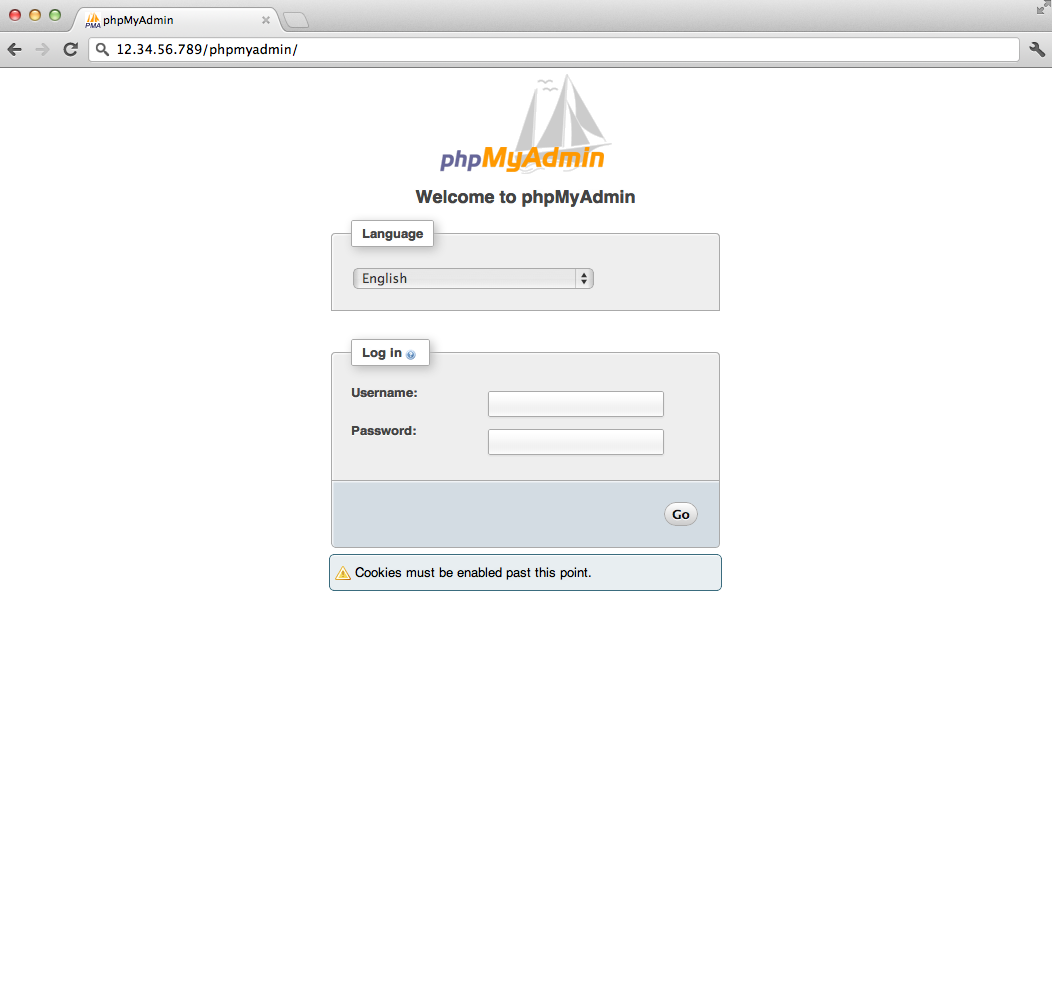
sudo service apache2 restartYou can then access phpmyadmin by going to youripaddress/phpmyadmin. The screen should look likethis
Security
Unfortunately older versions of phpMyAdmin have had serious security vulnerabilities including allowing remote users to eventually exploit root on the underlying virtual private server. One can prevent a majority of these attacks through a simple process: locking down the entire directory with Apache's native user/password restrictions which will prevent these remote users from even attempting to exploit older versions of phpMyAdmin.
Set Up the .htaccess File
To set this up start off by allowing the .htaccess file to work within the phpmyadmin directory. You can accomplish this in the phpmyadmin configuration file:
sudo nano /etc/phpmyadmin/apache.confUnder the directory section, add the line “AllowOverride All” under “Directory Index”, making the section look like this:
<Directory /usr/share/phpmyadmin>

        Options FollowSymLinks

        DirectoryIndex index.php

        AllowOverride All

        [...]
Configure the .htaccess file
With the .htaccess file allowed, we can proceed to set up a native user whose login would be required to even access the phpmyadmin login page.
Start by creating the .htaccess page in the phpmyadmin directory:
sudo nano /usr/share/phpmyadmin/.htaccessFollow up by setting up the user authorization within .htaccess file. Copy and paste the following text in:
AuthType Basic

AuthName "Restricted Files"

AuthUserFile /etc/apache2/.phpmyadmin.htpasswd

Require valid-user
Below you’ll see a quick explanation of each line
- AuthType: This refers to the type of authentication that will be used to the check the passwords. The passwords are checked via HTTP and the keyword Basic should not be changed.
- AuthName: This is text that will be displayed at the password prompt. You can put anything here.
- AuthUserFile: This line designates the server path to the password file (which we will create in the next step.)
- Require valid-user: This line tells the .htaccess file that only users defined in the password file can access the phpMyAdmin login screen.
Create the htpasswd file
Now we will go ahead and create the valid user information.
Start by creating a htpasswd file. Use the htpasswd command, and place the file in a directory of your choice as long as it is not accessible from a browser. Although you can name the password file whatever you prefer, the convention is to name it .htpasswd.
sudo htpasswd -c /etc/apache2/.phpmyadmin.htpasswd usernameA prompt will ask you to provide and confirm your password.
Once the username and passwords pair are saved you can see that the password is encrypted in the file.
FInish up by restarting apache:
sudo service apache2 restartAccessing phpMyAdmin
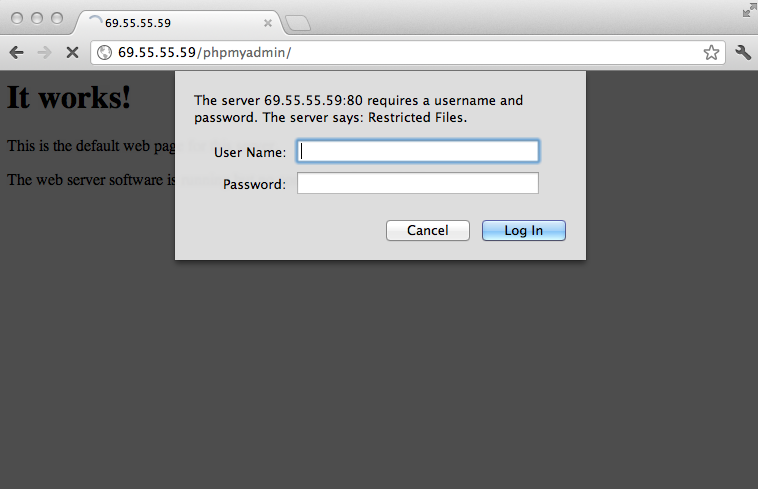
phpMyAdmin will now be much more secure since only authorized users will be able to reach the login page. Accessing youripaddress/phpmyadmin should display a screen like this.
Fill it in with the username and password that you generated. After you login you can access phpmyadmin with the MySQL username and password.
By Etel Sverdlov
How To Install and Secure phpMyAdmin on Ubuntu 12.04(MySQL图形管理)的更多相关文章
- Ruby on Rails Session 2: How to install Aptana Studio 3 on Ubuntu 12.04 LTS
Update: An updated version of these instructions for Ubuntu 12.10 (Quantal Quetzal) is available her ...
- ubuntu 12.04 mysql转移目录后 无法 启动
http://www.boyunjian.com/do/article/snapshot.do?uid=com.iteye.xgbjmxn%2Fblog%2F1208086(转,) 我是用ap ...
- Install Ruby on Rails on Ubuntu 12.04 LTS
1:Update package repository. sudo apt-get update 2:Install git and Curl. Git:是一个简单,快速,高效的版本控制系统. ...
- ubuntu 12.04 install docker-engine1.12.3
root@node3:/data/src# cat /etc/issueUbuntu 12.04.4 LTS \n \l root@node3:/data/src# cat /etc/apt/so ...
- Install Asterisk 11 on Ubuntu 12.04 LTS
http://blogs.digium.com/2012/11/14/how-to-install-asterisk-11-on-ubuntu-12-4-lts/ Last week I put up ...
- (转) How to install eclipse in ubuntu 12.04
源地址:http://www.krizna.com/ubuntu/install-eclipse-in-ubuntu-12-04/ Eclipse installation in ubuntu 12. ...
- Install Cocos2d-x v3.3 on Ubuntu 14.04 & Ubuntu 14.10(转)
Install Cocos2d-x v3.3 on Ubuntu 14.04 & Ubuntu 14.10 1 get the source code sudo apt-get install ...
- How to install / setup /upgrade PHP 5.5.x on Ubuntu 12.04 LTS
原文:http://www.dev-metal.com/how-to-setup-latest-version-of-php-5-5-on-ubuntu-12-04-lts/ 最近遇到了要在ubunt ...
- How to install the NVIDIA drivers on Ubuntu 18.04 Bionic Beaver Linux
Objective The objective is to install the NVIDIA drivers on Ubuntu 18.04 Bionic Beaver Linux. This a ...
随机推荐
- python 基础之第九天
###############错误和异常######################## 说明:e 是错误的具体原因,else 表示没有异常才会执行else的语句,finally 是无乱有没异常都要执 ...
- haprox动态下线后端主机
haproxy可以很好的支持主机下线,不需要编辑配置文件,也不需要重新reload服务,通过本身的socket发送指令即可: 当你的应用程序是高可用状态,一般部署的是>2的,这个时候就可以通过h ...
- Awesome Flask Awesome
A curated list of awesome Flask resources and plugins Awesome Flask Framework Admin interface Authen ...
- bzoj3569
线性基 非常高端 强制在线动态图 我们先搞出一个dfs树,然后所有非树边都和树边形成一个环.我们考虑什么情况会不连通,当且仅当树边和dfs序大于当前点的返祖边都被断掉才不连通,那么我们给每个非树边赋一 ...
- 3.4-3.6 依据业务需求分析HBase的表设计
一.依据[话单]查询需求分析HBase的表设计 1.分析 用户需要进行实时的查询,那么这些数据是放在HBase当中的,每个客户每天接打电话至少20个左右,而通信公司拥有很多用户,每天产生的数据都是上亿 ...
- C#中的explicit和implicit了解一下吧
今天在研究公司项目框架的时候看到了下面的用法,public static implicit operator JsonData(int data);.貌似很久没用过这种隐式转换的写法了,因此重新温习一 ...
- 《Android学习笔记》Android Studio如何去除顶部标题栏教程
序] 在初步开发Android应用中,我们会遇到一个问题,顶部标题栏的名字是项目名字(app名字)并且不可编辑.非常的不方便,那么我们有什么办法把他去掉呢? [相关文章] [开发工具] Android ...
- hdoj5493【树状数组+二分】
题意: 给你n个人的高度, 再给出一个值代表该高度下有前面比他高的 或 后面比他高的人数, 求满足条件下的最小字典序, 不行的话输出"impossible" 思路: 对于最小字典序 ...
- 文档通信(跨域-不跨域)、时时通信(websocket)、离线存储(applicationCache)、开启多线程(web worker)
一.文档间的通信 postMessage对象 //不跨域 1.iframe:obj.contentWindow [iframe中的window对象] iframe拿到父级页面的window: pare ...
- laravel M层
目录 App\Models 没有就自己创一个 创建对应控制器的php文件,首字母大写 <?php namespace App\Models; use Illuminate\Database\ ...