
Emmet Documentation ( Abbreviations+CSS Abbreviations )
Emmet — the essential toolkit for web-developers
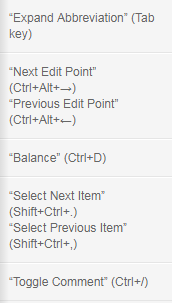
Abbreviations
Abbreviations Syntax
Elements
You can use elements’ names like div or p to generate HTML tags. Emmet doesn’t have a predefined set of available tag names, you can write any word and transform it into a tag: div → <div></div>, foo → <foo></foo> and so on.
Nesting operators
Child: >
Sibling: +
Climb-up: ^
div+div>p>span+em^bq
...outputs to
<div></div>

<div>

    <p><span></span><em></em></p>

    <blockquote></blockquote>

</div>
You can use as many ^ operators as you like, each operator will move one level up:
div+div>p>span+em^^^bq
...will output to
<div></div>

<div>

    <p><span></span><em></em></p>

</div>

<blockquote></blockquote>
Multiplication: *
Grouping: ()
Parenthesises are used by Emmets’ power users for grouping subtrees in complex abbreviations:
div>(header>ul>li*2>a)+footer>p
...expands to
<div>

    <header>

        <ul>

            <li><a href=""></a></li>

            <li><a href=""></a></li>

        </ul>

    </header>

    <footer>

        <p></p>

    </footer>

</div>
Attribute operators
ID and CLASS
div#header+div.page+div#footer.class1.class2.class3
Custom attributes
td[title="Hello world!" colspan=3]
Item numbering: $
ul>li.item$*5
Changing numbering base and direction
For example, to change direction, add @- after $:
ul>li.item$@-*5
…outputs to
<ul>

    <li class="item5"></li>

    <li class="item4"></li>

    <li class="item3"></li>

    <li class="item2"></li>

    <li class="item1"></li>

</ul>
To change counter base value, add @N modifier to $:
ul>li.item$@3*5
…transforms to
<ul>

    <li class="item3"></li>

    <li class="item4"></li>

    <li class="item5"></li>

    <li class="item6"></li>

    <li class="item7"></li>

</ul>
You can use these modifiers together:
ul>li.item$@-3*5
…is transformed to
<ul>

    <li class="item7"></li>

    <li class="item6"></li>

    <li class="item5"></li>

    <li class="item4"></li>

    <li class="item3"></li>

</ul>
Text: {}
Notes on abbreviation formatting
For example, use spaces between elements and operators, like this:
(header > ul.nav > li*5) + footer
But it won’t work, because space is a stop symbol where Emmet stops abbreviation parsing.
Element types
In the abbreviations section of snippets.json you can also define aliases: a short-hands for commonly used abbreviations. Aliases can be used to define:
- short names for long tag names;
- referencing commonly used abbreviations.
In snippets.json file, you can find the following definitions:
...

"html": {

    "abbreviations": {

        "bq": "blockquote",

        "ol+": "ol>li"

    }

}
Implicit tag names
Here’s how it resolves the names for some parent elements:
liforulandoltrfortable,tbody,theadandtfoottdfortroptionforselectandoptgroup
Take a look at some abbreviations equivalents with implicit and explicit tag names:
.wrap>.content |
div.wrap>div.content |
em>.info |
em>span.info |
ul>.item*3 |
ul>li.item*3 |
table>#row$*4>[colspan=2] |
table>tr#row$*4>td[colspan=2] |
“Lorem Ipsum” generator
1 ul.generic-list>lorem10.item*4
CSS Abbreviations
How it works?
First, it looks for a m10 snippet definition in snippets.json. If it’s found, it simply outputs it as a regular snippet. Otherwise, it extracts value from abbreviation.
When property part is found, resolver searches for the snippet definition in snippets.json. For an m part, it will find "m": "margin:|;" definition (| character is used as a caret position reference when the snippet is expanded).
Supplying values with units
By default, when you expand an abbreviation with integer value, Emmet outputs it with a px unit: m10 → margin: 10px;
If you’re expanding an abbreviation with a float value, it is outputted with an em unit: m1.5 → margin: 1.5em;
But you can explicitly provide the unit name, just by putting any alpha characters right after value: m1.5ex → margin: 1.5ex;, m10foo → margin: 10foo;.
If you’re explicitly defining units, you don’t need to use hyphens to separate values anymore: m10ex20em → margin: 10ex 20em;, m10ex-5 → margin: 10ex -5px;.
Value aliases
Emmet has a few aliases for commonly used values:
p→%e→emx→ex
You can use aliases instead of full units:
w100p→width: 100%m10p30e5x→margin: 10% 30em 5ex
Color values
Emmet supports hex color values, like this: c#3 → color: #333;
The # sign is a value separator so you don’t need to use hyphen to separate it. For example, bd5#0s expands to border: 5px #000 solid: the # sign separates color from 5 and since s (alias to solid) is not a hexadecimal character, it can be used without - value separator.
You can write one, two, three or six characters as color value:
#1→#111111#e0→#e0e0e0#fc0→#ffcc00
Unit-less properties
Some CSS properties are defined as unit-less, e.g. no unit suffix will be outputted: lh2 → line-height: 2;, fw400 → font-weight: 400;.
These values are: 'z-index, line-height, opacity and font-weight but you can override them with css.unitlessProperties preferences.
!important modifier
p!+m10e!
...will produce
padding:  !important;

margin: 10em !important;
Vendor prefixes
How it works?
For example, for -bdrs abbreviation it will look for a bdrs definition. snippet.json has the following definition:
"bdrs": "border-radius:|;"
Add prefixed properties by default
Explicit vendor prefixed
-wm-trf
Emmet has the following one-letter prefixes:
w:webkitm:mozs:mso:o
Gradients
lg( left, #fc0, 30%, red)

border-image:lg( left, #fc0, 30%, red)
...will produce
    background-image: -webkit-linear-gradient(left, #fc0, 30%, red);

    background-image: -moz-linear-gradient(left, #fc0, 30%, red);

    background-image: -o-linear-gradient(left, #fc0, 30%, red);

    background-image: linear-gradient(to right, #fc0, 30%, red);

    -webkit-border-image:-webkit-linear-gradient(left, #fc0, 30%, red);

    -moz-border-image:-moz-linear-gradient(left, #fc0, 30%, red);

    -o-border-image:-o-linear-gradient(left, #fc0, 30%, red);

    border-image:linear-gradient(to right, #fc0, 30%, red);
Fallback value
In preferences, you can enable css.gradient.fallback option to produce a fallback background-color CSS property whenever a gradient definition for background-* CSS property is expanded.
Fuzzy search
For example, instead of writing ov:h (overflow: hidden;) abbreviation, you can write ov-h, ovh or even oh.
Remember that you can always create your own snippets or redefine existing ones to fine-tune fuzzy search experience.
Emmet Documentation ( Abbreviations+CSS Abbreviations )的更多相关文章
- Emmet Documentation
src:http://docs.emmet.io/cheat-sheet/ Emmet Documentation Syntax Child: > nav>ul>li <n ...
- 转载: Emmet:HTML/CSS代码快速编写神器
Emmet:HTML/CSS代码快速编写神器 因为文章严禁转载,那本着做一个遵纪守法的好公民,我就不转载了,把链接放下面,方便查阅. http://www.iteye.com/news/27580
- 【03】emmet系列之CSS语法
[01]emmet系列之基础介绍 [02]emmet系列之HTML语法 [03]emmet系列之CSS语法 [04]emmet系列之编辑器 [05]emmet系列之各种缩写 单位: 有几个常用值别 ...
- Emmet:HTML/CSS代码快速编写神器
本文来源:http://www.iteye.com/news/27580 ,还可参考:http://www.w3cplus.com/tools/emmet-cheat-sheet.html Em ...
- Emmet快速编写CSS样式
基本的CSS样式编写时,很多样式只需输入首字母即可得到不带属性值的CSS样式,像上面说到的margin. 1.而对于一些带有特定的属性值的CSS样式,只需输入CSS标签与属性值的首字母就可以,比如: ...
- Emmet:HTML/CSS代码快速编写神器(转)
Emmet的前身是大名鼎鼎的Zen coding,如果你从事Web前端开发的话,对该插件一定不会陌生.它使用仿CSS选择器的语法来生成代码,大大提高了HTML/CSS代码编写的速度,比如下面的演示: ...
- Sublime Text 3插件之Emmet:HTML/CSS代码快速编写神器
一.快速编写HTML代码 1. 初始化 HTML文档需要包含一些固定的标签,比如<html>.<head>.<body>等,现在你只需要1秒钟就可以输入这些标签. ...
- Emmet:HTML/CSS代码快速编写神器教程
Emmet的前身是大名鼎鼎的Zen coding,如果你从事Web前端开发的话,对该插件一定不会陌生.它使用仿CSS选择器的语法来生成代码,大大提高了HTML/CSS代码编写的速度,比如下面的演示: ...
- (webstorm的css编写插件)Emmet:HTML/CSS代码快速编写神器
Emmet的前身是大名鼎鼎的Zen coding,如果你从事Web前端开发的话,对该插件一定不会陌生.它使用仿CSS选择器的语法来生成代码,大大提高了HTML/CSS代码编写的速度,比如下面的演示: ...
- Emmet:HTML/CSS代码快速编写神器--20150422
Emmet的前身是大名鼎鼎的Zen coding,如果你从事Web前端开发的话,对该插件一定不会陌生.它使用仿CSS选择器的语法来生成代码,大大提高了HTML/CSS代码编写的速度,比如下面的演示: ...
随机推荐
- 双层循环练习,pass_break_continue,和for循环---day06
1.双层循环练习 2.pass_break_continue pass:在代码块中无代码可写时,可用pass占位 break:终止当前循环,只能应用在循环里 continue:跳过当前循环,从下一次开 ...
- 第一百一十三篇: JS数组Array(二)数组方法 栈、队列、排序
好家伙, 在上一篇中,我们知道了, JS的数组中每个槽位可以存储任意类型的数据 那么,我们能通过数组去模仿某些数据结构吗? 答案是肯定的 1.栈方法 ECMAScript 给数组提供几个方法,让 ...
- 【App Service for Windows】为 App Service 配置自定义 Tomcat 环境
问题描述 当在App Service for Windows环境中所列出的Tomcat Version 没有所需要的情况下,如何实现自定义Tomcat 环境呢? 问题解答 第一步: 从官网下载要使用的 ...
- 【Azure Redis 缓存】如何使得Azure Redis可以仅从内网访问? Config 及 Timeout参数配置
问题描述 问题一:Redis服务,如何可以做到仅允许特定的子网内的服务器进行访问? 问题二:Redis服务,timeout和keepalive的设置是怎样的?是否可以配置成timeout 0? 问题三 ...
- 【Azure 应用服务】App Service 配置 Application Settings 访问Storage Account得到 could not be resolved: '*.file.core.windows.net'的报错。没有解析成对应中国区 Storage Account地址 *.file.core.chinacloudapi.cn
问题描述 App Service 配置 Application Settings 访问Storage Account.如下: { "name": "WEBSITE_CON ...
- android 混淆规则作用,Android代码混淆详解
一.混淆的意义 混淆代码并不是让代码无法被反编译,而是将代码中的类.方法.变量等信息进行重命名,把它们改成一些毫无意义的名字,同时也可以移除未被使用的类.方法.变量等. 所以直观的看,通过混淆可以提高 ...
- Git 常用的基础命令
#克隆项目到本地.url:项目的git地址:local_dir_name:克隆项目到本地的目录名称,如果不写就默认是git项目中的目录名称 git clone <url> <loca ...
- springboot,简要记录,方便复习,
boot 笔记第一步新建工程,导包,由于boot的数据库框架是用mybtis -paus,所以关于数据库系统那儿不用色选mybatis ,需要重新maven导包完整导包以下人容: <?xml v ...
- Ansible 基础入门
2)Ansible 介绍 Ansible 基本概念 Ansible 是一种自动化运维工具,基于 Paramiko 开发的,并且基于模块化工作,Ansible 是一种集成 IT 系统的配置管理.应用部署 ...
- Docker 安装成功(win10家庭版)
https://desktop.docker.com/win/stable/Docker Desktop Installer.exe 安装遇到了 然后 更新 这个 https://wslstorest ...