
Nginx - Windows下Nginx初入门
公司刚使用nginx,预先学习下。鉴于机器没有Linux环境,在Windows熟悉下。
下载
目前(2015-07-11),nginx的稳定版本是1.8.0,在官网下载先,windows版的nginx1.8.0
这是一个zip文件,解压后即可使用
Windows下的安装与启动
绿色文件,无须安装,直接即可启动。
据我所知,3种启动途径,其实都类似:
一、双击nginx.exe图标,可见黑窗口一闪而过,启动完毕。
二、命令行到nginx目录,输入nginx启动。(注,此方式命令行窗口无任何提示,且被锁定)
三、命令行到nginx目录,输入start nginx启动,此方式不锁定
启动后,默认情况下(无修改配置),可见到有两个nginx的进程,1个是master process,1个是worker processes。
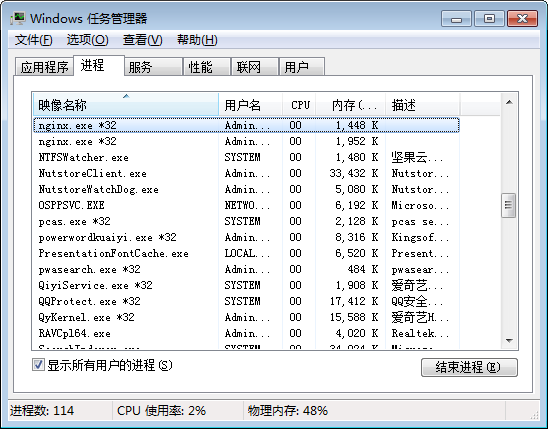
如果你在配置中配置2个worker_processes,进程中就可以看到1个是master process,2个是worker processes。
测试
默认nginx部署了些静态内容,我们可通过它测试nginx是否在工作。
默认的配置文件(NGINX_HOME/conf/nginx.conf)如下:
#user  nobody;

worker_processes  1;

#error_log  logs/error.log;

#error_log  logs/error.log  notice;

#error_log  logs/error.log  info;

#pid        logs/nginx.pid;

events {

    worker_connections  1024;

}

http {

    include       mime.types;

    default_type  application/octet-stream;

    #log_format  main  '$remote_addr - $remote_user [$time_local] "$request" '

    #                  '$status $body_bytes_sent "$http_referer" '

    #                  '"$http_user_agent" "$http_x_forwarded_for"';

    #access_log  logs/access.log  main;

    sendfile        on;

    #tcp_nopush     on;

    #keepalive_timeout  0;

    keepalive_timeout  65;

    #gzip  on;

    server {

        listen       80;

        server_name  localhost;

        #charset koi8-r;

        #access_log  logs/host.access.log  main;

        location / {

            root   html;

            index  index.html index.htm;

        }

        #error_page  404              /404.html;

        # redirect server error pages to the static page /50x.html

        #

        error_page   500 502 503 504  /50x.html;

        location = /50x.html {

            root   html;

        }

        # proxy the PHP scripts to Apache listening on 127.0.0.1:80

        #

        #location ~ \.php$ {

        #    proxy_pass   http://127.0.0.1;

        #}

        # pass the PHP scripts to FastCGI server listening on 127.0.0.1:9000

        #

        #location ~ \.php$ {

        #    root           html;

        #    fastcgi_pass   127.0.0.1:9000;

        #    fastcgi_index  index.php;

        #    fastcgi_param  SCRIPT_FILENAME  /scripts$fastcgi_script_name;

        #    include        fastcgi_params;

        #}

        # deny access to .htaccess files, if Apache's document root

        # concurs with nginx's one

        #

        #location ~ /\.ht {

        #    deny  all;

        #}

    }

    # another virtual host using mix of IP-, name-, and port-based configuration

    #

    #server {

    #    listen       8000;

    #    listen       somename:8080;

    #    server_name  somename  alias  another.alias;

    #    location / {

    #        root   html;

    #        index  index.html index.htm;

    #    }

    #}

    # HTTPS server

    #

    #server {

    #    listen       443 ssl;

    #    server_name  localhost;

    #    ssl_certificate      cert.pem;

    #    ssl_certificate_key  cert.key;

    #    ssl_session_cache    shared:SSL:1m;

    #    ssl_session_timeout  5m;

    #    ssl_ciphers  HIGH:!aNULL:!MD5;

    #    ssl_prefer_server_ciphers  on;

    #    location / {

    #        root   html;

    #        index  index.html index.htm;

    #    }

    #}

}
通过观察配置文件的非注释项(参考Nginx配置文件nginx.conf中文详解),大概可知:
1、启动了1个worker processes
2、worker_connections,最大并发数为1024
3、include mime.types,引入mime.types文件所声明的文件扩展名与文件类型映射
4、application/octet-stream,默认使用application/octet-stream
5、sendfile,开启高效文件传输模式
6、监听本机“localhost”的80端口
7、映射目录为“当前目录的html目录”
8、出现500、502、503、504错误,则映射到50x.html
浏览地址http://localhost,即可访问其默认页面,即映射到NGINX_HOME/html/index.html
其他静态内容,如html、图片,可自行添加测试。
日志
日志默认位于NGINX_HOME/logs/,可见:
1、access.log,访问日志
2、error.log,异常日志
3、nginx.pid,进程(仅在启动nginx后才有此日志)
CentOS下Nginx的安装与启动
tar -zxvf nginx-1.8..tar.gz

cd nginx-1.8.

./configure

make

make install

/usr/local/nginx/sbin/nginx -c /usr/local/nginx/conf/nginx.conf
安装完毕,查看进程及相关日志:
ps -ef | grep nginx

less /usr/local/nginx/logs/error.log

less /usr/local/nginx/logs/nginx.pid

less /usr/local/nginx/logs/access.log
较详细的Nginx在Linux的博文见《【Nginx】Nginx在Linux下的入门介绍》。
Nginx - Windows下Nginx初入门的更多相关文章
- Nginx - Windows下Nginx初入门,附CentOS下Nginx的安装
公司刚使用nginx,预先学习下.鉴于机器没有Linux环境,在Windows熟悉下. 下载 目前(2015-07-11),nginx的稳定版本是1.8.0,在官网下载先,windows版的nginx ...
- Nginx - Windows下Nginx基本安装和配置
Nginx 是一个轻量级的高性能 Http WebServer,以事件驱动方式编写,因此相比 Apache 而言,Nginx 更加稳定.性能更好,而且配置简单,资源占用较低. 1. 安装 Nginx ...
- Nginx - Windows下nginx定时分割日志
1.建立批处理脚本,c:\soft\demo.bat @echo off taskkill /F /IM nginx.exe > nul cd C:\soft\nginx-1.11.3 rem ...
- Windows下Nginx配置SSL实现Https访问(包含证书生成)
Vincent.李 Windows下Nginx配置SSL实现Https访问(包含证书生成) Windows下Nginx配置SSL实现Https访问(包含证书生成) 首先要说明为什么要实现https ...
- Windows下Nginx Virtual Host多站点配置详解
Windows下Nginx Virtual Host多站点配置详解 此教程适用于Windows系统已经配置好Nginx+Php+Mysql环境的同学. 如果您还未搭建WNMP环境,请查看 window ...
- windows下nginx的启动关闭
Windows下Nginx的启动.停止等命令 在Windows下使用Nginx,我们需要掌握一些基本的操作命令,比如:启动.停止Nginx服务,重新载入Nginx等,下面我就进行一些简单的介绍. .启 ...
- Windows下Nginx的启动、停止等命令
Windows下Nginx的启动.停止等命令 在Windows下使用Nginx,我们需要掌握一些基本的操作命令,比如:启动.停止Nginx服务,重新载入Nginx等,下面我就进行一些简单的介绍.1.启 ...
- Windows下Nginx的启动、停止等命令(转)
Windows下Nginx的启动.停止等命令 在Windows下使用Nginx,我们需要掌握一些基本的操作命令,比如:启动.停止Nginx服务,重新载入Nginx等,下面我就进行一些简单的介绍.1.启 ...
- windows下nginx+fastcgi不能使用file_get_contents/curl/fopen的原因
这两天一直在搞windows下nginx+fastcgi的file_get_contents请求.我想,很多同学都遇到当file_get_contents请求外网的http/https的php文件时毫 ...
随机推荐
- sqlserver表数据导出为insert into语句
<1>select 'insert into table_name (name,code) values ('''+name+''','''+code+''');' sql_str fr ...
- 校验日期函数的js
/判断输入内容是否为空 function IsNull(){ var str = document.getElementById('str').value.trim(); if(str.length= ...
- oracle创建用户、授予权限及删除用户
创建用户 oracle对表空间 USERS 无权限 alter user 用户名 quota unlimited on users; //创建临时表空间 create temporary ta ...
- zzulioj 1907小火山的宝藏交易(dfs记忆化搜索)
#include <stdio.h> #include <algorithm> #include <string.h> #include <vector> ...
- java核心知识点学习----并发和并行的区别,进程和线程的区别,如何创建线程和线程的四种状态,什么是线程计时器
多线程并发就像是内功,框架都像是外功,内功不足,外功也难得精要. 1.进程和线程的区别 一个程序至少有一个进程,一个进程至少有一个线程. 用工厂来比喻就是,一个工厂可以生产不同种类的产品,操作系统就是 ...
- Android Log介绍
android.util.Log常用的方法有以下5个:Log.v() ,Log.d() ,Log.i() ,Log.w() ,Log.e() .按照日志级别从高到低为ERROR, WARN, INFO ...
- 对比DOM和jQuery完善度
<input type="text" id="username" value="请输入你的用户名"> <script> ...
- sublime构建执行go程序真爽
1.安装gosublime插件 2.直接在sublime下调试运行共程序,不用去cmd了: 选择编译系统,编译,出现下面的模拟命令行,直接执行go的命令即可,比如go run process.go,结 ...
- KVC笔记
利用KVC可以随意修改一个对象的属性或者成员变量(并且私有的也可以修改) 示例代码: 示例一: Person *p = [[Person alloc] init]; p.dog = [[Dog al ...
- webview 实现滑动前进后退功能
实现该功能大家一定会想到在OnTouchListener里实现 webview.setOnTouchListener(new OnTouchListener() { @Override public ...