
吴裕雄 实战PYTHON编程(6)
import matplotlib.pyplot as plt
plt.rcParams['font.sans-serif']=['Simhei']
plt.rcParams['axes.unicode_minus']=False
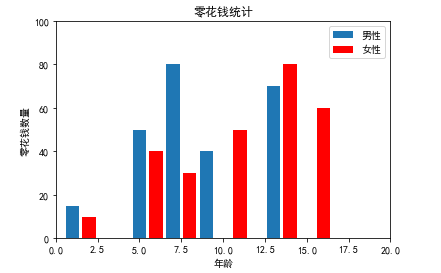
listx1 = [1,5,7,9,13,16]
listy1 = [15,50,80,40,70,50]
plt.bar(listx1, listy1, label="男性")
listx2 = [2,6,8,11,14,16]
listy2 = [10,40,30,50,80,60]
plt.bar(listx2, listy2, color="red", label="女性")
plt.legend()
plt.xlim(0, 20)
plt.ylim(0, 100)
plt.title("零花钱统计")
plt.xlabel("年龄")
plt.ylabel("零花钱数量")
plt.show()
import matplotlib.pyplot as plt
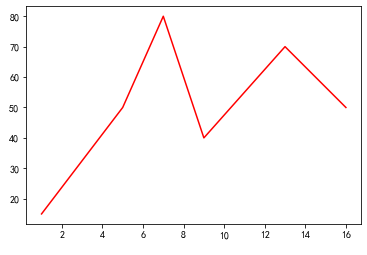
listx = [1,5,7,9,13,16]
listy = [15,50,80,40,70,50]
plt.plot(listx, listy, color ="red")
plt.show()
import matplotlib.pyplot as plt
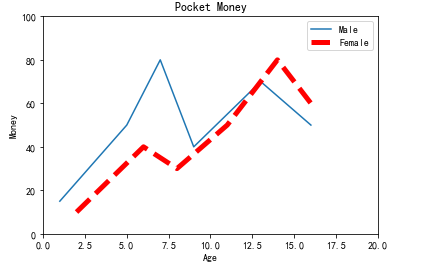
listx1 = [1,5,7,9,13,16]
listy1 = [15,50,80,40,70,50]
plt.plot(listx1, listy1, label="Male")
listx2 = [2,6,8,11,14,16]
listy2 = [10,40,30,50,80,60]
plt.plot(listx2, listy2, color="red", linewidth=5.0, linestyle="--", label="Female")
plt.legend()
plt.xlim(0, 20)
plt.ylim(0, 100)
plt.title("Pocket Money")
plt.xlabel("Age")
plt.ylabel("Money")
plt.show()
import matplotlib.pyplot as plt
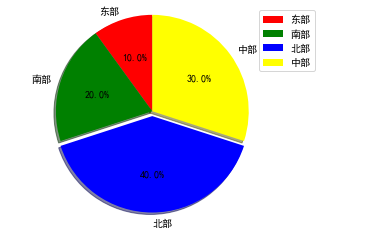
labels = ["东部", "南部", "北部", "中部"]
sizes = [5, 10, 20, 15]
colors = ["red", "green", "blue", "yellow"]
explode = (0, 0, 0.05, 0)
plt.pie(sizes,explode = explode,labels = labels,colors = colors,\
labeldistance = 1.1,autopct = "%3.1f%%",shadow = True,\
startangle = 90,pctdistance = 0.6)
plt.axis("equal")
plt.legend()
plt.show()
import numpy as np
import matplotlib.pyplot as plt #导入绘图模块,重命名为plt
import requests #导入网页内容抓取包
from bs4 import BeautifulSoup as bs #导入网页解析模块,重命名为bs
from pylab import * #导入pylab包
rcParams['font.sans-serif'] = ['SimHei'] #让matplotlib支持简体中文
year = [] #横坐标列表
gdp = [] #纵坐标列表
#url = "http://value500.com/M2GDP.html" #设置要在哪个网页抓数据
url = "http://value500.com/M2GDP.html"
content = requests.get(url) #获取网页内容
print(content)
content.encoding='utf-8' #转为utf-8编码
content1=content.text #取得网页内容的text部分
parse = bs(content1,"html.parser") #进行html解析
data1 = parse.find_all("table") #获取所有表元素
rows = data1[19].find_all("tr") #取出包含所需数据的表(网页第20个表)
i=0 #为了不读取表头数据,设置此控制变量
for row in rows:
cols = row.find_all("td") #把每一行表数据存入cols变量
if(len(cols) > 0 and i==0): #如果是第一行,则控制变量加1
i+=1
else: #如果不是第一行,则写入绘图列表
year.append(cols[0].text[:-2]) #取得年份数据(数据的最后两个字符不是数据需去除)并写入图形的year轴
gdp.append(cols[2].text) #把gdp值存入gdp轴
plt.plot(year, gdp, linewidth=2.0) #绘制图形,线宽为2
plt.title("1990~2016年度我国GDP") #设置图形标题
plt.xlabel("年度") #设置x轴标题
plt.ylabel("GDP(亿元)") #设置y轴标题
plt.show() #显示所绘图形
from bokeh.plotting import figure, show
p = figure(width=800, height=400)
listx = [1,5,7,9,13,16]
listy = [15,50,80,40,70,50]
p.line(listx, listy)
show(p)
from bokeh.plotting import figure, show, output_file
output_file("F:\\pythonBase\\pythonex\\lineout.html")
p = figure(width=800, height=400)
listx = [1,5,7,9,13,16]
listy = [15,50,80,40,70,50]
p.line(listx, listy)
show(p)
from bokeh.plotting import figure, show
p = figure(width=800, height=400, title="零花钱统计")
# p.title_text_color = "green"
# p.title_text_font_size = "18pt"
p.xaxis.axis_label = "年龄"
p.xaxis.axis_label_text_color = "violet"
p.yaxis.axis_label = "零花钱"
p.yaxis.axis_label_text_color = "violet"
dashs = [12, 4]
listx1 = [1,5,7,9,13,16]
listy1 = [15,50,80,40,70,50]
p.line(listx1, listy1, line_width=4, line_color="red", line_alpha=0.3, line_dash=dashs, legend="男性")
listx2 = [2,6,8,11,14,16]
listy2 = [10,40,30,50,80,60]
p.line(listx2, listy2, line_width=4, legend="女性")
show(p)
from bokeh.plotting import figure, show
p = figure(width=800, height=400, title="零花钱统计")
# p.title_text_font_size = "18pt"
p.xaxis.axis_label = "X 轴"
p.yaxis.axis_label = "y 轴"
listx = [1,5,7,9,13,16]
listy = [15,50,80,40,70,50]
sizes=[10,20,30,30,20,10]
colors=["red","blue","green","pink","violet","gray"]
#sizes=25 #所有点相同大小
#colors="red" #所有点相同颜色
p.circle(listx, listy, size=sizes, color=colors, alpha=0.5)
show(p)
from bokeh.plotting import figure, show
import matplotlib.pyplot as plt #导入绘图模块,重命名为plt
import requests #导入网页内容抓取包
from bs4 import BeautifulSoup as bs #导入网页解析模块,重命名为bs
year = [] #横坐标列表
gdp = [] #纵坐标列表
url = "http://value500.com/M2GDP.html" #设置要在哪个网页抓数据
content = requests.get(url) #获取网页内容
content.encoding='utf-8' #转为utf-8编码
content1=content.text #取得网页内容的text部分
parse = bs(content1,"html.parser") #进行html解析
data1 = parse.find_all("table") #获取所有表元素
rows = data1[19].find_all("tr") #取出包含所需数据的表(网页第20个表)
i=0 #为了不读取表头数据,设置此控制变量
for row in rows:
cols = row.find_all("td") #把每一行表数据存入cols变量
if(len(cols) > 0 and i==0): #如果是第一行,则控制变量加1
i+=1
else: #如果不是第一行,则写入绘图列表
year.append(cols[0].text[:-2]) #取得年份数据(数据的最后两个字符不是数据需去除)并写入图形的year轴
gdp.append(cols[2].text) #把gdp值存入gdp轴
p = figure(width=800, height=400, title="1990~2016年度我国GDP") #在浏览器生成画图区域
p.title_text_font_size = "20pt" #设置字体大小为20
p.xaxis.axis_label = "年度" #设置x轴标题
p.yaxis.axis_label = "GDP(亿元)" #设置y轴标题
p.circle(year,gdp, size=6) # 圆点显示,点的大小为6
show(p) #显示图形
吴裕雄 实战PYTHON编程(6)的更多相关文章
- 吴裕雄 实战PYTHON编程(10)
import cv2 cv2.namedWindow("frame")cap = cv2.VideoCapture(0)while(cap.isOpened()): ret, im ...
- 吴裕雄 实战PYTHON编程(9)
import cv2 cv2.namedWindow("ShowImage1")cv2.namedWindow("ShowImage2")image1 = cv ...
- 吴裕雄 实战PYTHON编程(8)
import pandas as pd df = pd.DataFrame( {"林大明":[65,92,78,83,70], "陈聪明":[90,72,76, ...
- 吴裕雄 实战PYTHON编程(7)
import os from win32com import client word = client.gencache.EnsureDispatch('Word.Application')word. ...
- 吴裕雄 实战PYTHON编程(5)
text = '中华'print(type(text))#<class 'str'>text1 = text.encode('gbk')print(type(text1))#<cla ...
- 吴裕雄 实战PYTHON编程(4)
import hashlib md5 = hashlib.md5()md5.update(b'Test String')print(md5.hexdigest()) import hashlib md ...
- 吴裕雄 实战python编程(3)
import requests from bs4 import BeautifulSoup url = 'http://www.baidu.com'html = requests.get(url)sp ...
- 吴裕雄 实战python编程(2)
from urllib.parse import urlparse url = 'http://www.pm25x.com/city/beijing.htm'o = urlparse(url)prin ...
- 吴裕雄 实战python编程(1)
import sqlite3 conn = sqlite3.connect('E:\\test.sqlite') # 建立数据库联接cursor = conn.cursor() # 建立 cursor ...
随机推荐
- Angular 4 绑定
一.事件绑定 1. 创建doOnClick函数 2. 网页中绑定doOnClick方法 3. 效果图 二. 属性绑定 1. 定义imgUrl的网址 2. 定义img src属性 另外一种写法 3. ...
- TX Textcontrol 使用总结一模板
以下内容纯属个人使用感想,如有问题,还望讲解!!! 简介与使用感想: TX Text Control是一套功能丰富的文字处理控件,它以可重复使用控件的形式为开发人员提供了Word中常用的文字处理功能, ...
- css 填坑常用代码分享[居家实用型]
原文地址 http://www.cnblogs.com/jikey/p/4233003.html 以下是常用的代码收集,没有任何技术含量,只是填坑的积累.转载请注明出处,谢谢. 一. css 2.x ...
- vue 感觉很好的渲染模式
<ul v-if="todos.length"> <li v-for="todo in todos"> {{ todo }} </ ...
- bzoj 4911: [Sdoi2017]切树游戏
考虑维护原树的lct,在上面dp,由于dp方程特殊,均为异或卷积或加法,计算中可以只使用fwt后的序列 v[w]表示联通子树的最浅点为w,且不选w的splay子树中的点 l[w]表示联通子树的最浅点在 ...
- TMOD
1. • tag/itemlist {{Syntax Error}} Debug info: Unexpected token else Waiting... Debug info: node D:/ ...
- ROS的工作模式和ESXI网卡工作模式的关系
1.ROS网卡如果工作在桥接模式,那么ESXI网卡的工作模式必须设置为Promiscuous Mode(混杂模式)和Forged Transmits(伪传输)这两个必须都为开启状态,如下: 这种情况, ...
- oracle 用函数返回对象集合
1.先要声明全局type:并且,字段变量类型要为object,不能为record: (1)CREATE OR REPLACE TYPE "DDD_BY_DEPT_STATISTISC&quo ...
- Web API 源码剖析之全局配置
Web API 源码剖析之全局配置 Web API 均指Asp.net Web API .本节讲述的是基于Web API 系统在寄宿于IIS. 本节主要讲述Web API全局配置.它是如何优雅的实现 ...
- JavaScript词法分析(尽力理解)
JavaScript中在调用函数的那一瞬间之前,会先进行词法分析 词法分析的过程: 当函数调用的前一瞬间,会先形成一个激活对象:Avtive Object(AO),并会分析以下3个方面: 1:函数参数 ...