
提供openssl -aes-256-cbc兼容加密/解密的简单python函数
原文链接:http://joelinoff.com/blog/?p=885
这里的示例显示了如何使用python以与openssl aes-256-cbc完全兼容的方式加密和解密数据。它是基于我在本网站上发布的C ++ Cipher类中所做的工作。它适用于python-2.7和python-3.x。
关键思想是基于openssl生成密钥和iv密码的数据以及它使用的“Salted__”前缀的方式。
因为我也掌握openssl的内部细节,所以先留着,等以后要是遇到需要了,在研究
使用方法
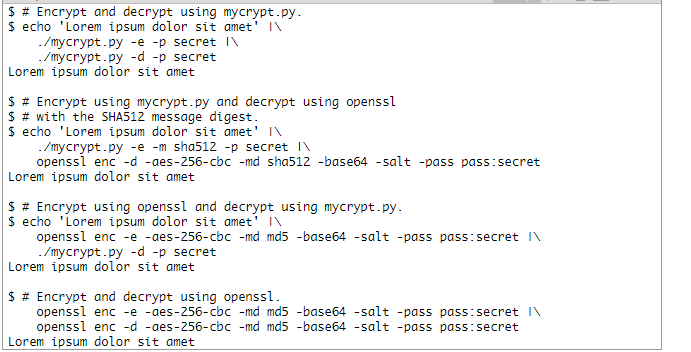
代码:
#!/usr/bin/env python

'''

Implement openssl compatible AES-256 CBC mode encryption/decryption.

This module provides encrypt() and decrypt() functions that are compatible

with the openssl algorithms.

This is basically a python encoding of my C++ work on the Cipher class

using the Crypto.Cipher.AES class.

URL: http://projects.joelinoff.com/cipher-1.1/doxydocs/html/

'''

# LICENSE

#

# MIT Open Source

#

# Copyright (c) 2014 Joe Linoff

#

# Permission is hereby granted, free of charge, to any person

# obtaining a copy of this software and associated documentation files

# (the "Software"), to deal in the Software without restriction,

# including without limitation the rights to use, copy, modify, merge,

# publish, distribute, sublicense, and/or sell copies of the Software,

# and to permit persons to whom the Software is furnished to do so,

# subject to the following conditions:

#

# The above copyright notice and this permission notice shall be

# included in all copies or substantial portions of the Software.

#

# THE SOFTWARE IS PROVIDED "AS IS", WITHOUT WARRANTY OF ANY KIND,

# EXPRESS OR IMPLIED, INCLUDING BUT NOT LIMITED TO THE WARRANTIES OF

# MERCHANTABILITY, FITNESS FOR A PARTICULAR PURPOSE AND

# NONINFRINGEMENT. IN NO EVENT SHALL THE AUTHORS OR COPYRIGHT HOLDERS

# BE LIABLE FOR ANY CLAIM, DAMAGES OR OTHER LIABILITY, WHETHER IN AN

# ACTION OF CONTRACT, TORT OR OTHERWISE, ARISING FROM, OUT OF OR IN

# CONNECTION WITH THE SOFTWARE OR THE USE OR OTHER DEALINGS IN THE

# SOFTWARE.

import argparse

import base64

import os

import re

import hashlib

import inspect

import sys

from getpass import getpass

from Crypto.Cipher import AES

VERSION='1.2'

# ================================================================

# debug

# ================================================================

def _debug(msg, lev=1):

    '''

    Print a debug message with some context.

    '''

    sys.stderr.write('DEBUG:{} ofp {}\n'.format(inspect.stack()[lev][2], msg))

# ================================================================

# get_key_and_iv

# ================================================================

def get_key_and_iv(password, salt, klen=32, ilen=16, msgdgst='md5'):

    '''

    Derive the key and the IV from the given password and salt.

    This is a niftier implementation than my direct transliteration of

    the C++ code although I modified to support different digests.

    CITATION: http://stackoverflow.com/questions/13907841/implement-openssl-aes-encryption-in-python

    @param password  The password to use as the seed.

    @param salt      The salt.

    @param klen      The key length.

    @param ilen      The initialization vector length.

    @param msgdgst   The message digest algorithm to use.

    '''

    # equivalent to:

    #   from hashlib import <mdi> as mdf

    #   from hashlib import md5 as mdf

    #   from hashlib import sha512 as mdf

    mdf = getattr(__import__('hashlib', fromlist=[msgdgst]), msgdgst)

    password = password.encode('ascii', 'ignore')  # convert to ASCII

    try:

        maxlen = klen + ilen

        keyiv = mdf(password + salt).digest()

        tmp = [keyiv]

        while len(tmp) < maxlen:

            tmp.append( mdf(tmp[-1] + password + salt).digest() )

            keyiv += tmp[-1]  # append the last byte

        key = keyiv[:klen]

        iv = keyiv[klen:klen+ilen]

        return key, iv

    except UnicodeDecodeError:

        return None, None

# ================================================================

# encrypt

# ================================================================

def encrypt(password, plaintext, chunkit=True, msgdgst='md5'):

    '''

    Encrypt the plaintext using the password using an openssl

    compatible encryption algorithm. It is the same as creating a file

    with plaintext contents and running openssl like this:

    $ cat plaintext

    <plaintext>

    $ openssl enc -e -aes-256-cbc -base64 -salt \\

        -pass pass:<password> -n plaintext

    @param password  The password.

    @param plaintext The plaintext to encrypt.

    @param chunkit   Flag that tells encrypt to split the ciphertext

                     into 64 character (MIME encoded) lines.

                     This does not affect the decrypt operation.

    @param msgdgst   The message digest algorithm.

    '''

    salt = os.urandom(8)

    key, iv = get_key_and_iv(password, salt, msgdgst=msgdgst)

    if key is None:

        return None

    # PKCS#7 padding

    padding_len = 16 - (len(plaintext) % 16)

    if isinstance(plaintext, str):

        padded_plaintext = plaintext + (chr(padding_len) * padding_len)

    else: # assume bytes

        padded_plaintext = plaintext + (bytearray([padding_len] * padding_len))

    # Encrypt

    cipher = AES.new(key, AES.MODE_CBC, iv)

    ciphertext = cipher.encrypt(padded_plaintext)

    # Make openssl compatible.

    # I first discovered this when I wrote the C++ Cipher class.

    # CITATION: http://projects.joelinoff.com/cipher-1.1/doxydocs/html/

    openssl_ciphertext = b'Salted__' + salt + ciphertext

    b64 = base64.b64encode(openssl_ciphertext)

    if not chunkit:

        return b64

    LINELEN = 64

    chunk = lambda s: b'\n'.join(s[i:min(i+LINELEN, len(s))]

                                for i in range(0, len(s), LINELEN))

    return chunk(b64)

# ================================================================

# decrypt

# ================================================================

def decrypt(password, ciphertext, msgdgst='md5'):

    '''

    Decrypt the ciphertext using the password using an openssl

    compatible decryption algorithm. It is the same as creating a file

    with ciphertext contents and running openssl like this:

    $ cat ciphertext

    # ENCRYPTED

    <ciphertext>

    $ egrep -v '^#|^$' | \\

        openssl enc -d -aes-256-cbc -base64 -salt -pass pass:<password> -in ciphertext

    @param password   The password.

    @param ciphertext The ciphertext to decrypt.

    @param msgdgst    The message digest algorithm.

    @returns the decrypted data.

    '''

    # unfilter -- ignore blank lines and comments

    if isinstance(ciphertext, str):

        filtered = ''

        nl = '\n'

        re1 = r'^\s*$'

        re2 = r'^\s*#'

    else:

        filtered = b''

        nl = b'\n'

        re1 = b'^\\s*$'

        re2 = b'^\\s*#'

    for line in ciphertext.split(nl):

        line = line.strip()

        if re.search(re1,line) or re.search(re2, line):

            continue

        filtered += line + nl

    # Base64 decode

    raw = base64.b64decode(filtered)

    assert(raw[:8] == b'Salted__' )

    salt = raw[8:16]  # get the salt

    # Now create the key and iv.

    key, iv = get_key_and_iv(password, salt, msgdgst=msgdgst)

    if key is None:

        return None

    # The original ciphertext

    ciphertext = raw[16:]

    # Decrypt

    cipher = AES.new(key, AES.MODE_CBC, iv)

    padded_plaintext = cipher.decrypt(ciphertext)

    if isinstance(padded_plaintext, str):

        padding_len = ord(padded_plaintext[-1])

    else:

        padding_len = padded_plaintext[-1]

    plaintext = padded_plaintext[:-padding_len]

    return plaintext

# include the code above ...

# ================================================================

# _open_ios

# ================================================================

def _open_ios(args):

    '''

    Open the IO files.

    '''

    ifp = sys.stdin

    ofp = sys.stdout

    if args.input is not None:

        try:

            ifp = open(args.input, 'rb')

        except IOError:

            print('ERROR: cannot read file: {}'.format(args.input))

            sys.exit(1)

    if args.output is not None:

        try:

            ofp = open(args.output, 'wb')

        except IOError:

            print('ERROR: cannot write file: {}'.format(args.output))

            sys.exit(1)

    return ifp, ofp

# ================================================================

# _close_ios

# ================================================================

def _close_ios(ifp, ofp):

    '''

    Close the IO files if necessary.

    '''

    if ifp != sys.stdin:

        ifp.close()

    if ofp != sys.stdout:

        ofp.close()

# ================================================================

# _write

# ================================================================

def _write(ofp, out, newline=False):

    '''

    Write out the data in the correct format.

    '''

    if ofp == sys.stdout and isinstance(out, bytes):

        out = out.decode('utf-8', 'ignored')

        ofp.write(out)

        if newline:

            ofp.write('\n')

    elif isinstance(out, str):

        ofp.write(out)

        if newline:

            ofp.write('\n')

    else:  # assume bytes

        ofp.write(out)

        if newline:

            ofp.write(b'\n')

# ================================================================

# _write

# ================================================================

def _read(ifp):

    '''

    Read the data in the correct format.

    '''

    return ifp.read()

# ================================================================

# _runenc

# ================================================================

def _runenc(args):

    '''

    Encrypt data.

    '''

    if args.passphrase is None:

        while True:

            passphrase = getpass('Passphrase: ')

            tmp = getpass('Re-enter passphrase: ')

            if passphrase == tmp:

                break

            print('')

            print('Passphrases do not match, please try again.')

    else:

        passphrase = args.passphrase

    ifp, ofp = _open_ios(args)

    text = _read(ifp)

    out = encrypt(passphrase, text, msgdgst=args.msgdgst)

    _write(ofp, out, True)

    _close_ios(ifp, ofp)

# ================================================================

# _rundec

# ================================================================

def _rundec(args):

    '''

    Decrypt data.

    '''

    if args.passphrase is None:

        passphrase = getpass('Passphrase: ')

    else:

        passphrase = args.passphrase

    ifp, ofp = _open_ios(args)

    text = _read(ifp)

    out = decrypt(passphrase, text, msgdgst=args.msgdgst)

    _write(ofp, out, False)

    _close_ios(ifp, ofp)

# ================================================================

# _runtest

# ================================================================

def _runtest(args):

    '''

    Run a series of iteration where each iteration generates a random

    password from 8-32 characters and random text from 20 to 256

    characters. The encrypts and decrypts the random data. It then

    compares the results to make sure that everything works correctly.

    The test output looks like this:

    $ crypt 2000

    2000 of 2000 100.00%  15 139 2000    0

    $ #     ^    ^        ^  ^   ^       ^

    $ #     |    |        |  |   |       +-- num failed

    $ #     |    |        |  |   +---------- num passed

    $ #     |    |        |  +-------------- size of text for a test

    $ #     |    |        +----------------- size of passphrase for a test

    $ #     |    +-------------------------- percent completed

    $ #     +------------------------------- total

    # #+------------------------------------ current test

    @param args  The args parse arguments.

    '''

    import string

    import random

    from random import randint

    # Encrypt/decrypt N random sets of plaintext and passwords.

    num = args.test

    ofp = sys.stdout

    if args.output is not None:

        try:

            ofp = open(args.output, 'w')

        except IOError:

            print('ERROR: can open file for writing: {}'.format(args.output))

            sys.exit(1)

    chset = string.printable

    passed = 0

    failed = []

    maxlen = len(str(num))

    for i in range(num):

        ran1 = randint(8,32)

        password = ''.join(random.choice(chset) for x in range(ran1))

        ran2 = randint(20, 256)

        plaintext = ''.join(random.choice(chset) for x in range(ran2))

        ciphertext = encrypt(password, plaintext, msgdgst=args.msgdgst)

        verification = decrypt(password, ciphertext, msgdgst=args.msgdgst)

        if plaintext != verification:

            failed.append( [password, plaintext] )

        else:

            passed += 1

        output = '%*d of %d %6.2f%% %3d %3d %*d %*d %s' % (maxlen,i+1,

                                                           num,

                                                           100*(i+1)/num,

                                                           len(password),

                                                           len(plaintext),

                                                           maxlen, passed,

                                                           maxlen, len(failed),

                                                           args.msgdgst)

        if args.output is None:

            ofp.write('\b'*80)

            ofp.write(output)

            ofp.flush()

        else:

            ofp.write(output+'\n')

    ofp.write('\n')

    if len(failed):

        for i in range(len(failed)):

            ofp.write('%3d %2d %-34s %3d %s\n' % (i,

                                                  len(failed[i][0]),

                                                  '"'+failed[i][0]+'"',

                                                  len(failed[i][1]),

                                                  '"'+failed[i][1]+'"'))

        ofp.write('\n')

    if args.output is not None:

        ofp.close()

# ================================================================

# _cli_opts

# ================================================================

def _cli_opts():

    '''

    Parse command line options.

    @returns the arguments

    '''

    mepath = os.path.abspath(sys.argv[0]).encode('utf-8')

    mebase = os.path.basename(mepath)

    description = '''

        Implements encryption/decryption that is compatible with openssl

        AES-256 CBC mode.

        You can use it as follows:

            EXAMPLE 1: {0} -> {0} (MD5)

                $ # Encrypt and decrypt using {0}.

                $ echo 'Lorem ipsum dolor sit amet' | \\

                    {0} -e -p secret | \\

                    {0} -d -p secret

                Lorem ipsum dolor sit amet

            EXAMPLE 2: {0} -> openssl (MD5)

                $ # Encrypt using {0} and decrypt using openssl.

                $ echo 'Lorem ipsum dolor sit amet' | \\

                    {0} -e -p secret | \\

                    openssl enc -d -aes-256-cbc -md md5 -base64 -salt -pass pass:secret

                Lorem ipsum dolor sit amet

            EXAMPLE 3: openssl -> {0} (MD5)

                $ # Encrypt using openssl and decrypt using {0}

                $ echo 'Lorem ipsum dolor sit amet' | \\

                    openssl enc -e -aes-256-cbc -md md5 -base64 -salt -pass pass:secret

                    {0} -d -p secret

                Lorem ipsum dolor sit amet

            EXAMPLE 4: openssl -> openssl (MD5)

                $ # Encrypt and decrypt using openssl

                $ echo 'Lorem ipsum dolor sit amet' | \\

                    openssl enc -e -aes-256-cbc -md md5 -base64 -salt -pass pass:secret

                    openssl enc -d -aes-256-cbc -md md5 -base64 -salt -pass pass:secret

                Lorem ipsum dolor sit amet

            EXAMPLE 5: {0} -> {0} (SHA512)

                $ # Encrypt and decrypt using {0}.

                $ echo 'Lorem ipsum dolor sit amet' | \\

                    {0} -e -m sha512 -p secret | \\

                    {0} -d -m sha512 -p secret

                Lorem ipsum dolor sit amet

            EXAMPLE 6: {0} -> openssl (SHA512)

                $ # Encrypt using {0} and decrypt using openssl.

                $ echo 'Lorem ipsum dolor sit amet' | \\

                    {0} -e -m sha512 -p secret | \\

                    openssl enc -d -aes-256-cbc -md sha1=512 -base64 -salt -pass pass:secret

                Lorem ipsum dolor sit amet

            EXAMPLE 7:

                $ # Run internal tests.

                $ {0} -t 2000

                2000 of 2000 100.00%%  21 104 2000    0 md5

                $ #     ^    ^        ^  ^   ^       ^ ^

                $ #     |    |        |  |   |       | +- message digest

                $ #     |    |        |  |   |       +--- num failed

                $ #     |    |        |  |   +----------- num passed

                $ #     |    |        |  +--------------- size of text for a test

                $ #     |    |        +------------------ size of passphrase for a test

                $ #     |    +--------------------------- percent completed

                $ #     +-------------------------------- total

                # #+------------------------------------- current test

'''.format(mebase.decode('ascii', 'ignore'))

    parser = argparse.ArgumentParser(prog=mebase,

                                     formatter_class=argparse.RawDescriptionHelpFormatter,

                                     description=description,

                                     )

    group = parser.add_mutually_exclusive_group(required=True)

    group.add_argument('-d', '--decrypt',

                       action='store_true',

                       help='decryption mode')

    group.add_argument('-e', '--encrypt',

                       action='store_true',

                       help='encryption mode')

    parser.add_argument('-i', '--input',

                        action='store',

                        help='input file, default is stdin')

    parser.add_argument('-m', '--msgdgst',

                        action='store',

                        default='md5',

                        help='message digest (md5, sha, sha1, sha256, sha512), default is md5')

    parser.add_argument('-o', '--output',

                        action='store',

                        help='output file, default is stdout')

    parser.add_argument('-p', '--passphrase',

                        action='store',

                        help='passphrase for encrypt/decrypt operations')

    group.add_argument('-t', '--test',

                       action='store',

                       default=-1,

                       type=int,

                       help='test mode (TEST is an integer)')

    parser.add_argument('-v', '--verbose',

                        action='count',

                        help='the level of verbosity')

    parser.add_argument('-V', '--version',

                        action='version',

                        version='%(prog)s '+VERSION)

    args = parser.parse_args()

    return args

# ================================================================

# main

# ================================================================

def main():

    args = _cli_opts()

    if args.test > 0:

        if args.input is not None:

            print('WARNING: input argument will be ignored.')

        if args.passphrase is not None:

            print('WARNING: passphrase argument will be ignored.')

        _runtest(args)

    elif args.encrypt:

        _runenc(args)

    elif args.decrypt:

        _rundec(args)

# ================================================================

# MAIN

# ================================================================

if __name__ == "__main__":

    main()
提供openssl -aes-256-cbc兼容加密/解密的简单python函数的更多相关文章
- 通过Jni实现AES的CBC模式加密解密
AES加密方式基本实现,出现一个问题就是代码的安全性.我们知道java层代码很容易被反编译,很有可能泄漏我们加密方式与密钥 内容,那我们该怎么办呢?我们可以使用c/c++实现加密,编译成So库的形式, ...
- php中签名公钥、私钥(SHA1withRSA签名)以及AES(AES/ECB/PKCS5Padding)加密解密详解
由于http请求是无状态,所以我们不知道请求方到底是谁.于是就诞生了签名,接收方和请求方协商一种签名方式进行验证,来取得互相信任,进行下一步业务逻辑交流. 其中签名用得很多的就是公钥私钥,用私钥签名, ...
- Python实现AES的CBC模式加密和解密过程详解 和 chr() 函数 和 s[a:b:c] 和函数lambda
1.chr()函数 chr() 用一个范围在 range(256)内的(就是0-255)整数作参数,返回一个对应的字符. 2.s[a:b:c] s=(1,2,3,4,5) 1>. s[a]下标访 ...
- 解决AES算法CBC模式加密字符串后再解密出现乱码问题
问题 在使用 AES CBC 模式加密字符串后,再进行解密,解密得到的字符串出现乱码情况,通常都是前几十个字节乱码: 复现 因为是使用部门 cgi AESEncryptUtil 库,找到问题后,在这里 ...
- php实现AES/CBC/PKCS5Padding加密解密(又叫:对称加密)
今天在做一个和java程序接口的架接,java那边需要我这边(PHP)对传过去的值进行AES对称加密,接口返回的结果也是加密过的(就要用到解密),然后试了很多办法,也一一对应了AES的key密钥值,偏 ...
- openssl生成CA签署 及 加密解密基础
openssl 生成私有CA 及签署证书 openssl 配置文件: /etc/pki/tls/openssl.cnf 1. 在openssl CA 服务器端生成私钥 cd /etc/pki/CA/ ...
- Android DES加密的CBC模式加密解密和ECB模式加密解密
DES加密共有四种模式:电子密码本模式(ECB).加密分组链接模式(CBC).加密反馈模式(CFB)和输出反馈模式(OFB). CBC模式加密: import java.security.Key; i ...
- openssl pem密钥文件rsa加密解密例子
准备工作 命令行加密解密,用与比对代码中的算法和命令行的算法是否一致 C:\openssl_test>openssl rsautl -encrypt -in data.txt -inkey pu ...
- AES实现财务数据的加密解密存储
需求背景 众所周知,金融行业有各种各样的财务报表,有些报表涉及到公司财务或经营相关的敏感数据,需要进行加密存储,只有掌握密钥的用户才能看到解密后的数据.注意,这里所说的加密并不是针对整个数据库或者表全 ...
随机推荐
- autofac IOC
http://www.cnblogs.com/liupeng/p/4806184.html srvanyui 自建服务
- Windows系统环境变量path优先级测试报告
转自:http://bluekylin.cnblogs.com/archive/2005/12/16/298797.html 总以为自己很已经会操作windows了,今天在它帮助中看到一大片还不知道的 ...
- CNN卷积可视化与反卷积
1.<Visualizing and Understanding Convolutional Networks> 2.<Adaptive deconvolutional networ ...
- Quantum Computation and Quantum Information
https://www.amazon.com/Quantum-Computation-Information-10th-Anniversary/dp/1107002176/ref=asap_bc?ie ...
- Python args **kwargs作用
python当函数的参数不确定时,可以使用*args和**kwargs,*args用于捕获所有no keyword参数,它是一个tuple.**kwargs捕获所有keyword参数,它是一个dict ...
- 每日英语:Surviving a Conference Call
The conference call is one of the most familiar rituals of office life -- and one of the most hated. ...
- RedHat中代理设置
YUM代理设置 编辑/etc/yum.conf,在最后加入 # Proxy proxy=http://username:password@proxy_ip:port/ 也可以使用proxy_usern ...
- maven copy jar 插件
插件比较特殊 eclipse下的 首先声明插件 <pluginManagement> <plugin> <groupId>org.apache.maven.plu ...
- Python3求栈最小元素
[本文出自天外归云的博客园] 思路:入栈时靠辅助栈记住主栈元素中最小的,出栈时一直pop主栈元素直到辅助栈栈顶元素出现. 代码如下(定义栈.超级栈): class Stack(object): def ...
- java获取上周任意一天的日期
/** * 获取上周周几的日期,默认一周从周一开始 * @param dayOfWeek * @param weekOffset * @return */ public static Date get ...