
asp.net core for vs code
1,命令
dotnet new --help 查询命令帮助
D:\github\test2>dotnet run 启动web程序
dotnet build 编译代码
dotnet restore 还原包
dotnet publish 发布项目
2,模板
using System;

using System.Collections.Generic;

using System.Diagnostics;

using System.Linq;

using System.Threading.Tasks;

using Microsoft.AspNetCore.Mvc;

using test3.Models;

namespace test3.Controllers

{

    public class HomeController : Controller

    {

        public IActionResult Index()

        {

            return View();

        }

        public IActionResult About()

        {

            ViewData["Message"] = "Your application description page.";

            return View();

        }

        public IActionResult Contact()

        {

            ViewData["Message"] = "Your contact page.";

            return View();

        }

        public IActionResult Error()

        {

            return View(new ErrorViewModel { RequestId = Activity.Current?.Id ?? HttpContext.TraceIdentifier });

        }

    }

}
Controller模板
3,更换启动浏览器

windows下启动浏览器命令: C:\Windows\System32>cmd.exe /C start http://localhost:5000/api/values
"launchBrowser": {

                "enabled": true,

                "args": "${auto-detect-url}",

                "windows": {

                    "command": "C:\\Users\\Hunter\\AppData\\Local\\Google\\Chrome\\Application\\chrome.exe",

                    "args": "${auto-detect-url}"

                },

                "osx": {

                    "command": "open"

                },

                "linux": {

                    "command": "xdg-open"

                }

            },
更新配置
4,vscode使用nuget
①安装nuget

② ctrl + shift +P 选择nuget,然后输入包名称回车下载

③包版本变更
打开.csproj文件,直接更改PackageReference下的Version
然后dotnet restore
5,使用ef migration
dotnet ef migrations add initialCreate Add-Migration【添加更新实体】
dotnet ef database update Update-Database【向数据库更新】
dotnet ef migrations remove Remove-Migration【删除最后一个migration文件,前提是该migration文件为update到数据库】
dotnet ef database update LastGoodMigration Update-Database LastGoodMigration【回滚到指定的migration文件。不会删除migration文件。如果不需要migration文件可以通过dotnet ef migrations remove删除掉】
dotnet ef migrations script Script-Migration【打印出数据库变更脚本】
6,配置.net core的工作目录

7,使用dotnet ef migrations命令
需要在工程文件中加入
<PackageReference Include="Microsoft.EntityFrameworkCore.Tools" Version="2.0.2"/> 和 <DotNetCliToolReference Include="Microsoft.EntityFrameworkCore.Tools.DotNet" Version="2.0.2"/>
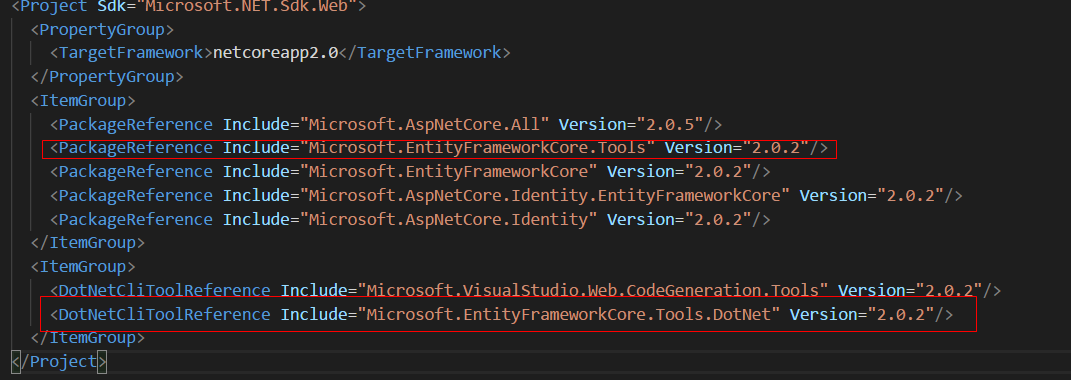
8,指定migration生成的目录
dotnet ef migrations add init -o Data/Migrations

以后再添加不用使用 -o Data/Migrations 直接会添加在Data/Migrations文件夹下
9,vscode使用Bower
①vscode安装Bower扩展
Ctrl + Shift + p 就可以使用Bower了
②在项目中添加.bowerrc文件指定包安装路径
{

    "directory": "wwwroot/lib"

}
③添加bower.json文件
{

  "name": "MvcDemo2",

  "private": true,

  "dependencies": {

    "jquery": "3.1.1",

    "bootstrap": "3.3.7",

    "zTree":"3.5.33"

  }

}
10,引用项目
asp.net core for vs code的更多相关文章
- asp.net core 使用EF7 Code First 创建数据库,同时使用命令创建数据库
1.首先下载vs2015的Asp.Net Core(RC2)的插件工具(https://www.microsoft.com/net/core#windows)2.创建一个asp.net Core的项目 ...
- ASP.NET Core EFCore 之Code First
1.在.NET Core项目中使用Nuget引用包 Sql Server 请安装 Microsoft.EntityFrameworkCore.SqlServer 2.添加实体类 [Table(&quo ...
- ASP.NET Core模块概述
原文地址:ASP.NET Core Module overview By Tom Dykstra, Rick Strahl, and Chris Ross ASP.NET Core模块(ANCM)让你 ...
- ASP.NET Core Module overview模块概述
原文地址:ASP.NET Core Module overview By Tom Dykstra, Rick Strahl, and Chris Ross ASP.NET Core模块(ANCM)让你 ...
- 如何在ASP.NET Core Web API中使用Mini Profiler
原文如何在ASP.NET Core Web API中使用Mini Profiler 由Anuraj发表于2019年11月25日星期一阅读时间:1分钟 ASPNETCoreMiniProfiler 这篇 ...
- asp.net core使用identity+jwt保护你的webapi(三)——refresh token
前言 上一篇已经介绍了identity的注册,登录,获取jwt token,本篇来完成refresh token. 开始 开始之前先说明一下为什么需要refresh token. 虽然jwt toke ...
- docker4dotnet #3 在macOS上使用Visual Studio Code和Docker开发asp.net core和mysql应用
.net猿遇到了小鲸鱼,觉得越来越兴奋.本来.net猿只是在透过家里那田子窗看外面的世界,但是看着海峡对岸的苹果园越来越茂盛,实在不想再去做一只宅猿了.于是,.net猿决定搭上小鲸鱼的渡轮到苹果园去看 ...
- ASP.NET Core 中文文档 第二章 指南(1)用 Visual Studio Code 在 macOS 上创建首个 ASP.NET Core 应用程序
原文:Your First ASP.NET Core Application on a Mac Using Visual Studio Code 作者:Daniel Roth.Steve Smith ...
- Windows下构建ASP.NET Core+Code First+Docker
背景介绍 本文将会示范如何在Windows系统下基于ASP.NET Core构建跨平台服务,并通过Docker容器运行发布. 首先说一下为什么选择这一套组合: 我本人和我们Code4Thought团队 ...
随机推荐
- js数组的操作push,pop,shift,unshift
push(args)可以每次压入多个元素,并返回更新后的数组长度. var oldArr=[1,2,3]; alert(oldArr.push(4,[5,6]))–>5(这里只会将[5,6]当做 ...
- 如何用ModelsimSE仿真IP核-以PLL为例
我们之前介绍了如何使用Modelsim SE进行仿真和利用do文件的仿真方法,但是其中待仿真的模块是我们自己编写的Verilog模块,但是在实际工作中,我们的设计中会经常用到FPGA厂商给我们提供的现 ...
- Python 3.x 格式化输出字符串 % & format 笔记
Python 3.x 格式化输出字符串 % & format 笔记 python格式化字符串有%和{}两种 字符串格式控制符. 字符串输入数据格式类型(%格式操作符号) %%百分号标记 %c字 ...
- linux中fork()函数详解【转】
转自:http://blog.csdn.net/jason314/article/details/5640969 一.fork入门知识 一个进程,包括代码.数据和分配给进程的资源.fork()函数通过 ...
- Python poll IO多路复用
一.poll介绍 poll本质上和select没有区别,只是没有了最大连接数(linux上默认1024个)的限制,原因是它基于链表存储的. 本人的另一篇博客讲了 python select : ht ...
- 如何从现有版本升级到element UI2.0?使用npm-check-updates
转:https://blog.csdn.net/wojiaomaxiaoqi/article/details/78428738 登录element UI官网时提示2.0已经正式发布了,Element ...
- 如何用Python写一个贪吃蛇AI
前言 这两天在网上看到一张让人涨姿势的图片,图片中展示的是贪吃蛇游戏, 估计大部分人都玩过.但如果仅仅是贪吃蛇游戏,那么它就没有什么让人涨姿势的地方了. 问题的关键在于,图片中的贪吃蛇真的很贪吃XD, ...
- python中的zip、map、reduce 、lambda函数的使用。
lambda只是一个表达式,函数体比def简单很多. lambda的主体是一个表达式,而不是一个代码块.仅仅能在lambda表达式中封装有限的逻辑进去. lambda表达式是起到一个函数速写的作用.允 ...
- VIM 报错
syntax error: unexpected end of file if 没配对 在最后加 fi 试试 环境变量用不了 export PATH=/usr/bin:/usr/sbin:/bin:/ ...
- django----重定向
urlpatterns = [ re_path(r'^(\w+)(\w+)/$',views.index,name="index"), ] 1.<a href="{ ...