
Failed to resolve: com.android.support:appcompat-v7:27.0.1问题解决
今天,在毫无征兆的情况下AndroidStudio又抽风了,搞了大半天,试了网上众多方案,终于解决了这个问题。咱们一步一步来
第一步:这是最开始的bug
Error:Failed to resolve: com.android.support:support-annotations:27.0.1
Install Repository and sync project
Open File
Show in Project Structure dialog
Error:Failed to resolve: com.android.support:appcompat-v7:27.0.1
Install Repository and sync project
Open File
Show in Project Structure dialog
这个问题可以通过修改project的gradle,添加maven { url “https://maven.google.com” }即可,如图
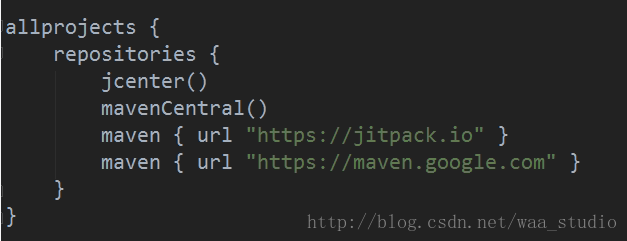
同时,打开SDK Manager
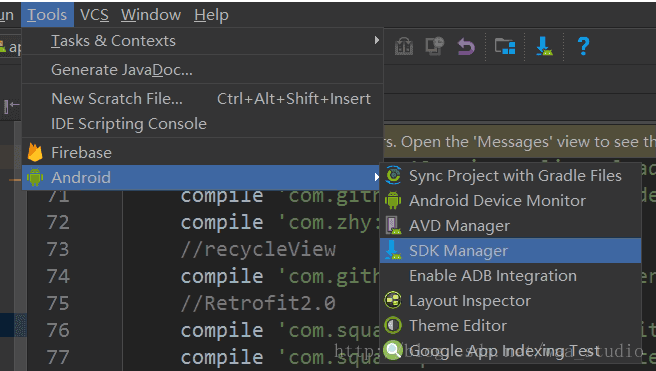
检查repository是否已经下载,并安装
Failed to resolve: com.android.support:appcompat-v7:27.0.1问题解决的更多相关文章
- Failed to resolve: com.android.support:design:25.4.0
韩梦飞沙 韩亚飞 313134555@qq.com yue31313 han_meng_fei_sha 错误:(27, 13) Failed to resolve: com.android.s ...
- Failed to resolve com.android.support:support-compat:25.4.0
3down votefavorite I am trying to include this library to my project by adding compile 'jp.wasabee ...
- Error:(27, 13) Failed to resolve: com.android.support.constraint:constraint-layout:1.0.2约束布局constraint-layout导入失败的解决方案
运行demo提示错误: Error:(27, 13) Failed to resolve: com.android.support.constraint:constraint-layout:1.0.2 ...
- (转)Android Studio Error:Failed to resolve: com.android.support:appcompat-v7:25.1.0解决方案
今天不知道为什么导入eclipse项目后就出现了错误,没导入之前是正常使用AS的 Error:(26, 13) Failed to resolve: com.android.support:appco ...
- Error:Failed to resolve: com.android.support.constraint:constraint-layout:1.0.2
可以换个maven库: allprojects { repositories { jcenter() //maven { url "https://jitpack.io" } ma ...
- Error:Failed to resolve: com.android.support:recyclerview-v7:26.1.0
修改gradle allprojects { repositories { maven { url "https://maven.google.com" } jcenter() } ...
- Failed to resolve: com.android.support:appcompat-v7:28 问题解决
apply plugin: 'com.android.application' android { compileSdkVersion buildToolsVersion "28.0.2&q ...
- Android添加百分比布局库时显示Failed to resolve: com.android.support.percent:问题
这是看第一行代码中遇到的问题,要添加百分比布局库的依赖时要在app下的bulid.gradle添加以下代码 implementation fileTree(dir:'libs',include:['* ...
- Andriod Studio 解决问题 Failed to resolve: com.android.support:appcompat-v7:28.+
Andriod Studio报错提示: Error:(26, 13) Failed to resolve: com.android.support:appcompat-v7:28.+ 原因:Andri ...
随机推荐
- BTrace使用简介
很多时候在online的应用出现问题时,很多时候我们需要知道更多的程序的运行细节,但又不可能在开发的时候就把程序中所有的运行细节都打印到日志上,通常这个时候能采取的就是修改代码,重新部署,然后再观察, ...
- Go语言之高级篇beego框架之请求数据处理
1.Controller中数据参数处理 获取参数:我们经常需要获取用户传递的数据,包括 Get.POST 等方式的请求,beego 里面会自动解析这些数据,你可以通过如下方式获取数据: GetStri ...
- mongodb 字符串查找匹配中$regex的用法
官网地址:https://docs.mongodb.com/manual/reference/operator/query/regex/#regex-case-insensitive 举个例子来说:现 ...
- java.util.WeakHashMap
http://mikewang.blog.51cto.com/3826268/880775 http://mzlly999.iteye.com/blog/1126049 java.util.WeakH ...
- 【Visual Studio】Visual Studio对CLR异常的特殊支持
Visual Studio 对异常进行了特殊的支持,它能够在进行了特殊设置后,使代码中的try catch块失效.也就是说,一个异常在正常情况下应该能够被某个特殊的try catch块捕获,但是Vis ...
- 在 OC 中调用 Swift 代码
1.在 Objective-C 项目中使用 Swift 代码 1)在 OC 项目中创建 .Swift 文件,文件中的格式为其本有的格式. 2)Xcode 提示是否创建 Objective-C brid ...
- 各个屏幕的logo尺寸要求
DENSITY SIZE LOCATION RATIO SCREEN MARGIN XXXHDPI 192×192 drawable-xxxhdpi 4 640 DPI 12 to 16 pixels ...
- Ubuntu 13.10 安装Terminalx 后更改默认终端设置
1.安装 terminalx, sudo apt-get install terminator 2.Ctrl+ Alt + t 试一下打开什么终端,我的默认启动的是Terminator;如果想换换默认 ...
- PNG、 JPG图片压缩方法
参考链接 https://tinypng.com/developers/reference/python 1.安装 pip install --upgrade tinify 2.使用python脚本压 ...
- [C#] 一款代码注释清理工具
[C#] 一款代码注释清理工具 在程序开发过程中,很多时候我们都会在代码中进行注释,以便大家更容易理解或能更直观明白某个类或方法是用来做什么的,我们就会用注释 就以C#为列子,注释符大致为'//' ...