
Mapbox使用详解
一、简介:
二、使用:
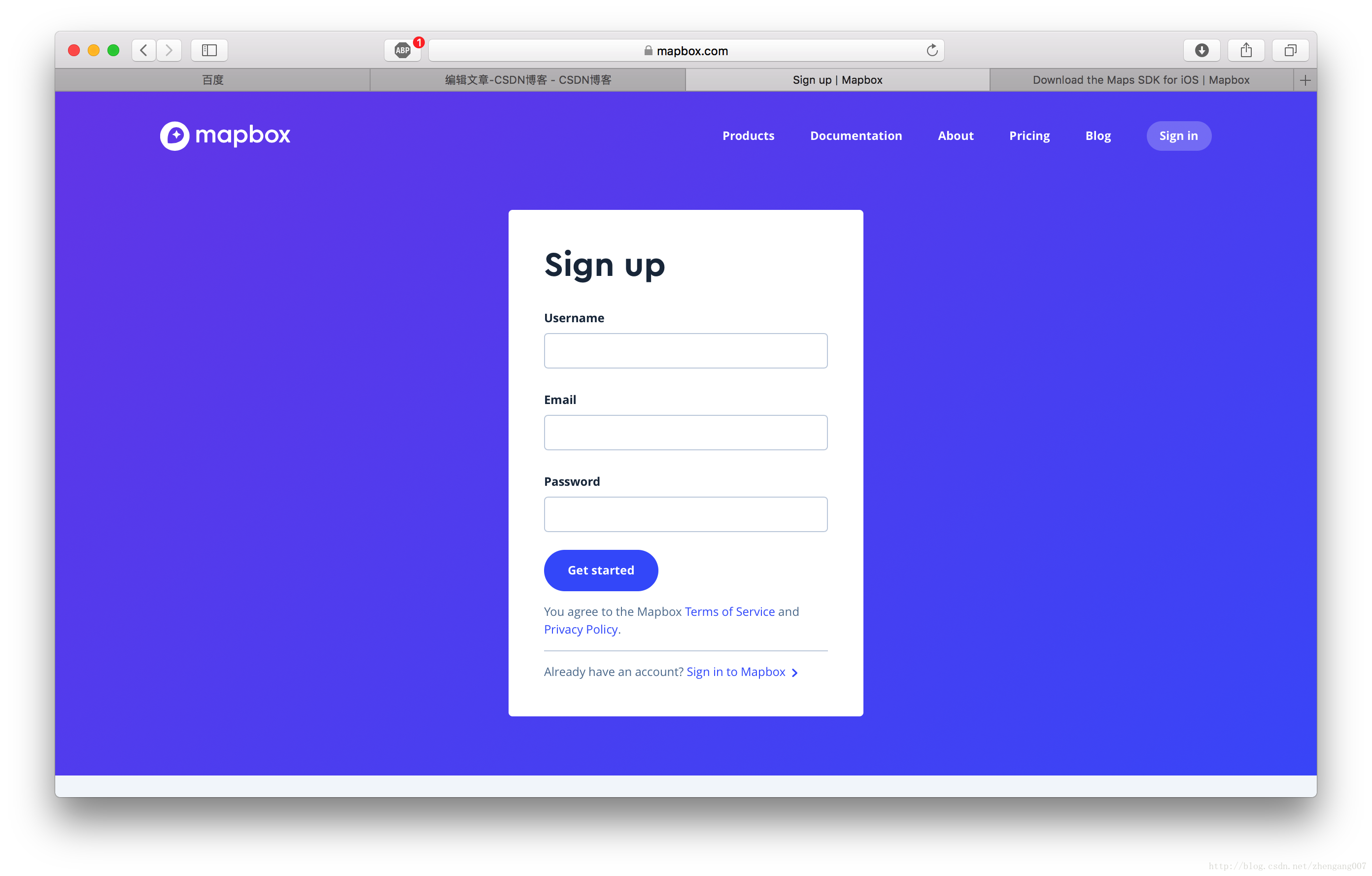
1、注册账号:

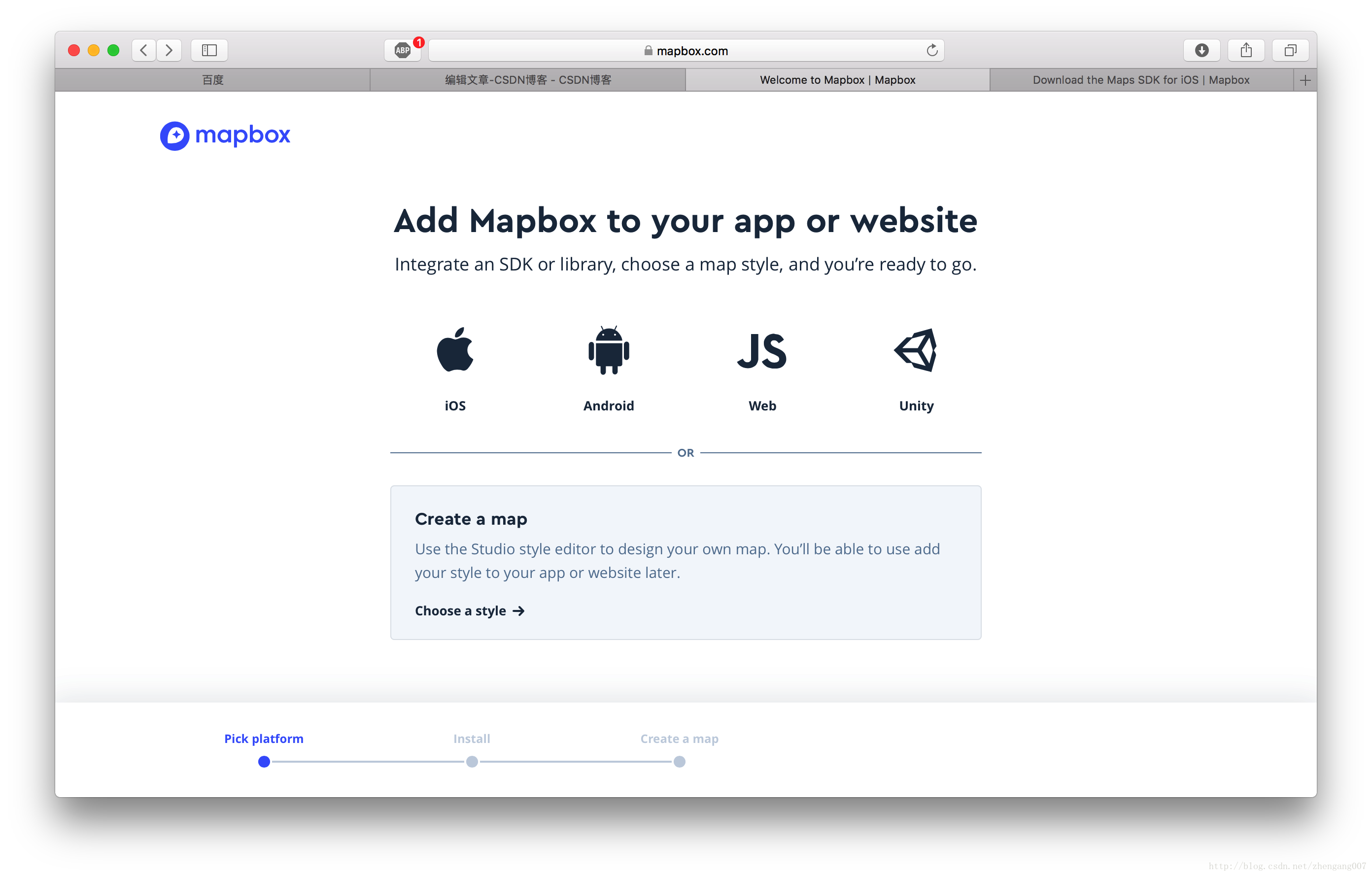
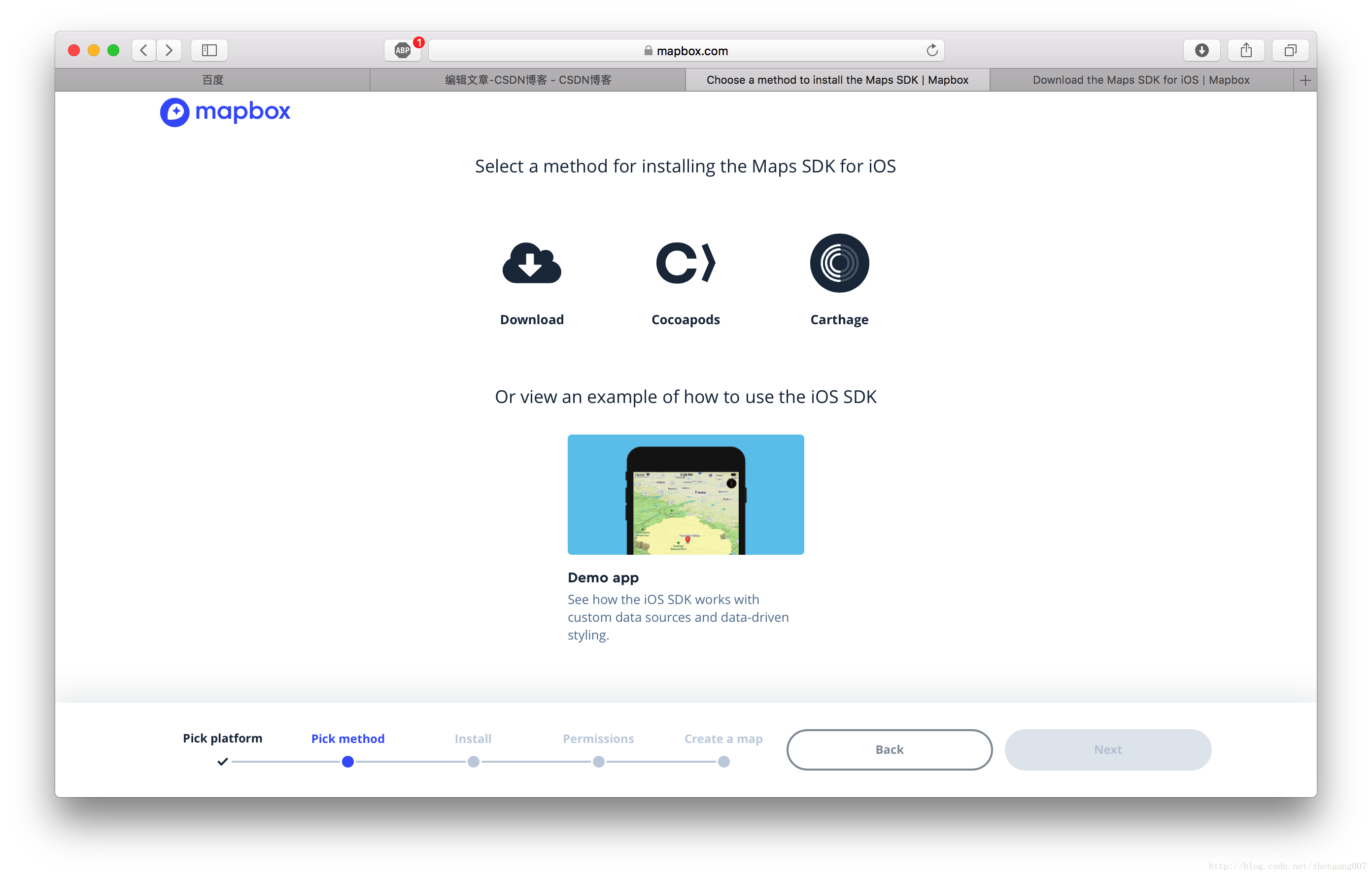
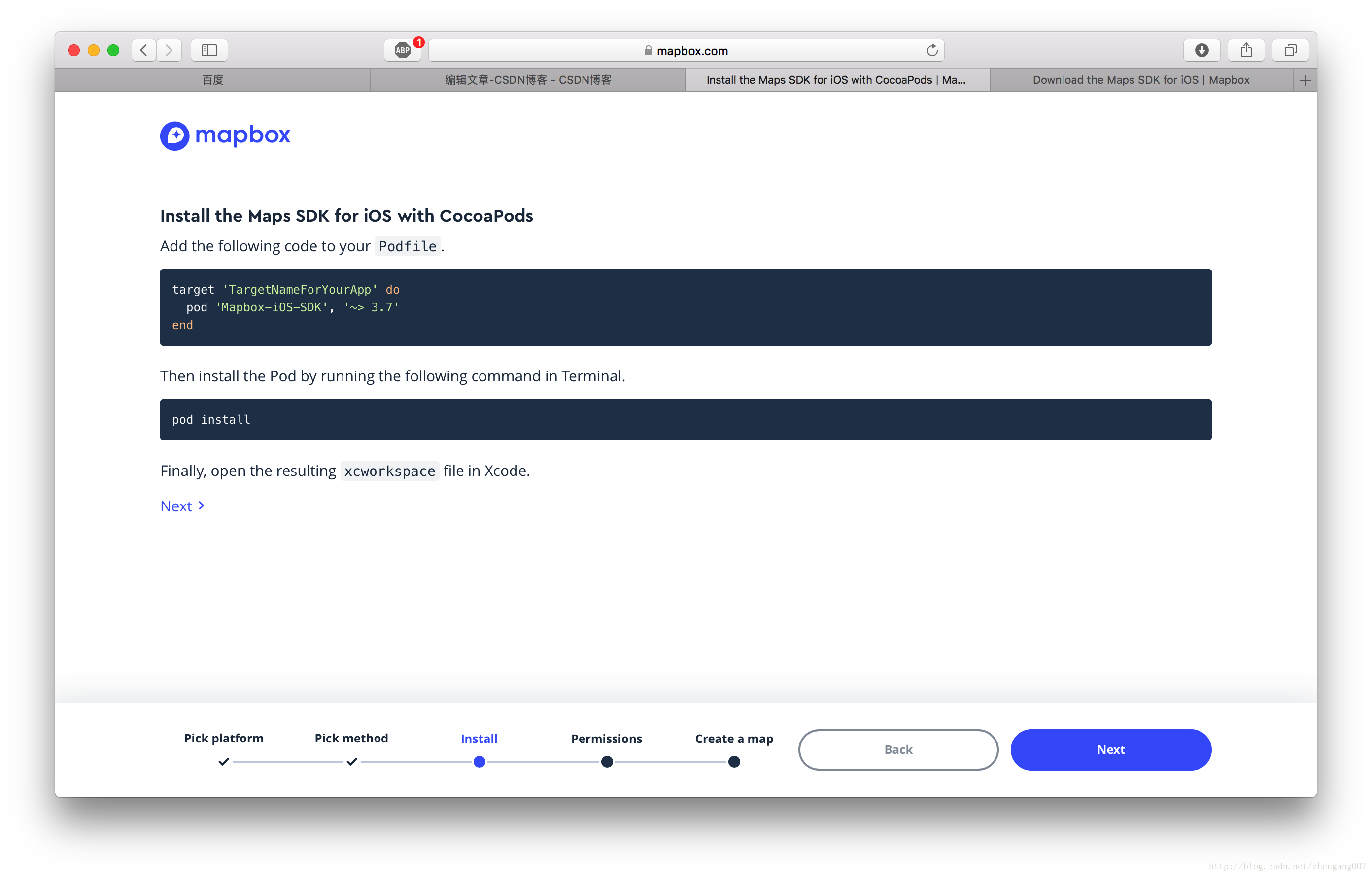
2、引入工程:
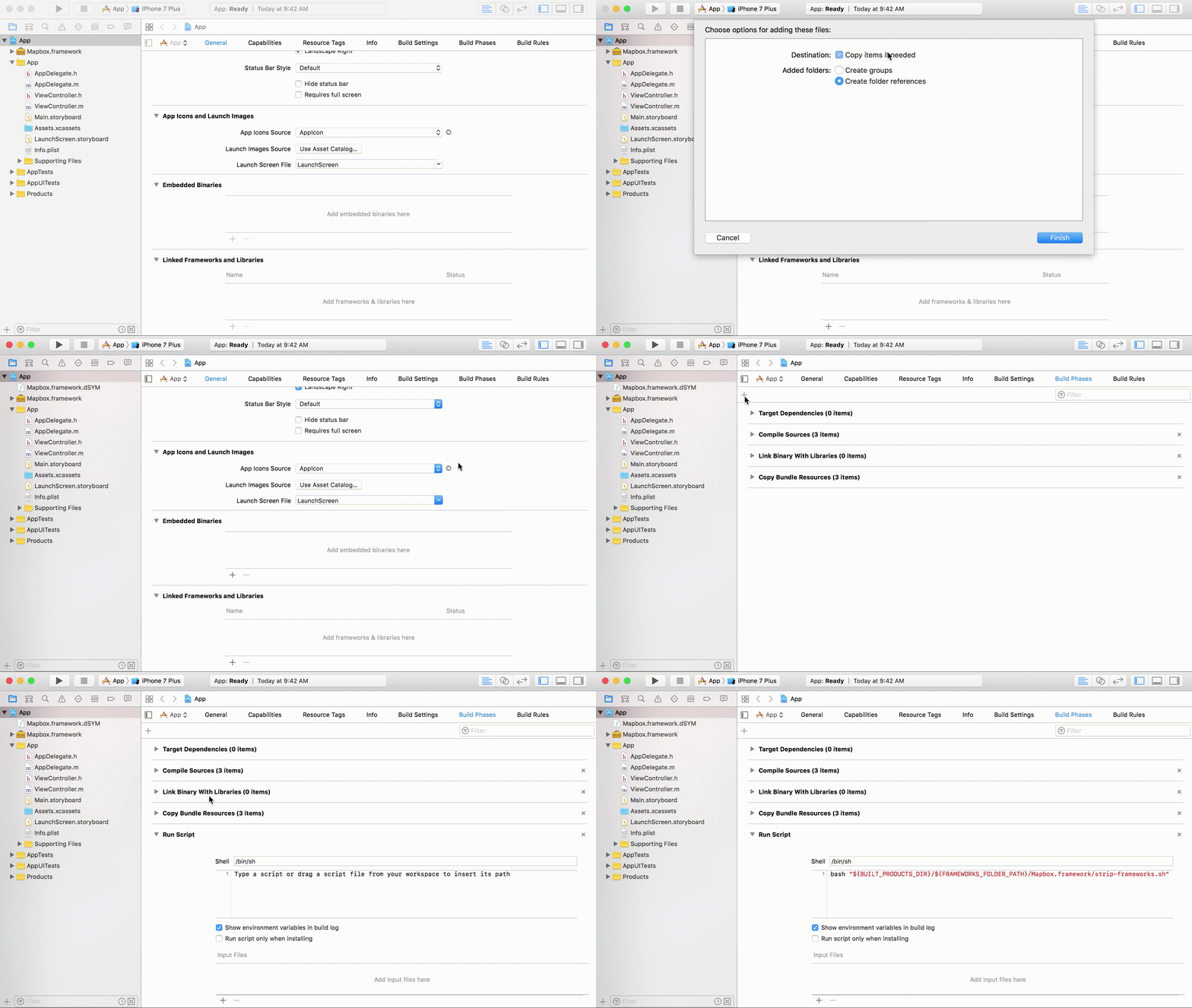
- 把Mapbox.frameworks 文件拖拽到 “ 项目 -> TARGETS -> Build Phases -> Embed Frameworks ” 这个路径下;
- 在路径 “项目 -> TARGETS -> Build Phases -> + -> New Run Script phase” 粘贴一串 shel l脚本代码 :
bash "${BUILT_PRODUCTS_DIR}/${FRAMEWORKS_FOLDER_PATH}/Mapbox.framework/strip-frameworks.sh"
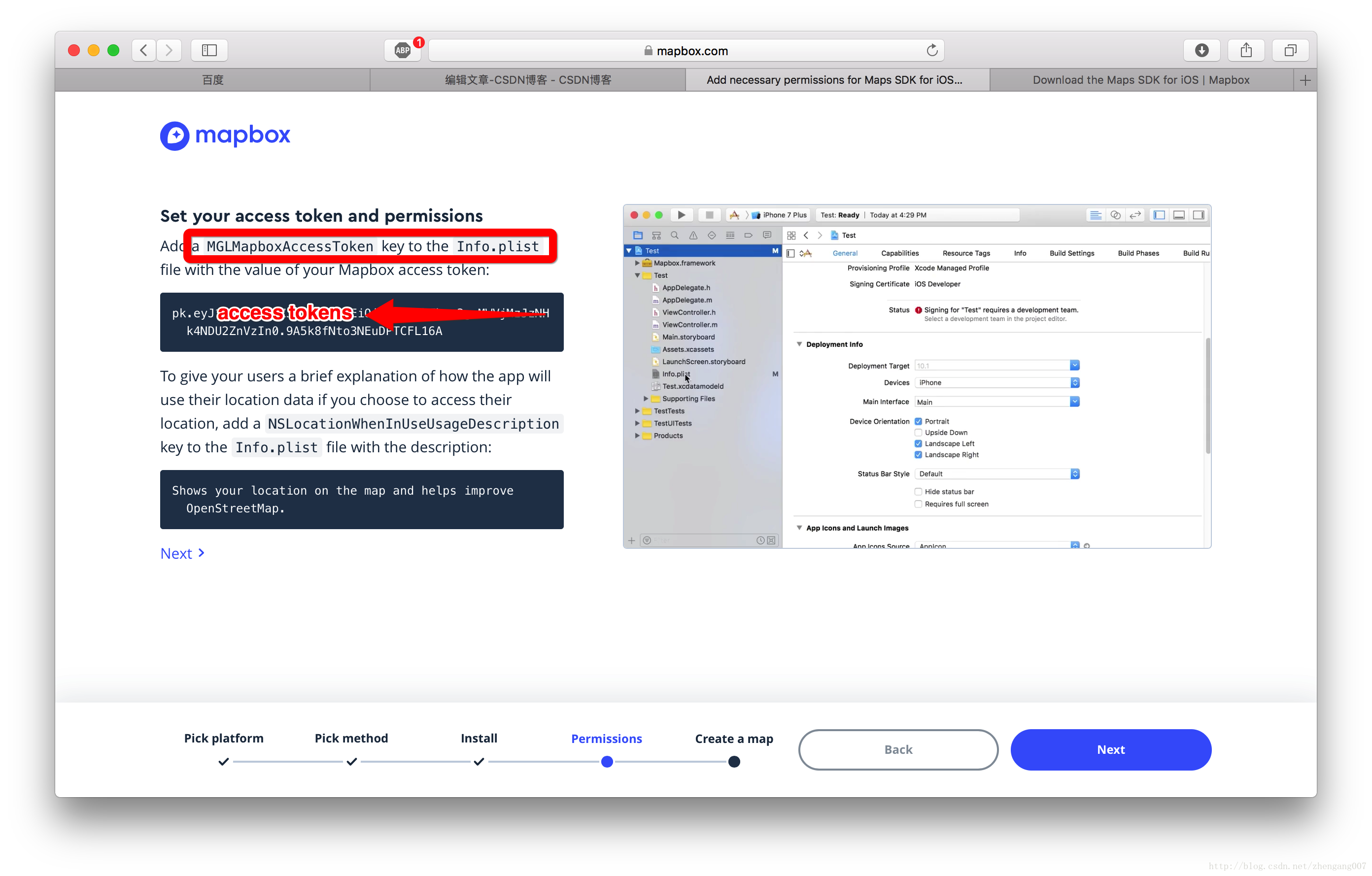
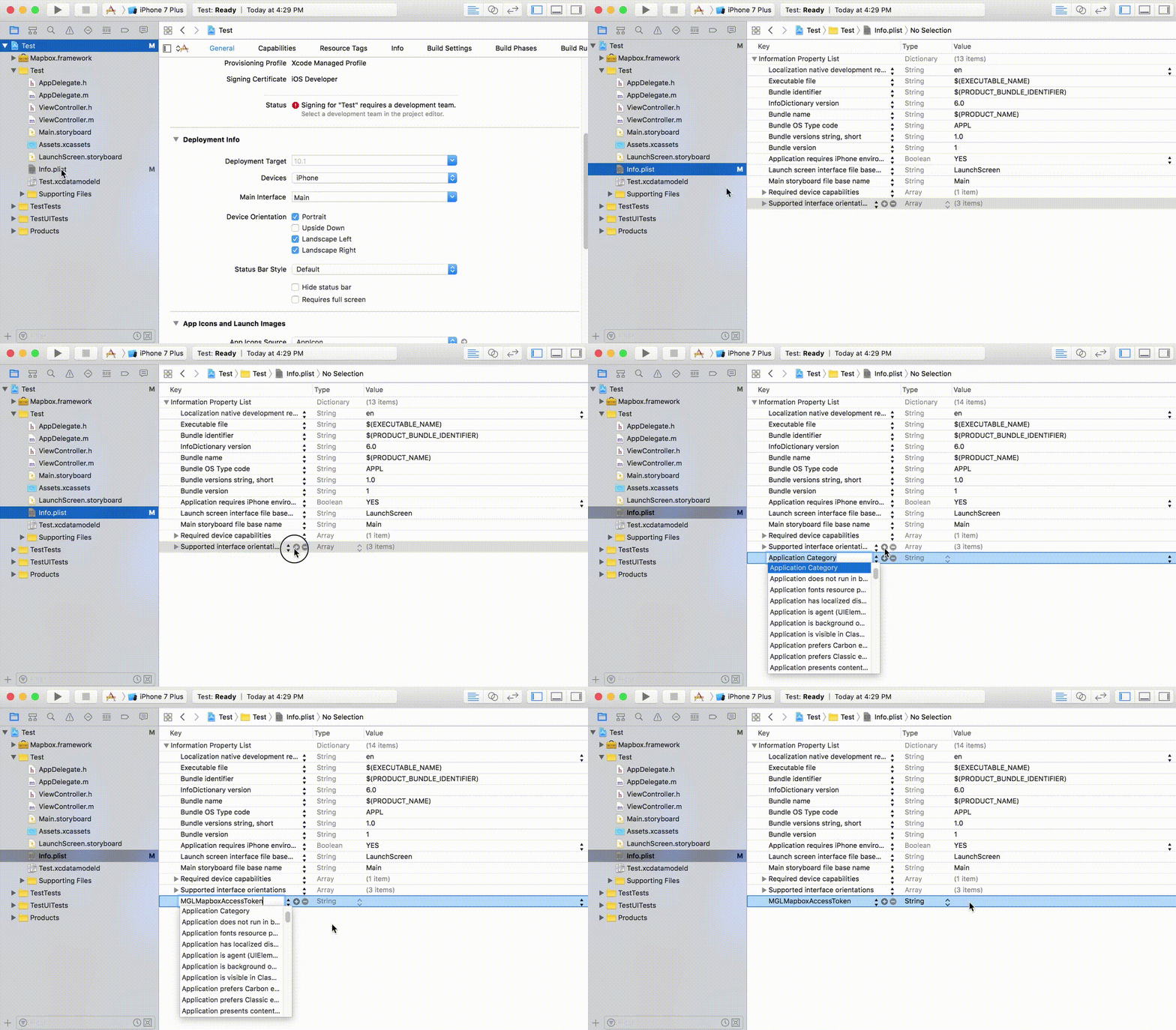
- 在Info.plist 文件中添加 key 为 MGLMapboxAccessToken 其值为【Access tokens】 字符串;
- 在Info.plist 文件中添加 key 为 NSLocationWhenInUseUsageDescription 其值为 bool 类型的 YES;
3、Mapbox.framework类的使用:
【1】加载地图:
- #import "LoadMapboxViewController.h"
- #import <Mapbox/Mapbox.h>
- @interface LoadMapboxViewController ()<MGLMapViewDelegate>
- @property (nonatomic, strong) MGLMapView *mapView;
- @end
- @implementation LoadMapboxViewController
- - (void)viewDidLoad {
- [super viewDidLoad];
- // Do any additional setup after loading the view.
- self.title = @"加载地图";
- [self.view addSubview:self.mapView];
- }
- - (MGLMapView *)mapView {
- if (_mapView == nil) {
- //设置地图的 frame 和 地图个性化样式
- _mapView = [[MGLMapView alloc] initWithFrame:self.view.bounds styleURL:[NSURL URLWithString:@"mapbox://styles/mapbox/streets-v10"]];
- _mapView.autoresizingMask = UIViewAutoresizingFlexibleWidth | UIViewAutoresizingFlexibleHeight;
- //设置地图默认显示的地点和缩放等级
- [_mapView setCenterCoordinate:CLLocationCoordinate2DMake(39.980528, 116.306745) zoomLevel:15 animated:YES];
- //显示用户位置
- _mapView.showsUserLocation = YES;
- //定位模式
- _mapView.userTrackingMode = MGLUserTrackingModeFollow;
- //是否倾斜地图
- _mapView.pitchEnabled = YES;
- //是否旋转地图
- _mapView.rotateEnabled = NO;
- //代理
- _mapView.delegate = self;
- }
- return _mapView;
- }
- @end
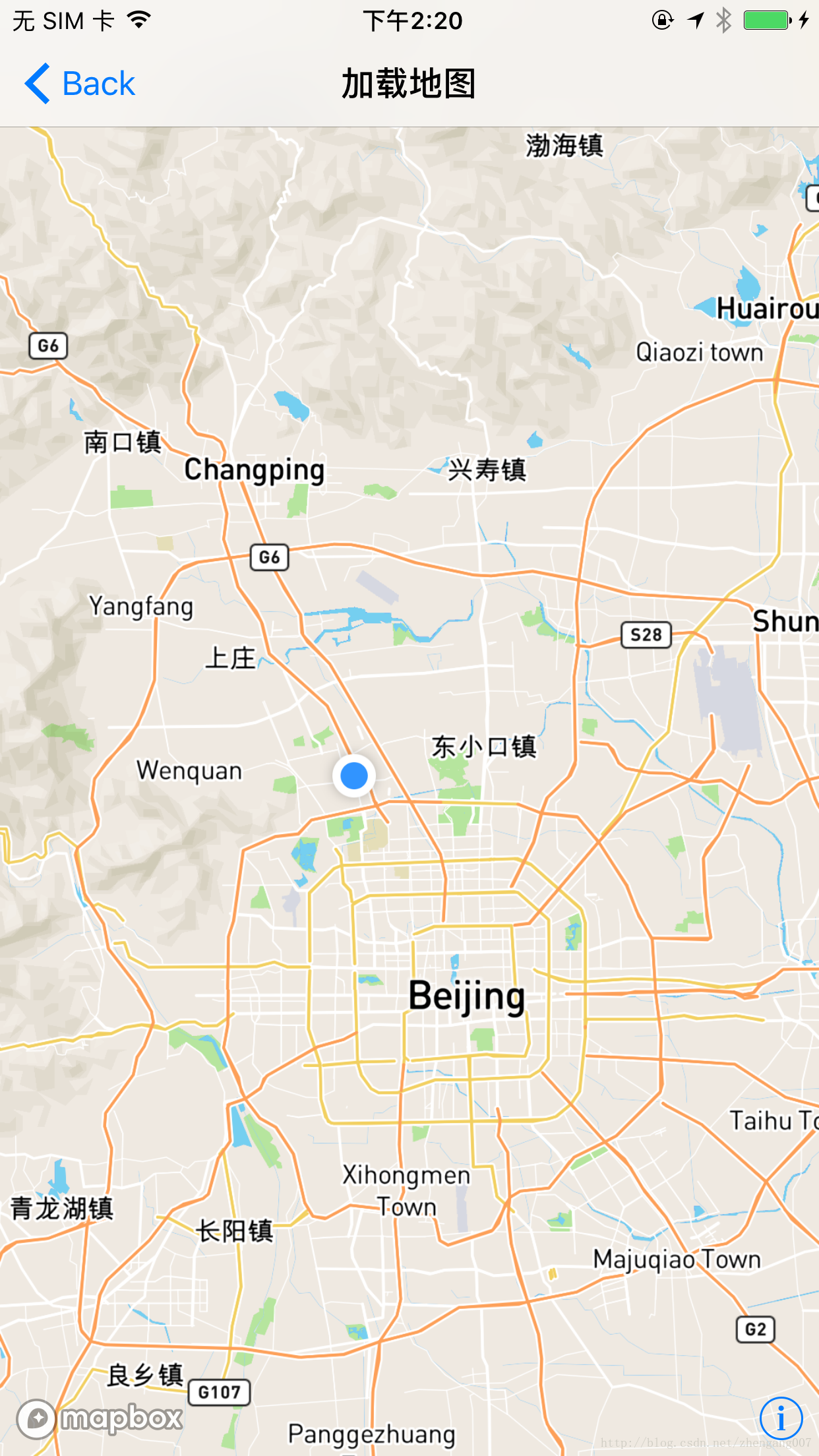
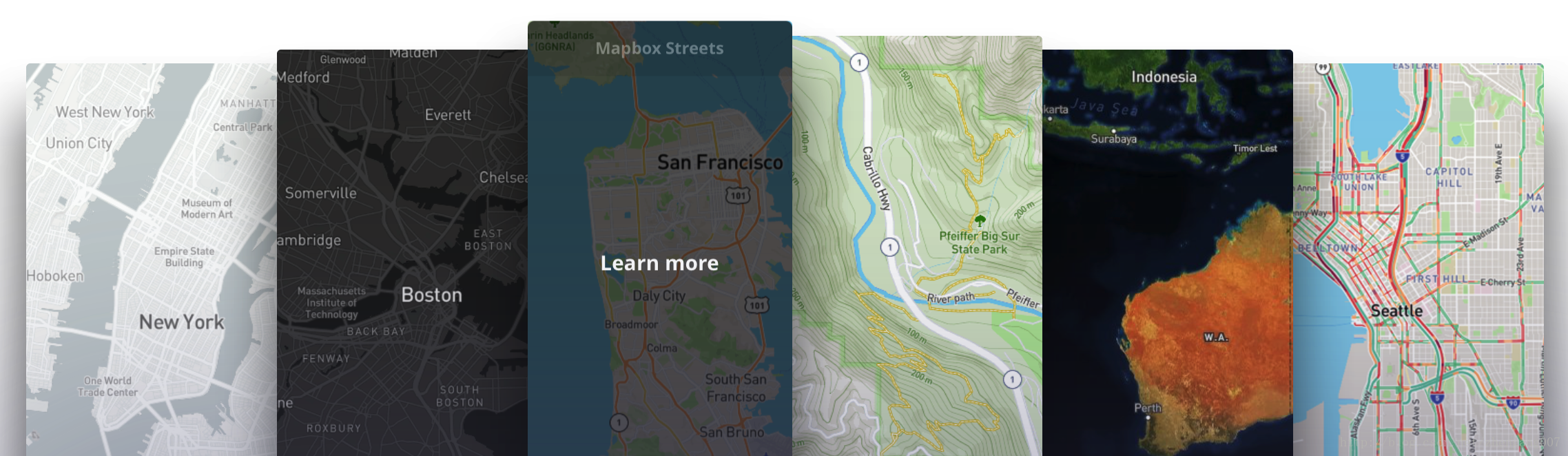
【2】加载各种样式的地图:
[self.mapView setStyleURL:[NSURL URLWithString:@"mapbox://styles/mapbox/streets-v10"]];
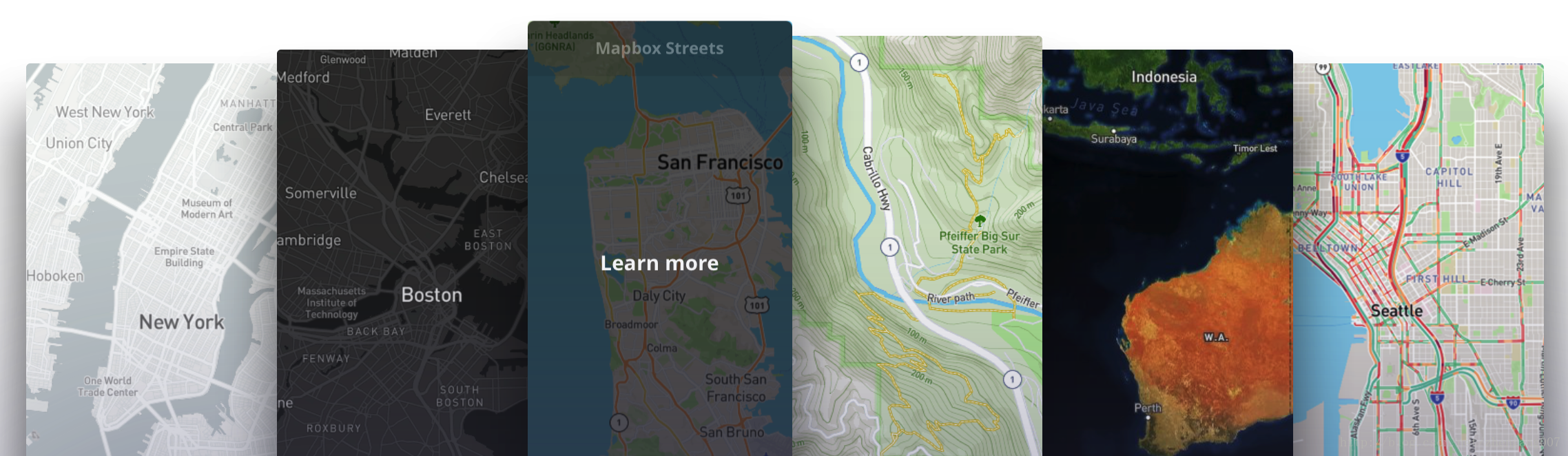
这是所有地图已经做好的模板样式参数:
- mapbox://styles/mapbox/streets-v10
- mapbox://styles/mapbox/outdoors-v10
- mapbox://styles/mapbox/light-v9
- mapbox://styles/mapbox/dark-v9
- mapbox://styles/mapbox/satellite-v9
- mapbox://styles/mapbox/satellite-streets-v10
- mapbox://styles/mapbox/navigation-preview-day-v2
- mapbox://styles/mapbox/navigation-preview-night-v2
- mapbox://styles/mapbox/navigation-guidance-day-v2
- mapbox://styles/mapbox/navigation-guidance-night-v2
使用不同的参数呈现出来的地图风格变不一样。
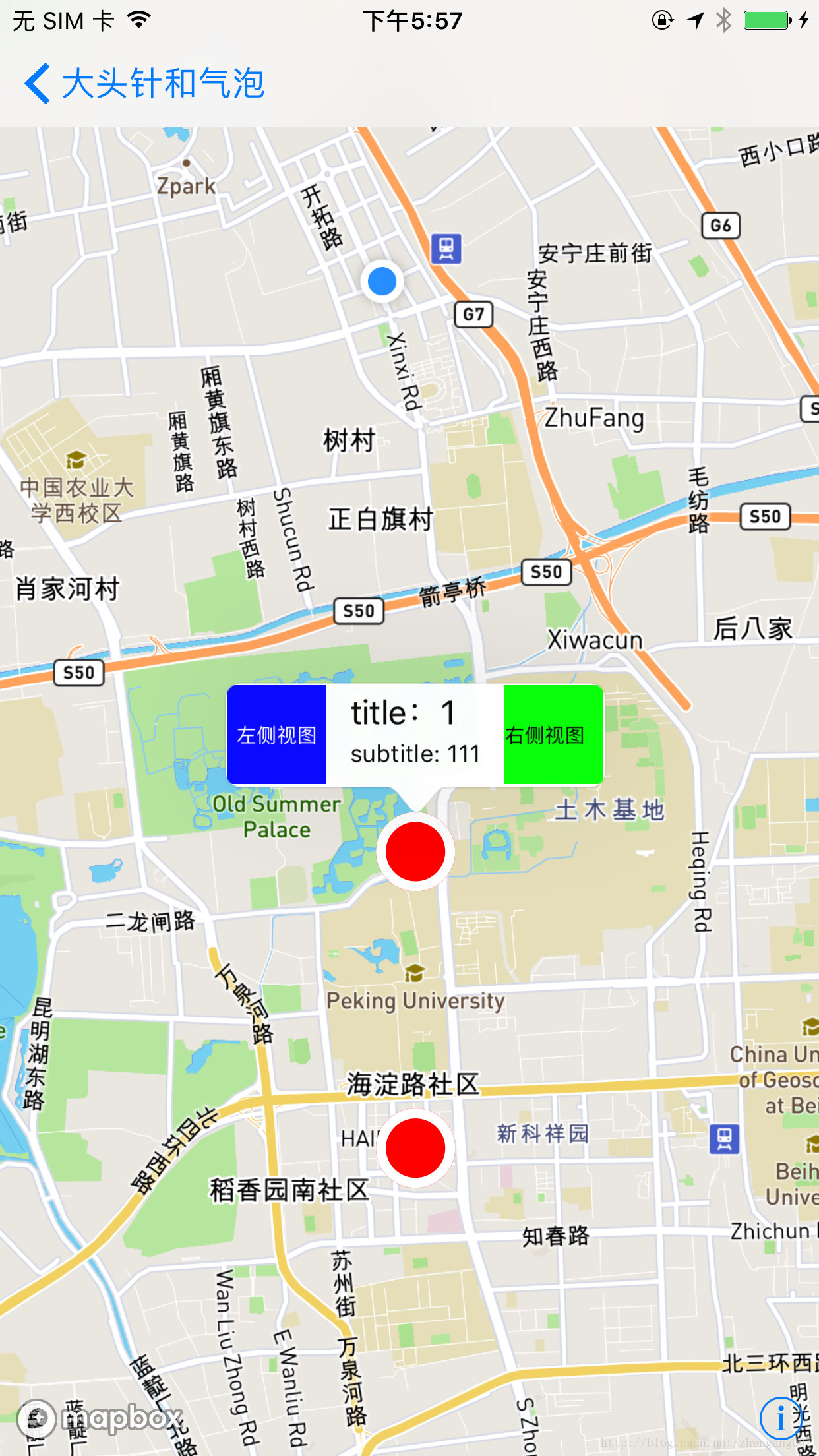
【3】加载大头针和默认气泡:
- //
- // DefaultAnnotationCalloutViewController.m
- // MapboxExample
- //
- // Created by iron on 2018/1/30.
- // Copyright © 2018年 wangzhengang. All rights reserved.
- //
- #import "DefaultAnnotationCalloutViewController.h"
- #import <Mapbox/Mapbox.h>
- @interface DefaultAnnotationCalloutViewController ()<MGLMapViewDelegate>
- @property (nonatomic, strong) MGLMapView *mapView;
- @property (nonatomic, copy) NSArray *annotationsArray;
- @end
- @implementation DefaultAnnotationCalloutViewController
- - (void)dealloc {
- [_mapView removeFromSuperview];
- _mapView.delegate = nil;
- _mapView = nil;
- }
- - (void)viewDidLoad {
- [super viewDidLoad];
- [self.view addSubview:self.mapView];
- }
- - (void)didReceiveMemoryWarning {
- [super didReceiveMemoryWarning];
- // Dispose of any resources that can be recreated.
- }
- - (MGLMapView *)mapView {
- if (_mapView == nil) {
- //设置地图的 frame 和 地图个性化样式
- _mapView = [[MGLMapView alloc] initWithFrame:self.view.bounds styleURL:[NSURL URLWithString:@"mapbox://styles/mapbox/streets-v10"]];
- _mapView.autoresizingMask = UIViewAutoresizingFlexibleWidth | UIViewAutoresizingFlexibleHeight;
- //设置地图默认显示的地点和缩放等级
- [_mapView setCenterCoordinate:CLLocationCoordinate2DMake(39.980528, 116.306745) zoomLevel:15 animated:NO];
- //显示用户位置
- _mapView.showsUserLocation = YES;
- //定位模式
- _mapView.userTrackingMode = MGLUserTrackingModeNone;
- //是否倾斜地图
- _mapView.pitchEnabled = YES;
- //是否旋转地图
- _mapView.rotateEnabled = NO;
- //代理
- _mapView.delegate = self;
- }
- return _mapView;
- }
- - (NSArray *)annotationsArray {
- if (_annotationsArray == nil) {
- CLLocationCoordinate2D coords[2];
- coords[0] = CLLocationCoordinate2DMake(39.980528, 116.306745);
- coords[1] = CLLocationCoordinate2DMake(40.000, 116.306745);
- NSMutableArray *pointsArray = [NSMutableArray array];
- for (NSInteger i = 0; i < 2; ++i) {
- MGLPointAnnotation *pointAnnotation = [[MGLPointAnnotation alloc] init];
- pointAnnotation.coordinate = coords[i];
- pointAnnotation.title = [NSString stringWithFormat:@"title:%ld", (long)i];
- pointAnnotation.subtitle = [NSString stringWithFormat:@"subtitle: %ld%ld%ld", (long)i,(long)i,(long)i];
- [pointsArray addObject:pointAnnotation];
- }
- _annotationsArray = [pointsArray copy];
- }
- return _annotationsArray;
- }
- #pragma mark MGLMapViewDelegate
- - (void)mapViewDidFinishLoadingMap:(MGLMapView *)mapView {
- ///地图加载完成时加载大头针
- [mapView addAnnotations:self.annotationsArray];
- }
- - (MGLAnnotationView *)mapView:(MGLMapView *)mapView viewForAnnotation:(id<MGLAnnotation>)annotation {
- if (![annotation isKindOfClass:[MGLPointAnnotation class]]) {
- return nil;
- }
- MGLAnnotationView *annotationView = [mapView dequeueReusableAnnotationViewWithIdentifier:@"MGLAnnotationView"];
- if (annotationView == nil) {
- annotationView = [[MGLAnnotationView alloc] initWithAnnotation:annotation reuseIdentifier:@"MGLAnnotationView"];
- [annotationView setFrame:CGRectMake(0, 0, 40, 40)];
- [annotationView setBackgroundColor:[UIColor redColor]];
- annotationView.layer.cornerRadius = 20.f;
- annotationView.layer.masksToBounds= YES;
- annotationView.layer.borderColor = [UIColor whiteColor].CGColor;
- annotationView.layer.borderWidth = 5.f;
- }
- return annotationView;
- }
- ///是否显示气泡
- -(BOOL)mapView:(MGLMapView *)mapView annotationCanShowCallout:(id<MGLAnnotation>)annotation {
- return YES;
- }
- ///完成加载大头针
- - (void)mapView:(MGLMapView *)mapView didAddAnnotationViews:(NSArray<MGLAnnotationView *> *)annotationViews {
- [mapView showAnnotations:self.annotationsArray edgePadding:UIEdgeInsetsMake(100, 50, 100, 50) animated:YES];
- }
- ///气泡左侧视图
- - (UIView *)mapView:(MGLMapView *)mapView leftCalloutAccessoryViewForAnnotation:(id<MGLAnnotation>)annotation {
- UIView *view = [[UIView alloc] initWithFrame:CGRectMake(0, 0, 50, 50)];
- view.backgroundColor= [UIColor blueColor];
- UILabel *lab = [[UILabel alloc] initWithFrame:view.bounds];
- lab.text = @"左侧视图";
- lab.textColor = [UIColor whiteColor];
- lab.font = [UIFont systemFontOfSize:10];
- lab.textAlignment = NSTextAlignmentCenter;
- [view addSubview:lab];
- return view;
- }
- ///气泡右侧视图,
- - (UIView *)mapView:(MGLMapView *)mapView rightCalloutAccessoryViewForAnnotation:(id<MGLAnnotation>)annotation {
- UIView *view = [[UIView alloc] initWithFrame:CGRectMake(0, 0, 50, 50)];
- view.backgroundColor= [UIColor greenColor];
- UILabel *lab = [[UILabel alloc] initWithFrame:view.bounds];
- lab.text = @"右侧视图";
- lab.textColor = [UIColor blackColor];
- lab.font = [UIFont systemFontOfSize:10];
- [view addSubview:lab];
- return view;
- }
- @end
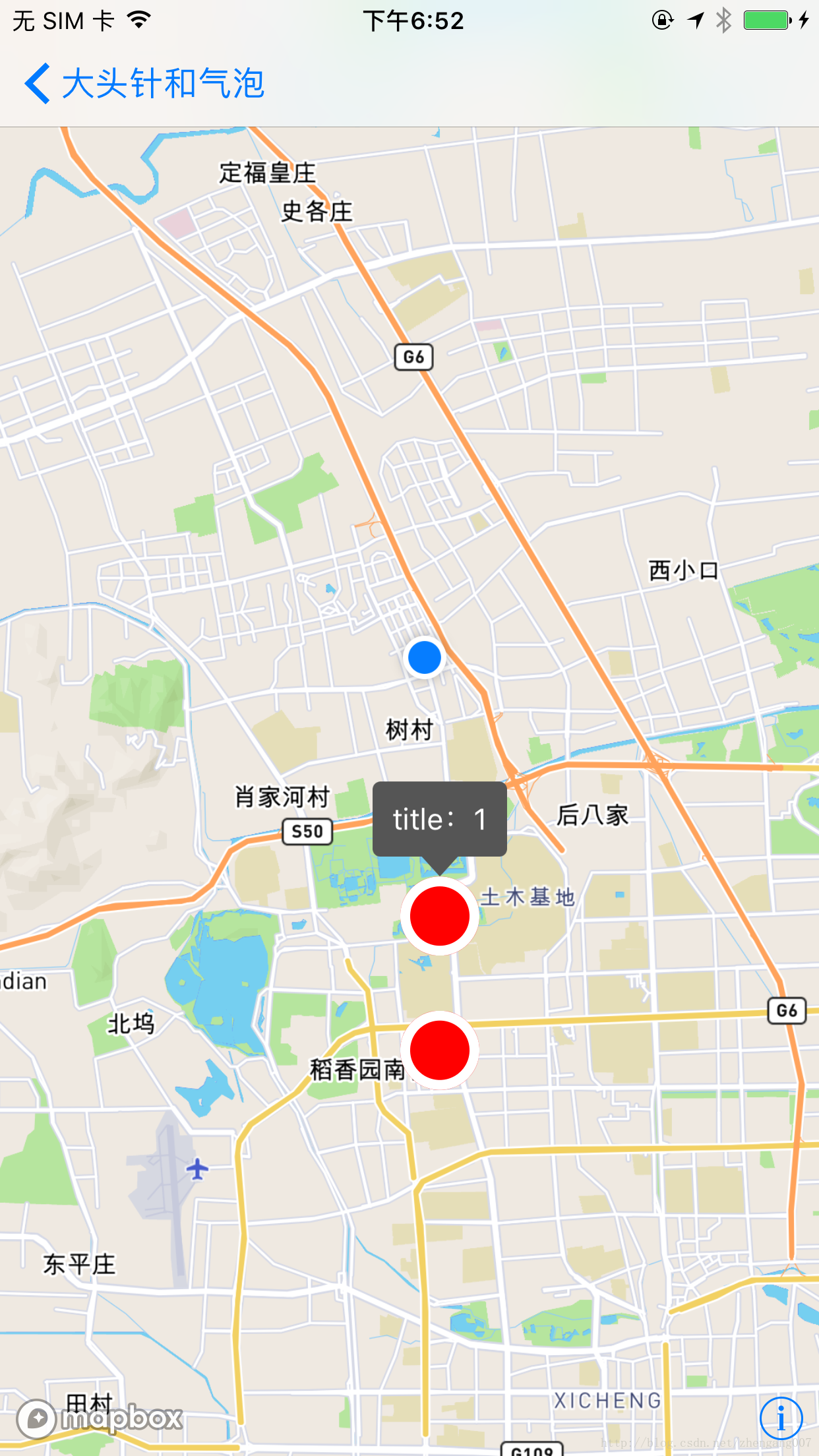
【4】加载图片大头针和自定义气泡:
- 创建一个继承 UIview 的类 CustomeMapViewCalloutView 并遵守 < MGLCalloutView > 这个协议;
- 在 CustomeMapViewCalloutView 中实现各种需求;
- ;
- //
- // CustomeMapViewCalloutView.h
- // Etoury
- //
- // Created by iron on 2017/5/21.
- // Copyright © 2017年 iron. All rights reserved.
- //
- #import <UIKit/UIKit.h>
- #import <Mapbox/Mapbox.h>
- @interface CustomeMapViewCalloutView : UIView<MGLCalloutView>
- @end
- //
- // CustomeMapViewCalloutView.m
- // Etoury
- //
- // Created by iron on 2017/5/21.
- // Copyright © 2017年 iron. All rights reserved.
- //
- #import "CustomeMapViewCalloutView.h"
- // Set defaults for custom tip drawing
- static CGFloat const tipHeight = 10.0;
- static CGFloat const tipWidth = 20.0;
- @interface CustomeMapViewCalloutView ()
- @property (strong, nonatomic) UIButton *mainBody;
- @end
- @implementation CustomeMapViewCalloutView {
- id <MGLAnnotation> _representedObject;
- __unused UIView *_leftAccessoryView;/* unused */
- __unused UIView *_rightAccessoryView;/* unused */
- __weak id <MGLCalloutViewDelegate> _delegate;
- BOOL _dismissesAutomatically;
- BOOL _anchoredToAnnotation;
- }
- @synthesize representedObject = _representedObject;
- @synthesize leftAccessoryView = _leftAccessoryView;/* unused */
- @synthesize rightAccessoryView = _rightAccessoryView;/* unused */
- @synthesize delegate = _delegate;
- @synthesize anchoredToAnnotation = _anchoredToAnnotation;
- @synthesize dismissesAutomatically = _dismissesAutomatically;
- - (instancetype)initWithFrame:(CGRect)frame
- {
- self = [super initWithFrame:frame];
- if (self)
- {
- self.backgroundColor = [UIColor clearColor];
- // Create and add a subview to hold the callout’s text
- UIButton *mainBody = [UIButton buttonWithType:UIButtonTypeSystem];
- mainBody.backgroundColor = [self backgroundColorForCallout];
- mainBody.tintColor = [UIColor whiteColor];
- mainBody.contentEdgeInsets = UIEdgeInsetsMake(10.0, 10.0, 10.0, 10.0);
- mainBody.layer.cornerRadius = 4.0;
- self.mainBody = mainBody;
- [self addSubview:self.mainBody];
- }
- return self;
- }
- #pragma mark - MGLCalloutView API
- - (void)presentCalloutFromRect:(CGRect)rect inView:(UIView *)view constrainedToView:(UIView *)constrainedView animated:(BOOL)animated
- {
- // Do not show a callout if there is no title set for the annotation
- if (![self.representedObject respondsToSelector:@selector(title)])
- {
- return;
- }
- [view addSubview:self];
- // Prepare title label
- [self.mainBody setTitle:self.representedObject.title forState:UIControlStateNormal];
- [self.mainBody sizeToFit];
- if ([self isCalloutTappable])
- {
- // Handle taps and eventually try to send them to the delegate (usually the map view)
- [self.mainBody addTarget:self action:@selector(calloutTapped) forControlEvents:UIControlEventTouchUpInside];
- }
- else
- {
- // Disable tapping and highlighting
- self.mainBody.userInteractionEnabled = NO;
- }
- // Prepare our frame, adding extra space at the bottom for the tip
- CGFloat frameWidth = self.mainBody.bounds.size.width;
- CGFloat frameHeight = self.mainBody.bounds.size.height + tipHeight;
- CGFloat frameOriginX = rect.origin.x + (rect.size.width/2.0) - (frameWidth/2.0);
- CGFloat frameOriginY = rect.origin.y - frameHeight;
- self.frame = CGRectMake(frameOriginX, frameOriginY,
- frameWidth, frameHeight);
- if (animated)
- {
- self.alpha = 0.0;
- [UIView animateWithDuration:0.2 animations:^{
- self.alpha = 1.0;
- }];
- }
- }
- - (void)dismissCalloutAnimated:(BOOL)animated
- {
- if (self.superview)
- {
- if (animated)
- {
- [UIView animateWithDuration:0.2 animations:^{
- self.alpha = 0.0;
- } completion:^(BOOL finished) {
- [self removeFromSuperview];
- }];
- }
- else
- {
- [self removeFromSuperview];
- }
- }
- }
- // Allow the callout to remain open during panning.
- - (BOOL)dismissesAutomatically {
- return NO;
- }
- - (BOOL)isAnchoredToAnnotation {
- return YES;
- }
- // https://github.com/mapbox/mapbox-gl-native/issues/9228
- - (void)setCenter:(CGPoint)center {
- center.y = center.y - CGRectGetMidY(self.bounds);
- [super setCenter:center];
- }
- #pragma mark - Callout interaction handlers
- - (BOOL)isCalloutTappable
- {
- if ([self.delegate respondsToSelector:@selector(calloutViewShouldHighlight:)]) {
- return [self.delegate performSelector:@selector(calloutViewShouldHighlight:) withObject:self];
- }
- return NO;
- }
- - (void)calloutTapped
- {
- if ([self isCalloutTappable] && [self.delegate respondsToSelector:@selector(calloutViewTapped:)])
- {
- [self.delegate performSelector:@selector(calloutViewTapped:) withObject:self];
- }
- }
- #pragma mark - Custom view styling
- - (UIColor *)backgroundColorForCallout
- {
- return [UIColor darkGrayColor];
- }
- - (void)drawRect:(CGRect)rect
- {
- // Draw the pointed tip at the bottom
- UIColor *fillColor = [self backgroundColorForCallout];
- CGFloat tipLeft = rect.origin.x + (rect.size.width / 2.0) - (tipWidth / 2.0);
- CGPoint tipBottom = CGPointMake(rect.origin.x + (rect.size.width / 2.0), rect.origin.y + rect.size.height);
- CGFloat heightWithoutTip = rect.size.height - tipHeight - 1;
- CGContextRef currentContext = UIGraphicsGetCurrentContext();
- CGMutablePathRef tipPath = CGPathCreateMutable();
- CGPathMoveToPoint(tipPath, NULL, tipLeft, heightWithoutTip);
- CGPathAddLineToPoint(tipPath, NULL, tipBottom.x, tipBottom.y);
- CGPathAddLineToPoint(tipPath, NULL, tipLeft + tipWidth, heightWithoutTip);
- CGPathCloseSubpath(tipPath);
- [fillColor setFill];
- CGContextAddPath(currentContext, tipPath);
- CGContextFillPath(currentContext);
- CGPathRelease(tipPath);
- }
- @end
在view controller中使用自定义的callout view:
- //
- // CustomeAnnotationCalloutViewController.m
- // MapboxExample
- //
- // Created by iron on 2018/1/30.
- // Copyright © 2018年 wangzhengang. All rights reserved.
- //
- #import "CustomeAnnotationCalloutViewController.h"
- #import <Mapbox/Mapbox.h>
- #import "CustomeMapViewCalloutView.h"
- @interface CustomeAnnotationCalloutViewController ()<MGLMapViewDelegate>
- @property (nonatomic, strong) MGLMapView *mapView;
- @property (nonatomic, copy) NSArray *annotationsArray;
- @end
- @implementation CustomeAnnotationCalloutViewController
- - (void)dealloc {
- [_mapView removeFromSuperview];
- _mapView.delegate = nil;
- _mapView = nil;
- }
- - (void)viewDidLoad {
- [super viewDidLoad];
- [self.view addSubview:self.mapView];
- }
- - (MGLMapView *)mapView {
- if (_mapView == nil) {
- //设置地图的 frame 和 地图个性化样式
- _mapView = [[MGLMapView alloc] initWithFrame:self.view.bounds styleURL:[NSURL URLWithString:@"mapbox://styles/mapbox/streets-v10"]];
- _mapView.autoresizingMask = UIViewAutoresizingFlexibleWidth | UIViewAutoresizingFlexibleHeight;
- //设置地图默认显示的地点和缩放等级
- [_mapView setCenterCoordinate:CLLocationCoordinate2DMake(39.980528, 116.306745) zoomLevel:15 animated:NO];
- //显示用户位置
- _mapView.showsUserLocation = YES;
- //定位模式
- _mapView.userTrackingMode = MGLUserTrackingModeNone;
- //是否倾斜地图
- _mapView.pitchEnabled = YES;
- //是否旋转地图
- _mapView.rotateEnabled = NO;
- //代理
- _mapView.delegate = self;
- }
- return _mapView;
- }
- - (NSArray *)annotationsArray {
- if (_annotationsArray == nil) {
- CLLocationCoordinate2D coords[2];
- coords[0] = CLLocationCoordinate2DMake(39.980528, 116.306745);
- coords[1] = CLLocationCoordinate2DMake(40.000, 116.306745);
- NSMutableArray *pointsArray = [NSMutableArray array];
- for (NSInteger i = 0; i < 2; ++i) {
- MGLPointAnnotation *pointAnnotation = [[MGLPointAnnotation alloc] init];
- pointAnnotation.coordinate = coords[i];
- pointAnnotation.title = [NSString stringWithFormat:@"title:%ld", (long)i];
- pointAnnotation.subtitle = [NSString stringWithFormat:@"subtitle: %ld%ld%ld", (long)i,(long)i,(long)i];
- [pointsArray addObject:pointAnnotation];
- }
- _annotationsArray = [pointsArray copy];
- }
- return _annotationsArray;
- }
- #pragma mark MGLMapViewDelegate
- - (void)mapViewDidFinishLoadingMap:(MGLMapView *)mapView {
- ///地图加载完成时加载大头针
- [mapView addAnnotations:self.annotationsArray];
- }
- - (MGLAnnotationView *)mapView:(MGLMapView *)mapView viewForAnnotation:(id<MGLAnnotation>)annotation {
- if (![annotation isKindOfClass:[MGLPointAnnotation class]]) {
- return nil;
- }
- MGLAnnotationView *annotationView = [mapView dequeueReusableAnnotationViewWithIdentifier:@"MGLAnnotationView"];
- if (annotationView == nil) {
- annotationView = [[MGLAnnotationView alloc] initWithAnnotation:annotation reuseIdentifier:@"MGLAnnotationView"];
- [annotationView setFrame:CGRectMake(0, 0, 40, 40)];
- [annotationView setBackgroundColor:[UIColor redColor]];
- annotationView.layer.cornerRadius = 20.f;
- annotationView.layer.masksToBounds= YES;
- annotationView.layer.borderColor = [UIColor whiteColor].CGColor;
- annotationView.layer.borderWidth = 5.f;
- }
- return annotationView;
- }
- ///是否显示气泡
- -(BOOL)mapView:(MGLMapView *)mapView annotationCanShowCallout:(id<MGLAnnotation>)annotation {
- return YES;
- }
- ///完成加载大头针
- - (void)mapView:(MGLMapView *)mapView didAddAnnotationViews:(NSArray<MGLAnnotationView *> *)annotationViews {
- [mapView showAnnotations:self.annotationsArray edgePadding:UIEdgeInsetsMake(100, 50, 100, 50) animated:YES];
- }
- ///加载定义callout view
- - (id<MGLCalloutView>)mapView:(MGLMapView *)mapView calloutViewForAnnotation:(id<MGLAnnotation>)annotation {
- CustomeMapViewCalloutView *calloutView = [[CustomeMapViewCalloutView alloc] init];
- calloutView.representedObject = annotation;
- return calloutView;
- }
- ///气泡点击事件
- - (void)mapView:(MGLMapView *)mapView tapOnCalloutForAnnotation:(id<MGLAnnotation>)annotation {
- NSLog(@"点击了气泡: %@", annotation);
- [mapView deselectAnnotation:annotation animated:YES];
- [self showAlertControllerWithViewContorller:self title:@"点击了气泡" message:nil leftButtonTitle:nil rightButtonTitle:@"确定"];
- }
- #pragma mark - 警告框
- - (void)showAlertControllerWithViewContorller:(UIViewController *)viewController title:(NSString *)title message:(NSString *)message leftButtonTitle:(NSString *)leftBtnTitle rightButtonTitle:(NSString *)rightBtnTitle {
- UIAlertController *alert = [UIAlertController alertControllerWithTitle:title message:message preferredStyle:UIAlertControllerStyleAlert];
- if (leftBtnTitle) {
- [alert addAction:[UIAlertAction actionWithTitle:leftBtnTitle style:UIAlertActionStyleDefault handler:^(UIAlertAction * _Nonnull action) {
- }]];
- }
- if (rightBtnTitle) {
- [alert addAction:[UIAlertAction actionWithTitle:rightBtnTitle style:UIAlertActionStyleDefault handler:^(UIAlertAction * _Nonnull action) {
- }]];
- }
- [viewController presentViewController:alert animated:YES completion:nil];
- }
- @end
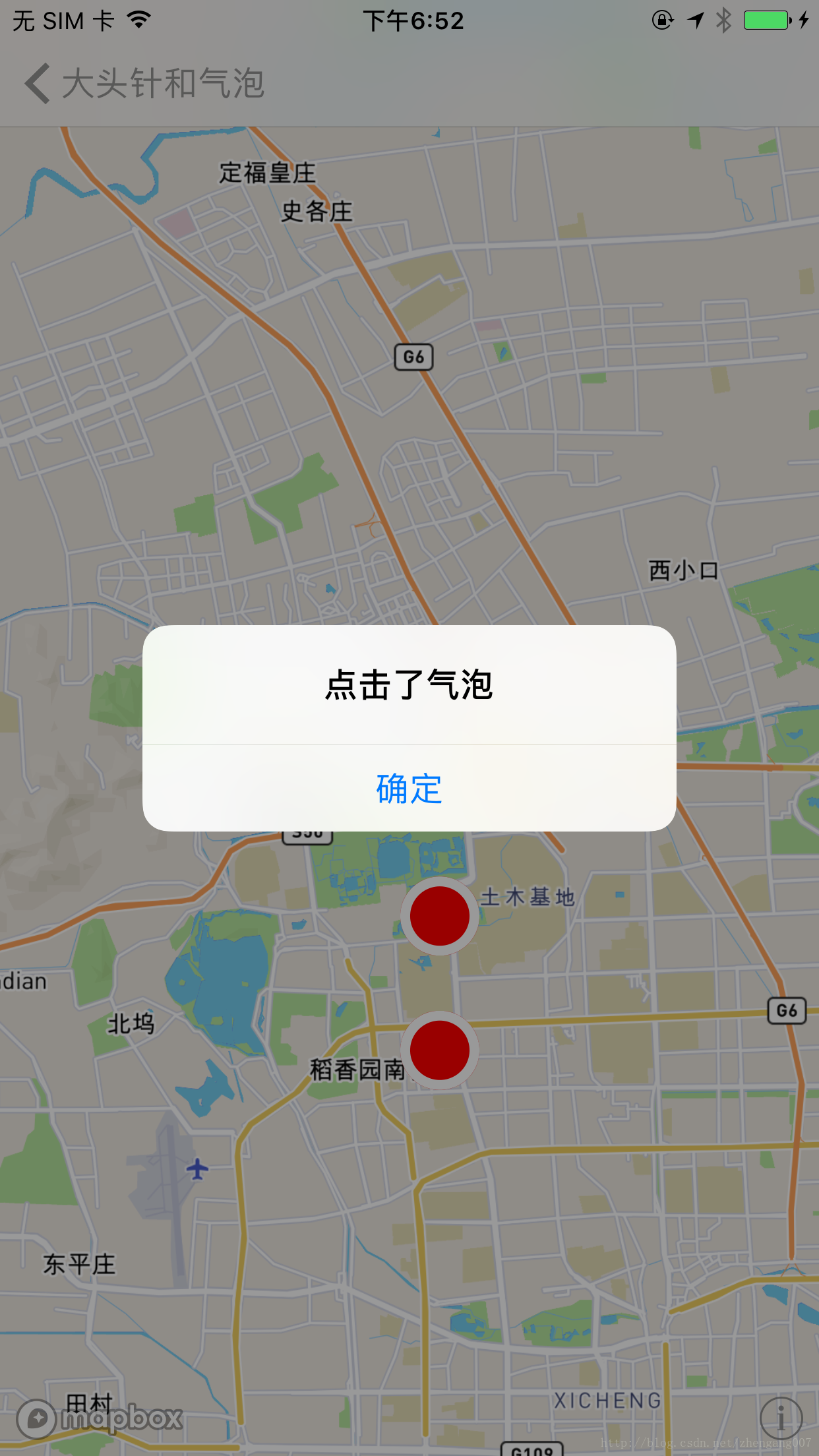
效果如下:
【5】绘制线段和多边形:
- MGLPolygon 有 strokeColor 这个参数,却没有设置 描边线宽度和样式的参数;
- MGLPolyline 没有 strokeColor 和 fillColor 之分,而且画虚线的代码写起来很麻烦;
总体来讲,MGLPolygon 和 MGLPolyline 这两个类没有高德地图和百度地图那样使用起来方便,另外,MGLPolyline 这个类中的 MGLShapeSource 、MGLStyleLayer 虽然使用起来很麻烦,但是相对来说倒是保持了灵活性。
为了提高 MGLPolygon 和 MGLPolyline 的使用便利性,我对 MGLPolygon 、MGLPolyline 的基类 MGLShape 扩展了几个属性:
- @property (nonatomic, strong) UIColor *fillColor;//填充颜色
- @property (nonatomic, assign) CGFloat fillOpacity;//填充透明度
- @property (nonatomic, strong) UIColor *strokeColor;//描边颜色
- @property (nonatomic, assign) BOOL isDash;//YES = 虚线/NO = 实线
- @property (nonatomic, assign) NSInteger strokeWeight;//描边宽度
MGLShape+PolygonParamer.h
- //
- // MGLShape+PolygonParamer.h
- // Etoury
- //
- // Created by dev on 2018/1/3.
- // Copyright © 2018年 iron. All rights reserved.
- //
- #import <Mapbox/Mapbox.h>
- @interface MGLShape (PolygonParamer)
- @property (nonatomic, strong) UIColor *fillColor;//填充颜色
- @property (nonatomic, assign) CGFloat fillOpacity;//填充透明度
- @property (nonatomic, strong) UIColor *strokeColor;//描边颜色
- @property (nonatomic, assign) BOOL isDash;//YES = 虚线/NO = 实线
- @property (nonatomic, assign) NSInteger strokeWeight;//描边宽度
- @end
MGLShape+PolygonParamer.h
- //
- // MGLShape+PolygonParamer.m
- // Etoury
- //
- // Created by dev on 2018/1/3.
- // Copyright © 2018年 iron. All rights reserved.
- //
- #import "MGLShape+PolygonParamer.h"
- #import <objc/runtime.h>
- static UIColor *_fillColor;//填充颜色
- static NSInteger _fillOpacity;//填充透明度
- static UIColor *_strokeColor;//描边颜色
- static BOOL _isDash;//YES = 虚线/NO = 实线
- static NSInteger _strokeWeight;//描边宽度
- @implementation MGLShape (PolygonParamer)
- - (void)setFillColor:(UIColor *)fillColor {
- objc_setAssociatedObject(self, &_fillColor, fillColor, OBJC_ASSOCIATION_COPY);
- }
- - (UIColor *)fillColor {
- return objc_getAssociatedObject(self, &_fillColor);
- }
- - (void)setFillOpacity:(CGFloat)fillOpacity {
- NSNumber *fillOpacityNumber = @(fillOpacity);
- objc_setAssociatedObject(self, &_fillOpacity, fillOpacityNumber, OBJC_ASSOCIATION_COPY);
- }
- - (CGFloat)fillOpacity {
- NSNumber *fillOpacityNumber = objc_getAssociatedObject(self, &_fillOpacity);
- return [fillOpacityNumber floatValue];
- }
- - (void)setStrokeColor:(UIColor *)strokeColor {
- objc_setAssociatedObject(self, &_strokeColor, strokeColor, OBJC_ASSOCIATION_COPY);
- }
- - (UIColor *)strokeColor {
- return objc_getAssociatedObject(self, &_strokeColor);
- }
- - (void)setIsDash:(BOOL)isDash {
- NSNumber *isDashNumber = [NSNumber numberWithBool:isDash];
- objc_setAssociatedObject(self, &_isDash, isDashNumber, OBJC_ASSOCIATION_COPY);
- }
- - (BOOL)isDash {
- NSNumber *isDashNumber = objc_getAssociatedObject(self, &_isDash);
- return [isDashNumber boolValue];
- }
- - (void)setStrokeWeight:(NSInteger)strokeWeight {
- NSNumber *strokeWeightNumber = @(strokeWeight);
- objc_setAssociatedObject(self, &_strokeWeight, strokeWeightNumber, OBJC_ASSOCIATION_COPY);
- }
- - (NSInteger)strokeWeight {
- NSNumber *strokeWeightNumber = objc_getAssociatedObject(self, &_strokeWeight);
- return [strokeWeightNumber integerValue];
- }
- @end
把 MGLShape+PolygonParamer引入到 view controller 中:
- //
- // LinePolygonMapboxViewController.m
- // MapboxExample
- //
- // Created by iron on 2018/1/30.
- // Copyright © 2018年 wangzhengang. All rights reserved.
- //
- #import "LinePolygonMapboxViewController.h"
- #import <Mapbox/Mapbox.h>
- #import "MGLShape+PolygonParamer.h"
- @interface LinePolygonMapboxViewController ()<MGLMapViewDelegate>
- @property (nonatomic, strong) MGLMapView *mapView;
- @property (nonatomic, strong) MGLPolyline *blueLine;//蓝色线段
- @property (nonatomic, strong) MGLPolyline *strokeLine;//多边形边线
- @property (nonatomic, strong) MGLPolygon *polygon;//多边形
- @end
- @implementation LinePolygonMapboxViewController
- - (void)dealloc {
- [_mapView removeFromSuperview];
- _mapView.delegate = nil;
- _mapView = nil;
- }
- - (void)viewDidLoad {
- [super viewDidLoad];
- self.title = @"线段和多边形";
- [self.view addSubview:self.mapView];
- }
- - (void)didReceiveMemoryWarning {
- [super didReceiveMemoryWarning];
- // Dispose of any resources that can be recreated.
- }
- - (MGLMapView *)mapView {
- if (_mapView == nil) {
- //设置地图的 frame 和 地图个性化样式
- _mapView = [[MGLMapView alloc] initWithFrame:self.view.bounds styleURL:[NSURL URLWithString:@"mapbox://styles/mapbox/streets-v10"]];
- _mapView.autoresizingMask = UIViewAutoresizingFlexibleWidth | UIViewAutoresizingFlexibleHeight;
- //设置地图默认显示的地点和缩放等级
- [_mapView setCenterCoordinate:CLLocationCoordinate2DMake(39.980528, 116.306745) zoomLevel:8 animated:YES];
- //显示用户位置
- _mapView.showsUserLocation = YES;
- //定位模式
- _mapView.userTrackingMode = MGLUserTrackingModeNone;
- //是否倾斜地图
- _mapView.pitchEnabled = YES;
- //是否旋转地图
- _mapView.rotateEnabled = NO;
- //代理
- _mapView.delegate = self;
- }
- return _mapView;
- }
- - (MGLPolyline *)blueLine {
- if (_blueLine == nil) {
- CLLocationCoordinate2D coords[3];
- coords[0] = CLLocationCoordinate2DMake(27.000, 95.356745);
- coords[1] = CLLocationCoordinate2DMake(20.000, 105.356745);
- coords[2] = CLLocationCoordinate2DMake(27.000, 115.356745);
- _blueLine = [MGLPolyline polylineWithCoordinates:coords count:3];
- _blueLine.strokeColor = [UIColor blueColor];
- _blueLine.strokeWeight = 3.f;
- _blueLine.fillOpacity = 0.75f;
- _blueLine.isDash = NO;
- }
- return _blueLine;
- }
- - (MGLPolyline *)strokeLine {
- if (_strokeLine == nil) {
- CLLocationCoordinate2D coords[6];
- coords[0] = CLLocationCoordinate2DMake(30.980528, 110.306745);
- coords[2] = CLLocationCoordinate2DMake(30.000, 120.306745);
- coords[1] = CLLocationCoordinate2DMake(40.000, 120.306745);
- coords[3] = CLLocationCoordinate2DMake(40.000, 110.306745);
- coords[4] = CLLocationCoordinate2DMake(35.000, 95.356745);
- coords[5] = CLLocationCoordinate2DMake(30.980528, 110.306745);;
- _strokeLine = [MGLPolyline polylineWithCoordinates:coords count:6];
- _strokeLine.strokeColor = [UIColor blackColor];
- _strokeLine.strokeWeight = 2.f;
- _strokeLine.fillOpacity = 0.75f;
- _strokeLine.isDash = YES;
- }
- return _strokeLine;
- }
- - (MGLPolygon *)polygon {
- if (_polygon == nil) {
- CLLocationCoordinate2D coords[6];
- coords[0] = CLLocationCoordinate2DMake(30.980528, 110.306745);
- coords[2] = CLLocationCoordinate2DMake(30.000, 120.306745);
- coords[1] = CLLocationCoordinate2DMake(40.000, 120.306745);
- coords[3] = CLLocationCoordinate2DMake(40.000, 110.306745);
- coords[4] = CLLocationCoordinate2DMake(35.000, 95.356745);
- _polygon = [MGLPolygon polygonWithCoordinates:coords count:5];
- _polygon.fillColor = [UIColor redColor];
- _polygon.strokeColor = [UIColor blueColor];
- _polygon.strokeWeight= 2.f;
- _polygon.fillOpacity = 0.5f;
- }
- return _polygon;
- }
- #pragma mark MGLMapViewDelegate
- - (void)mapViewDidFinishLoadingMap:(MGLMapView *)mapView {
- ///地图加载完成后绘制 线段 和 多边形
- [mapView addOverlays:@[self.blueLine, self.strokeLine, self.polygon]];
- ///把窗口显示到合适的范围
- [mapView setVisibleCoordinateBounds:self.polygon.overlayBounds edgePadding:UIEdgeInsetsMake(0, 10, 200, 10) animated:YES];
- // [mapView setVisibleCoordinateBounds:self.line.overlayBounds edgePadding:UIEdgeInsetsMake(300, 10, 0, 10) animated:YES];
- }
- - (CGFloat)mapView:(MGLMapView *)mapView alphaForShapeAnnotation:(MGLShape *)annotation {
- ///MGLPolyline 和 MGLPolygon 都执行这个方法
- return annotation.fillOpacity;
- }
- - (UIColor *)mapView:(MGLMapView *)mapView strokeColorForShapeAnnotation:(MGLShape *)annotation {
- ///MGLPolyline 和 MGLPolygon 都执行这个方法
- if ([@"MGLPolyline" isEqualToString:NSStringFromClass([annotation class])]) {
- if (annotation.isDash) {
- MGLShapeSource *shapeSource = [self addSourceWithShape:annotation];
- [self.mapView.style addSource:shapeSource];
- MGLStyleLayer *styleLayer = [self dashedLineWithStyle:shapeSource shape:annotation lineDashPattern:@[@2.f, @1.f] lineCap:MGLLineCapButt lineColor:[UIColor blackColor] lineWidth:@2];
- [self.mapView.style addLayer:styleLayer];
- return [UIColor clearColor];
- } else {
- return annotation.strokeColor;
- }
- } else if ([@"MGLPolygon" isEqualToString:NSStringFromClass([annotation class])]) {
- return annotation.strokeColor;
- }
- return annotation.strokeColor;
- }
- - (UIColor *)mapView:(MGLMapView *)mapView fillColorForPolygonAnnotation:(MGLPolygon *)annotation {
- /// MGLPolygon 执行这个方法, MGLPolyline 不执行这个方法
- return annotation.fillColor;
- }
- - (CGFloat)mapView:(MGLMapView *)mapView lineWidthForPolylineAnnotation:(MGLPolyline *)annotation {
- ///MGLPolyline 执行这个方法, MGLPolygon 不执行
- return annotation.strokeWeight;
- }
- #pragma mark 画虚线
- - (MGLShapeSource *)addSourceWithShape:(MGLShape *)shape {
- return [[MGLShapeSource alloc] initWithIdentifier:@"DashLines" shape:shape options:nil];
- }
- - (MGLStyleLayer *)dashedLineWithStyle:(MGLShapeSource *)shapeSource shape:(MGLShape *)shape lineDashPattern:(NSArray<NSNumber *> *)lineDashPattern lineCap:(MGLLineCap)cap lineColor:(UIColor *)lineColor lineWidth:(NSNumber *)lineWidth {
- MGLLineStyleLayer *lineStyleLayer = [[MGLLineStyleLayer alloc] initWithIdentifier:@"DashLines" source:shapeSource];
- //线段模型
- lineStyleLayer.lineDashPattern = [MGLStyleValue valueWithRawValue:lineDashPattern];
- //线段头部
- lineStyleLayer.lineCap = [MGLStyleValue valueWithRawValue:[NSNumber numberWithInteger:cap]];
- //线段颜色
- lineStyleLayer.lineColor = [MGLStyleValue valueWithRawValue:lineColor];
- //线段宽度
- lineStyleLayer.lineWidth = [MGLStyleValue valueWithRawValue:lineWidth];
- return lineStyleLayer;
- }
- @end
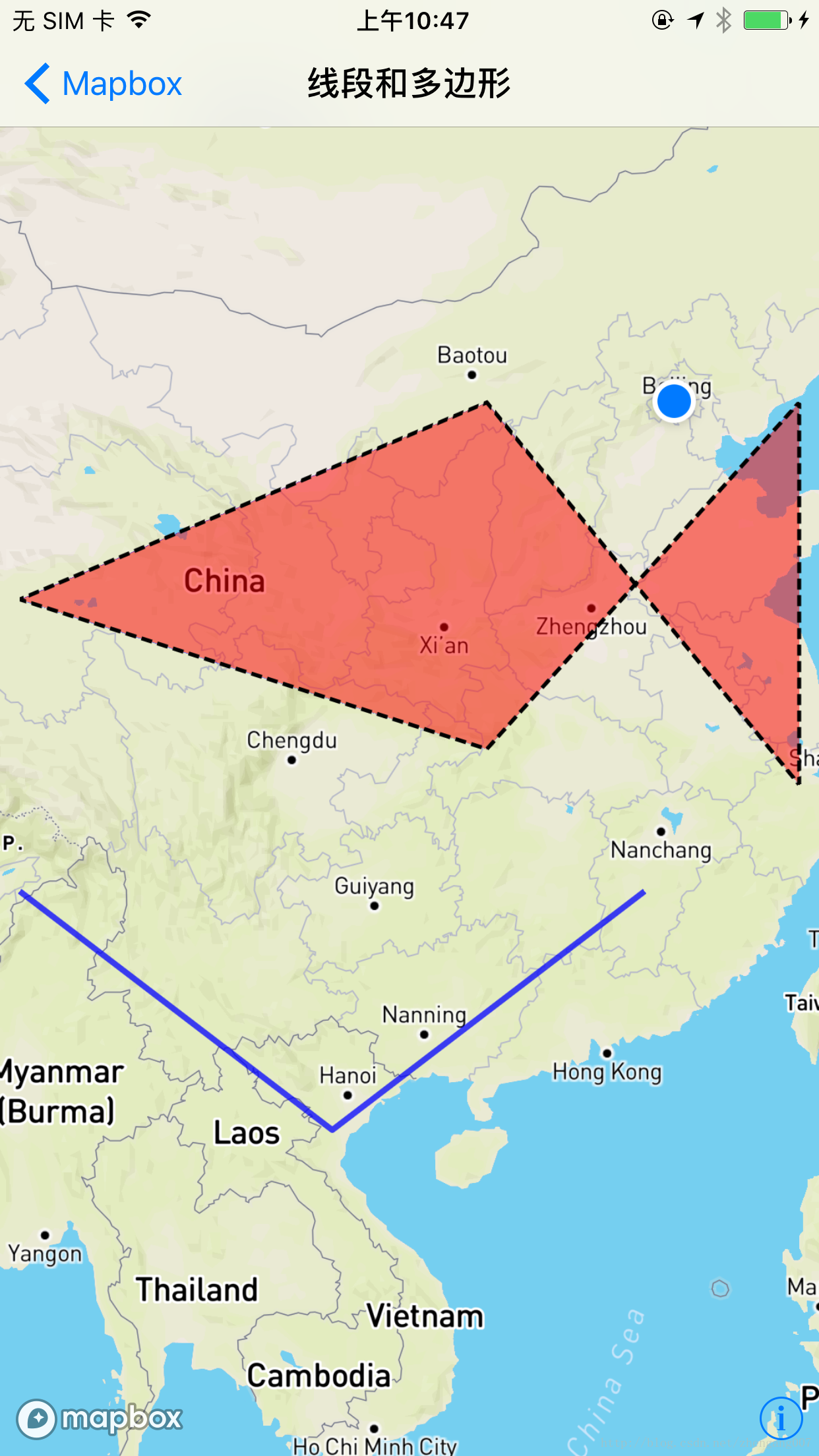
整个代码的是用步骤是这样的:
- 实现 MGLShape (PolygonParamer) 扩展类 MGLShape+PolygonParamer ;
- 把 MGLShape+PolygonParamer.h 引入到 LinePolygonMapboxViewController.h 这个 view controller 中;
- 运行看效果;
三、后续更新:
四、和其他地图的对比:

五、项目代码地址:
Mapbox使用详解的更多相关文章
- Linq之旅:Linq入门详解(Linq to Objects)
示例代码下载:Linq之旅:Linq入门详解(Linq to Objects) 本博文详细介绍 .NET 3.5 中引入的重要功能:Language Integrated Query(LINQ,语言集 ...
- 架构设计:远程调用服务架构设计及zookeeper技术详解(下篇)
一.下篇开头的废话 终于开写下篇了,这也是我写远程调用框架的第三篇文章,前两篇都被博客园作为[编辑推荐]的文章,很兴奋哦,嘿嘿~~~~,本人是个很臭美的人,一定得要截图为证: 今天是2014年的第一天 ...
- EntityFramework Core 1.1 Add、Attach、Update、Remove方法如何高效使用详解
前言 我比较喜欢安静,大概和我喜欢研究和琢磨技术原因相关吧,刚好到了元旦节,这几天可以好好学习下EF Core,同时在项目当中用到EF Core,借此机会给予比较深入的理解,这里我们只讲解和EF 6. ...
- Java 字符串格式化详解
Java 字符串格式化详解 版权声明:本文为博主原创文章,未经博主允许不得转载. 微博:厉圣杰 文中如有纰漏,欢迎大家留言指出. 在 Java 的 String 类中,可以使用 format() 方法 ...
- Android Notification 详解(一)——基本操作
Android Notification 详解(一)--基本操作 版权声明:本文为博主原创文章,未经博主允许不得转载. 微博:厉圣杰 源码:AndroidDemo/Notification 文中如有纰 ...
- Android Notification 详解——基本操作
Android Notification 详解 版权声明:本文为博主原创文章,未经博主允许不得转载. 前几天项目中有用到 Android 通知相关的内容,索性把 Android Notificatio ...
- Git初探--笔记整理和Git命令详解
几个重要的概念 首先先明确几个概念: WorkPlace : 工作区 Index: 暂存区 Repository: 本地仓库/版本库 Remote: 远程仓库 当在Remote(如Github)上面c ...
- Drawable实战解析:Android XML shape 标签使用详解(apk瘦身,减少内存好帮手)
Android XML shape 标签使用详解 一个android开发者肯定懂得使用 xml 定义一个 Drawable,比如定义一个 rect 或者 circle 作为一个 View 的背景. ...
- Node.js npm 详解
一.npm简介 安装npm请阅读我之前的文章Hello Node中npm安装那一部分,不过只介绍了linux平台,如果是其它平台,有前辈写了更加详细的介绍. npm的全称:Node Package M ...
随机推荐
- The JRE_HOME environment variable is not defined correctly
启动Tomcat后startup.bat脚本调用了catalina.bat,然后catalina.bat调用了setclasspath.bat,setclasspath.bat的头部定义了JAVA_H ...
- String的substring()用于截取字符串
substring() 用于返回一个字符串的子字符串,即截取字符串功能. substring()常用的重载方法如下: substring(int beginIndex,int endIndex) 意思 ...
- MySQL InnoDB独立表空间模式的优点和缺点介绍
File-Per-Table的优点: 1.当表删除或者truncate,空间可以被OS回收.2.Truncate table在单个.ibd文件上执行更快.3.可以为每个表指定一个特定存储.优化IO ...
- How to set spring boot active profiles with maven profiles
In the previous post you could read about separate Spring Boot builds for a local development machin ...
- genymotion中app不能安装问题
在安装app时弹出如下图报错. 官网解释:Genymotion模拟器使用的是x86架构,在第三方市场上的应用有部分不采用x86这么一种架构,所以在编译的时候不通过,报“APP not installe ...
- 超实用的JavaScript代码段 Item1 --倒计时效果
现今团购网.电商网.门户网等,常使用时间记录重要的时刻,如时间显示.倒计时差.限时抢购等,本文分析不同倒计时效果的计算思路及方法,掌握日期对象Date,获取时间的方法,计算时差的方法,实现不同的倒时计 ...
- 好代码是管出来的——浅谈.Net Core的代码管理方法与落地(更新中...)
软件开发的目的是在规定成本和时间前提下,开发出具有适用性.有效性.可修改性.可靠性.可理解性.可维护性.可重用性.可移植性.可追踪性.可互操作性和满足用户需求的软件产品. 而对于整个开发过程来说,开发 ...
- BootStrapTable获取选中数据值并传参至父页面
如何实现以下效果呢? 首先,我们先要了解一下BootStrapTable如何获取选中数据的具体值. 如下图所示,怎样选择任意一行,获取其中的数据 一.首先想要选择任意一行,就得必须先有选择框,选择框是 ...
- types.go
} type ChannelStatsList []*ChannelStats func (c ChannelStatsList) Len() int { return len(c) } func ( ...
- Instrumentation(3)
摘要: Instrumentation 类加载过程 Instrumentation与Transformer Instrumentation与Transformer的关系 Instrumenta ...