
通过JavaScript调用SOAP终结点执行实体消息
关注本人微信和易信公众号: 微软动态CRM专家罗勇 ,回复148或者20150813可方便获取本文,同时可以在第一时间得到我发布的最新的博文信息,follow me!
//Add the code you want to test here:

// You must use the SoapLoggerOrganizationService 'slos' proxy rather than the IOrganizationService proxy you would normally use.
就是在这里写你要执行的消息,我这里以分享一个客户记录的读取权限给一个CRM的用户为例,C#版本的代码是这么写的:
var request = new GrantAccessRequest()

{

PrincipalAccess = new PrincipalAccess()

{

AccessMask = AccessRights.ReadAccess,

Principal = new EntityReference("systemuser", new Guid("CC06819E-9AD3-E411-80BC-00155D09F02E"))

},

Target = new EntityReference("account", new Guid("FB9A903E-FC3F-E511-80DF-00155D1D7B07"))

};

slos.Execute(request);
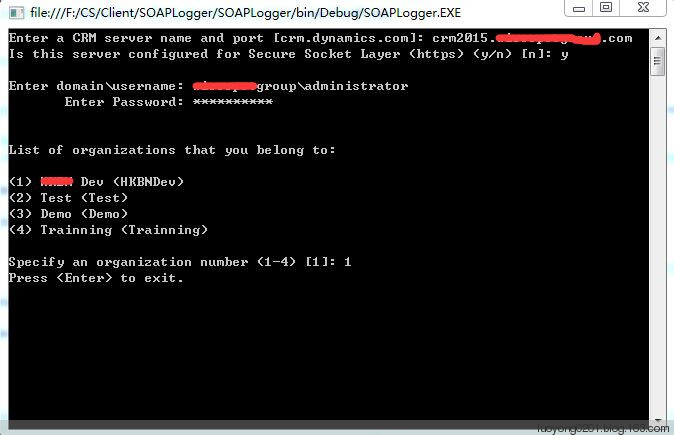
确保编译能通过后调试起来,我这里按 F5 启动起来,弹出如下窗口,我输入如下,我这个CRM环境没有做IFD,但是是使用HTTS绑定的,所以第二个选项我输入了Y,大家根据自己的环境做选择啊。
HTTP REQUEST

--------------------------------------------------

POST https://crm2015.luoyong.com/SuGeGeDev/XRMServices/2011/Organization.svc/web

Content-Type: text/xml; charset=utf-8

SOAPAction: http://schemas.microsoft.com/xrm/2011/Contracts/Services/IOrganizationService/Execute

<s:Envelope xmlns:s="http://schemas.xmlsoap.org/soap/envelope/">

<s:Body>

<Execute xmlns="http://schemas.microsoft.com/xrm/2011/Contracts/Services" xmlns:i="http://www.w3.org/2001/XMLSchema-instance">

<request i:type="b:GrantAccessRequest" xmlns:a="http://schemas.microsoft.com/xrm/2011/Contracts" xmlns:b="http://schemas.microsoft.com/crm/2011/Contracts">

<a:Parameters xmlns:c="http://schemas.datacontract.org/2004/07/System.Collections.Generic">

<a:KeyValuePairOfstringanyType>

<c:key>Target</c:key>

<c:value i:type="a:EntityReference">

<a:Id>fb9a903e-fc3f-e511-80df-00155d1d7b07</a:Id>

<a:LogicalName>account</a:LogicalName>

<a:Name i:nil="true" />

</c:value>

</a:KeyValuePairOfstringanyType>

<a:KeyValuePairOfstringanyType>

<c:key>PrincipalAccess</c:key>

<c:value i:type="b:PrincipalAccess">

<b:AccessMask>ReadAccess</b:AccessMask>

<b:Principal>

<a:Id>cc06819e-9ad3-e411-80bc-00155d09f02e</a:Id>

<a:LogicalName>systemuser</a:LogicalName>

<a:Name i:nil="true" />

</b:Principal>

</c:value>

</a:KeyValuePairOfstringanyType>

</a:Parameters>

<a:RequestId i:nil="true" />

<a:RequestName>GrantAccess</a:RequestName>

</request>

</Execute>

</s:Body>

</s:Envelope>

--------------------------------------------------

HTTP RESPONSE

--------------------------------------------------

<s:Envelope xmlns:s="http://schemas.xmlsoap.org/soap/envelope/">

<s:Body>

<ExecuteResponse xmlns="http://schemas.microsoft.com/xrm/2011/Contracts/Services" xmlns:i="http://www.w3.org/2001/XMLSchema-instance">

<ExecuteResult i:type="b:GrantAccessResponse" xmlns:a="http://schemas.microsoft.com/xrm/2011/Contracts" xmlns:b="http://schemas.microsoft.com/crm/2011/Contracts">

<a:ResponseName>GrantAccess</a:ResponseName>

<a:Results xmlns:c="http://schemas.datacontract.org/2004/07/System.Collections.Generic" />

</ExecuteResult>

</ExecuteResponse>

</s:Body>

</s:Envelope>

--------------------------------------------------
可以知道这个文件既记载了请求的消息文本,也记载了返回的消息文本。
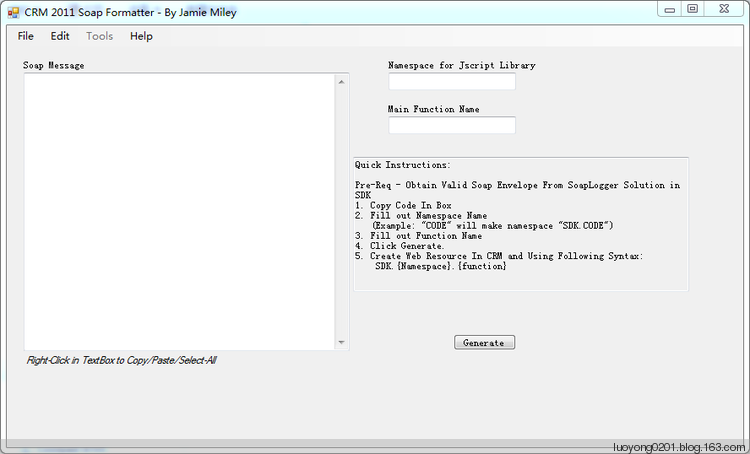
这个工具怎么使用,官方有一篇文章:CRM 2011 Jscript Soap Request Formatter RELEASED!! 不过国内不能阅读到,原因你懂的,不懂的话你可能是比较少在中国大陆生活。我这里直接上用法了。

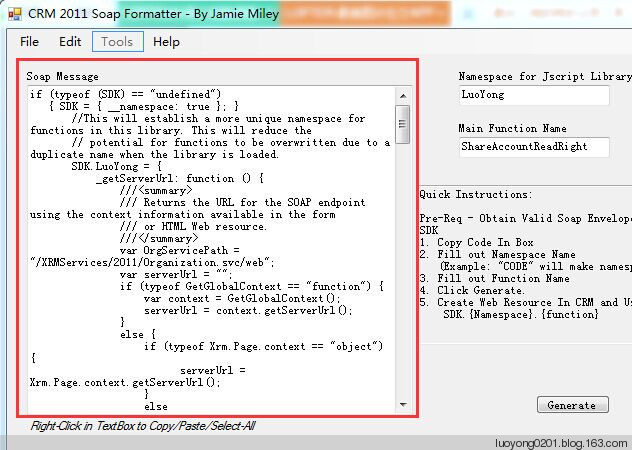
function ShareAccountReadRightRequest(AccountId,SystemUserId)

{

var requestMain = ""

requestMain += "<s:Envelope xmlns:s=\"http://schemas.xmlsoap.org/soap/envelope/\">

    ";

    requestMain += " <s:Body>

        ";

        requestMain += " <Execute xmlns=\"http://schemas.microsoft.com/xrm/2011/Contracts/Services\" xmlns:i=\"http://www.w3.org/2001/XMLSchema-instance\">

            ";

            requestMain += " <request i:type=\"b:GrantAccessRequest\" xmlns:a=\"http://schemas.microsoft.com/xrm/2011/Contracts\" xmlns:b=\"http://schemas.microsoft.com/crm/2011/Contracts\">

                ";

                requestMain += " <a:Parameters xmlns:c=\"http://schemas.datacontract.org/2004/07/System.Collections.Generic\">

                    ";

                    requestMain += " <a:KeyValuePairOfstringanyType>

                        ";

                        requestMain += " <c:key>Target</c:key>";

                        requestMain += " <c:value i:type=\"a:EntityReference\">

                            ";

                            requestMain += " <a:Id>

                                ";

                                requestMain += AccountId;

                                requestMain += "

                            </a:Id>";

                            requestMain += " <a:LogicalName>account</a:LogicalName>";

                            requestMain += " <a:Name i:nil=\"true\" />";

                            requestMain += "

                        </c:value>";

                        requestMain += "

                    </a:KeyValuePairOfstringanyType>";

                    requestMain += " <a:KeyValuePairOfstringanyType>

                        ";

                        requestMain += " <c:key>PrincipalAccess</c:key>";

                        requestMain += " <c:value i:type=\"b:PrincipalAccess\">

                            ";

                            requestMain += " <b:AccessMask>ReadAccess</b:AccessMask>";

                            requestMain += " <b:Principal>

                                ";

                                requestMain += " <a:Id>

                                    ";

                                    requestMain += SystemUserId;

                                    requestMain += "

                                </a:Id>";

                                requestMain += " <a:LogicalName>systemuser</a:LogicalName>";

                                requestMain += " <a:Name i:nil=\"true\" />";

                                requestMain += "

                            </b:Principal>";

                            requestMain += "

                        </c:value>";

                        requestMain += "

                    </a:KeyValuePairOfstringanyType>";

                    requestMain += "

                </a:Parameters>";

                requestMain += " <a:RequestId i:nil=\"true\" />";

                requestMain += " <a:RequestName>GrantAccess</a:RequestName>";

                requestMain += "

            </request>";

            requestMain += "

        </Execute>";

        requestMain += "

    </s:Body>";

    requestMain += "

</s:Envelope>";

var req = new XMLHttpRequest();

//req.open("POST", Xrm.Page.context.getClientUrl() + "/XRMServices/2011/Organization.svc/web", true);

req.open("POST", GetGlobalContext().getClientUrl() + "/XRMServices/2011/Organization.svc/web", true);

req.setRequestHeader("Accept", "application/xml, text/xml, */*");

req.setRequestHeader("Content-Type", "text/xml; charset=utf-8");

req.setRequestHeader("SOAPAction", "http://schemas.microsoft.com/xrm/2011/Contracts/Services/IOrganizationService/Execute");

req.onreadystatechange = function () { CallSOAPResponse(req); };

req.send(requestMain);

}

function CallSOAPResponse(req)

{

if (req.readyState == 4) {

req.onreadystatechange = null; //avoids memory leaks

if (req.status == 200) {

//成功我这里什么都不做

}

else {

Xrm.Utility.alertDialog("共享客户失败。请确保共享给的用户对客户实体至少具有最低级别的读取权限。");

}

}

}
这样就可以方便的在JavaScript中调用了。
通过JavaScript调用SOAP终结点执行实体消息的更多相关文章
- JavaScript 究竟是怎样执行的?
摘要: 理解 JS 引擎运行原理. 作者:前端小智 原文:搞懂 JavaScript 引擎运行原理 Fundebug经授权转载,版权归原作者所有. 一些名词 JS 引擎 - 一个读取代码并运行的引擎, ...
- 翻译-使用Spring调用SOAP Web Service
原文链接: http://spring.io/guides/gs/consuming-web-service/ 调用SOAP web service 本指南将指导你使用Spring调用一个基于SOAP ...
- 使用IPostBackEventHandler让JavaScript“调用”回传事件
在由ASP.NET所谓前台调用后台.后台调用前台想到HTTP——实践篇(二)通过自己模拟HTML标签事件与服务器交互,讲了ASP.NET的服务器控件是怎么render成HTML后市怎么“调用”后台方法 ...
- [转]Javascript中的自执行函数表达式
[转]Javascript中的自执行函数表达式 本文转载自:http://www.ghugo.com/javascript-auto-run-function/ 以下是正文: Posted on 20 ...
- 深入理解javascript中的立即执行函数(function(){…})()
投稿:junjie 字体:[增加 减小] 类型:转载 时间:2014-06-12 我要评论 这篇文章主要介绍了深入理解javascript中的立即执行函数,立即执行函数也叫立即调用函数,通常它的写法是 ...
- Axis2(10):使用soapmonitor模块监视soap请求与响应消息
在Axis2中提供了一个Axis2模块(soapmonitor),该模块实现了与<WebService大讲堂之Axis2(9):编写Axis2模块(Module)>中实现的logging模 ...
- javascript 作用域链与执行环境
前言:这是笔者学习之后自己的理解与整理.如果有错误或者疑问的地方,请大家指正,我会持续更新! 作用域.作用域链.执行环境.执行环境栈以及this的概念在javascript中非常重要,本人经常弄混淆, ...
- 怎么样加快JavaScript加载和执行效率
概览 无论当前 JavaScript 代码是内嵌还是在外链文件中,页面的下载和渲染都必须停下来等待脚本执行完成.JavaScript 执行过程耗时越久,浏览器等待响应用户输入的时间就越长.浏览器在下载 ...
- javascript调用Flash里对象的方法(函数)搞了五个小时。
搞了几个小时后,才发现,之前走的路是错的. 今天在Firefox浏览器上测试一个javascript调用Flash中的一个对象的方法时遇到问题了, 一搞就整整搞了一个下午. 我记得之前我用Flash8 ...
随机推荐
- H5音乐自动播放ios//禁止安卓手机图片点击
定义音乐按钮 <div id="music-btn" class="o-play" style="width: 24px; height: 24 ...
- Win10 安装 VMWare中 MAC OS X的安装,VMWare tools的配置与iOS的Helloworld
iOS的开发必须在MAC OS X系统下进行,这很蛋疼,现在MACBOOK动不动就上千上万大洋,这足够买台配置怪兽了,好吗?然而,我们是可以通过在VMWare中安装MAC OS X进行iOS开发的.对 ...
- 在Windows、Mac和 Linux系统中安装Python与 PyCharm
“工欲善其事,必先利其器”,本文介绍 Python环境的安装和 Python的集成开发环境(IDE) PyCharn的安装. 一.Python安装( Windows.Mac和 Linux) 当前主 ...
- [Swift]LeetCode394. 字符串解码 | Decode String
Given an encoded string, return it's decoded string. The encoding rule is: k[encoded_string], where ...
- [SQL]LeetCode601. 体育馆的人流量 | Human Traffic of Stadium
SQL架构 Create table If Not Exists stadium (id int, visit_date DATE NULL, people int) Truncate table s ...
- [Swift]LeetCode904. 水果成篮 | Fruit Into Baskets
In a row of trees, the i-th tree produces fruit with type tree[i]. You start at any tree of your cho ...
- JavaScript03-基本概念一
js包括:语法.语句.类型.关键字.保留字.操作符和对象. 语法.关键字.保留字 1.js中一切区分大小写,包括变量.函数名.操作符: 2.标识符规则,第一个字符必须是字母.下划线_.或者美元符号,其 ...
- Python—day18 dandom、shutil、shelve、系统标准流、logging
一.dandom模块 (0, 1) 小数:random.random() [1, 10] 整数:random.randint(1, 10) [1, 10) 整数:random.randrange(1, ...
- qt之fiddler抓包
最近项目中使用到了Qt的网络库,在用的过程中也发现了不少坑和问题,本文仅仅作为记录,方便日后查阅. 因为我们整个客户端的gui都是使用qt来完成的,心想qt既然有网络库,而且真心觉着qt封装的控 ...
- Kafka从入门到进阶
1. Apache Kafka是一个分布式流平台 1.1 流平台有三个关键功能: 发布和订阅流记录,类似于一个消息队列或企业消息系统 以一种容错的持久方式存储记录流 在流记录生成的时候就处理它们 ...