
C#+AE实现类似IDentify功能及对高亮显示相关接口的总结
kenika 原文C#+AE实现类似IDentify功能及对高亮显示相关接口的总结
ArcMap中的Identify功能是有目的查看要素(Feature)属性信息经常使用的工具。ArcMap中的Identify功能有以下几个特征:
第一, 鼠标点击具有“穿透力”,可以同时对多个图层的要素实现选择;
第二, 同一图层可以选择多个要素;
第三, 被选中要素并不高亮显示,而是以绿色闪烁一次;
第四, 所有选中要素列于弹出的信息窗口中。
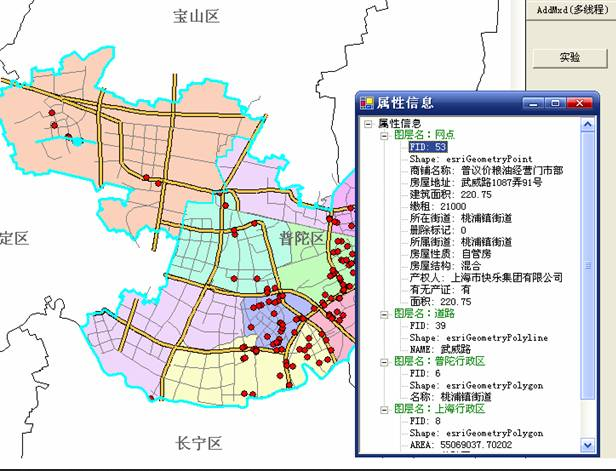
今天用C#和AE也试着写了一个类似于Identify功能的工具,有如下要求:
第一, 鼠标具有“穿透力”,可以同时对多个图层进行选择(点选);
第二, 每一图层最多只能选中一个要素,这与ArcMap中不同;
第三, 被选中要素需要高亮显示,而不是闪烁一次,也与ArcMap不同;
第四, 按下工具后,在地图上单击弹出属性信息窗口,再次单击,仍有该窗口显示属性信息,即不可打开多个属性信息窗口。
private void axMapControl1_OnMouseDown(object sender, ESRI.ArcGIS.MapControl.IMapControlEvents2_OnMouseDownEvent e)

{

if(this.blnIsIdentifyEnable)

     {

         //如果查询比较频繁,此类变量可以设置成类级别

         IFeatureLayer pFL;

         IFeatureSelection pFeatureSelection;

         IEnvelope pEnv;

         IGeometry pGeometry;

         ISpatialFilter pSpatialFilter;

         ISelectionSet pSelectionSet;

         IEnumIDs pEnumIDs;

         IFeature pFeature;

//                ImageList imageList = new ImageList();

//                imageList.

         //用于查询的矩形(相当于点的缓冲区,这样比生成缓冲区节省资源),

         //envelope的大小根据实际情况设定,以方便使用为准

         pEnv = new EnvelopeClass();

         pEnv.PutCoords(e.mapX-,e.mapY-,e.mapX+,e.mapY+);

         pGeometry = pEnv as IGeometry;

         pSpatialFilter = new SpatialFilterClass();

         pSpatialFilter.Geometry = pGeometry;

         pSpatialFilter.SpatialRel = esriSpatialRelEnum.esriSpatialRelIntersects;

         //运用singleton模式设计窗体,只允许存在一个ShowAttributeTable实例

         ShowAttributeTable frmShowAttribute = ShowAttributeTable.CreateForm();

         frmShowAttribute.Show();

         frmShowAttribute.AttributeTreeView.Nodes.Clear();//首先清除上次结果

         frmShowAttribute.AttributeTreeView.ShowLines = true;

         frmShowAttribute.AttributeTreeView.ShowPlusMinus = true;

         TreeNode rootNode = new TreeNode();

         rootNode.Text = "属性信息";

//                rootNode.ImageIndex

         Font font = new Font("黑体",);

         rootNode.NodeFont = font;

         //添加根节点“属性信息”

         frmShowAttribute.AttributeTreeView.Nodes.Add(rootNode);

         //没有必要将地图上的高亮选择清除,因为下面对每个图层的选择都用esriSelectionResultNew,会自动清除上次的高亮显示,

         //而不同图层之间的高亮选择不会有任何影响,因为IFeatureSelection接口的一切属性和方法都是针对一个图层

//                this.axMapControl1.Map.ClearSelection();

         for(int i=;i<this.axMapControl1.LayerCount;i++)

         {

             pFL = this.axMapControl1.get_Layer(i) as IFeatureLayer;

             if(pFL.Visible && pFL.Selectable)

             {

                 pFeatureSelection = pFL as IFeatureSelection;

                 //选择之前先清除,这是个好习惯(除非是用Add方式)

                 pFeatureSelection.Clear();

                 pFeatureSelection.SelectFeatures(pSpatialFilter,esriSelectionResultEnum.esriSelectionResultNew,true);

                 pSelectionSet = pFeatureSelection.SelectionSet;

                 //如果选择集内有Feature

                 if(pSelectionSet.Count>)

                 {

                     //构建图层节点并添加到根节点

                     TreeNode layerNameNode = new TreeNode();

                     layerNameNode.ForeColor = Color.Green;

                     layerNameNode.Text = "图层名:" + pFL.Name;

                     rootNode.Nodes.Add(layerNameNode);

                     //通过pEnumIDs获得该SelectionSet中的Feature的id值,再用FeatureClass.GetFeature()方法获得该Feature对象

                     //这里为了学习新接口而使用了IEnumIDs,为了获得SelectionSet中的Feature,可以使用其Search()方法

                     //获得ICursor,再使用循环获得Feature,如下注释选定行

//                            pSelectionSet.Search(null,false,out pCursor);

//                            pRow = pCursor.NextRow();

//                            if(pRow!=null)

//                            {

//                            }

                     pEnumIDs = pSelectionSet.IDs;

                     long id = pEnumIDs.Next();

                     while(id!=-)

                     {

                         pFeature = pFL.FeatureClass.GetFeature((int)id);

                         for(int j=;j<pFeature.Fields.FieldCount;j++)

                         {

                             if(j!=)

                             {

                                 //构建字段值节点并添加到图层节点下

                                 TreeNode fieldInfoNode = new TreeNode();

                                 fieldInfoNode.Text = pFeature.Fields.get_Field(j).Name + ": " + pFeature.get_Value(j).ToString();

                                 layerNameNode.Nodes.Add(fieldInfoNode);

                             }

                             //如果是shape字段就显示GeometryType

                             else

                             {

                                 TreeNode fieldInfoNode = new TreeNode();

                                 fieldInfoNode.Text = pFeature.Fields.get_Field(j).Name + ": " + pFeature.Shape.GeometryType.ToString();

                                 layerNameNode.Nodes.Add(fieldInfoNode);

                             }

                             frmShowAttribute.AttributeTreeView.ExpandAll();

                         }

                         id = pEnumIDs.Next();

                     }

                 }

             }

 }

}
属性信息窗体ShowAttributeTable的设计的关键代码:
 public class ShowAttributeTable : System.Windows.Forms.Form

 {

  /// <summary>

  /// 必需的设计器变量。

  /// </summary>

  private System.ComponentModel.Container components = null;

  private System.Windows.Forms.TreeView treeView1;

  public TreeView AttributeTreeView//设置treeView1的属性

  {

   get{return this.treeView1;}

   set{this.treeView1 = value;}

  }

  private static ShowAttributeTable frm;

  public static ShowAttributeTable CreateForm()

  {

   if(frm==null)

    frm = new ShowAttributeTable();

   return frm;

  }

  private ShowAttributeTable()

  {

   //

   // Windows 窗体设计器支持所必需的

   //

   InitializeComponent();

   //

   // TODO: 在 InitializeComponent 调用后添加任何构造函数代码

   //

  }

  /// <summary>

  /// 清理所有正在使用的资源。

  /// </summary>

  protected override void Dispose( bool disposing )

  {

   if( disposing )

   {

    if(components != null)

    {

     components.Dispose();

    }

   }

   base.Dispose( disposing );

  }

  #region Windows 窗体设计器生成的代码

  /// <summary>

  /// 设计器支持所需的方法 - 不要使用代码编辑器修改

  /// 此方法的内容。

  /// </summary>

  private void InitializeComponent()

  {

   this.treeView1 = new System.Windows.Forms.TreeView();

   this.SuspendLayout();

   //

   // treeView1

   //

   this.treeView1.Dock = System.Windows.Forms.DockStyle.Fill;

   this.treeView1.ImageIndex = -;

   this.treeView1.Location = new System.Drawing.Point(, );

   this.treeView1.Name = "treeView1";

   this.treeView1.SelectedImageIndex = -;

   this.treeView1.Size = new System.Drawing.Size(, );

   this.treeView1.TabIndex = ;

   //

   // ShowAttributeTable

   //

   this.AutoScaleBaseSize = new System.Drawing.Size(, );

   this.ClientSize = new System.Drawing.Size(, );

   this.Controls.Add(this.treeView1);

   this.Name = "ShowAttributeTable";

   this.Text = "属性信息";

   this.TopMost = true;

   this.Closed += new System.EventHandler(this.ShowAttributeTable_Closed);

   this.ResumeLayout(false);

  }

  #endregion

  private void ShowAttributeTable_Closed(object sender, System.EventArgs e)

  {

   frm = null;

  }

 }
IEnumFeatureSetup pEnumFeatureSetup = this.axMapControl1.Map.FeatureSelection as IEnumFeatureSetup;

pEnumFeatureSetup.AllFields = true;

IEnumFeature pEnumFeature = pEnumFeatureSetup as IEnumFeature;

IFeature pFeature = pEnumFeature.Next();

while(pFeature!=null)

{

    MessageBox.Show(pFeature.get_value().toString());

    pFeature = pEnumFeature.Next();

}
C#+AE实现类似IDentify功能及对高亮显示相关接口的总结的更多相关文章
- 扩展 delphi 泛型 以实现类似lambda功能 , C#中的any count first last 等扩展方法
扩展 delphi 泛型 以实现类似lambda功能 , C#中的any count first last 等扩展方法 在C#中对泛型的扩展,输入参数是泛型本身的内容,返回值则是bool.基于这一点, ...
- 用setTimeout实现与setInteval类似的功能
用setTimeout实现与setInteval类似的功能,代码如下: (function(){ var self = arguments.callee; //获取函数本身 count++; if ( ...
- 【转载】ASP.NET以Post方式抓取远程网页内容类似爬虫功能
使用HttpWebRequest等Http相关类,可以在应用程序中或者网站中模拟浏览器发送Post请求,在请求带入相应的Post参数值,而后请求回远程网页信息.实现这一功能也很简单,主要是依靠Http ...
- 在vue项目中使用codemirror插件实现代码编辑器功能(代码高亮显示及自动提示
在vue项目中使用codemirror插件实现代码编辑器功能(代码高亮显示及自动提示) 1.使用npm安装依赖 npm install --save codemirror; 2.在页面中放入如下代码 ...
- NVR硬件录像机web无插件播放方案功能实现之相关接口注意事项说明
该篇博文主要用来说明EasyNVR硬件录像回放版本的相关接口说明和调用的demo: 方便用户的二次开发和集成. 软件根目录会包含接口文档的,因此,本文主要是对一些特定接口的说明和接口实现功能的讲解以及 ...
- 使用Typescript重构axios(二十一)——请求取消功能:添加axios.isCancel接口
0. 系列文章 1.使用Typescript重构axios(一)--写在最前面 2.使用Typescript重构axios(二)--项目起手,跑通流程 3.使用Typescript重构axios(三) ...
- asp.net + Jquery 实现类似Gridview功能 (一)
不知不觉2015年就过去一半了,由于过年前后公司人员陆续离职(这个...),项目忙不过来,从过年来上班就一直在忙,最近项目终于告一段落,开始步入正轨(不用天天赶项目了).所以最近才有时间写这个东西,可 ...
- Python不同电脑之间传输文件实现类似scp功能不输密码
SCP vs SFTP 通过paramiko还可以传输文件,如何通过paramiko在计算机之间传输文件,通过阅读官方文档,发现有如下两种方式: sftp = paramiko.SFTPClient. ...
- c++ 连接两个字符串实现代码 实现类似strcat功能(转)
想实现strcat功能,直接网上找一个. 第一种: #include "stdafx.h" #include<iostream> using namespace std ...
随机推荐
- cap理论理解
一个分布式系统里面,节点组成的网络本来应该是连通的.然而可能因为一些故障,使得有些节点之间不连通了,整个网络就分成了几块区域.数据就散布在了这些不连通的区域中.这就叫分区. 当你一个数据项只在一个节点 ...
- Python的正则表达概述
本文介绍了Python对于正则表达式的支持,包括正则表达式基础以及Python正则表达式标准库的完整介绍及使用示例.本文的内容不包括如何编写高效的正则表达式.如何优化正则表达式,这些主题请查看其他教程 ...
- Java IO:SocketChannel和Selector在ZooKeeper中应用
转载请注明出处:jiq•钦's technical Blog 假设不了解SocketChannel和Selector.请先阅读我的还有一篇博文:点击打开链接 ZooKeeper的启动从QuorumPe ...
- jquery--this
<!DOCTYPE HTML PUBLIC "-//W3C//DTD HTML 4.01//EN" "http://www.w3.org/TR/html4/stri ...
- screen-Orientation 横竖屏设置
1.xml中设置,这个主要是在AndroidManifest.xml 中查找activity,然后在里面设置属性,如下 <application android:label="@str ...
- golang sync.RWMutex
sync.RWMutex package main import ( "fmt" "runtime" "sync" ) func click ...
- 微信浏览器的html5页面显示配置等问题汇集 1,禁止微信浏览器分享页面链接 (定点更新)
公司新需求,要求从安卓IOS应用分享到微信的链接页面不允许二次转发,所以开始编程第一步,上网找资料... 网上大神就是多,不消两分钟,找到方案,很简单,上代码先: wx.config({ debug: ...
- TypeScript深入学习
基础类型booleannumberstringstring[]//Array<string> 数组类型(ReadonlyArray<string>数组不能修改,也不允许被赋值给 ...
- C8815 用 USB网卡(Asix AX88772 )上网
C8815 用 USB网卡(Asix AX88772 )上网 C8815不支持给USB外设供电,不过可以使用自供电的OTG线带动USB设备 C8815最新固件中没有Asix AX88772驱动,需要自 ...
- poj 1191 棋盘切割 (压缩dp+记忆化搜索)
一,题意: 中文题 二.分析: 主要利用压缩dp与记忆化搜索思想 三,代码: #include <iostream> #include <stdio.h> #include & ...