
Elasticsearch之curl创建索引库
关于curl的介绍,请移步
Elasticsearch学习概念之curl
启动es,请移步
Elasticsearch的前后台运行与停止(tar包方式)
Elasticsearch的前后台运行与停止(rpm包方式)
创建索引库,我这里命名为zhouls

[hadoop@djt002 elasticsearch-2.4.3]$ curl -XPUT 'http://192.168.80.200:9200/zhouls'
{"acknowledged":true}[hadoop@djt002 elasticsearch-2.4.3]$
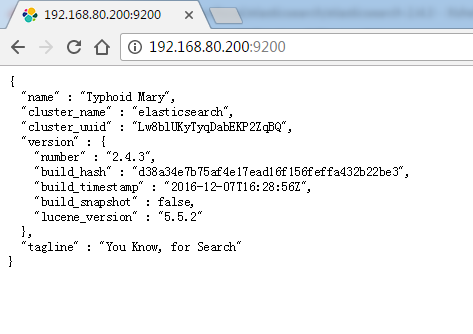
这里,是跟之前的elasticsearch.yml修改对应起来的。
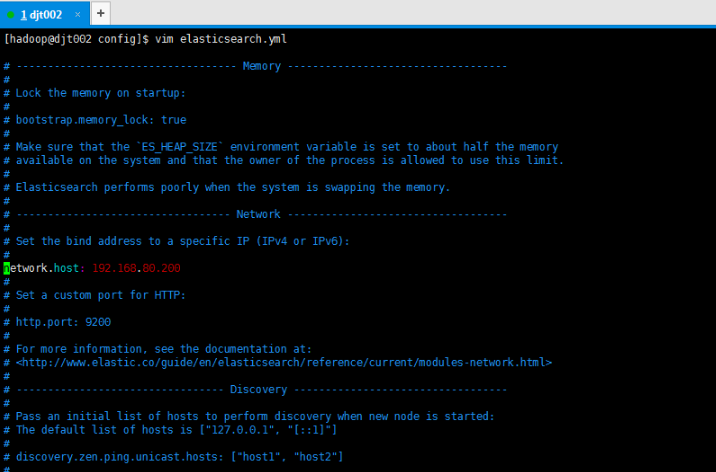
我们可以验证下,输入localhost或者127.0.0.1都会出现无法连接,不信你尝试。
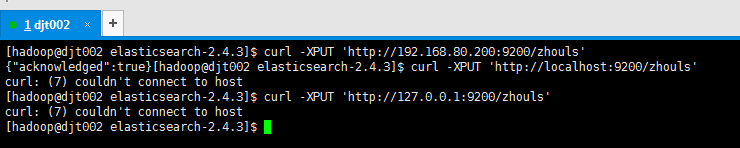
[hadoop@djt002 elasticsearch-2.4.3]$ curl -XPUT 'http://192.168.80.200:9200/zhouls'
{"acknowledged":true}[hadoop@djt002 elasticsearch-2.4.3]$ curl -XPUT 'http://localhost:9200/zhouls'
curl: (7) couldn't connect to host
[hadoop@djt002 elasticsearch-2.4.3]$ curl -XPUT 'http://127.0.0.1:9200/zhouls'
curl: (7) couldn't connect to host
[hadoop@djt002 elasticsearch-2.4.3]$
为了方便,更改为0.0.0.0

然后,重启es

[hadoop@djt002 elasticsearch-2.4.3]$ jps
2811 Jps
2741 Elasticsearch
[hadoop@djt002 elasticsearch-2.4.3]$ curl -XPUT 'http://localhost:9200/zhouls'
{"error":{"root_cause":[{"type":"index_already_exists_exception","reason":"already exists","index":"zhouls"}],"type":"index_already_exists_exception","reason":"already exists","index":"zhouls"},"status":400}[hadoop@djt002 elasticurl -XPUT 'http://127.0.0.1:9200/zhouls'
{"error":{"root_cause":[{"type":"index_already_exists_exception","reason":"already exists","index":"zhouls"}],"type":"index_already_exists_exception","reason":"already exists","index":"zhouls"},"status":400}[hadoop@djt002 elasticurl -XPUT 'http://192.168.80.200:9200/zhouls'
{"error":{"root_cause":[{"type":"index_already_exists_exception","reason":"already exists","index":"zhouls"}],"type":"index_already_exists_exception","reason":"already exists","index":"zhouls"},"status":400}[hadoop@djt002 elasticsearch-2.4.3]$
报这个错误,是正常的,因为,你重复创建索引库。根据经验之谈,一般用内网ip。如我的192.168.80.200。建议指定内网ip
本地回环地址:127.0.0.1
内网地址:192.168.80.200
外网地址:10.29.0.2
在这里0.0.0.0 表示可以通过上面所有ip都可以访问
以上是,Elasticsearch之curl创建索引库的方式1,以下是,Elasticsearch之curl创建索引库的方式2

[hadoop@djt002 elasticsearch-2.4.3]$ curl -XPUT 'http://192.168.80.200:9200/zhouls'
{"error":{"root_cause":[{"type":"index_already_exists_exception","reason":"already exists","index":"zhouls"}],"type":"index_already_exists_exception","reason":"already exists","index":"zhouls"},"status":400}[hadoop@djt002 elasticsearch-2.4.3]$ curl -XPOST 'http://192.168.80.200:9200/zhouls1'
{"acknowledged":true}[hadoop@djt002 elasticsearch-2.4.3]$
测试完,及时删除。

[hadoop@djt002 elasticsearch-2.4.3]$ curl -XPUT 'http://192.168.80.200:9200/zhouls'
{"error":{"root_cause":[{"type":"index_already_exists_exception","reason":"already exists","index":"zhouls"}],"type":"index_already_exists_exception","reason":"already exists","index":"zhouls"},"status":400}[hadoop@djt002 elasticsearch-2.4.3]$ curl -XPOST 'http://192.168.80.200:9200/zhouls1'
{"acknowledged":true}[hadoop@djt002 elasticsearch-2.4.3]$ curl -XDELETE 'http://192.168.80.200:9200/zhouls1'
{"acknowledged":true}[hadoop@djt002 elasticsearch-2.4.3]$
Elasticsearch之curl创建索引库的更多相关文章
- Elasticsearch之curl创建索引库和索引时注意事项
前提, Elasticsearch之curl创建索引库 Elasticsearch之curl创建索引 注意事项 1.索引库名称必须要全部小写,不能以下划线开头,也不能包含逗号 2.如果没有明确指定索引 ...
- Elasticsearch之curl创建索引
前提,是 Elasticsearch之curl创建索引库 [hadoop@djt002 elasticsearch-2.4.3]$ curl -XPUT 'http://192.168.80.200: ...
- Elasticsearch之curl删除索引库
关于curl创建索引库的介绍,请移步 Elasticsearch之curl创建索引库 [hadoop@djt002 elasticsearch-2.4.3]$ curl -XPUT 'http://1 ...
- (转)ElasticSearch Java Api-检索索引库
上篇博客记录了如何用java调用api把数据写入索引,这次记录下如何搜索. 一.准备数据 String data1 = JsonUtil.model2Json(new Blog(1, "gi ...
- lucene中创建索引库
package com.hope.lucene;import org.apache.commons.io.FileUtils;import org.apache.lucene.document.Doc ...
- elasticsearch kabana中创建索引
在kabana中创建索引和索引类型语法 PUT clockin{ "mappings": { "time": { } }} 查询索引下的所有数据 GET clo ...
- Elasticsearch之cur查询索引
前提, Elasticsearch之curl创建索引库 Elasticsearch之curl创建索引 Elasticsearch之curl创建索引库和索引时注意事项 Elasticsearch之cur ...
- Elasticsearch之CURL命令的DELETE
也可以看我写的下面的博客 Elasticsearch之curl删除 Elasticsearch之curl删除索引库 删除,某一条数据,如下 [hadoop@master elasticsearch-] ...
- Elasticsearch之curl删除
扩展下, Elasticsearch之curl删除索引库 [hadoop@djt002 elasticsearch-2.4.3]$ curl -XDELETE 'http://192.168.80.2 ...
随机推荐
- linux 11 -- mount,umount
Linux 文件系统是一个以 / 为根的大树,我们在不同的设备和分区上都有文件系统.我们如何处理这种明显的不一致性?根 (/) 文件系统是在初始化过程中挂载的.您创建的其他每个文件系统在挂载 在挂载点 ...
- 获取android模拟器的IP地址
http://blog.csdn.net/yjkwf/article/details/7244632 1.输入adb devices查看加载的设备 2.使用 adb -s [设备] [命令]执行命令 ...
- selenium之坑(StaleElementReferenceException: Message: Element not found in the cache...)
有时候循环点击一列链接,只能点到第一个,第二个就失败了 原因是第二个已经是新页面,当然找不到之前页面的元素.就算是后退回来的,页面也是不一样的 页面长的一样不一定是同一张页面,就像两个人长的一样不一定 ...
- 在 CentOS7最小化 下的编译安装:Nginx 1.5.2 + PHP 5.5.7 + MySQL 5.6.10
1.安装Nginx: 安装包目录 mkdir -p /Data/tgzcd /Data/tgz 安装编译依赖 yum install wget yum install pcre yum install ...
- Sql Server2008——存储过程编程简单例子
主要介绍: 存储过程的定义方法及其使用方法. 实例介绍: 1 创建学生表Student create database Stu use Stu go CREATE TABLE Student ( Sn ...
- 321list,元组,range**数字是不可迭代的!
一.list(列表) 列表是python中的基础数据类型之一,他是以[]括起来,每个元素以逗号隔开,而且他里面可以存放各种数据类型.列表相比于字符串,不仅可以储存不同的数据类型,而且可以储存大量数据, ...
- Luogu-4196 [CQOI2006]凸多边形
凸多边形的面积就相当于半平面交 求几个凸多边形面积交就相当于一堆半平面一起求交 #include<cmath> #include<cstdio> #include<cst ...
- codevs 1299 切水果 线段树
1299 切水果 时间限制: 1 s 空间限制: 128000 KB 题目描述 Description 简单的说,一共N个水果排成一排,切M次,每次切[L,R]区间的所有水果(可能有的水果 ...
- html转义字符及css清除
1. [代码][Java]代码 import java.util.HashMap;import java.util.Map; import org.apache.commons.lang3. ...
- spring boot: scope (一般注入说明(一) @Autowired注解)
实例一: DiConfig 文件: package di; import org.springframework.context.annotation.ComponentScan; import or ...