
"Hello World!" for Microsoft Windows
"Hello World!" for Microsoft Windows
It's time to write your first application! The following instructions are for users of Windows Vista, Windows 7, and Windows 8. Instructions for other platforms are in "Hello World!" for Solaris OS and Linux and "Hello World!" for the NetBeans IDE.
If you encounter(遭遇) problems with the instructions on this page, consult(查阅) the Common Problems (and Their Solutions).
A Checklist 
To write your first program, you'll need:
The Java SE Development Kit 8 (JDK 8)
You can download the Windows version now. (Make sure you download the JDK, not the JRE.) Consult the installation instructions.
A text editor
In this example, we'll use Notepad, a simple editor included with the Windows platforms. You can easily adapt(适应) these instructions if you use a different text editor.
These two items are all you'll need to write your first application.
Creating Your First Application
Your first application, HelloWorldApp, will simply display the greeting "Hello world!". To create this program, you will:
Create a source file
A source file contains code, written in the Java programming language, that you and other programmers can understand. You can use any text editor to create and edit source files.
Compile the source file into a .class file
The Java programming language compiler (
javac) takes your source file and translates its text into instructions that the Java virtual machine can understand. The instructions contained within this file are known as bytecodes.Run the program
The Java application launcher tool (
java) uses the Java virtual machine to run your application.
Create a Source File
To create a source file, you have two options:
You can save the file
HelloWorldApp.java.classFile.Or, you can use the following (longer) instructions.
First, start your editor. You can launch the Notepad editor from the Start menu by selecting Programs > Accessories > Notepad. In a new document, type in the following code:
/**  * The HelloWorldApp class implements an application that  * simply prints "Hello World!" to standard output.  */

class HelloWorldApp {     public static void main(String[] args) {         System.out.println("Hello World!"); // Display the string.     }

}
Be Careful When You Type 

Note: Type all code, commands, and file names exactly as shown. Both the compiler (
javac) and launcher (java) are case-sensitive, so you must capitalize consistently.
HelloWorldApp is not the same as helloworldapp.
Save the code in a file with the name HelloWorldApp.java. To do this in Notepad, first choose the File > Save As menu item. Then, in the Save As dialog box:
- Using the Save in combo box, specify the folder (directory) where you'll save your file. In this example, the directory is
myapplicationon theCdrive. - In the File name text field, type
"HelloWorldApp.java", including the quotation marks. - From the Save as type combo box, choose Text Documents (*.txt).
- In the Encoding combo box, leave the encoding as ANSI.
When you're finished, the dialog box should look like this.
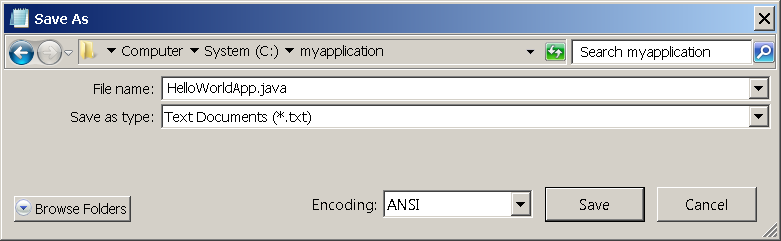
The Save As dialog just before you click Save.
Now click Save, and exit Notepad.
Compile the Source File into a .class File
Bring up a shell, or "command," window. You can do this from the Start menu by choosing Run... and then entering cmd. The shell window should look similar to the following figure.
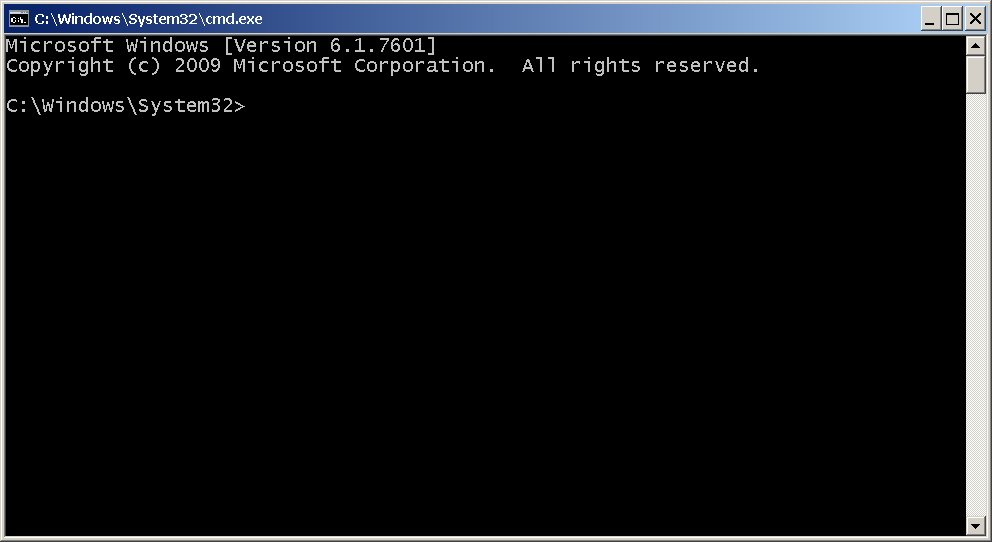
A shell window.
The prompt(提示) shows your current directory. When you bring up the prompt, your current directory is usually your home directory for Windows XP (as shown in the preceding figure.
To compile your source file, change your current directory to the directory where your file is located. For example, if your source directory is myapplication on the C drive, type the following command at the prompt and press Enter:
cd C:\myapplication
Now the prompt should change to C:\myapplication>.
Note:
To change to a directory on a different drive, you must type an extra command: the name of the drive. For example, to change to the myapplication directory on the D drive, you must enter D:, as follows:
C:\>D:

D:\>cd myapplication

D:\myapplication>
If you enter dir at the prompt, you should see your source file, as follows:
C:\>cd myapplication

C:\myapplication>dir

 Volume in drive C is System

 Volume Serial Number is F2E8-C8CC

 Directory of C:\myapplication

2014-04-24  01:34 PM    <DIR>          .

2014-04-24  01:34 PM    <DIR>          ..

2014-04-24  01:34 PM               267 HelloWorldApp.java

               1 File(s)            267 bytes

               2 Dir(s)  93,297,991,680 bytes free

C:\myapplication>
Now you are ready to compile. At the prompt, type the following command and press Enter.
javac HelloWorldApp.java
The compiler has generated a bytecode file, HelloWorldApp.class. At the prompt, type dir to see the new file that was generated as follows:
C:\myapplication>javac HelloWorldApp.java

C:\myapplication>dir

 Volume in drive C is System

 Volume Serial Number is F2E8-C8CC

 Directory of C:\myapplication

2014-04-24  02:07 PM    <DIR>          .

2014-04-24  02:07 PM    <DIR>          ..

2014-04-24  02:07 PM               432 HelloWorldApp.class

2014-04-24  01:34 PM               267 HelloWorldApp.java

               2 File(s)            699 bytes

               2 Dir(s)  93,298,032,640 bytes free

C:\myapplication>
Now that you have a .class file, you can run your program.
If you encounter problems with the instructions in this step, consult the Common Problems (and Their Solutions).
Run the Program
In the same directory, enter the following command at the prompt:
java -cp . HelloWorldApp
You should see the following on your screen:
C:\myapplication>java -cp . HelloWorldApp

Hello World!

C:\myapplication>
Congratulations! Your program works!
If you encounter problems with the instructions in this step, consult the Common Problems (and Their Solutions).
"Hello World!" for Microsoft Windows的更多相关文章
- Microsoft Windows* SDK May 2010 或较新版本(兼容 2010 年 6 月 DirectX SDK)GPU Detect
原文链接 下载代码样本 特性/描述 日期: 2016 年 5 月 5 日 GPU Detect 是一种简短的示例,演示了检测系统中主要显卡硬件(包括第六代智能英特尔® 酷睿™ 处理器产品家族)的方式. ...
- 需要正确安装 Microsoft.Windows.ShellExperienceHost 和 "Microsoft.Windows.Cortana" 应用程序。
windows 10 开始菜单修复工具 Win10开始菜单修复工具出现的原因,自从升级到Windows 10,一直BUG不断,而其中有一个BUG非常的让你印象深刻,就是开始菜单无响应,你用着用着电脑 ...
- 驱动开发利器Microsoft Windows Driver Kit 7.1.0下载
在Windows 2000 与Windows XP 系统采用是WINDDK来开发WINDOWS驱动程序,我手头也有WINDDK,可是从Windows Vista开始之后,一般采用Microsoft W ...
- C++ 无法将值写入注册表 HKEY_LOCAL_MACHINE\Sofeware\Microsoft\Windows\CurrentVersion\Run,以实现开机自启动应用程序。
C++ 无法将值写入注册表 HKEY_LOCAL_MACHINE\Sofeware\Microsoft\Windows\CurrentVersion\Run,以实现开机自启动应用程序.但可以写入到H ...
- [Solution] Microsoft Windows 服务(1) C#创建Windows服务
Microsoft Windows 服务(即,以前的 NT 服务)使您能够创建在它们自己的 Windows 会话中可长时间运行的可执行应用程序.这些服务可以在计算机启动时自动启动,可以暂停和重新启动而 ...
- Hyperion Business Modeling for Microsoft Windows (32-bit)
介质包搜索 常见问题 说明 复查 许可证列表 以确定需要下载的产品程序包. 请选择产品程序包和平台,然后单击“查找”. 如果只有一项结果,则可以看到下载页.如果有多个结果,请选择一个,然后单 ...
- Oracle Fusion Applications (11.1.8) Media Pack and Oracle Application Development Framework 11g (11.1.1.7.2) for Microsoft Windows x64 (64-bit)
Oracle Fusion Applications (11.1.8) Media Pack for Microsoft Windows x64 (64-bit) 重新搜索 常见问题 提示 ...
- Microsoft Windows 远程权限提升漏洞(CVE-2013-3175)(MS13-062)
漏洞版本: Microsoft Windows XP Microsoft Windows Vista Microsoft Windows Server 2008 Microsoft Windows R ...
- Microsoft Windows Sharepoint Services V3.0 安装图示
本文以图示的方式,向读者展示Microsoft Windows SharePoint Services V3.0的安装过程. 在以下图示的安装过程中,使用了下面所列出的软件: Windows Serv ...
随机推荐
- [Unity3D入门]入门级游戏项目"坦克狙击手"更新
[Unity3D入门]入门级游戏项目"坦克狙击手"更新 在上一篇中我分享了一个尚未完全写好的入门级unity3d项目"坦克狙击手". 本文介绍最新版的" ...
- <HTML5和CSS3响应式WEB设计指南>译者序
"不是我不明白,这世界变化快."崔健的这首歌使用在互联网领域最合适不过.只短短数年的功夫,互联网的浪潮还没过去,移动互联网的时代已经来临.人们已经习惯将越来越多的时间花在各种移动设 ...
- Spring MVC 1
============================== 摘抄至<跟我学SpringMVC.pdf> =========================== 1.首先用户发送请求— ...
- 知方可补不足~SQL2005使用ROW_NUMBER() OVER()进行数据分页
回到目录 数据分页是这个经常说的东西,无论在WEBForm还是WinForm中它都会被单独拿出来,或者是公用组件,或者是公用类库,反正对于数据分页这个东西,总是我们关注的一个话题,但事实上,数据分页归 ...
- Atitit 教育与培训学校 的计划策划 v2
Atitit 教育与培训学校 的计划策划 1. 历史大趋势,教育的普及化1 2. 我们的目标,人人可以接受硕士博士教育,确保全球60亿人的普世化教育1 3. 学校的注册,可以选择在全球费用最优惠的地方 ...
- Atitit 文档资料管理同步解决方案
Atitit 文档资料管理同步解决方案 流程 生成快照, 操作. 使用快照与dir对比,生成操作日志 /atiplat_cms/src/com/attilax/sync/SyncUtil.java p ...
- iOS---用LLDB调试,让移动开发更简单(一)
因文章字数超过限制,所以拆分成了上下篇 LLDB的Xcode默认的调试器,它与LLVM编译器一起,带给我们更丰富的流程控制和数据检测的调试功能.平时用Xcode运行程序,实际走的都是LLDB.熟练使用 ...
- react3 组件
<body><!-- React 真实 DOM 将会插入到这里 --><div id="example"></div> <!- ...
- 使用SQL Server Audit记录数据库变更
最近工作中有一个需求,就是某一个比较重要的业务表经常被莫名其妙的变更.在SQL Server中这类工作如果不事前捕获记录的话,无法做到.对于捕获变更来说,可以考虑的选择包括Trace,CDC. ...
- windows phone Datepicker Timepicker
选择程序包管理器控制台 在PM后输入Install-Package WPtoolkit可自动下载 PM> Install-Package WPtoolkit 在xaml中添加引用 xmlns:t ...