
Add a Preview to a List View将预览添加到列表视图
In this lesson, you will learn how to show a preview section in a List View's grid. For this purpose, the DemoTask List View will be used.
在本课中,您将学习如何在列表视图的网格中显示预览部分。为此,将使用演示任务列表视图。
Note 注意
Before proceeding, take a moment to review the following lessons.
在继续之前,请花点时间复习以下课程。
- Set a Many-to-Many Relationship
- Place an Action in a Different Location
- 设置多对多关系
- 将操作放置在其他位置
The DemoTask List View is presented by the ASPxGridListEditor in the ASP.NET application and by the GridListEditor in the WinForms application. These List Editors support the Automatic Preview feature provided by the ASPxGridView and XtraGrid controls. To enable this feature, you should open the Model Editor and assign the List View value to the PreviewColumnName property. When this property is not set, the feature is disabled. It is disabled by default.
演示任务列表视图由 ASP.NET 应用程序中的 ASPxGridListEditor 和 WinForms 应用程序中的 GridList 编辑器显示。这些列表编辑器支持 ASPxGridView 和 XtraGrid 控件提供的自动预览功能。要启用此功能,应打开模型编辑器并将列表视图值分配给"预览列名"属性。未设置此属性时,将禁用该功能。默认情况下,它处于禁用状态。
Invoke the Model Editor for the MySolution.Module project. Navigate to the Views | MySolution.Module.BusinessObjects | DemoTask_ListView node. It defines the List View that is used for DemoTask objects via the properties to the right. Set the PreviewColumnName property to "Description". As a result, the text for the preview section will be retrieved from the DemoTask.Description property.
调用 MySolution.模块项目的模型编辑器。导航到视图 |My解决方案.模块.业务对象 |DemoTask_ListView节点。它通过右侧的属性定义用于演示任务对象的列表视图。将"预览列名"属性设置为"描述"。因此,预览部分的文本将从"演示任务.描述"属性中检索。

Run the WinForms or ASP.NET application. Navigate to the DemoTask List View. Check to see that the preview section is enabled and it shows the DemoTask.Description property.
- 运行 WinForms 或ASP.NET应用程序。导航到演示任务列表视图。检查预览部分是否已启用,并显示"演示任务.描述"属性。
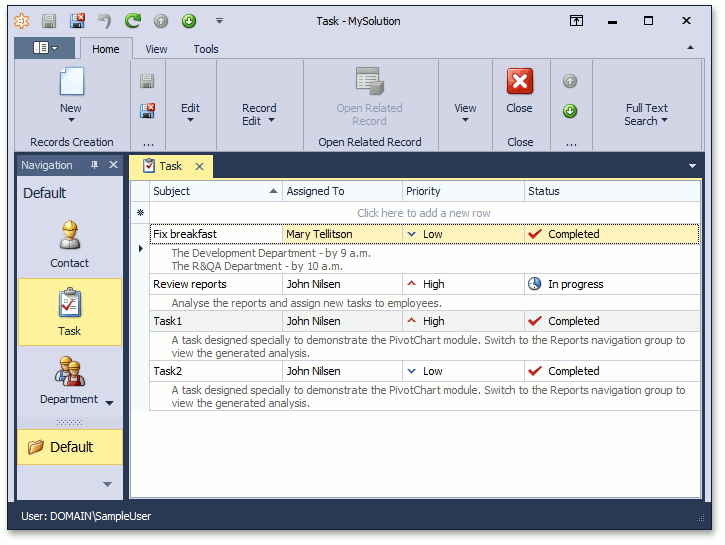
To see the changes made in this lesson, invoke the Model Editor for the Main Demo's MainDemo.Module, MainDemo.Module.Win and MainDemo.Module.Web projects. The MainDemo application is installed in %PUBLIC%\Documents\DevExpress Demos 19.2\Components\eXpressApp Framework\MainDemo by default. The ASP.NET version is available online at http://demos.devexpress.com/XAF/MainDemo/
要查看本课中所做的更改,请调用主演示 MainDemo.模块、MainDemo.module.win 和 MainDemo.module.Web 项目的模型编辑器。主演示应用程序安装在%PUBLIC%\Documents\DevExpress Demos 19.2\Components\eXpressApp Framework\MainDemo by default. The ASP.NET version is available online at http://demos.devexpress.com/XAF/MainDemo/
.
Add a Preview to a List View将预览添加到列表视图的更多相关文章
- Apply Grouping to List View Data 将分组应用于列表视图数据
This lesson will teach you how to apply grouping to List View data. For this purpose, you will group ...
- ios 在storyboard 和 xib中,显示自定义view的预览效果
发现FSCalendar这个控件能在xib中显示预览效果,是怎么实现的呢?其中涉及的知识又有哪些? 主要就是IBInspectable 和 IB_DESIGNABLE 先看 IBInspectable ...
- Images corrections preview with lensfun 不同型号镜头预览图 828张 合集
lensfun 目前支持900多种镜头, 但是网上并没有预览图; 闲暇时间做了800多张预览图合集 下载地址 链接: https://pan.baidu.com/s/1crfhoKKZKnxntvNH ...
- Make a List View Editable 使列表视图可编辑
In this lesson, you will learn how to make a List View editable. For this purpose, the DemoTask List ...
- moviepy音视频剪辑:输出文件前预览剪辑和视频帧的preview和imdisplay方法
☞ ░ 前往老猿Python博文目录 ░ 一.引言 由于moviepy合成剪辑后,输出需要较多的时间,那么在输出前预览一下有助于提高处理效率.moviepy提供了预览的工具,这个工具是基于pygame ...
- Add an Editor to a Detail View 将编辑器添加到详细信息视图
In this lesson, you will learn how to add an editor to a Detail View. For this purpose, the Departme ...
- Android列表视图(List View)
Android列表视图(ListView) ListView是一个显示滚动项列表的示视图组(viewgroup),通过使用适配器(Adapter)把这些列表项自动插入到列表中.适配器比如从一个数组或是 ...
- 动态添加布局、动态添加View、LinearLayout动态添加View;
LinearLayout提供了几个方法,用作动态添加View特别好用: 可以添加View.删除View.删除指定位置View.删除全部View: 看代码: public class MainActiv ...
- [下载] VS 2013 Update 4 & 社群版 (Visual Studio Community) & VS 2015 Preview预览版
这是我的备份,原文请看http://www.dotblogs.com.tw/mis2000lab/archive/2014/11/13/vs2013_update4_community_vs2015_ ...
随机推荐
- netty的调优-及-献上写过注释的源码工程
Netty能干什么? Http服务器 使用Netty可以编写一个 Http服务器, 就像tomcat那样,能接受用户发送的http请求, , 只不过没有实现Servelt规范, 但是它也能解析携带的参 ...
- NAT的三种类型
一.静态NAT 内部本地地址一对一转换成内部全局地址,相当内部本地的每一台PC都绑定了一个全局地址,即使这个地址没有被使用,其他的电脑也不能拿来转换使用,这样容易造成IP地址的资源浪费,一般是用于在内 ...
- Dapr 运用
Dapr 运用 前置条件 Docker Win10 Dapr 部署 本文将采用本地部署的方式. 安装 Dapr CLI 打开 Windows PowerShell 或 cmd ,运行以下命令以安装 D ...
- Asp.net MVC + AngularJS 统一权限管理系统(一)
背景: 之前公司内部做了不少系统,但是权限管理都是分开的:一直都想能够有一套统一管理的权限管理系统:有的时间都是一直在计划,随着时间的流逝,计划始终没有实现,也随着项目的增多而这权限管理也变得版本多样 ...
- [TimLinux] openpyxl 操作Excel
from openpyxl import Workbook from openpyxl.styles import Color, PatternFill, Font from openpyxl.sty ...
- 1、在aspx.cs后台Response.Write()跳转路径,打开新窗口
1.Response.Write()打开新窗口 Response.Write(" <script type='text/JavaScript'>window.open('&quo ...
- 【Webpack】319- Webpack4 入门手册(共 18 章)(上)
介绍 1. 背景 最近和部门老大,一起在研究团队[EFT - 前端新手村]的建设,目的在于:帮助新人快速了解和融入公司团队,帮助零基础新人学习和入门前端开发并且达到公司业务开发水平. 本文也是属于[E ...
- 磁盘分区(GPT)
右击 我的电脑 → 管理 → 磁盘管理 (对磁盘1进行分区)右击 磁盘1 → 初始化 磁盘1 右击 磁盘1白色部分 → 新建磁盘分区 先创建主分区(主分区最多创建4个,扩展分区最多1个) 输入分区大小 ...
- 1篇文章搞清楚8种JVM内存溢出(OOM)的原因和解决方法
前言 撸Java的同学,多多少少会碰到内存溢出(OOM)的场景,但造成OOM的原因却是多种多样. 堆溢出 这种场景最为常见,报错信息: java.lang.OutOfMemoryError: Java ...
- 学习构建调试Linux内核网络代码的环境MenuOS系统
构建调试Linux内核网络代码的环境MenuOS系统 一.前言 这是网络程序设计的第三次实验,主要是学习自己编译linux内核,构建一个具有简易功能的操作系统,同时在系统上面进行调试linux内核网络 ...