
(七十四)c#Winform自定义控件-金字塔图表
官网
前提
入行已经7,8年了,一直想做一套漂亮点的自定义控件,于是就有了本系列文章。
GitHub:https://github.com/kwwwvagaa/NetWinformControl
码云:https://gitee.com/kwwwvagaa/net_winform_custom_control.git
如果觉得写的还行,请点个 star 支持一下吧
欢迎前来交流探讨: 企鹅群568015492 
来都来了,点个【推荐】再走吧,谢谢
NuGet
Install-Package HZH_Controls
目录
https://www.cnblogs.com/bfyx/p/11364884.html
用处及效果
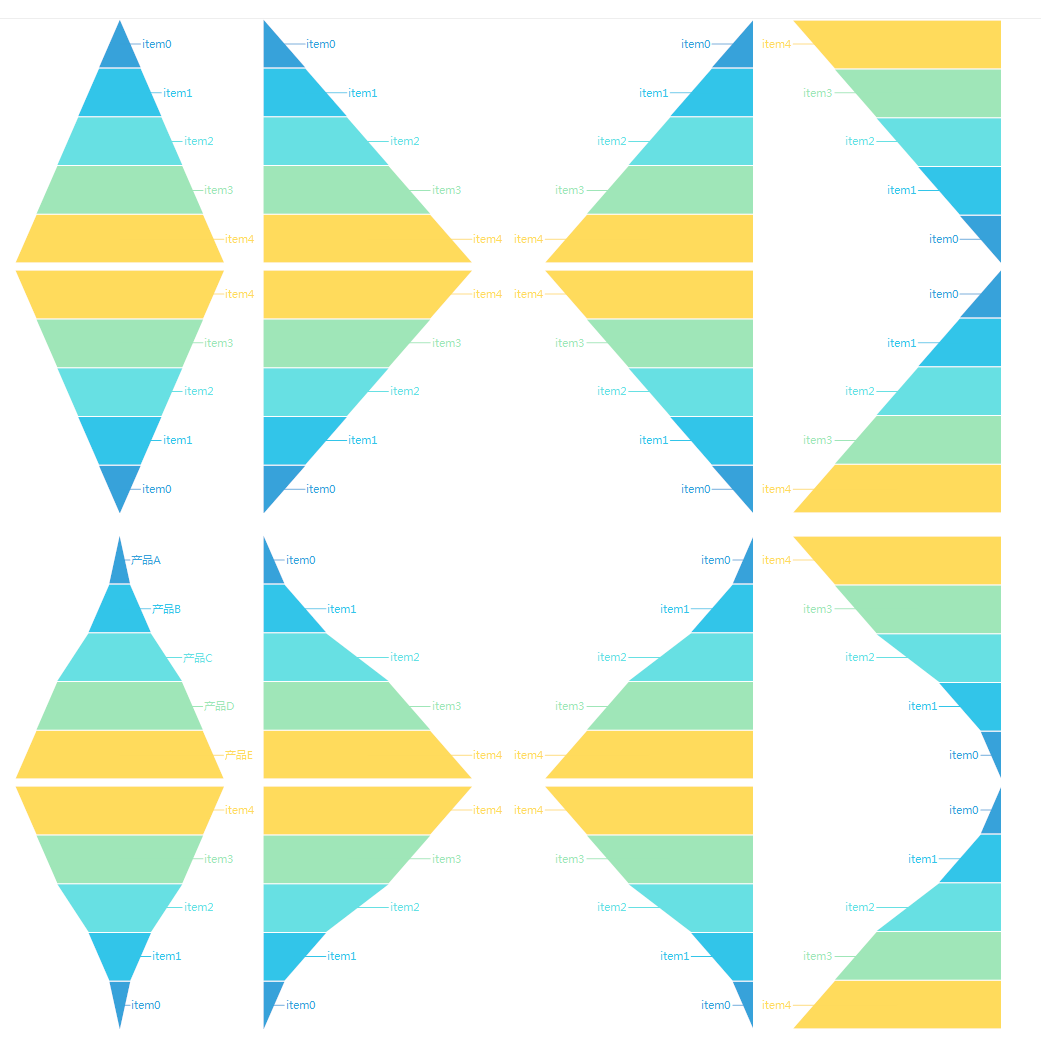
准备工作
依然使用GDI+画图,不懂的先百度了解下
开始
添加一些枚举
  public enum FunelChartAlignment

     {

         /// <summary>

         /// The left

         /// </summary>

         Left,

         /// <summary>

         /// The center

         /// </summary>

         Center,

         /// <summary>

         /// The right

         /// </summary>

         Right

     }

  public enum FunelChartDirection

     {

         /// <summary>

         /// Up

         /// </summary>

         UP,

         /// <summary>

         /// Down

         /// </summary>

         Down

     }
添加一个项实体
   public class FunelChartItem

     {

         /// <summary>

         /// Gets or sets the text.

         /// </summary>

         /// <value>The text.</value>

         public string Text { get; set; }

         /// <summary>

         /// Gets or sets the value.

         /// </summary>

         /// <value>The value.</value>

         public float Value { get; set; }

         /// <summary>

         /// Gets or sets the color of the value.

         /// </summary>

         /// <value>The color of the value.</value>

         public System.Drawing.Color? ValueColor { get; set; }

         /// <summary>

         /// Gets or sets the color of the text fore.

         /// </summary>

         /// <value>The color of the text fore.</value>

         public System.Drawing.Color? TextForeColor { get; set; }

     }
添加一个类UCFunnelChart ,继承UserControl
添加一些控制属性
 /// <summary>

         /// The title

         /// </summary>

         private string title;

         /// <summary>

         /// Gets or sets the title.

         /// </summary>

         /// <value>The title.</value>

         [Browsable(true)]

         [Category("自定义")]

         [Description("获取或设置标题")]

         public string Title

         {

             get { return title; }

             set

             {

                 title = value;

                 ResetTitleSize();

                 Invalidate();

             }

         }

         /// <summary>

         /// The title font

         /// </summary>

         private Font titleFont = new Font("微软雅黑", );

         /// <summary>

         /// Gets or sets the title font.

         /// </summary>

         /// <value>The title font.</value>

         [Browsable(true)]

         [Category("自定义")]

         [Description("获取或设置标题字体")]

         public Font TitleFont

         {

             get { return titleFont; }

             set

             {

                 titleFont = value;

                 ResetTitleSize();

                 Invalidate();

             }

         }

         /// <summary>

         /// The title fore color

         /// </summary>

         private Color titleForeColor = Color.Black;

         /// <summary>

         /// Gets or sets the color of the title fore.

         /// </summary>

         /// <value>The color of the title fore.</value>

         [Browsable(true)]

         [Category("自定义")]

         [Description("获取或设置标题文字颜色")]

         public Color TitleForeColor

         {

             get { return titleForeColor; }

             set

             {

                 titleForeColor = value;

                 Invalidate();

             }

         }

         /// <summary>

         /// The items

         /// </summary>

         private FunelChartItem[] items;

         /// <summary>

         /// Gets or sets the items.

         /// </summary>

         /// <value>The items.</value>

         [Browsable(true)]

         [Category("自定义")]

         [Description("获取或设置项目")]

         public FunelChartItem[] Items

         {

             get { return items; }

             set

             {

                 items = value;

                 Invalidate();

             }

         }

         /// <summary>

         /// The direction

         /// </summary>

         private FunelChartDirection direction = FunelChartDirection.UP;

         /// <summary>

         /// Gets or sets the direction.

         /// </summary>

         /// <value>The direction.</value>

         [Browsable(true)]

         [Category("自定义")]

         [Description("获取或设置方向")]

         public FunelChartDirection Direction

         {

             get { return direction; }

             set

             {

                 direction = value;

                 Invalidate();

             }

         }

         /// <summary>

         /// The alignment

         /// </summary>

         private FunelChartAlignment alignment = FunelChartAlignment.Center;

         /// <summary>

         /// Gets or sets the alignment.

         /// </summary>

         /// <value>The alignment.</value>

         [Browsable(true)]

         [Category("自定义")]

         [Description("获取或设置对齐方式")]

         public FunelChartAlignment Alignment

         {

             get { return alignment; }

             set

             {

                 alignment = value;

                 Invalidate();

             }

         }

         /// <summary>

         /// The item text align

         /// </summary>

         private FunelChartAlignment itemTextAlign = FunelChartAlignment.Center;

         /// <summary>

         /// Gets or sets the item text align.

         /// </summary>

         /// <value>The item text align.</value>

         [Browsable(true)]

         [Category("自定义")]

         [Description("获取或设置文字位置")]

         public FunelChartAlignment ItemTextAlign

         {

             get { return itemTextAlign; }

             set

             {

                 itemTextAlign = value;

                 ResetWorkingRect();

                 Invalidate();

             }

         }

         /// <summary>

         /// The show value

         /// </summary>

         private bool showValue = false;

         /// <summary>

         /// Gets or sets a value indicating whether [show value].

         /// </summary>

         /// <value><c>true</c> if [show value]; otherwise, <c>false</c>.</value>

         [Browsable(true)]

         [Category("自定义")]

         [Description("获取或设置是否显示值")]

         public bool ShowValue

         {

             get { return showValue; }

             set

             {

                 showValue = value;

                 Invalidate();

             }

         }

         /// <summary>

         /// The value format

         /// </summary>

         private string valueFormat = "0.##";

         /// <summary>

         /// Gets or sets the value format.

         /// </summary>

         /// <value>The value format.</value>

         [Browsable(true)]

         [Category("自定义")]

         [Description("获取或设置值格式化")]

         public string ValueFormat

         {

             get { return valueFormat; }

             set

             {

                 valueFormat = value;

                 Invalidate();

             }

         }

         /// <summary>

         /// The m rect working

         /// </summary>

         RectangleF m_rectWorking;

         /// <summary>

         /// The m title size

         /// </summary>

         SizeF m_titleSize = SizeF.Empty;

         /// <summary>

         /// The int split width

         /// </summary>

         int intSplitWidth = ;
构造函数初始化
  public UCFunnelChart()

         {

             this.SetStyle(ControlStyles.AllPaintingInWmPaint, true);

             this.SetStyle(ControlStyles.DoubleBuffer, true);

             this.SetStyle(ControlStyles.ResizeRedraw, true);

             this.SetStyle(ControlStyles.Selectable, true);

             this.SetStyle(ControlStyles.SupportsTransparentBackColor, true);

             this.SetStyle(ControlStyles.UserPaint, true);

             this.FontChanged += UCFunnelChart_FontChanged;

             Font = new Font("微软雅黑", );

             this.AutoScaleMode = System.Windows.Forms.AutoScaleMode.None;

             this.SizeChanged += UCFunnelChart_SizeChanged;

             Size = new System.Drawing.Size(, );

             items = new FunelChartItem[];

             if (ControlHelper.IsDesignMode())

             {

                 items = new FunelChartItem[];

                 for (int i = ; i < ; i++)

                 {

                     items[i] = new FunelChartItem()

                     {

                         Text = "item" + i,

                         Value =  * (i + )

                     };

                 }

             }

         }
当大小及状态改变时 重新计算工作区域
   void UCFunnelChart_FontChanged(object sender, EventArgs e)

         {

             ResetWorkingRect();

         }

         /// <summary>

         /// Handles the SizeChanged event of the UCFunnelChart control.

         /// </summary>

         /// <param name="sender">The source of the event.</param>

         /// <param name="e">The <see cref="EventArgs"/> instance containing the event data.</param>

         void UCFunnelChart_SizeChanged(object sender, EventArgs e)

         {

             ResetWorkingRect();

         }

         /// <summary>

         /// Resets the working rect.

         /// </summary>

         private void ResetWorkingRect()

         {

             if (itemTextAlign == FunelChartAlignment.Center)

             {

                 m_rectWorking = new RectangleF(, m_titleSize.Height ==  ?  : (m_titleSize.Height + ), this.Width, this.Height - (m_titleSize.Height ==  ?  : (m_titleSize.Height + )));

             }

             else if (itemTextAlign == FunelChartAlignment.Left)

             {

                 float fltMax = ;

                 if (items != null && items.Length > )

                 {

                     using (Graphics g = this.CreateGraphics())

                     {

                         fltMax = items.Max(p => g.MeasureString(p.Text, Font).Width);

                     }

                 }

                 m_rectWorking = new RectangleF(fltMax, m_titleSize.Height ==  ?  : (m_titleSize.Height + ), this.Width - fltMax, this.Height - (m_titleSize.Height ==  ?  : (m_titleSize.Height + )));

             }

             else

             {

                 float fltMax = ;

                 if (items != null && items.Length > )

                 {

                     using (Graphics g = this.CreateGraphics())

                     {

                         fltMax = items.Max(p => g.MeasureString(p.Text, Font).Width);

                     }

                 }

                 m_rectWorking = new RectangleF(, m_titleSize.Height ==  ?  : (m_titleSize.Height + ), this.Width - fltMax, this.Height - (m_titleSize.Height ==  ?  : (m_titleSize.Height + )));

             }

         }

         /// <summary>

         /// Resets the size of the title.

         /// </summary>

         private void ResetTitleSize()

         {

             if (string.IsNullOrEmpty(title))

             {

                 m_titleSize = SizeF.Empty;

             }

             else

             {

                 using (Graphics g = this.CreateGraphics())

                 {

                     m_titleSize = g.MeasureString(title, titleFont);

                     m_titleSize.Height += ;

                 }

             }

             ResetWorkingRect();

         }
重绘
 protected override void OnPaint(PaintEventArgs e)

         {

             base.OnPaint(e);

             var g = e.Graphics;

             g.SetGDIHigh();

             if (!string.IsNullOrEmpty(title))

             {

                 g.DrawString(title, titleFont, new SolidBrush(titleForeColor), new RectangleF(, , this.Width, m_titleSize.Height), new StringFormat() { Alignment = StringAlignment.Center, LineAlignment = StringAlignment.Center });

             }

             if (items == null || items.Length <= )

             {

                 g.DrawString("没有数据", Font, new SolidBrush(Color.Black), this.m_rectWorking, new StringFormat() { Alignment = StringAlignment.Center, LineAlignment = StringAlignment.Center });

                 return;

             }

             List<FunelChartItem> lstItems;

             if (direction == FunelChartDirection.UP)

             {

                 lstItems = items.OrderBy(p => p.Value).ToList();

             }

             else

             {

                 lstItems = items.OrderByDescending(p => p.Value).ToList();

             }

             List<RectangleF> lstRects = new List<RectangleF>();

             List<GraphicsPath> lstPaths = new List<GraphicsPath>();

             float maxValue = lstItems.Max(p => p.Value);

             float dblSplitHeight = m_rectWorking.Height / lstItems.Count;

             for (int i = ; i < lstItems.Count; i++)

             {

                 FunelChartItem item = lstItems[i];

                 if (item.ValueColor == null || item.ValueColor == Color.Empty || item.ValueColor == Color.Transparent)

                     item.ValueColor = ControlHelper.Colors[i];

                 switch (alignment)

                 {

                     case FunelChartAlignment.Left:

                         lstRects.Add(new RectangleF(m_rectWorking.Left, m_rectWorking.Top + dblSplitHeight * i, item.Value / maxValue * m_rectWorking.Width, dblSplitHeight));

                         break;

                     case FunelChartAlignment.Center:

                         lstRects.Add(new RectangleF(m_rectWorking.Left + (m_rectWorking.Width - (item.Value / maxValue * m_rectWorking.Width)) / , m_rectWorking.Top + dblSplitHeight * i, item.Value / maxValue * m_rectWorking.Width, dblSplitHeight));

                         break;

                     case FunelChartAlignment.Right:

                         lstRects.Add(new RectangleF(m_rectWorking.Right - (item.Value / maxValue * m_rectWorking.Width), m_rectWorking.Top + dblSplitHeight * i, item.Value / maxValue * m_rectWorking.Width, dblSplitHeight));

                         break;

                 }

             }

             for (int i = ; i < lstRects.Count; i++)

             {

                 var rect = lstRects[i];

                 GraphicsPath path = new GraphicsPath();

                 List<PointF> lstPoints = new List<PointF>();

                 if (direction == FunelChartDirection.UP)

                 {

                     switch (alignment)

                     {

                         case FunelChartAlignment.Left:

                             lstPoints.Add(new PointF(rect.Left, rect.Top));

                             if (i != )

                             {

                                 lstPoints.Add(new PointF(lstRects[i - ].Right, rect.Top));

                             }

                             break;

                         case FunelChartAlignment.Center:

                             if (i == )

                             {

                                 lstPoints.Add(new PointF(rect.Left + rect.Width / , rect.Top));

                             }

                             else

                             {

                                 lstPoints.Add(new PointF(lstRects[i - ].Left, rect.Top));

                                 lstPoints.Add(new PointF(lstRects[i - ].Right, rect.Top));

                             }

                             break;

                         case FunelChartAlignment.Right:

                             if (i == )

                             {

                                 lstPoints.Add(new PointF(rect.Right, rect.Top));

                             }

                             else

                             {

                                 lstPoints.Add(new PointF(rect.Right - lstRects[i - ].Width, rect.Top));

                                 lstPoints.Add(new PointF(rect.Right, rect.Top));

                             }

                             break;

                     }

                     lstPoints.Add(new PointF(rect.Right, rect.Bottom - intSplitWidth));

                     lstPoints.Add(new PointF(rect.Left, rect.Bottom - intSplitWidth));

                 }

                 else

                 {

                     lstPoints.Add(new PointF(rect.Left, rect.Top + intSplitWidth));

                     lstPoints.Add(new PointF(rect.Right, rect.Top + intSplitWidth));

                     switch (alignment)

                     {

                         case FunelChartAlignment.Left:

                             if (i == lstRects.Count - )

                             {

                                 lstPoints.Add(new PointF(rect.Left, rect.Bottom));

                             }

                             else

                             {

                                 lstPoints.Add(new PointF(lstRects[i + ].Right, rect.Bottom));

                                 lstPoints.Add(new PointF(rect.Left, rect.Bottom));

                             }

                             break;

                         case FunelChartAlignment.Center:

                             if (i == lstRects.Count - )

                             {

                                 lstPoints.Add(new PointF(rect.Left + rect.Width / , rect.Bottom));

                             }

                             else

                             {

                                 lstPoints.Add(new PointF(lstRects[i + ].Right, rect.Bottom));

                                 lstPoints.Add(new PointF(lstRects[i + ].Left, rect.Bottom));

                             }

                             break;

                         case FunelChartAlignment.Right:

                             if (i == lstRects.Count - )

                             {

                                 lstPoints.Add(new PointF(rect.Right, rect.Bottom));

                             }

                             else

                             {

                                 lstPoints.Add(new PointF(rect.Right, rect.Bottom));

                                 lstPoints.Add(new PointF(lstRects[i + ].Left, rect.Bottom));

                             }

                             break;

                     }

                 }

                 path.AddLines(lstPoints.ToArray());

                 path.CloseAllFigures();

                 // g.DrawPath(new Pen(new SolidBrush(lstItems[i].ValueColor.Value)), path);

                 g.FillPath(new SolidBrush(lstItems[i].ValueColor.Value), path);

                 //写字

                 if (itemTextAlign == FunelChartAlignment.Center)

                 {

                     g.DrawString(lstItems[i].Text + (ShowValue ? lstItems[i].Value.ToString("\n" + valueFormat) : ""), Font, new SolidBrush((lstItems[i].TextForeColor == null || lstItems[i].TextForeColor == Color.Empty || lstItems[i].TextForeColor == Color.Transparent) ? Color.White : lstItems[i].TextForeColor.Value), rect, new StringFormat() { Alignment = StringAlignment.Center, LineAlignment = StringAlignment.Center });

                 }

                 else if (itemTextAlign == FunelChartAlignment.Left)

                 {

                     g.DrawString(lstItems[i].Text + (ShowValue ? lstItems[i].Value.ToString("\n" + valueFormat) : ""), Font, new SolidBrush((lstItems[i].TextForeColor == null || lstItems[i].TextForeColor == Color.Empty || lstItems[i].TextForeColor == Color.Transparent) ? lstItems[i].ValueColor.Value : lstItems[i].TextForeColor.Value), new RectangleF(, rect.Top, rect.Left, rect.Height), new StringFormat() { Alignment = StringAlignment.Far, LineAlignment = StringAlignment.Center });

                     g.DrawLine(new Pen(new SolidBrush((lstItems[i].TextForeColor == null || lstItems[i].TextForeColor == Color.Empty || lstItems[i].TextForeColor == Color.Transparent) ? lstItems[i].ValueColor.Value : lstItems[i].TextForeColor.Value)), rect.Left, rect.Top + rect.Height / , rect.Left + rect.Width / , rect.Top + rect.Height / );

                 }

                 else

                 {

                     g.DrawString(lstItems[i].Text + (ShowValue ? lstItems[i].Value.ToString("\n" + valueFormat) : ""), Font, new SolidBrush((lstItems[i].TextForeColor == null || lstItems[i].TextForeColor == Color.Empty || lstItems[i].TextForeColor == Color.Transparent) ? lstItems[i].ValueColor.Value : lstItems[i].TextForeColor.Value), new RectangleF(rect.Right, rect.Top, this.Width - rect.Right, rect.Height), new StringFormat() { Alignment = StringAlignment.Near, LineAlignment = StringAlignment.Center });

                     g.DrawLine(new Pen(new SolidBrush((lstItems[i].TextForeColor == null || lstItems[i].TextForeColor == Color.Empty || lstItems[i].TextForeColor == Color.Transparent) ? lstItems[i].ValueColor.Value : lstItems[i].TextForeColor.Value)), rect.Left + rect.Width / , rect.Top + rect.Height / , rect.Right, rect.Top + rect.Height / );

                 }

             }

         }
完整代码
// ***********************************************************************
// Assembly : HZH_Controls
// Created : 2019-09-26
//
// ***********************************************************************
// <copyright file="UCFunnelChart.cs">
// Copyright by Huang Zhenghui(黄正辉) All, QQ group:568015492 QQ:623128629 Email:623128629@qq.com
// </copyright>
//
// Blog: https://www.cnblogs.com/bfyx
// GitHub:https://github.com/kwwwvagaa/NetWinformControl
// gitee:https://gitee.com/kwwwvagaa/net_winform_custom_control.git
//
// If you use this code, please keep this note.
// ***********************************************************************
using System;
using System.Collections.Generic;
using System.Linq;
using System.Text;
using System.Windows.Forms;
using System.Drawing;
using System.Drawing.Drawing2D;
using System.ComponentModel; namespace HZH_Controls.Controls
{
/// <summary>
/// Class UCFunnelChart.
/// Implements the <see cref="System.Windows.Forms.UserControl" />
/// </summary>
/// <seealso cref="System.Windows.Forms.UserControl" />
public class UCFunnelChart : UserControl
{
/// <summary>
/// The title
/// </summary>
private string title;
/// <summary>
/// Gets or sets the title.
/// </summary>
/// <value>The title.</value>
[Browsable(true)]
[Category("自定义")]
[Description("获取或设置标题")]
public string Title
{
get { return title; }
set
{
title = value;
ResetTitleSize();
Invalidate();
}
} /// <summary>
/// The title font
/// </summary>
private Font titleFont = new Font("微软雅黑", );
/// <summary>
/// Gets or sets the title font.
/// </summary>
/// <value>The title font.</value>
[Browsable(true)]
[Category("自定义")]
[Description("获取或设置标题字体")]
public Font TitleFont
{
get { return titleFont; }
set
{
titleFont = value;
ResetTitleSize();
Invalidate();
}
} /// <summary>
/// The title fore color
/// </summary>
private Color titleForeColor = Color.Black;
/// <summary>
/// Gets or sets the color of the title fore.
/// </summary>
/// <value>The color of the title fore.</value>
[Browsable(true)]
[Category("自定义")]
[Description("获取或设置标题文字颜色")]
public Color TitleForeColor
{
get { return titleForeColor; }
set
{
titleForeColor = value;
Invalidate();
}
}
/// <summary>
/// The items
/// </summary>
private FunelChartItem[] items;
/// <summary>
/// Gets or sets the items.
/// </summary>
/// <value>The items.</value>
[Browsable(true)]
[Category("自定义")]
[Description("获取或设置项目")]
public FunelChartItem[] Items
{
get { return items; }
set
{
items = value;
Invalidate();
}
} /// <summary>
/// The direction
/// </summary>
private FunelChartDirection direction = FunelChartDirection.UP;
/// <summary>
/// Gets or sets the direction.
/// </summary>
/// <value>The direction.</value>
[Browsable(true)]
[Category("自定义")]
[Description("获取或设置方向")]
public FunelChartDirection Direction
{
get { return direction; }
set
{
direction = value;
Invalidate();
}
} /// <summary>
/// The alignment
/// </summary>
private FunelChartAlignment alignment = FunelChartAlignment.Center;
/// <summary>
/// Gets or sets the alignment.
/// </summary>
/// <value>The alignment.</value>
[Browsable(true)]
[Category("自定义")]
[Description("获取或设置对齐方式")]
public FunelChartAlignment Alignment
{
get { return alignment; }
set
{
alignment = value;
Invalidate();
}
} /// <summary>
/// The item text align
/// </summary>
private FunelChartAlignment itemTextAlign = FunelChartAlignment.Center;
/// <summary>
/// Gets or sets the item text align.
/// </summary>
/// <value>The item text align.</value>
[Browsable(true)]
[Category("自定义")]
[Description("获取或设置文字位置")]
public FunelChartAlignment ItemTextAlign
{
get { return itemTextAlign; }
set
{
itemTextAlign = value;
ResetWorkingRect();
Invalidate();
}
}
/// <summary>
/// The show value
/// </summary>
private bool showValue = false;
/// <summary>
/// Gets or sets a value indicating whether [show value].
/// </summary>
/// <value><c>true</c> if [show value]; otherwise, <c>false</c>.</value>
[Browsable(true)]
[Category("自定义")]
[Description("获取或设置是否显示值")]
public bool ShowValue
{
get { return showValue; }
set
{
showValue = value;
Invalidate();
}
} /// <summary>
/// The value format
/// </summary>
private string valueFormat = "0.##";
/// <summary>
/// Gets or sets the value format.
/// </summary>
/// <value>The value format.</value>
[Browsable(true)]
[Category("自定义")]
[Description("获取或设置值格式化")]
public string ValueFormat
{
get { return valueFormat; }
set
{
valueFormat = value;
Invalidate();
}
} /// <summary>
/// The m rect working
/// </summary>
RectangleF m_rectWorking;
/// <summary>
/// The m title size
/// </summary>
SizeF m_titleSize = SizeF.Empty;
/// <summary>
/// The int split width
/// </summary>
int intSplitWidth = ; /// <summary>
/// Initializes a new instance of the <see cref="UCFunnelChart"/> class.
/// </summary>
public UCFunnelChart()
{
this.SetStyle(ControlStyles.AllPaintingInWmPaint, true);
this.SetStyle(ControlStyles.DoubleBuffer, true);
this.SetStyle(ControlStyles.ResizeRedraw, true);
this.SetStyle(ControlStyles.Selectable, true);
this.SetStyle(ControlStyles.SupportsTransparentBackColor, true);
this.SetStyle(ControlStyles.UserPaint, true);
this.FontChanged += UCFunnelChart_FontChanged;
Font = new Font("微软雅黑", ); this.AutoScaleMode = System.Windows.Forms.AutoScaleMode.None;
this.SizeChanged += UCFunnelChart_SizeChanged;
Size = new System.Drawing.Size(, );
items = new FunelChartItem[];
if (ControlHelper.IsDesignMode())
{
items = new FunelChartItem[];
for (int i = ; i < ; i++)
{
items[i] = new FunelChartItem()
{
Text = "item" + i,
Value = * (i + )
};
}
}
} /// <summary>
/// Handles the FontChanged event of the UCFunnelChart control.
/// </summary>
/// <param name="sender">The source of the event.</param>
/// <param name="e">The <see cref="EventArgs"/> instance containing the event data.</param>
void UCFunnelChart_FontChanged(object sender, EventArgs e)
{
ResetWorkingRect();
} /// <summary>
/// Handles the SizeChanged event of the UCFunnelChart control.
/// </summary>
/// <param name="sender">The source of the event.</param>
/// <param name="e">The <see cref="EventArgs"/> instance containing the event data.</param>
void UCFunnelChart_SizeChanged(object sender, EventArgs e)
{
ResetWorkingRect();
} /// <summary>
/// Resets the working rect.
/// </summary>
private void ResetWorkingRect()
{
if (itemTextAlign == FunelChartAlignment.Center)
{
m_rectWorking = new RectangleF(, m_titleSize.Height == ? : (m_titleSize.Height + ), this.Width, this.Height - (m_titleSize.Height == ? : (m_titleSize.Height + )));
}
else if (itemTextAlign == FunelChartAlignment.Left)
{
float fltMax = ;
if (items != null && items.Length > )
{
using (Graphics g = this.CreateGraphics())
{
fltMax = items.Max(p => g.MeasureString(p.Text, Font).Width);
}
}
m_rectWorking = new RectangleF(fltMax, m_titleSize.Height == ? : (m_titleSize.Height + ), this.Width - fltMax, this.Height - (m_titleSize.Height == ? : (m_titleSize.Height + )));
}
else
{
float fltMax = ;
if (items != null && items.Length > )
{
using (Graphics g = this.CreateGraphics())
{
fltMax = items.Max(p => g.MeasureString(p.Text, Font).Width);
}
}
m_rectWorking = new RectangleF(, m_titleSize.Height == ? : (m_titleSize.Height + ), this.Width - fltMax, this.Height - (m_titleSize.Height == ? : (m_titleSize.Height + )));
}
} /// <summary>
/// Resets the size of the title.
/// </summary>
private void ResetTitleSize()
{
if (string.IsNullOrEmpty(title))
{
m_titleSize = SizeF.Empty;
}
else
{
using (Graphics g = this.CreateGraphics())
{
m_titleSize = g.MeasureString(title, titleFont);
m_titleSize.Height += ;
}
}
ResetWorkingRect();
} /// <summary>
/// 引发 <see cref="E:System.Windows.Forms.Control.Paint" /> 事件。
/// </summary>
/// <param name="e">包含事件数据的 <see cref="T:System.Windows.Forms.PaintEventArgs" />。</param>
protected override void OnPaint(PaintEventArgs e)
{
base.OnPaint(e);
var g = e.Graphics;
g.SetGDIHigh(); if (!string.IsNullOrEmpty(title))
{
g.DrawString(title, titleFont, new SolidBrush(titleForeColor), new RectangleF(, , this.Width, m_titleSize.Height), new StringFormat() { Alignment = StringAlignment.Center, LineAlignment = StringAlignment.Center });
} if (items == null || items.Length <= )
{
g.DrawString("没有数据", Font, new SolidBrush(Color.Black), this.m_rectWorking, new StringFormat() { Alignment = StringAlignment.Center, LineAlignment = StringAlignment.Center });
return;
} List<FunelChartItem> lstItems;
if (direction == FunelChartDirection.UP)
{
lstItems = items.OrderBy(p => p.Value).ToList();
}
else
{
lstItems = items.OrderByDescending(p => p.Value).ToList();
} List<RectangleF> lstRects = new List<RectangleF>();
List<GraphicsPath> lstPaths = new List<GraphicsPath>();
float maxValue = lstItems.Max(p => p.Value);
float dblSplitHeight = m_rectWorking.Height / lstItems.Count;
for (int i = ; i < lstItems.Count; i++)
{
FunelChartItem item = lstItems[i];
if (item.ValueColor == null || item.ValueColor == Color.Empty || item.ValueColor == Color.Transparent)
item.ValueColor = ControlHelper.Colors[i]; switch (alignment)
{
case FunelChartAlignment.Left:
lstRects.Add(new RectangleF(m_rectWorking.Left, m_rectWorking.Top + dblSplitHeight * i, item.Value / maxValue * m_rectWorking.Width, dblSplitHeight));
break;
case FunelChartAlignment.Center:
lstRects.Add(new RectangleF(m_rectWorking.Left + (m_rectWorking.Width - (item.Value / maxValue * m_rectWorking.Width)) / , m_rectWorking.Top + dblSplitHeight * i, item.Value / maxValue * m_rectWorking.Width, dblSplitHeight));
break;
case FunelChartAlignment.Right:
lstRects.Add(new RectangleF(m_rectWorking.Right - (item.Value / maxValue * m_rectWorking.Width), m_rectWorking.Top + dblSplitHeight * i, item.Value / maxValue * m_rectWorking.Width, dblSplitHeight));
break;
}
} for (int i = ; i < lstRects.Count; i++)
{
var rect = lstRects[i];
GraphicsPath path = new GraphicsPath();
List<PointF> lstPoints = new List<PointF>();
if (direction == FunelChartDirection.UP)
{
switch (alignment)
{
case FunelChartAlignment.Left:
lstPoints.Add(new PointF(rect.Left, rect.Top));
if (i != )
{
lstPoints.Add(new PointF(lstRects[i - ].Right, rect.Top));
}
break;
case FunelChartAlignment.Center:
if (i == )
{
lstPoints.Add(new PointF(rect.Left + rect.Width / , rect.Top));
}
else
{
lstPoints.Add(new PointF(lstRects[i - ].Left, rect.Top));
lstPoints.Add(new PointF(lstRects[i - ].Right, rect.Top));
}
break;
case FunelChartAlignment.Right:
if (i == )
{
lstPoints.Add(new PointF(rect.Right, rect.Top));
}
else
{
lstPoints.Add(new PointF(rect.Right - lstRects[i - ].Width, rect.Top));
lstPoints.Add(new PointF(rect.Right, rect.Top));
}
break;
}
lstPoints.Add(new PointF(rect.Right, rect.Bottom - intSplitWidth));
lstPoints.Add(new PointF(rect.Left, rect.Bottom - intSplitWidth));
}
else
{
lstPoints.Add(new PointF(rect.Left, rect.Top + intSplitWidth));
lstPoints.Add(new PointF(rect.Right, rect.Top + intSplitWidth));
switch (alignment)
{
case FunelChartAlignment.Left:
if (i == lstRects.Count - )
{
lstPoints.Add(new PointF(rect.Left, rect.Bottom));
}
else
{
lstPoints.Add(new PointF(lstRects[i + ].Right, rect.Bottom));
lstPoints.Add(new PointF(rect.Left, rect.Bottom));
}
break;
case FunelChartAlignment.Center:
if (i == lstRects.Count - )
{
lstPoints.Add(new PointF(rect.Left + rect.Width / , rect.Bottom));
}
else
{
lstPoints.Add(new PointF(lstRects[i + ].Right, rect.Bottom));
lstPoints.Add(new PointF(lstRects[i + ].Left, rect.Bottom));
}
break;
case FunelChartAlignment.Right:
if (i == lstRects.Count - )
{
lstPoints.Add(new PointF(rect.Right, rect.Bottom));
}
else
{
lstPoints.Add(new PointF(rect.Right, rect.Bottom));
lstPoints.Add(new PointF(lstRects[i + ].Left, rect.Bottom));
}
break;
}
}
path.AddLines(lstPoints.ToArray());
path.CloseAllFigures();
// g.DrawPath(new Pen(new SolidBrush(lstItems[i].ValueColor.Value)), path);
g.FillPath(new SolidBrush(lstItems[i].ValueColor.Value), path); //写字
if (itemTextAlign == FunelChartAlignment.Center)
{
g.DrawString(lstItems[i].Text + (ShowValue ? lstItems[i].Value.ToString("\n" + valueFormat) : ""), Font, new SolidBrush((lstItems[i].TextForeColor == null || lstItems[i].TextForeColor == Color.Empty || lstItems[i].TextForeColor == Color.Transparent) ? Color.White : lstItems[i].TextForeColor.Value), rect, new StringFormat() { Alignment = StringAlignment.Center, LineAlignment = StringAlignment.Center });
}
else if (itemTextAlign == FunelChartAlignment.Left)
{
g.DrawString(lstItems[i].Text + (ShowValue ? lstItems[i].Value.ToString("\n" + valueFormat) : ""), Font, new SolidBrush((lstItems[i].TextForeColor == null || lstItems[i].TextForeColor == Color.Empty || lstItems[i].TextForeColor == Color.Transparent) ? lstItems[i].ValueColor.Value : lstItems[i].TextForeColor.Value), new RectangleF(, rect.Top, rect.Left, rect.Height), new StringFormat() { Alignment = StringAlignment.Far, LineAlignment = StringAlignment.Center });
g.DrawLine(new Pen(new SolidBrush((lstItems[i].TextForeColor == null || lstItems[i].TextForeColor == Color.Empty || lstItems[i].TextForeColor == Color.Transparent) ? lstItems[i].ValueColor.Value : lstItems[i].TextForeColor.Value)), rect.Left, rect.Top + rect.Height / , rect.Left + rect.Width / , rect.Top + rect.Height / );
}
else
{
g.DrawString(lstItems[i].Text + (ShowValue ? lstItems[i].Value.ToString("\n" + valueFormat) : ""), Font, new SolidBrush((lstItems[i].TextForeColor == null || lstItems[i].TextForeColor == Color.Empty || lstItems[i].TextForeColor == Color.Transparent) ? lstItems[i].ValueColor.Value : lstItems[i].TextForeColor.Value), new RectangleF(rect.Right, rect.Top, this.Width - rect.Right, rect.Height), new StringFormat() { Alignment = StringAlignment.Near, LineAlignment = StringAlignment.Center });
g.DrawLine(new Pen(new SolidBrush((lstItems[i].TextForeColor == null || lstItems[i].TextForeColor == Color.Empty || lstItems[i].TextForeColor == Color.Transparent) ? lstItems[i].ValueColor.Value : lstItems[i].TextForeColor.Value)), rect.Left + rect.Width / , rect.Top + rect.Height / , rect.Right, rect.Top + rect.Height / );
}
}
}
}
}
最后的话
如果你喜欢的话,请到 https://gitee.com/kwwwvagaa/net_winform_custom_control 点个星星吧
(七十四)c#Winform自定义控件-金字塔图表的更多相关文章
- (七十)c#Winform自定义控件-饼状图
前提 入行已经7,8年了,一直想做一套漂亮点的自定义控件,于是就有了本系列文章. GitHub:https://github.com/kwwwvagaa/NetWinformControl 码云:ht ...
- 第三百七十四节,Django+Xadmin打造上线标准的在线教育平台—创建课程app,在models.py文件生成4张表,课程表、课程章节表、课程视频表、课程资源表
第三百七十四节,Django+Xadmin打造上线标准的在线教育平台—创建课程app,在models.py文件生成4张表,课程表.课程章节表.课程视频表.课程资源表 创建名称为app_courses的 ...
- “全栈2019”Java第七十四章:内部类与静态内部类相互嵌套
难度 初级 学习时间 10分钟 适合人群 零基础 开发语言 Java 开发环境 JDK v11 IntelliJ IDEA v2018.3 文章原文链接 "全栈2019"Java第 ...
- 孤荷凌寒自学python第七十四天开始写Python的第一个爬虫4
孤荷凌寒自学python第七十四天开始写Python的第一个爬虫4 (完整学习过程屏幕记录视频地址在文末) 今天在上一天的基础上继续完成对我的第一个代码程序的书写. 直接上代码.详细过程见文末屏幕录像 ...
- (四十五)c#Winform自定义控件-水波图表
前提 入行已经7,8年了,一直想做一套漂亮点的自定义控件,于是就有了本系列文章. GitHub:https://github.com/kwwwvagaa/NetWinformControl 码云:ht ...
- (七十三)c#Winform自定义控件-资源加载窗体
前提 入行已经7,8年了,一直想做一套漂亮点的自定义控件,于是就有了本系列文章. GitHub:https://github.com/kwwwvagaa/NetWinformControl 码云:ht ...
- (三十)c#Winform自定义控件-文本框(三)
前提 入行已经7,8年了,一直想做一套漂亮点的自定义控件,于是就有了本系列文章. 开源地址:https://gitee.com/kwwwvagaa/net_winform_custom_control ...
- (二十)c#Winform自定义控件-有后退的窗体
前提 入行已经7,8年了,一直想做一套漂亮点的自定义控件,于是就有了本系列文章. 开源地址:https://gitee.com/kwwwvagaa/net_winform_custom_control ...
- (五十)c#Winform自定义控件-滑块
前提 入行已经7,8年了,一直想做一套漂亮点的自定义控件,于是就有了本系列文章. GitHub:https://github.com/kwwwvagaa/NetWinformControl 码云:ht ...
随机推荐
- JDK1.6 对 synchronized 的锁优化
1. 背景 在 JDK 1.6 中对锁的实现引入了大量的优化. 目的 减少锁操作的开销. 2. 锁优化 在看下面的内容之间,希望大家对 Mark Word 有个大体的理解.Java 中一个对象在堆中的 ...
- java性能使用
1.慎用异常 j写在for循环外面 2.使用局部变量 局部变量在栈(stack)里面,速度快;全局变量在堆(heap)里面 int a =0; public static int ta =0; 3.位 ...
- Oracle笔记_多表查询
1 执行sql文件 @文件地址名 --执行某个sql文件: 2 多表查询 想要的数据不在同一张表,就需要多个表进行联查. 多表查询也叫做表连接查询,其中的where条件就是连接条件. 可以使用join ...
- 【阿里云IoT+YF3300】4.Alink物模型之事件触发
名词解释:设备的功能模型之一,设备运行时的事件,事件一般包含需要被外部感知和处理的通知信息,可包含多个输出参数.如,某项任务完成的信息,或者设备发生故障或告警时的温度等,事件可以被订阅和推送. 在工控 ...
- UVA 10699 Count the factors 题解
Time limit 3000 ms OS Linux Write a program, that computes the number of different prime factors in ...
- 从入门到实践:创作一个自己的 Helm Chart
前言 我们平时在日常生活中会经常在不同的平台上与各种各样的应用打交道,比如从苹果的 App Store 里下载的淘宝.高德.支付宝等应用,或者是在 PC 端安装的 Word.Photoshop.Ste ...
- three.js实现球体地球城市模拟迁徙
概况如下:1.SphereGeometry实现自转的地球:2.THREE.ImageUtils.loadTexture加载地图贴图材质:3.THREE.Math.degToRad,Math.sin,M ...
- CSAPP - Ch 1 - 计算机系统漫游
目录 0 序言及摘要 1 信息就是位+上下文 2 程序被其他程序翻译成不同的格式 3 了解编译系统如何工作是大有益处的 0 序言及摘要 (1) 序言: CS:APP -- Computer Syste ...
- Linux搭建nginx负载均衡(两台服务器之间)
负载均衡种类 第一种:通过硬件负载解决,常见的有NetScaler.F5.Radware和Array等商用的负载均衡器,价格比较昂贵 第二种:通过软件负载解决,常见的软件有LVS.Nginx.apac ...
- 关于工作流引擎ccflow待办分类 研究与技术实现
关于工作流引擎待办分类 研究与技术实现 关键字:工作流引擎 BPM系统 待办类型 名词:待办 概要介绍:待办就是当前的登录人员要处理的工作,在工作流程里面的节点类型不同,业务场景不同,我们把待办分为如 ...