
Android 开源项目android-open-project解析之(三) ScrollView,TimeView,TipView,FlipView
九、ScrollView
Discrollview
支持滚动时Item淡入淡出,平移,缩放效果的ScrollView
项目地址:https://github.com/flavienlaurent/discrollview
Demo地址:https://github.com/flavienlaurent/discrollview/raw/master/sample.apkPullScrollView
仿照新浪微博Androidclient个人中心的ScrollView,下拉背景伸缩回弹效果。ParallaxScrollView
支持视差滚动的ScrollView 。背景图片的滚动速度小于ScrollView中子控件的滚动速度
项目地址:https://github.com/chrisjenx/ParallaxScrollView
Demo地址:http://cloud.github.com/downloads/chrisjenx/ParallaxScrollView/ParallaxScrollViewDemo-v1.0.5.apkAKParallax-Android
支持视差滚动的ScrollView
项目地址:https://github.com/ideaismobile/AKParallax-Android
Demo地址:id=com.appkraft.parallax_sample">https://play.google.com/store/apps/details?
id=com.appkraft.parallax_sample
Android-ObservableScrollView
监听滚动视图滚动事件的库,帮助与Toolbar的交互动效处理与Material Design的实现
项目地址:https://github.com/ksoichiro/Android-ObservableScrollView
Demo地址:https://play.google.com/store/apps/details?id=com.github.ksoichiro.android.observablescrollview.samples2OverScrollView
有弹性的ScrollView,实现了当手指滑动到ScrollView的顶部、底部时,能够继续的向上、向下拉伸。当释放手指的时候,向上、下回弹
项目地址:https://github.com/EverythingMe/OverScrollView
十、TimeView
包含TimePicker、DatePicker、CalendarView、Clock等时间相关控件
android-times-square
Android日历时间部件,支持选取单个日期,多个日期。及日期区间段和对话框形式显示
项目地址:https://github.com/square/android-times-square
Demo地址:raw=true">https://github.com/Trinea/TrineaDownload/blob/master/times-square-demo.apk?
raw=true
android-calendar-card
日历
项目地址:https://github.com/kenumir/android-calendar-card
Demo地址:https://play.google.com/store/apps/details?id=com.wt.calendarcardsample
效果图:AndroidWheel
Android Wheel支持城市、多种日期时间、password、图片
项目地址:https://code.google.com/p/android-wheel/
效果图:GoogleDateTimePickers
时间选择部件
项目地址:https://github.com/Mirkoddd/GoogleDateTimePickers
文档介绍:https://play.google.com/store/apps/details?id=com.mirko.sample&hl=itDateTimePicker
日期选择部件(Google Agenda的样式风格)
项目地址:https://github.com/flavienlaurent/datetimepicker
Demo地址:https://raw.github.com/biboune/datetimepicker/master/datetimepicker-sample.apk
效果图:android-betterpickers
提供日期、数字、时间(数字方式和钟表方式)、反复周期(闹钟的周期反复)、HMS(时、分、秒)的选择,支持以DialogFragment的弹窗选择
项目地址:https://github.com/derekbrameyer/android-betterpickers
Demo地址:https://play.google.com/store/apps/details?id=com.doomonafireball.betterpickers.sample效果图:Android Week View
日期控件。支持周,天视图,支持自己定义样式
项目地址:https://github.com/alamkanak/Android-Week-View
效果图:
十一、TipView
包含Toast、角标、UndoBar等提示性控件
Crouton
丰富样式的Toast,同意alert、comfirm、info样式及点击消失样式,同意设置Toast显示时间。同意自己定义View。 本文32. SuperToasts为其扩展版
项目地址:https://github.com/keyboardsurfer/Crouton
Demo地址:http://play.google.com/store/apps/details?id=de.keyboardsurfer.app.demo.crouton
supertooltips
带动画效果的Tips显示
项目地址:https://github.com/nhaarman/supertooltips
Demo地址:https://play.google.com/store/apps/details?id=com.haarman.supertooltipsAndroid ViewBadger
为其它View加入角标等
项目地址:https://github.com/jgilfelt/android-viewbadger
Demo地址:raw=true">https://github.com/Trinea/TrineaDownload/blob/master/android-viewbadger.apk?raw=true
效果图:SuperToasts
更丰富样式的toast,支持Button、Progress、Horizontal Progress样式、支持进入动画、支持撤销及其动画设置
项目地址:https://github.com/JohnPersano/SuperToasts
Demo地址:https://play.google.com/store/apps/details?id=com.supertoastsdemo
效果图:UndoBar
屏幕底部显示取消或是确认的PopupWindows
项目地址:https://github.com/soarcn/UndoBar
效果图:
UndoBar
屏幕底部显示取消或是确认某操作
项目地址:https://github.com/jenzz/Android-UndoBar
效果图:Android-ActionItemBadge
能够在ActionBar的MenuItem上显示一个小角标
项目地址:https://github.com/mikepenz/Android-ActionItemBadge
效果图: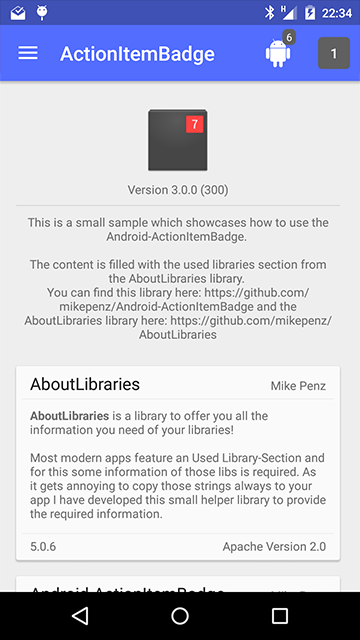
SnackBar
Material Design 风格的 Toast。类似 Google inbox 中的提示
项目地址:https://github.com/MrEngineer13/SnackBar
Demo地址:id=com.mrengineer13.snackbar.sample">https://play.google.com/store/apps/details?
id=com.mrengineer13.snackbar.sample
效果图:HeadsUp
在2.3上使用 android 5.0的 HeadsUp 效果
项目地址:https://github.com/zzz40500/HeadsUp
效果图:
十二、FlipView
android-flip
类似Flipboard翻转动画的实现
项目地址:https://github.com/openaphid/android-flip
Demo地址:https://github.com/openaphid/android-flip/blob/master/FlipView/Demo/APK/Aphid-FlipView-Demo.apk?raw=true
APP演示样例:flipboardFlipImageView
支持x、y、z及动画选择的翻转动画的实现
项目地址:https://github.com/castorflex/FlipImageView
Demo地址:id=fr.castorflex.android.flipimageview">https://play.google.com/store/apps/details?
id=fr.castorflex.android.flipimageview
FoldableLayout
Flip翻转效果的ListView。眼下还不支持ListView缓存
项目地址:https://github.com/alexvasilkov/FoldableLayout
Demo地址:http://play.google.com/store/apps/details?id=com.alexvasilkov.foldablelayout.sample
Android 开源项目android-open-project解析之(三) ScrollView,TimeView,TipView,FlipView的更多相关文章
- Android 开源项目android-open-project工具库解析之(一) 依赖注入,图片缓存,网络相关,数据库orm工具包,Android公共库
一.依赖注入DI 通过依赖注入降低View.服务.资源简化初始化.事件绑定等反复繁琐工作 AndroidAnnotations(Code Diet) android高速开发框架 项目地址:https: ...
- Android 开源项目及其学习
Android 系统研究:http://blog.csdn.net/luoshengyang/article/details/8923485 Android 腾讯技术人员博客 http://hukai ...
- 【原】Android热更新开源项目Tinker源码解析系列之三:so热更新
本系列将从以下三个方面对Tinker进行源码解析: Android热更新开源项目Tinker源码解析系列之一:Dex热更新 Android热更新开源项目Tinker源码解析系列之二:资源文件热更新 A ...
- 【原】Android热更新开源项目Tinker源码解析系列之一:Dex热更新
[原]Android热更新开源项目Tinker源码解析系列之一:Dex热更新 Tinker是微信的第一个开源项目,主要用于安卓应用bug的热修复和功能的迭代. Tinker github地址:http ...
- 【原】Android热更新开源项目Tinker源码解析系列之二:资源文件热更新
上一篇文章介绍了Dex文件的热更新流程,本文将会分析Tinker中对资源文件的热更新流程. 同Dex,资源文件的热更新同样包括三个部分:资源补丁生成,资源补丁合成及资源补丁加载. 本系列将从以下三个方 ...
- Android 开源项目源码解析(第二期)
Android 开源项目源码解析(第二期) 阅读目录 android-Ultra-Pull-To-Refresh 源码解析 DynamicLoadApk 源码解析 NineOldAnimations ...
- 直接拿来用!最火的Android开源项目(完结篇)
直接拿来用!最火的Android开源项目(完结篇) 2014-01-06 19:59 4785人阅读 评论(1) 收藏 举报 分类: android 高手进阶教程(100) 摘要:截至目前,在GitH ...
- 直接拿来用!最火的Android开源项目(完结篇)(转)
摘要:截至目前,在GitHub“最受欢迎的开源项目”系列文章中我们已介绍了40个Android开源项目,对于如此众多的项目,你是Mark.和码友分享经验还是慨叹“活到老要学到老”?今天我们将继续介绍另 ...
- GitHub 优秀的 Android 开源项目(转)
今天查找资源时看到的一篇文章,总结了很多实用资源,十分感谢原作者分享. 转自:http://blog.csdn.net/shulianghan/article/details/18046021 主要介 ...
随机推荐
- Fedora 21 安装VirtualBox
注: 所有操作需要root权限 如果不是root用户在下面所有命令前加sudo 装dkms,kernel-devel,makecache: yum install dkms yum install ...
- Notepad++ Shortcuts(Chinese and English Version)
Ctrl+C 复制Ctrl+X 剪切Ctrl+V 粘贴Ctrl+Z 撤消Ctrl+Y 恢复Ctrl+A 全选Ctrl+F 键查找对话框启动Ctrl+H 查找/替换对话框Ctrl+D 复制并粘贴当行 C ...
- UIProgressView
UIProgressView顾名思义用来显示进度的,如音乐,视频的播放进度,和文件的上传下载进度等. 下面以一个简单的实例来介绍UIprogressView的使用. @interface Activi ...
- ThinkPHP 3.2 模板使用函数
{$name|md5|strtoupper|substr=0,3} 编译后的结果是: <?php echo (substr(strtoupper(md5($name)),0,3));?> ...
- 转:ImageMagick +Jmagick安装
原文来自于: 目录 一.ImageMagick介绍 二.安装支持库 三.在Linux上用源码编译安装ImageMagick与Jmagick 四.在Linux上使用yum安装ImageMagick与Jm ...
- 隐藏 response headers
1.response headers 为何物 从上图看到..这 透漏出服务器端 1.操作系统版本, IIS版本.开发语言 .以及.net framework 版本 虽然现在IIS 可以挂php .甚至 ...
- C#程序设计基础——类、对象、方法
类与对象 类 类是一种构造,通过使用该构造,用户可以将其他类型的变量.方法和事件组合在一起,从而创建自定义类型.类就像一个蓝图,它定义类型的数据和行为. 对象 定义类之后,便可通过将类加载到内存中来使 ...
- Winform 隐藏程序窗口
internal class HideOnStartupApplicationContext : ApplicationContext { private Form mainFormInternal; ...
- Strust2的json插件
以下这段摘自网上: Json是一种轻量级的数据交换格式,JSon插件提供了一种名为json的ActionResultType .一旦为Action指定了该结果处理类型,JSON插件就会自动将Actio ...
- android之apk自动更新解析包失败问题
在apk自动更新(相关问题可以看我的博客http://blog.csdn.net/caicongyang) 从服务器下载完成后,点击notification提示安装时,每次都报解析包失败错误!首先我想 ...